element14 Community
element14 Community
    Register Log In
  • Site
  • Search
  • Log In Register
  • Community Hub
    Community Hub
    • What's New on element14
    • Feedback and Support
    • Benefits of Membership
    • Personal Blogs
    • Members Area
    • Achievement Levels
  • Learn
    Learn
    • Ask an Expert
    • eBooks
    • element14 presents
    • Learning Center
    • Tech Spotlight
    • STEM Academy
    • Webinars, Training and Events
    • Learning Groups
  • Technologies
    Technologies
    • 3D Printing
    • FPGA
    • Industrial Automation
    • Internet of Things
    • Power & Energy
    • Sensors
    • Technology Groups
  • Challenges & Projects
    Challenges & Projects
    • Design Challenges
    • element14 presents Projects
    • Project14
    • Arduino Projects
    • Raspberry Pi Projects
    • Project Groups
  • Products
    Products
    • Arduino
    • Avnet & Tria Boards Community
    • Dev Tools
    • Manufacturers
    • Multicomp Pro
    • Product Groups
    • Raspberry Pi
    • RoadTests & Reviews
  • About Us
    About the element14 Community
  • Store
    Store
    • Visit Your Store
    • Choose another store...
      • Europe
      •  Austria (German)
      •  Belgium (Dutch, French)
      •  Bulgaria (Bulgarian)
      •  Czech Republic (Czech)
      •  Denmark (Danish)
      •  Estonia (Estonian)
      •  Finland (Finnish)
      •  France (French)
      •  Germany (German)
      •  Hungary (Hungarian)
      •  Ireland
      •  Israel
      •  Italy (Italian)
      •  Latvia (Latvian)
      •  
      •  Lithuania (Lithuanian)
      •  Netherlands (Dutch)
      •  Norway (Norwegian)
      •  Poland (Polish)
      •  Portugal (Portuguese)
      •  Romania (Romanian)
      •  Russia (Russian)
      •  Slovakia (Slovak)
      •  Slovenia (Slovenian)
      •  Spain (Spanish)
      •  Sweden (Swedish)
      •  Switzerland(German, French)
      •  Turkey (Turkish)
      •  United Kingdom
      • Asia Pacific
      •  Australia
      •  China
      •  Hong Kong
      •  India
      •  Japan
      •  Korea (Korean)
      •  Malaysia
      •  New Zealand
      •  Philippines
      •  Singapore
      •  Taiwan
      •  Thailand (Thai)
      •  Vietnam
      • Americas
      •  Brazil (Portuguese)
      •  Canada
      •  Mexico (Spanish)
      •  United States
      Can't find the country/region you're looking for? Visit our export site or find a local distributor.
  • Translate
  • Profile
  • Settings
Personal Blogs
  • Community Hub
  • More
Personal Blogs
Legacy Personal Blogs ImageCraft JumpStart Microbox Education Kit - Part 2: Stepping Through an Example - what do I learn?
  • Blog
  • Documents
  • Mentions
  • Sub-Groups
  • Tags
  • More
  • Cancel
  • New
  • Share
  • More
  • Cancel
Group Actions
  • Group RSS
  • More
  • Cancel
Engagement
  • Author Author: Jan Cumps
  • Date Created: 31 Oct 2015 9:20 AM Date Created
  • Views 3092 views
  • Likes 3 likes
  • Comments 23 comments
  • educational
  • firmware
  • imagecraft
  • embedded
  • arm_cortex
  • stm32
  • stmicro
  • kit
  • nucleo
Related
Recommended

ImageCraft JumpStart Microbox Education Kit - Part 2: Stepping Through an Example - what do I learn?

Jan Cumps
Jan Cumps
31 Oct 2015

The ImageCraft JumpStart Microbox Education Kit is a set of hardware and software tools to teach C and Cortex-M embedded programming.

In essence, it's an Arduino compatible shield, an STMicro Nucleo dev board, a C book, an IDE, a compiler and libraries.


In this blog series I'm trying to find out if it's more then just an existing 3rd party dev board paired with a shield. And if (and how) this kit can turn you into an embedded programmer.


In part 1, I checked the out-of-box experience.

This time I'm going to review one of the example projects, and check if I learn something about embedded development.

I'll use the real time clock example, because the source for the RTC driver is available, and it uses I2C.


I'm going to use 2 methods to check the learning path: Can I step through the example in the debugger to see what's happening, and I'll use the Hardware Guide to step through a tutorial.


The Hardware Guide


The tutorial for the MicroBox Education Kit projects is called the Hardware Overview.


It's a rich document with info on basics of the ARM microcontroller like clocks, memory and GIO. It also has a section for all the hardware available on the educational shield.

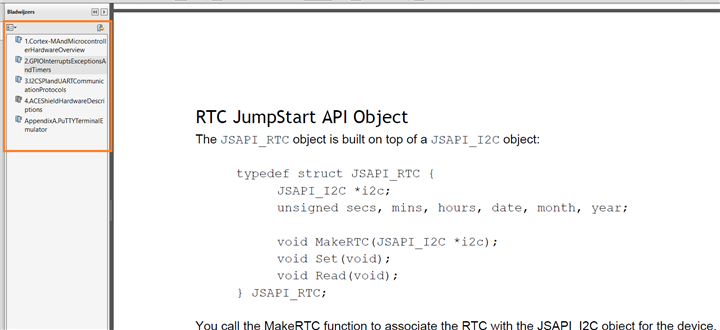
I would like to see a better index though. I had a hard time navigating to the chapter for the real time clock, and had to use the scroll wheel to go to the correct chapter.
 

image


If you do not know up front where the chapter is in the pdf, you'll have to scroll page by page through a 100 page document untill you are at the desired location. There's no overview at the beginning of the document either that explains what's in the manual or on what page/section to find it.

So I spent time browsing through the full PDF first to find out what's covered and where it is. Search works - but then you have to know up front what you're looking for, and it takes a fair bit of pushing next before you reach the RTC chapter.


The hardware guide asks you to review info in a document called <Examples and Tutorials>. I couldn't find that document so I put this on hold and tried method 2: stepping through an example


Stepping through an Example Project


The second way to learn something is by taking an existing example, and step through it. I'll do this with the RTC example.

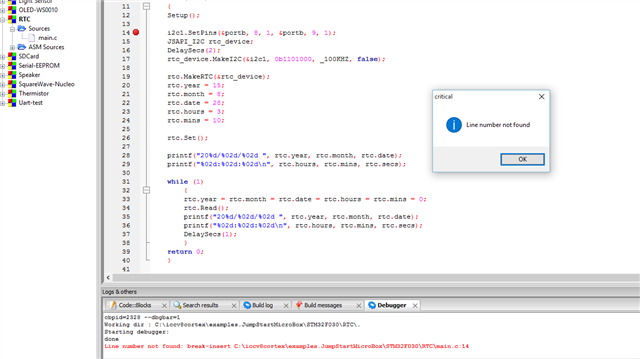
I ran into an issue with the newest IDE install that I received earlier this week. When I set a breakpoint, things go wrong.


image


I get messages like Line Number not found, and removing breakpoints doesn't work. They reappear randomly while debugging or after restarting the IDE.

Line number not found: break-insert C:\iccv8cortex\examples.JumpStartMicroBox\STM32F030\RTC\main.c:14

Cannot open file: C:\Work\V8\examples.JumpStartMicroBox\STM32F030\RTC\main.c

I don't have a c:\work folder on my pc. Needs to be looked at


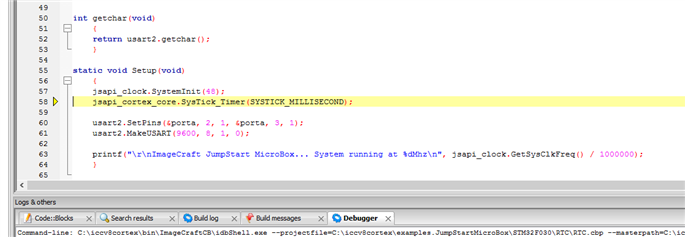
Debugging works after that, but there's not much to learn. The example uses an abstraction layer, and you can't step into that code.

You see that the program calls a function clock.SystemInit() , but there's nothing more that you can learn than that the proprietary library has a function with that declaration.

You don't see what's happening with the controller. You don't learn something generic about embedded.
 

image


It's a difficult call for me. All works out of the box, IDE and compiler are fast. The examples work.

But I haven't found a compelling educational path yet. And the experience with the latest IDE/tool chain download is rough.

I'm in two minds on this kit at the moment. I'll put it to rest for a day and review it with a clear and fresh mind soon...


Related posts
ImageCraft JumpStart Microbox Education Kit - Part 1: Preview
ImageCraft JumpStart Microbox Education Kit - Part 2: Stepping Through an Example - what do I learn?
ImageCraft JumpStart Microbox Education Kit - Part 3a: The Education Shield - LED matrix and I/O expander
  • Sign in to reply

Top Comments

  • richardman
    richardman over 10 years ago +1
    Jan, sorry for the debugger issue - it sounds like the debug info is stale: the installer should have removed the object and debug files so that it will do a Build before debugging and syncing the source…
  • Jan Cumps
    Jan Cumps over 10 years ago in reply to richardman +1
    Richard, thanks for the reply. I will try the rebuild the projects and report back (I did that for the OLED and RTC projects that were giving the error and it didn't help this morning, but I'll retry once…
  • Jan Cumps
    Jan Cumps over 10 years ago in reply to richardman +1
    Richard Man wrote: ..l There is no point in using the blog for this process. Once we clear the issues, you can report back. Thanks That's not how a review works. i will not continue this exercise…
  • shabaz
    shabaz over 10 years ago in reply to richardman

    Richard Man wrote:


    The question is: what would you rather do? Spend times just to get the basic structure going, which is completely useless if you move on to a different chip, even from the same silicon vendor, or spend time writing your application? Again, if the answer is latter, then JumpStart API is for you.


    Are those the only two choices? What about Energia, mbed, which make getting going with ARM microcontrollers extremely simple for beginners and hobbyists.

    For commercial customers, there are cool tools like TI's PinMux to help set the registers,

    and a wealth of peripheral driver code, all with source code.

    Even with jumpstart, if you move to different silicon, you'll still need to spend time ensuring

    the new microcontroller can support certain functions on certain pins, so you still need to

    go through the microcontroller documentation.

    With the same vendor usually the peripherals can be fairly similar, so it doesn't take

    ages making the necessary tweaks if the manufacturer has not supplied driver code (which is unlikely) - and one gets to learn about the peripherals at the

    same time, meaning one can make better use of them.


    Jumpstart may be a great product, but it is unfair to imply there are only two choices here

    when there is plenty of code from manufacturers to make life easier - no need to work

    just from the datasheet to get the basic structure going as you say.


    Is source code available for Jumpstart? I'm still not clear.

    • Cancel
    • Vote Up +1 Vote Down
    • Sign in to reply
    • More
    • Cancel
  • sidprice
    sidprice over 10 years ago in reply to Jan Cumps

    HI Jan, I am the writer of the debug engine for the this tool chain and would love to figure out what is going on.


    First, we are trying to characterize some issues that users have reported in the area of setting/clearing breakpoints, to date we have not been able to identify the root causes so your ongoing input would be most valuable.


    I have a work-around that you could try that may help and also would also help us to home in on the issue. First activate one of the two projects you have been looking at and start the debugger. Attempt to set a breakpoint on a source code line, if the "not found" popup appears click OK and then on the Debug menu select "Remove all breakpoints." Stop the debugger and repeat this process for the second project you have been looking at.


    Let me know if this resolves the issue of setting breakpoints,

    Sid

    • Cancel
    • Vote Up 0 Vote Down
    • Sign in to reply
    • More
    • Cancel
  • richardman
    richardman over 10 years ago in reply to Jan Cumps

    Dear Jan, I'm afraid there is a misunderstanding: I am not dictating how you should write your blog, I am just saying that for the ease of communicating, including possibly sending us log files so we can determine the cause of the problem, is best to do it via email. If you insist that we do it via comments on this blog, that is fine with me. The debugger person, Sid, will have to get an account, we will have to see whether we can duplicate your issue with our set up. If by chance that "it works for us" - which does happen as issues may be related to some configurations, we will need you to send us the log file. To begin with, enabled Settings->Debugger->Full Setting, then run the the debugger til the problem occurs. Then copy and paste the content of the debug window and ... well, you can post it as a comment if you wish.


    Possibly we might even need the Windows message logs, in that case, you need to run the Windows dbgview program, which we install under c:\iccv8cortex\.bin (there's a dot before the bin), and do the exercise again. Then you can save the log file and provide the content to us.


    Thanks

    • Cancel
    • Vote Up 0 Vote Down
    • Sign in to reply
    • More
    • Cancel
  • Jan Cumps
    Jan Cumps over 10 years ago in reply to richardman

    Richard Man wrote:

    ..l

    There is no point in using the blog for this process. Once we clear the issues, you can report back.


    Thanks

    That's not how a review works. i will not continue this exercise when you say when I should or should not blog.


    Feel free to revoke my license.

    • Cancel
    • Vote Up +1 Vote Down
    • Sign in to reply
    • More
    • Cancel
  • richardman
    richardman over 10 years ago in reply to Jan Cumps

    Points taken re: JumpStart API. I will take your observation into consideration.


    As for the debug issues, the debugger and I will contact you via email to see what's going on. There is no point in using the blog for this process. Once we clear the issues, you can report back.


    Thanks

    • Cancel
    • Vote Up 0 Vote Down
    • Sign in to reply
    • More
    • Cancel
<>
element14 Community

element14 is the first online community specifically for engineers. Connect with your peers and get expert answers to your questions.

  • Members
  • Learn
  • Technologies
  • Challenges & Projects
  • Products
  • Store
  • About Us
  • Feedback & Support
  • FAQs
  • Terms of Use
  • Privacy Policy
  • Legal and Copyright Notices
  • Sitemap
  • Cookies

An Avnet Company © 2026 Premier Farnell Limited. All Rights Reserved.

Premier Farnell Ltd, registered in England and Wales (no 00876412), registered office: Farnell House, Forge Lane, Leeds LS12 2NE.

ICP 备案号 10220084.

Follow element14

  • X
  • Facebook
  • linkedin
  • YouTube