element14 Community
element14 Community
    Register Log In
  • Site
  • Search
  • Log In Register
  • Community Hub
    Community Hub
    • What's New on element14
    • Feedback and Support
    • Benefits of Membership
    • Personal Blogs
    • Members Area
    • Achievement Levels
  • Learn
    Learn
    • Ask an Expert
    • eBooks
    • element14 presents
    • Learning Center
    • Tech Spotlight
    • STEM Academy
    • Webinars, Training and Events
    • Learning Groups
  • Technologies
    Technologies
    • 3D Printing
    • FPGA
    • Industrial Automation
    • Internet of Things
    • Power & Energy
    • Sensors
    • Technology Groups
  • Challenges & Projects
    Challenges & Projects
    • Design Challenges
    • element14 presents Projects
    • Project14
    • Arduino Projects
    • Raspberry Pi Projects
    • Project Groups
  • Products
    Products
    • Arduino
    • Avnet & Tria Boards Community
    • Dev Tools
    • Manufacturers
    • Multicomp Pro
    • Product Groups
    • Raspberry Pi
    • RoadTests & Reviews
  • About Us
  • Store
    Store
    • Visit Your Store
    • Choose another store...
      • Europe
      •  Austria (German)
      •  Belgium (Dutch, French)
      •  Bulgaria (Bulgarian)
      •  Czech Republic (Czech)
      •  Denmark (Danish)
      •  Estonia (Estonian)
      •  Finland (Finnish)
      •  France (French)
      •  Germany (German)
      •  Hungary (Hungarian)
      •  Ireland
      •  Israel
      •  Italy (Italian)
      •  Latvia (Latvian)
      •  
      •  Lithuania (Lithuanian)
      •  Netherlands (Dutch)
      •  Norway (Norwegian)
      •  Poland (Polish)
      •  Portugal (Portuguese)
      •  Romania (Romanian)
      •  Russia (Russian)
      •  Slovakia (Slovak)
      •  Slovenia (Slovenian)
      •  Spain (Spanish)
      •  Sweden (Swedish)
      •  Switzerland(German, French)
      •  Turkey (Turkish)
      •  United Kingdom
      • Asia Pacific
      •  Australia
      •  China
      •  Hong Kong
      •  India
      •  Korea (Korean)
      •  Malaysia
      •  New Zealand
      •  Philippines
      •  Singapore
      •  Taiwan
      •  Thailand (Thai)
      • Americas
      •  Brazil (Portuguese)
      •  Canada
      •  Mexico (Spanish)
      •  United States
      Can't find the country/region you're looking for? Visit our export site or find a local distributor.
  • Translate
  • Profile
  • Settings
Personal Blogs
  • Community Hub
  • More
Personal Blogs
Legacy Personal Blogs Kaypro USB Keyboard Interface (TTL)
  • Blog
  • Documents
  • Mentions
  • Sub-Groups
  • Tags
  • More
  • Cancel
  • New
  • Share
  • More
  • Cancel
Group Actions
  • Group RSS
  • More
  • Cancel
Engagement
  • Author Author: mfetting
  • Date Created: 19 Sep 2019 2:50 PM Date Created
  • Views 2008 views
  • Likes 9 likes
  • Comments 4 comments
Related
Recommended

Kaypro USB Keyboard Interface (TTL)

mfetting
mfetting
19 Sep 2019

My goal is to have a keyboard interface that would enable the use of a USB keyboard with a Kaypro computer.  The Interface will allow input from a USB Keyboard and communicate via TTL serial (transistor-transistor logic) through the J2 serial interface using the (rj9) connection on the back of the Kaypro (4 wire, 300 baud interface).


While 300 baud may seem somewhat slow, it is equivalent to 30 characters per second, which is faster than I can type.


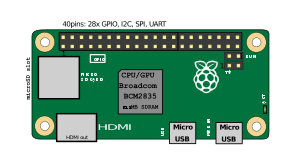
I plan to use a Raspberry Pi Zero, with a USB Keyboard to interface to the Kaypro 10 via TTL.
 

image


Section of the Motherboard schematic for the rj9 keyboard cable connector. Kaypro utilized a (RJ9 / RJ10 / RJ22) 4p4C 28 gauge wire headset cord to connect the keyboard to the computer.


image

Notes:


  1. The Raspberry Pi 2 and Pi Zero (non wireless, non bluetooth) support 300 baud for the serial TTL using the PL011 UART.  (May have a few in the parts bin)
  2. Another option would be an Arduino USB Shield on an Arduino Mega 2560 to handle the translation.
  3. The USB Host - Keyboard to ASCII Converter by www.hobbytronics.co.uk, look interesting, but at a minimum will only do 1200 baud.


USB Keyboard Key to ASCII Translation


0


1


2


3


4


5


6


7


8


9


A


B


C


D


E


F


0


Space


0


@


P


'


p


F1


Num
  Lock


Num Enter


Insert


1


!


1


A


Q


a


q


M LCNT


B LCNT


F2


Caps Lock


Num /


Home


2


"


2


B


R


b


r


F3


Scroll Lock


Num *


End


WINAPP


3


#


3


C


S


c


s


M LALT


B LALT


F4
Num 9


Page
  Up


4


$


4


D


T


d


t


M RCNT


B RCNT


F5
  Num 8


Page
  Down


5


%


5


E


U


e


u


F6


Num 7
Up
  Arrow


6


&


6


F


V


f


v


M RALT


B RALT


F7


Num 6


Down
  Arrow


7


`


7


G


W


g


w


F8


Num 5


Left
  Arrow


8


BS


(


8


H


X


h


x


M
  LFTWIN


B
  LFTWIN


F9


Num 4
Right
  Arrow


9


Tab


)


9


I


Y


i


y


M
  RTWIN


B
  RTWIN


F10


Num 3


Print
  Screen


A


*


:


J


Z


j


z


F11


Num 2


Pause Break


B


Esc


+


;


K


[


k


{


F12


Num 1


Del


C


,


<


L


\


l


|


Num 0


D


Enter


-


=


M


]


m


}


Num -


E


.


>


N


^


n


~


Num +


F


/


?


O


_


o


Num .


1. Blank Table entries indicate no output.

2. M - make code only (simulates "stuck" key); B - break code only (releases "stuck" key)

3. LCNT/RCNT - left/right control keys; LSHF/RSHF - left/right shift keys; LALT/RALT - left/right Alt keys; LFTWIN/RTWIN - left/right Windows keys.

4. NUM prefix denotes keys from NUM pad.

5. PRT SCR is Print Screen key.

6. WINAPP is Windows key.

7. Keys are specified by US English keyboard keycap legends.


To use the table, find the key in the table, then read the code in hex from the column/row digits. The most significant hex digit is in the top row, the least significant is in the left column. For example, the @ sign will produce hex 40.


Codes beyond the standard ASCII table have been added to support keys found on the PC keyboard, but not in the ASCII character set. For instance, hex codes A0 to AB will be generated for the twelve function keys, F1 to F12.


The ASCII code is generated when a keyboard key is pressed. No code is generated when a key is released. The Alt and Control keys, both left and right, are an exception, as shown in the Table above. Separate codes are generated when one of these key is pressed, and when it is released. If the Shift key is held down, upper case ASCII characters, or characters, such as the @ sign, will be generated.

  • Sign in to reply

Top Comments

  • DAB
    DAB over 6 years ago +2
    Yes, I remember when we went from 110 to 300 baud. What a difference it made. Then we went to 9600 a couple of years later and wow. DAB
  • dubbie
    dubbie over 6 years ago in reply to DAB +1
    I agree. I still think anything above 9600 Baud is going to go wrong. And 115,000 Baud, surely nothing can go that fast! Dubbie
  • chargen
    chargen over 2 years ago

    This is interesting, could there be any RGB logic (from the OpenRGB project/ OpenRGB Plugin -effects project) please let me know I have ideas like integrating a mouse, a bigger bios    well
    chargen @ gmail.com if you decide to sell this

    • Cancel
    • Vote Up 0 Vote Down
    • Sign in to reply
    • More
    • Cancel
  • dubbie
    dubbie over 6 years ago in reply to DAB

    I agree. I still think anything above 9600 Baud is going to go wrong. And 115,000 Baud, surely nothing can go that fast!


    Dubbie

    • Cancel
    • Vote Up +1 Vote Down
    • Sign in to reply
    • More
    • Cancel
  • DAB
    DAB over 6 years ago

    Yes, I remember when we went from 110 to 300 baud.

    What a difference it made.

    Then we went to 9600 a couple of years later and wow.


    DAB

    • Cancel
    • Vote Up +2 Vote Down
    • Sign in to reply
    • More
    • Cancel
  • dubbie
    dubbie over 6 years ago

    Ahh, Serial communications from the past. Those were the days. I could understand the whole protocol and make it work as well. The RS232C voltage levels were always a good laugh to explain to my students as they were probably the only bi-polar signals they would ever see.


    Dubbie

    • Cancel
    • Vote Up 0 Vote Down
    • Sign in to reply
    • More
    • Cancel
element14 Community

element14 is the first online community specifically for engineers. Connect with your peers and get expert answers to your questions.

  • Members
  • Learn
  • Technologies
  • Challenges & Projects
  • Products
  • Store
  • About Us
  • Feedback & Support
  • FAQs
  • Terms of Use
  • Privacy Policy
  • Legal and Copyright Notices
  • Sitemap
  • Cookies

An Avnet Company © 2025 Premier Farnell Limited. All Rights Reserved.

Premier Farnell Ltd, registered in England and Wales (no 00876412), registered office: Farnell House, Forge Lane, Leeds LS12 2NE.

ICP 备案号 10220084.

Follow element14

  • X
  • Facebook
  • linkedin
  • YouTube