element14 Community
element14 Community
    Register Log In
  • Site
  • Search
  • Log In Register
  • Community Hub
    Community Hub
    • What's New on element14
    • Feedback and Support
    • Benefits of Membership
    • Personal Blogs
    • Members Area
    • Achievement Levels
  • Learn
    Learn
    • Ask an Expert
    • eBooks
    • element14 presents
    • Learning Center
    • Tech Spotlight
    • STEM Academy
    • Webinars, Training and Events
    • Learning Groups
  • Technologies
    Technologies
    • 3D Printing
    • FPGA
    • Industrial Automation
    • Internet of Things
    • Power & Energy
    • Sensors
    • Technology Groups
  • Challenges & Projects
    Challenges & Projects
    • Design Challenges
    • element14 presents Projects
    • Project14
    • Arduino Projects
    • Raspberry Pi Projects
    • Project Groups
  • Products
    Products
    • Arduino
    • Avnet & Tria Boards Community
    • Dev Tools
    • Manufacturers
    • Multicomp Pro
    • Product Groups
    • Raspberry Pi
    • RoadTests & Reviews
  • About Us
  • Store
    Store
    • Visit Your Store
    • Choose another store...
      • Europe
      •  Austria (German)
      •  Belgium (Dutch, French)
      •  Bulgaria (Bulgarian)
      •  Czech Republic (Czech)
      •  Denmark (Danish)
      •  Estonia (Estonian)
      •  Finland (Finnish)
      •  France (French)
      •  Germany (German)
      •  Hungary (Hungarian)
      •  Ireland
      •  Israel
      •  Italy (Italian)
      •  Latvia (Latvian)
      •  
      •  Lithuania (Lithuanian)
      •  Netherlands (Dutch)
      •  Norway (Norwegian)
      •  Poland (Polish)
      •  Portugal (Portuguese)
      •  Romania (Romanian)
      •  Russia (Russian)
      •  Slovakia (Slovak)
      •  Slovenia (Slovenian)
      •  Spain (Spanish)
      •  Sweden (Swedish)
      •  Switzerland(German, French)
      •  Turkey (Turkish)
      •  United Kingdom
      • Asia Pacific
      •  Australia
      •  China
      •  Hong Kong
      •  India
      • Japan
      •  Korea (Korean)
      •  Malaysia
      •  New Zealand
      •  Philippines
      •  Singapore
      •  Taiwan
      •  Thailand (Thai)
      • Vietnam
      • Americas
      •  Brazil (Portuguese)
      •  Canada
      •  Mexico (Spanish)
      •  United States
      Can't find the country/region you're looking for? Visit our export site or find a local distributor.
  • Translate
  • Profile
  • Settings
Personal Blogs
  • Community Hub
  • More
Personal Blogs
Legacy Personal Blogs Simple I/O control using PYNQ
  • Blog
  • Documents
  • Mentions
  • Sub-Groups
  • Tags
  • More
  • Cancel
  • New
  • Share
  • More
  • Cancel
Group Actions
  • Group RSS
  • More
  • Cancel
Engagement
  • Author Author: Fred27
  • Date Created: 12 May 2020 8:55 PM Date Created
  • Views 5432 views
  • Likes 7 likes
  • Comments 24 comments
  • pynq-z2
  • pynq
  • pynqstarter
Related
Recommended

Simple I/O control using PYNQ

Fred27
Fred27
12 May 2020

I really enjoyed the first PYNQ workshop and also an Embedded Hour session that was a few days later. I thought the best use of time would be to get my head around all the ways you can control the IO on the PYNQ-Z2 board.


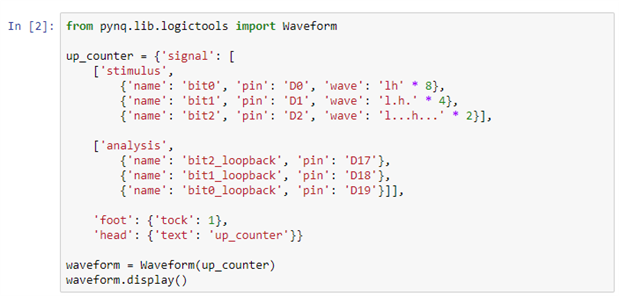
We were given an example of using the pattern generator and trance analyzer to toggle a few pins and monitor what happens, but the example given just took some pin names and magically knew how to access them. This example for instance generated output on D0-D2 and monitored D17-D19:
image


This great if you just want the pattern generator to do the work for you, but what if you want some finer control over these pins? What if you want to communicate with a device over I2C?


There are overlays for a fixed set of Pmod devices but I wanted to go a little off the beaten track and use another device. Well, for this you need to jump into another area of your Jupyter notebook and get familiar with the Microblaze side of things.


Microblaze

Microblaze is an interesting concept. Programming FPGAs is a world away from the probably more familiar world of microcontrollers. FPGAs are really powerful but there are times when a microcontroller is better suited to the job. Now, the Zynq device on the board already has an ARM microntroller inside it, but that's busy running Linux and doing all the stuff that makes PYNQ possible. What if you just need a little bit of precedural microcontroller goodness to help you along? That's where Microblaze comes in. It's a fairly small 16-bit microcontroller that's actually created withing the FPGA fabric.


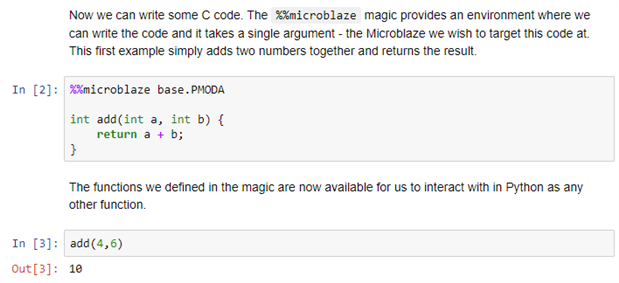
I must admit it took me a while to find my way around the Microblaze abilities of the PYNQ board. There are a few examples but I couldn't actually find any comprehensive documentation. Under the microblaze_programming notebook I found some useful looking sections such as this:
 

image

IO on Arduino headers

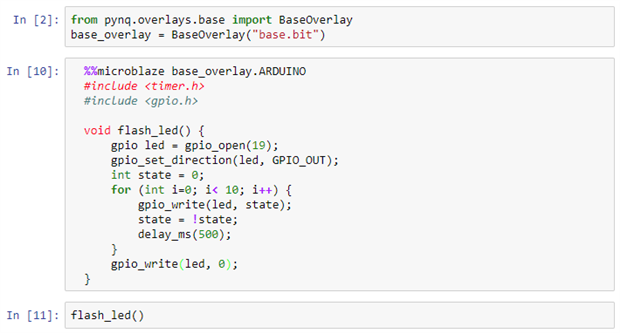
However, I decided that I wanted to mess with some pins on the Arduino-style header. There were examples for Microblade targetting PMODA and I found another for the Pi pin headers (using %%microblaze base.RPI) and a bit of guesswork lead me to the following for targetting the pins I wanted and flashing an LED attached to pin A5 of the Arduino header:
image

Now, none of this is complicated, but it required some guesswork. Not really complicated quesswork, but guesswork all the same. Considering how well PYNQ is set up to be self-documenting and easy to work with I found this odd. In particular, I found the the A5 pin is referred to as "19" buried in a comment on this page. Other than that though, it was easy enough to create a Microblaze processor and get it running some simple C code - via a Python-based notebook.


I2C on Arduino headers

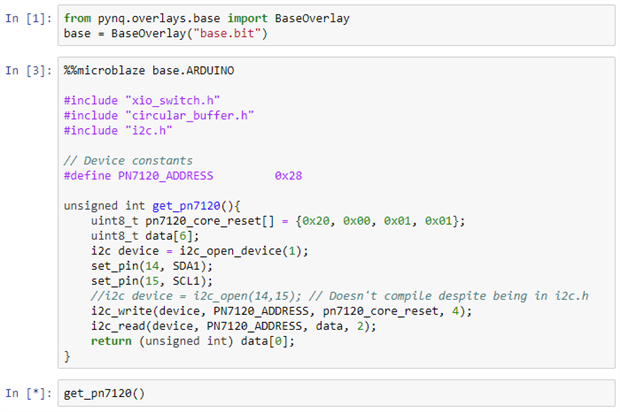
After finding an I2C example on the Raspberry Pi headers, I thought it should be reasonably simple adapting this to some different pins. Unfortunately this wasn't the case. This is the code I came up with, and despite trying lots of variations, whenever I executed the code, it hung. I couldn't see any way to find where it had hung without some clunky pin toggling either.
image


Take off and nuke it from orbit. It's the only way to be sure.

To make things more frustrating it seemed impossible to rest things without powering off the board. Killing the PYNQ Kernel had no effect. In fact, even if you have successful Microblaze code running (such as blinking and LED in an endless loop) there appears to be no way to stop it.


Sorry this blog is not a success story, but I believe in writing things up as they are - good or bad. I'm going to keep on plugging away at this when I get the chance between work and other projects.

  • Sign in to reply

Top Comments

  • Fred27
    Fred27 over 5 years ago in reply to jc2048 +2
    The 0x28 came from some working code from another device (Azure Sphere). That was a great suggestion to use 0x50 but in this case 0x28 was correct. I know some I2C libraries expect the address specified…
  • weiwei2
    weiwei2 over 5 years ago +1
    i am also trying to achieve similar, although i am still testing with other PYNQ board
  • Fred27
    Fred27 over 5 years ago in reply to weiwei2 +1
    I hope my partial success is some help to you. If you make any further progress, be sure to let us know.
  • ralphjy
    ralphjy over 5 years ago in reply to ralphjy

    I just looked into the base.tcl file and the arduino_trace_analyzer was removed quite a while ago - no explanation why.  I was considering rebuilding the base overlay to add this back but I guess we're going to learn how build overlays in the next workshop.  Hopefully it was not removed because of some issue.


    image

    • Cancel
    • Vote Up 0 Vote Down
    • Sign in to reply
    • More
    • Cancel
  • Fred27
    Fred27 over 5 years ago in reply to ralphjy

    It did need initialization - a reset pulse of a reasonable length and a delay before trying to access it over I2C. I've now got it working, but need to tidy a few things up before posting a finished version.

    • Cancel
    • Vote Up +1 Vote Down
    • Sign in to reply
    • More
    • Cancel
  • ralphjy
    ralphjy over 5 years ago in reply to Fred27

    It might be the specific device that you're talking to needs to be initialized in a specific way.  I just tried moving my Grove ADC from the PMOD port to the Arduino shield and tried the same configuration that you tried (using the default I2C pins on device 0).  It worked without any issues.  I tried hooking up the trace analyzer but for some reason the BaseOverlay does not include a configuration for the trace analyzer on Arduino, only on PMODs and RPi.  The address for the ADC is 0x50.


    image

    • Cancel
    • Vote Up +1 Vote Down
    • Sign in to reply
    • More
    • Cancel
  • Fred27
    Fred27 over 5 years ago in reply to jc2048

    What I mean is that if I run a section starting "%%microblaze" with an LED blinky, this LED continues to flash even if I change it to something else and run again. I've think I've also seen different behaviour if I run some code, reboot and run the same code again.


    It almost feels like each time you run a microblaze section it spins up another microblaze instance that is never disposed of. Sooner or later the kernel hangs. Of course this could just be my confusion as I'm stumbling around with this.

    • Cancel
    • Vote Up +1 Vote Down
    • Sign in to reply
    • More
    • Cancel
  • jc2048
    jc2048 over 5 years ago in reply to Fred27

    That's good. Once you can see things happening on the oscilloscope you've got a good basis for sorting out the rest. I'm always much happier when I get to that point. Good luck with the rest.


    I'm not sure what you're saying about calling instances of Microblaze. It's a processor built out of the logic, so if you called for too many of them to fit it would fail at the synthesis/layout/routing stage, wouldn't it?

    • Cancel
    • Vote Up 0 Vote Down
    • Sign in to reply
    • More
    • Cancel
<>
element14 Community

element14 is the first online community specifically for engineers. Connect with your peers and get expert answers to your questions.

  • Members
  • Learn
  • Technologies
  • Challenges & Projects
  • Products
  • Store
  • About Us
  • Feedback & Support
  • FAQs
  • Terms of Use
  • Privacy Policy
  • Legal and Copyright Notices
  • Sitemap
  • Cookies

An Avnet Company © 2026 Premier Farnell Limited. All Rights Reserved.

Premier Farnell Ltd, registered in England and Wales (no 00876412), registered office: Farnell House, Forge Lane, Leeds LS12 2NE.

ICP 备案号 10220084.

Follow element14

  • X
  • Facebook
  • linkedin
  • YouTube