


Hi All,
I have been playing with the amazing little STM32 sensortile.box unit for the past two weeks ( on and off I hasten to say).
It has sensors for :
temperature
relative humidity
acceleration
magnetic fields
sound
etc.
Data is either streamed out via BLE or may be sent to its SD card.
Communication is via a smart phone of the Android or Apple types, and not Microsoft.
So far I have discovered that some phones work well and others less so, as their communication is unreliable.
On the bad list are Huawei and LG Nexus 4.
Good list OneplusTwoEqualsThree. ( or whatever it is!)
An app on the phone lets you download info to the sensortile.box via BLE. This info is in the form of an App. For example, you can get
it to stream data from a selection of sensors at the rate of your choosing, from a speedy 100Hz down. I have set a reading every 30 secs
and get the selected sensors data into the 8GB SD card in CSV format.
It has its own LiPo battery so can be told to store say temperature and rH, then placed in your fridge. My fridge is 5C inside. Interesting.
Also interesting is the RSSI values displayed on the phone do not drop much during this experiment. A fridge's door seal is very leaky at BT
frequencies.
If I and/or ST can solve the unreliable download issue with some phones then it will be very useful indeed.
Update 2nd April 2020...
One small problem: the tiny BOOT button has broken. Two tiny metal discs and the actuator button popped out of the tiny s/m body.
The body's plastic is slightly split so doesn't hold the button in reliably.
Anyway, I have downloaded software file SensorTile.box_334.bin to 0x08000000 via a micro-USB cable using STM32Cube Programmer.
The board has to be put into Boot mode by disconnecting the battery then holding the BOOT button down while plugging in the powered USB lead, then the button may be released. Device Manager ( Win10) will show a new USB device pop up.
There are old instructions on the Web about using DFuse ( what a great name!) but STM32Cube Prog is the latest and works fine.
You may well be able to download software via BT if you have a reasonably modern smartphone, and can then forget the USB cable stuff. Sadly my Nexus 4 tries to download firmware but ends with a failure message.
Anyway, I used the phone to download an App to the board which logs time, temperature, pressure and rH to the internal 8GB SD card, such that the sampling rate was set to 30 seconds. The board was then commanded by the phone to start logging.
The board then went in my fridge for an hour or so. It logged 5C!
Then in the loft for two days. We have had problems with condensation up there and I was a bit worried that my stash of surface-mount components might suffer.
That is the reason to do the experiment.
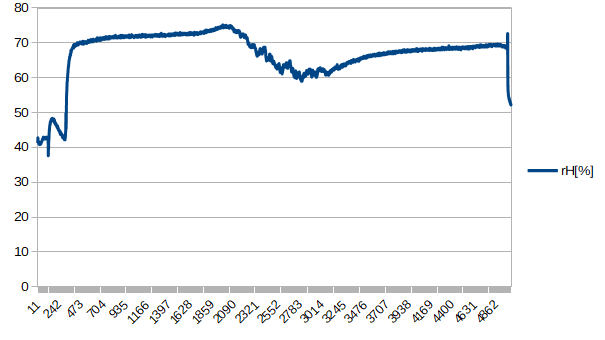
Results: 70% rH in the loft!
Also good: the LiPo battery seems to go on and on. I will do some battery life tests, but at the 30 secs per sample it should last for weeks!
Over 2 days, the logged CSV file was only 222KB.
Here are the graphs from LibreOffice...
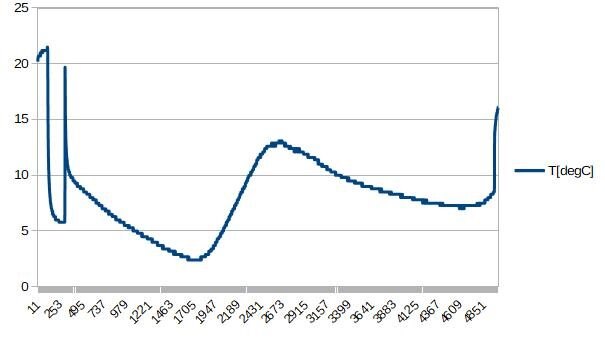
temperature (above) fridge at 5C then loft.
Now rH...
If anyone has tried using this board then please add a comment adding what mobile device you used. OS, and if how reliable it was. Thanks.
Latest status: 18th August 2020
I have managed to get the two LEDs flashing on and off with a simple program via the Arduino IDE. No programming kit is needed, only a USB to micro-USB cable!
Some of these steps may not be needed..
1. Downloaded and installed STM32 AC6 IDE
2. Ditto STM32 Cube Programmer
3. Ditto Arduino IDE, start IDE
4. In File/ Preferences/Settings/Additional Board Manager URLs Add the line
https://github.com/stm32duino/BoardManagerFiles/raw/master/STM32/package_stm_index.json
5. Go to Tools/Library Manager and click Contributors, search for STM32 and install.
6. Select board , STM32, Eval
7. USART Support enabled
8. USB Support CDC Generic
9. Upload method : DFU
10. Open examples and select one from Eval e.g. i2c_scanner
11. Verify. Plug in micro USB lead to Sensorttile.box with BOOT button pressed and no battery. Other end of lead to USB socket on PC.
12. Release BOOT button. It should show up in Device Manager under USB devices.
13. Press IDE's Upload button. It somehow automatically uses the STM Cube Programmer to access the board. That's it!
Enjoy! Remember to unplug before reprogramming so the BOOT button is effective.
To use LEDs, try this:
#define CPU_LED PB15
#define CPU_LED2 PF2
in Setup() put this:
pinMode(CPU_LED, OUTPUT);
pinMode(CPU_LED2, OUTPUT);
in Loop() use this as required...
digitalWrite(CPU_LED, LOW);
digitalWrite(CPU_LED2, HIGH);