element14 Community
element14 Community
    Register Log In
  • Site
  • Search
  • Log In Register
  • Community Hub
    Community Hub
    • What's New on element14
    • Feedback and Support
    • Benefits of Membership
    • Personal Blogs
    • Members Area
    • Achievement Levels
  • Learn
    Learn
    • Ask an Expert
    • eBooks
    • element14 presents
    • Learning Center
    • Tech Spotlight
    • STEM Academy
    • Webinars, Training and Events
    • Learning Groups
  • Technologies
    Technologies
    • 3D Printing
    • FPGA
    • Industrial Automation
    • Internet of Things
    • Power & Energy
    • Sensors
    • Technology Groups
  • Challenges & Projects
    Challenges & Projects
    • Design Challenges
    • element14 presents Projects
    • Project14
    • Arduino Projects
    • Raspberry Pi Projects
    • Project Groups
  • Products
    Products
    • Arduino
    • Avnet & Tria Boards Community
    • Dev Tools
    • Manufacturers
    • Multicomp Pro
    • Product Groups
    • Raspberry Pi
    • RoadTests & Reviews
  • About Us
  • Store
    Store
    • Visit Your Store
    • Choose another store...
      • Europe
      •  Austria (German)
      •  Belgium (Dutch, French)
      •  Bulgaria (Bulgarian)
      •  Czech Republic (Czech)
      •  Denmark (Danish)
      •  Estonia (Estonian)
      •  Finland (Finnish)
      •  France (French)
      •  Germany (German)
      •  Hungary (Hungarian)
      •  Ireland
      •  Israel
      •  Italy (Italian)
      •  Latvia (Latvian)
      •  
      •  Lithuania (Lithuanian)
      •  Netherlands (Dutch)
      •  Norway (Norwegian)
      •  Poland (Polish)
      •  Portugal (Portuguese)
      •  Romania (Romanian)
      •  Russia (Russian)
      •  Slovakia (Slovak)
      •  Slovenia (Slovenian)
      •  Spain (Spanish)
      •  Sweden (Swedish)
      •  Switzerland(German, French)
      •  Turkey (Turkish)
      •  United Kingdom
      • Asia Pacific
      •  Australia
      •  China
      •  Hong Kong
      •  India
      • Japan
      •  Korea (Korean)
      •  Malaysia
      •  New Zealand
      •  Philippines
      •  Singapore
      •  Taiwan
      •  Thailand (Thai)
      • Vietnam
      • Americas
      •  Brazil (Portuguese)
      •  Canada
      •  Mexico (Spanish)
      •  United States
      Can't find the country/region you're looking for? Visit our export site or find a local distributor.
  • Translate
  • Profile
  • Settings
Personal Blogs
  • Community Hub
  • More
Personal Blogs
Legacy Personal Blogs TCN75-3.3 Temp Sensor Control Board
  • Blog
  • Documents
  • Mentions
  • Sub-Groups
  • Tags
  • More
  • Cancel
  • New
  • Share
  • More
  • Cancel
Group Actions
  • Group RSS
  • More
  • Cancel
Engagement
  • Author Author: robotonics
  • Date Created: 4 Feb 2012 11:15 PM Date Created
  • Views 820 views
  • Likes 0 likes
  • Comments 1 comment
  • i2c
  • pic24f
Related
Recommended

TCN75-3.3 Temp Sensor Control Board

robotonics
robotonics
4 Feb 2012

I just started on a project to familiarise myself with the TCN75-3.3MOATCN75-3.3MOA Temp sensor from Microchip.


I have used a PIC24FJ64GA004 microcontroller, mainly to practice programming the PIC24F.


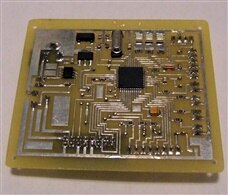
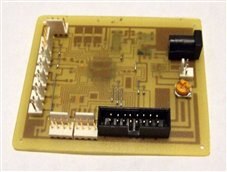
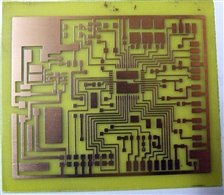
Below is a pic of the etched PCB board ready to be drilled, tinned, and all components soldered.


I will write a detailed report on the project and make the files available as time allows.


                   Board Etched                              Tinned, Drilled, and Populated                      Ready for Testing
imageimageimage


Design & Build notes:


The TCN75-3.3V Temp sensor control board is a good example of HOW NOT TO design a circuit. I short cut my usual rigorous design process to allow me to quickly get started on learning how to program the PIC24 microcontroller.


I decided what I wanted the circuit to do:


Program (in C) a PIC24F microcontroller to communicate via I2C bus with a TCN75-3.3V temperature sensor. (The PIC24F has known problems in Master I2C mode)


and:


Output data via serial to PC using USB to serial cable (No USB OTG on PIC24F)

Display Data on 16*2 Character LCD to user.

Status LED's and User Input (Switch/Button) for added functionality later.


I decided on a whim to use 3 status LED's and had room for 4 inputs for switches/buttons.


The reason behind these decisions:


I wanted to learn how to develop code in C for the I2C comms, Micro to PC serial link, and displaying data on an LCD. All of which I have done before, although not in C as I have mainly used assembler in the past. I have never used the PIC24 series before either.


I also wanted to practice with NI Labview and see if I could get data into Labview from the serial link.


All of which will be used in future projects that I wish to complete.

  • Sign in to reply
  • fustini
    fustini over 13 years ago

    Very nice looking.  How do you go about drilling the holes?

    • Cancel
    • Vote Up 0 Vote Down
    • Sign in to reply
    • More
    • Cancel
element14 Community

element14 is the first online community specifically for engineers. Connect with your peers and get expert answers to your questions.

  • Members
  • Learn
  • Technologies
  • Challenges & Projects
  • Products
  • Store
  • About Us
  • Feedback & Support
  • FAQs
  • Terms of Use
  • Privacy Policy
  • Legal and Copyright Notices
  • Sitemap
  • Cookies

An Avnet Company © 2025 Premier Farnell Limited. All Rights Reserved.

Premier Farnell Ltd, registered in England and Wales (no 00876412), registered office: Farnell House, Forge Lane, Leeds LS12 2NE.

ICP 备案号 10220084.

Follow element14

  • X
  • Facebook
  • linkedin
  • YouTube