


About the Application
- Keen.IO is a cloud platform that provides data collection and analysis services via the REST API. Keen offers SDKs for many programming languages, including browser-side JavaScript and Node.js.
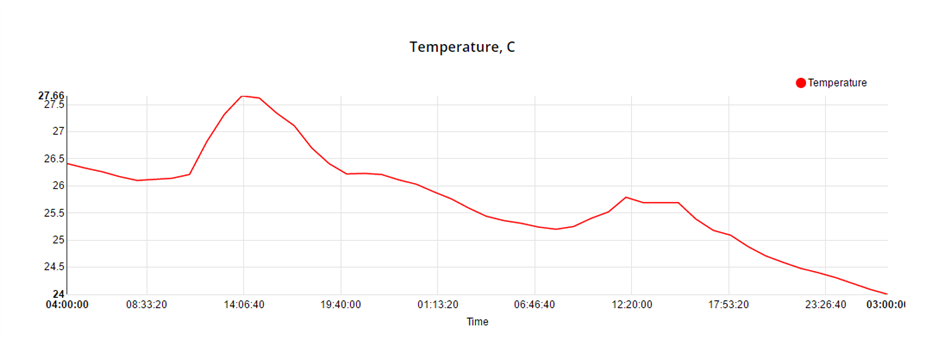
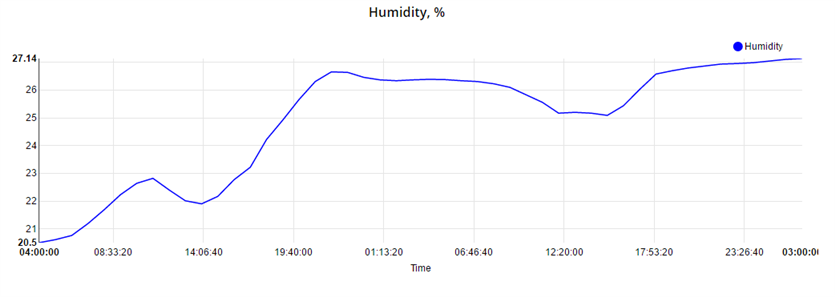
- In this tutorial we used Tibbit #30 (ambient humidity and temperature meter) for collecting environmental data and storing it on the Keen.IO server.
- A very simple in-browser application is used for fetching data from Keen.IO and displaying charts in the browser window (the charts below have been received from Keen.IO, they are not static).
- Data collection and representation are separated into device.js and server.js applications.
What you need
Hardware
- 1 x Tibbit #10 (power supply)
- 1 x Linux TPS3 (LTPS3) board, optionally in a TBP3 enclosure
- 1 x Tibbit #00-3 (2 direct I/O lines with 5V and ground)*
- 1 x Tibbit #18 (power jack)
- 1 x Tibbit #30 (ambient humidity/temperature meter)

Onboard Software
- Node.js V6.x.x (pre-installed during production)
External Services
- Keen.IO (you should create an account)
GitHub Repository
Name: keenio-tutorial
Repository page: https://github.com/tibbotech/keenio-tutorial
Clone URL: https://github.com/tibbotech/keenio-tutorial.git
Updated At: Fri Oct 14 2016
Setting Up External Services
- Create a Keen.IO account (free for up to 50000 events per month);
- Add your project;
- Click on the title of the project to open an overview tab:

- Receive your projectID and API keys (you need read and write keys):
Store the keys securely, especially the master one

Node.js Application
Configuration and Installation
- Define the configuration in the LTPS Web Interface;
- Login to the LTPP3 board from the SSH client;
- Install NPM and other tools as required;
- Install the application:
git clone https://github.com/tibbotech/keenio-tutorial.git
cd keenio-tutorial
npm install .
- Launch the app:
node device
Comments in the code explain how it works
// requires Keen.IO client module
const Keen = require('keen.io');

// requires Tibbo's humidity/temperature meter and sets it up to work with I2C line 4
const humTempMeter = require('@tibbo-tps/tibbit-30').init("S5");

// Binds the client to your account
const client = Keen.configure({
  projectId: "57066...........fe6a1279",
  writeKey: "0d2b95d4aa686e8274aa40604109d59c5..............4501378b3c193c3286608"
});

// Every minute..
setInterval(function(){
   // ..reads the environmental data from the meter..
   var data = humTempMeter.getData();

   // ..checks out if everything's correct..
   if(data.status === 1){
   var payload = {
  hum: data.humidity,
  temp: data.temperature
  };

   // ..and submits them to your event collection.
  client.addEvent("humtemp", payload, function(err){
   if(err !== null){
   console.log(err);
  }
  });
  }
},60000);
Web Interface
Installation
- The web interface application can be installed on your PC, a remote server, or executed on the same LTPS device (as a separate process)
- Install the application (skip if running on the same LTPS):
git clone https://github.com/tibbotech/keenio-tutorial.git
cd keenio-tutorial
npm install .
- Launch:
node server
Comments in the code explain how it works
browser.js
angular
  .module('tutorials',['nvd3'])
  .controller("nodejs-keen",['$scope',function($scope){
   var client = new Keen({
  projectId: "5706............fe6a1279",
  readKey: "29ec96c5e..........746871b0923"
  });

   // Configures NVD3 charting engine
  $scope.options = {
  chart: {
  type: 'lineChart',
  height: 300,
  margin: {
  top: 20,
  right: 20,
  bottom: 40,
  left: 55
  },
  x: function (d) {
   return d.x;
  },
  y: function (d) {
   return d.y;
  },
  useInteractiveGuideline: true,
  xAxis: {
  axisLabel: 'Time',
  tickFormat: function (d) {
   return d3.time.format("%X")(new Date(d));
  }
  }
  }
  };

  $scope.temperature = [
  {
  values: [],
  key: 'Temperature',
  color: 'red'
  }
  ];

  $scope.humidity = [
  {
  values: [],
  key: 'Humidity',
  color: 'blue'
  }
  ];

   // Defines Keen.IO query
   var query = new Keen.Query("multi_analysis", {
  event_collection: "humtemp",
  timeframe: {
  start : "2016-04-09T00:00:00.000Z",
  end : "2016-04-11T00:00:00.000Z"
  },
  interval: "hourly",
  analyses: {
  temp : {
  analysis_type : "average",
  target_property: "temp"
  },
  hum : {
  analysis_type : "average",
  target_property: "hum"
  }
  }
  });

  Keen.ready(function(){
   // Executes the query..
  client.run(query, function(err, res){

   // ..transforms the received data to be accepted by NVD3..
  res.result.forEach(function(record){
   var timestamp = new Date(record.timeframe.end);
  $scope.temperature[0].values.push({
  x: timestamp,
  y: record.value.temp.toFixed(2)
  });
  $scope.humidity[0].values.push({
  x: timestamp,
  y: record.value.hum.toFixed(2)
  });
  });

   // ..and does rendering
  $scope.$apply();
  });
  });
  }]);
index.html
<html>
   <head>
   <link href="http://cdnjs.cloudflare.com/ajax/libs/nvd3/1.8.2/nv.d3.min.css" rel="stylesheet" type="text/css">

   <script src="https://ajax.googleapis.com/ajax/libs/angularjs/1.4.2/angular.min.js"/>
   <script src="https://cdnjs.cloudflare.com/ajax/libs/angular-nvd3/1.0.6/angular-nvd3.min.js" type="text/javascript"/>
   <script src="http://cdnjs.cloudflare.com/ajax/libs/keen-js/3.4.0/keen.min.js" type="text/javascript"/>
   <script src="http://cdnjs.cloudflare.com/ajax/libs/d3/3.5.16/d3.min.js" type="text/javascript"/>
   <script src="http://cdnjs.cloudflare.com/ajax/libs/nvd3/1.8.2/nv.d3.min.js" type="text/javascript"/>

   <script src="browser.js" type="text/javascript"/>
   </head>

   <body ng-app="chart" ng-controller="nodejs-keen">
   <h3>Temperature, C</h3>
   <nvd3 options="options" data="temperature">

   <h3>Humidity, %</h3>
   <nvd3 options="options" data="humidity">
   </body>
</html>
Read more at: http://tibbo.com/linux/nodejs/tracking-environmental-data.html
-

DAB
-
Cancel
-
Vote Up
0
Vote Down
-
-
Sign in to reply
-
More
-
Cancel
Comment-

DAB
-
Cancel
-
Vote Up
0
Vote Down
-
-
Sign in to reply
-
More
-
Cancel
Children