element14 Community
element14 Community
    Register Log In
  • Site
  • Search
  • Log In Register
  • Community Hub
    Community Hub
    • What's New on element14
    • Feedback and Support
    • Benefits of Membership
    • Personal Blogs
    • Members Area
    • Achievement Levels
  • Learn
    Learn
    • Ask an Expert
    • eBooks
    • element14 presents
    • Learning Center
    • Tech Spotlight
    • STEM Academy
    • Webinars, Training and Events
    • Learning Groups
  • Technologies
    Technologies
    • 3D Printing
    • FPGA
    • Industrial Automation
    • Internet of Things
    • Power & Energy
    • Sensors
    • Technology Groups
  • Challenges & Projects
    Challenges & Projects
    • Design Challenges
    • element14 presents Projects
    • Project14
    • Arduino Projects
    • Raspberry Pi Projects
    • Project Groups
  • Products
    Products
    • Arduino
    • Avnet & Tria Boards Community
    • Dev Tools
    • Manufacturers
    • Multicomp Pro
    • Product Groups
    • Raspberry Pi
    • RoadTests & Reviews
  • About Us
  • Store
    Store
    • Visit Your Store
    • Choose another store...
      • Europe
      •  Austria (German)
      •  Belgium (Dutch, French)
      •  Bulgaria (Bulgarian)
      •  Czech Republic (Czech)
      •  Denmark (Danish)
      •  Estonia (Estonian)
      •  Finland (Finnish)
      •  France (French)
      •  Germany (German)
      •  Hungary (Hungarian)
      •  Ireland
      •  Israel
      •  Italy (Italian)
      •  Latvia (Latvian)
      •  
      •  Lithuania (Lithuanian)
      •  Netherlands (Dutch)
      •  Norway (Norwegian)
      •  Poland (Polish)
      •  Portugal (Portuguese)
      •  Romania (Romanian)
      •  Russia (Russian)
      •  Slovakia (Slovak)
      •  Slovenia (Slovenian)
      •  Spain (Spanish)
      •  Sweden (Swedish)
      •  Switzerland(German, French)
      •  Turkey (Turkish)
      •  United Kingdom
      • Asia Pacific
      •  Australia
      •  China
      •  Hong Kong
      •  India
      • Japan
      •  Korea (Korean)
      •  Malaysia
      •  New Zealand
      •  Philippines
      •  Singapore
      •  Taiwan
      •  Thailand (Thai)
      • Vietnam
      • Americas
      •  Brazil (Portuguese)
      •  Canada
      •  Mexico (Spanish)
      •  United States
      Can't find the country/region you're looking for? Visit our export site or find a local distributor.
  • Translate
  • Profile
  • Settings
Personal Blogs
  • Community Hub
  • More
Personal Blogs
NexGen Flight Simuator NexGen: Cockpit iop & Model Server Road Map!
  • Blog
  • Documents
  • Mentions
  • Sub-Groups
  • Tags
  • More
  • Cancel
  • New
  • Share
  • More
  • Cancel
Group Actions
  • Group RSS
  • More
  • Cancel
Engagement
  • Author Author: phoenixcomm
  • Date Created: 18 May 2019 12:34 AM Date Created
  • Views 297 views
  • Likes 2 likes
  • Comments 0 comments
  • throttle quadrant
  • nexgen
  • rudder_pedals
  • diy cockpit
  • arinc-661
  • landing gear lever
  • sidestick
  • java programing language
  • flight simulation
  • c programing language
  • arduino mega
Related
Recommended

NexGen: Cockpit iop & Model Server Road Map!

phoenixcomm
phoenixcomm
18 May 2019

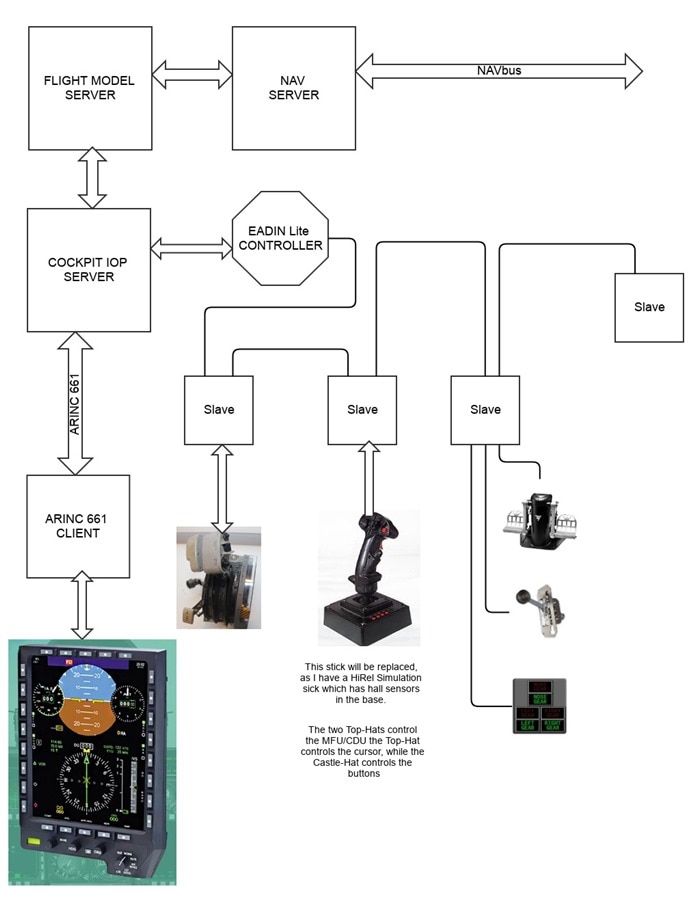
Well here is the other half of the roadmap! This concerns the integration between the:image

            • Flight Model Server and the NavServer.
            • Cockpit IOP and the Flight Model Server.
            • Cockpit IOP and ARINC-661 MFU/CDU
            • Cockpit IOP and the EADEN Controllers
            • EADEN to Slave CPU(s)
    1. I will describe the Throttle Quadrant, the Side-Stick, Gear Lever and Gear Lamps, and Rudder Pedals functions:
      1. Throttle Quadrant:
        1. Throttle Levers. (right and left)
        2. Throttle Gates and Finger Lifts. (right and left)
        3. The position of the Throttle Lever in the Gates is determined by 2 microswitches:
          1. OFF
          2. MAX THRUST.
        4. THRUST is the space between the two Gates,  and its position is determined by a potentiometer.
        5. Flaps Lever (on the left side),  and its position is determined by a potentiometer.
        6. Other Controls and Switches:
      2. Side-Stick:
        1. Inside the base, there is a Hall Sensor ring which determines the Pitch and Roll angles.
        2. Other Controls and Switches:
          1. Castel Hat Switch controls the selection of the MFD outer selector switches.
          2. Coolie Hat Switch controls the cursor on the MFD.
      3. Gear Lever and Lights
        1. Gear Lever itself has several functions:
          1. Gear UP/Down
          2. Gear Down for weight on wheels (this prevents retracting the gear when on the ground.
        2. Gear Lights
          1. RED / Gear UP
          2. GREEN / Gear Down and Locked
          3. AMBER Blinking Gear is in movement.
        3. Rudder Pedals with Toe Brakes:
          1. Controls the position of the Rudder. This uses one potentiometer.
          2. Force on the top of the Rudder Pedals controls the Wheel Brakes. This uses one potentiometer per side.
        4. Engine Start Panel
          1. Switches (Right and Left) only control the 2  small automotive engines that are in the fuselage.
          2. Run switches that select which mode the ignition is in.
            1. Stop
            2. Start
            3. ignition A
            4. ignition B
            5. Both
          3. LED displays that show the RPM (one per engine). 3 digits each.
          4. Start Switch which can crank ether engine. depending on Throttle Lever Position and of the engine RUN Switch in the Start. position.


      • When the Flight Model Server is started it is in the heartbeat mode which means it is just sending an empty frame only consisting of just the UNIX timestamp,  64bits.
      • AT this time you can enter one of two modes:
        • VFR
        • IFR
      • Assuming you are in IFR flight you would use the MFU/CDU to enter the Airport and known location. This information is transmitted to the Flight Model Server and the Nav Server
      • Assuming you start the engines, when you advance the throttles the EADINLite Controller will send a message to the Cockpit IOP which in turns sends it Flight Model Server which again updates the NAVserver.
      • Information entered into the MFU/CDU is an ARINC-661 system. This can put all manner of information on MFU/CDU. The buttons can be manually pushed and can also be controlled via the MFU/CDU Sidestick's Castel-Hat switch. The sidestick's Coolie-Hat controls the MFU/CDU Cursor, and the Red Button on the right is for the sidestick's enter command.
image

  • Sign in to reply
element14 Community

element14 is the first online community specifically for engineers. Connect with your peers and get expert answers to your questions.

  • Members
  • Learn
  • Technologies
  • Challenges & Projects
  • Products
  • Store
  • About Us
  • Feedback & Support
  • FAQs
  • Terms of Use
  • Privacy Policy
  • Legal and Copyright Notices
  • Sitemap
  • Cookies

An Avnet Company © 2026 Premier Farnell Limited. All Rights Reserved.

Premier Farnell Ltd, registered in England and Wales (no 00876412), registered office: Farnell House, Forge Lane, Leeds LS12 2NE.

ICP 备案号 10220084.

Follow element14

  • X
  • Facebook
  • linkedin
  • YouTube