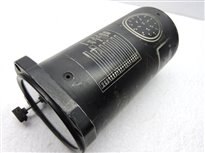
element14 Community
element14 Community
    Register Log In
  • Site
  • Search
  • Log In Register
  • Community Hub
    Community Hub
    • What's New on element14
    • Feedback and Support
    • Benefits of Membership
    • Personal Blogs
    • Members Area
    • Achievement Levels
  • Learn
    Learn
    • Ask an Expert
    • eBooks
    • element14 presents
    • Learning Center
    • Tech Spotlight
    • STEM Academy
    • Webinars, Training and Events
    • Learning Groups
  • Technologies
    Technologies
    • 3D Printing
    • FPGA
    • Industrial Automation
    • Internet of Things
    • Power & Energy
    • Sensors
    • Technology Groups
  • Challenges & Projects
    Challenges & Projects
    • Design Challenges
    • element14 presents Projects
    • Project14
    • Arduino Projects
    • Raspberry Pi Projects
    • Project Groups
  • Products
    Products
    • Arduino
    • Avnet & Tria Boards Community
    • Dev Tools
    • Manufacturers
    • Multicomp Pro
    • Product Groups
    • Raspberry Pi
    • RoadTests & Reviews
  • About Us
  • Store
    Store
    • Visit Your Store
    • Choose another store...
      • Europe
      •  Austria (German)
      •  Belgium (Dutch, French)
      •  Bulgaria (Bulgarian)
      •  Czech Republic (Czech)
      •  Denmark (Danish)
      •  Estonia (Estonian)
      •  Finland (Finnish)
      •  France (French)
      •  Germany (German)
      •  Hungary (Hungarian)
      •  Ireland
      •  Israel
      •  Italy (Italian)
      •  Latvia (Latvian)
      •  
      •  Lithuania (Lithuanian)
      •  Netherlands (Dutch)
      •  Norway (Norwegian)
      •  Poland (Polish)
      •  Portugal (Portuguese)
      •  Romania (Romanian)
      •  Russia (Russian)
      •  Slovakia (Slovak)
      •  Slovenia (Slovenian)
      •  Spain (Spanish)
      •  Sweden (Swedish)
      •  Switzerland(German, French)
      •  Turkey (Turkish)
      •  United Kingdom
      • Asia Pacific
      •  Australia
      •  China
      •  Hong Kong
      •  India
      • Japan
      •  Korea (Korean)
      •  Malaysia
      •  New Zealand
      •  Philippines
      •  Singapore
      •  Taiwan
      •  Thailand (Thai)
      • Vietnam
      • Americas
      •  Brazil (Portuguese)
      •  Canada
      •  Mexico (Spanish)
      •  United States
      Can't find the country/region you're looking for? Visit our export site or find a local distributor.
  • Translate
  • Profile
  • Settings
Personal Blogs
  • Community Hub
  • More
Personal Blogs
NexGen Flight Simuator NeXGen: Hacking a ID-453/ARN-30 Course Indicator
  • Blog
  • Documents
  • Mentions
  • Sub-Groups
  • Tags
  • More
  • Cancel
  • New
  • Share
  • More
  • Cancel
Group Actions
  • Group RSS
  • More
  • Cancel
Engagement
  • Author Author: phoenixcomm
  • Date Created: 7 Oct 2016 4:13 AM Date Created
  • Views 912 views
  • Likes 5 likes
  • Comments 4 comments
  • flight simulator
  • nexgen
  • diy hardware
  • arduino mega 2560
  • Course Indicator
  • id-453/arn-30
Related
Recommended

NeXGen: Hacking a ID-453/ARN-30 Course Indicator

phoenixcomm
phoenixcomm
7 Oct 2016

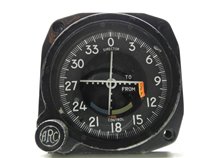
imageThe ID-453/ARN-30 is a Vietnam-era CDI. The connector on the rear is an ARC 19 pin. Well, here I'm going to do this from memory as this indicator has been already been taken apart. So let's begin.

Analysis: As you can see there are 2 pointers (Vertical and Horizontal pointers) and 2 flags (Vertical and Horizontal pointers) as well as the FROM-TO motor and a resolver, but let's just talk about the first five. They really are the same, just D’Arsonval Meter Movements, and they can be driven by the Arduino PCM output.
image

image

Device Name Mnemonic Power Ground

Vertical Pointer

      Positive Going:

      Negative Going:

PCM_VP


A

B


B

A

Horizontal Pointer

      Positive Going:

      Negative Going:

PCM_HP


C

D


D

C

Vertical Pointer Flag PCM_VPF E F
Horizontal Pointer Flag PCM_HPF G H

To-From Meter

    TO

    FROM

PCM_TFM


I

J


J

I

Resolver:
    Rotor Coil
    Stator Coils

RSLVR

RSLVR_R

RSLVR_Sin
RSLVR_Cos

neutral


O, P

N

L

K

image image

While most Arduinos, such as the Uno, Duemilanove, and the Leonardo only have only 6 PCM ports, the Mega2560 has 16 PCM output ports.

The  OBS pointer or the Omnibearing selector controls the selected bearing. This is shown by a small pointer and a small dot for the reciprocal bearing. This pointer is commonly referred to as the BUG A Resolver, Clifton Precision Type PS-17-E-1 is used to Read the Bearing' which are Sine and Cosine of the angle of the bearing.  The Resolver's COS and SIN are connected together at S1 and S2 (K), which becomes neutral, while S3 (N) and S4 (L) are outputs, SIN, and COS respectively.

In the picture below, you will see four black wire-wound resistors These are most likely shunts for the meters Just ignore them and test pinouts Here I used a DVM Amprobe  30XR-A30XR-A on the 2k ohm setting and the meters moved So I changed the setting to the and I could deflect the meter full scale and change the flags as well.image

The only other thing that I have to do now is to take care of the From-To Motor. This is the same as the other two flags but it is bi-directional, so it will require two (2) outputs as well.


~~ Cris image

Keep tuned in, More to Come!


Back to the Main Index
image


NOTES, FIXES, and TYPOS

  1. 07Oct16  Changed all variable names with '-' in them to '_' ....Blond Moment. LOL image
  2. 18Oct16  Changed the format of the table in Red.  (trying to fix the pdf downloader)
  3. 30Aug18 Changed some of the page formattings, to get rid of very small lines.
My Pin Outs:
ARC
12139
Connector
Mnemonic RS232
Connector
Mega Pin
A PCM_VP_pos 1 6
B PCM_VP_neg 14 7
C

PCM_HP_pos

2 8
D PCM_HP_neg 15 9
E PCM_VPF_pos 3 10
F PCM_VPF_neg 16 neutral
G PCM_HPF_pos 4 12
H PCM_HPF_neg 17 neutral
I

PCM_TFM_pos

5 13
J PCM_TFM_neg 18 14
K RSLV_neut 21 neutral
L RSLV_Sin 7
N RSLV_Cos 9
O RSLV_R_400Hz_1 12
P RSLV_R_400Hz_2 25
M, Q, R, S NO CONNECTION


Header file: D-453_ARN-30.hHeader 2

/* MEGA PINS */
  const int Serial_Rx = 0;
  const int Serial_Tx = 1;

// Vertical Pointer & Flag
  const int PWM_VP_pos  = 6;
  const int PWM_VP_neg  = 7;
  const int PWM_VPF_pos = 10;
// Horizontal Pointer & Flag
  const int PWM_HP_pos  = 8;
  const int PWM_HP_neg  = 9;
  const int PWM_HPF_pos = 12;
// From-To Meter
  const int PWM_TFM_pos = 13;
  const int PWM_TFM_neg = 14;

Part of my main file: D-453_ARN-30.c or pde
#include D-453_ARN.h
void setup() {
  pinMode( PWM_VP_pos,  OUTPUT ); // for change in direction change polarity
  pinMode( PWM_VP_neg,  OUTPUT ); // for change in direction change polarity
  pinMode( PWM_VPF_pos, OUTPUT );
  pinMode( PWM_HP_pos,  OUTPUT ); // for change in direction change polarity
  pinMode( PWM_HP_neg,  OUTPUT ); // for change in direction change polarity
  pinMode( PWM_VHF_pos, OUTPUT );
  pinMode( PWM_TFM_pos, OUTPUT ); // for change in direction change polarity
  pinMode( PWM_TFM_neg, OUTPUT ); } // for change in direction change polarity
//      OUTPUT +/- SCALING
  • Sign in to reply

Top Comments

  • phoenixcomm
    phoenixcomm over 9 years ago in reply to kulky64 +2
    OMG!! I must have had brain fog.. hell I'm blond.
  • kulky64
    kulky64 over 9 years ago +1
    Interesting post. Does Arduino IDE allows minus sign "-" in variable names? I thought it is now allowed to use any special characters in variable names (except underscore) in C/C++.
  • phoenixcomm
    phoenixcomm over 8 years ago in reply to clamb94

    a resolver and a synchro are very similar, with you most probably use most of the same software for reading and maybe driving.

    both units need a reference (400hz)  (see resolver figure above ) and a synchro please, see Flight Simulator 101, or Back to College - Part 7: Understanding Synchros.

    Reading Resolver: Drive Vr with 400hz, Decode Sin/Cos outputs fins.

    Reding Synchro: Drive Rotor with 400hz, Decode Sin/Cos outputs fins.

    Moving Synchro: Drive Rotor with 400hz, Drive S1 - S2 - S3 with PCM

    • Cancel
    • Vote Up 0 Vote Down
    • Sign in to reply
    • More
    • Cancel
  • clamb94
    clamb94 over 8 years ago

    Do you plan to interface the resolver as well?

    Would be really interested in connecting an resolver to an Arduino =)

    • Cancel
    • Vote Up 0 Vote Down
    • Sign in to reply
    • More
    • Cancel
  • phoenixcomm
    phoenixcomm over 9 years ago in reply to kulky64

    OMG!! I must have had brain fog.. hell I'm blond.image

    • Cancel
    • Vote Up +2 Vote Down
    • Sign in to reply
    • More
    • Cancel
  • kulky64
    kulky64 over 9 years ago

    Interesting post. Does Arduino IDE allows minus sign "-" in variable names? I thought it is now allowed to use any special characters in variable names (except underscore) in C/C++.

    • Cancel
    • Vote Up +1 Vote Down
    • Sign in to reply
    • More
    • Cancel
element14 Community

element14 is the first online community specifically for engineers. Connect with your peers and get expert answers to your questions.

  • Members
  • Learn
  • Technologies
  • Challenges & Projects
  • Products
  • Store
  • About Us
  • Feedback & Support
  • FAQs
  • Terms of Use
  • Privacy Policy
  • Legal and Copyright Notices
  • Sitemap
  • Cookies

An Avnet Company © 2025 Premier Farnell Limited. All Rights Reserved.

Premier Farnell Ltd, registered in England and Wales (no 00876412), registered office: Farnell House, Forge Lane, Leeds LS12 2NE.

ICP 备案号 10220084.

Follow element14

  • X
  • Facebook
  • linkedin
  • YouTube