element14 Community
element14 Community
    Register Log In
  • Site
  • Search
  • Log In Register
  • Community Hub
    Community Hub
    • What's New on element14
    • Feedback and Support
    • Benefits of Membership
    • Personal Blogs
    • Members Area
    • Achievement Levels
  • Learn
    Learn
    • Ask an Expert
    • eBooks
    • element14 presents
    • Learning Center
    • Tech Spotlight
    • STEM Academy
    • Webinars, Training and Events
    • Learning Groups
  • Technologies
    Technologies
    • 3D Printing
    • FPGA
    • Industrial Automation
    • Internet of Things
    • Power & Energy
    • Sensors
    • Technology Groups
  • Challenges & Projects
    Challenges & Projects
    • Design Challenges
    • element14 presents Projects
    • Project14
    • Arduino Projects
    • Raspberry Pi Projects
    • Project Groups
  • Products
    Products
    • Arduino
    • Avnet & Tria Boards Community
    • Dev Tools
    • Manufacturers
    • Multicomp Pro
    • Product Groups
    • Raspberry Pi
    • RoadTests & Reviews
  • About Us
    About the element14 Community
  • Store
    Store
    • Visit Your Store
    • Choose another store...
      • Europe
      •  Austria (German)
      •  Belgium (Dutch, French)
      •  Bulgaria (Bulgarian)
      •  Czech Republic (Czech)
      •  Denmark (Danish)
      •  Estonia (Estonian)
      •  Finland (Finnish)
      •  France (French)
      •  Germany (German)
      •  Hungary (Hungarian)
      •  Ireland
      •  Israel
      •  Italy (Italian)
      •  Latvia (Latvian)
      •  
      •  Lithuania (Lithuanian)
      •  Netherlands (Dutch)
      •  Norway (Norwegian)
      •  Poland (Polish)
      •  Portugal (Portuguese)
      •  Romania (Romanian)
      •  Russia (Russian)
      •  Slovakia (Slovak)
      •  Slovenia (Slovenian)
      •  Spain (Spanish)
      •  Sweden (Swedish)
      •  Switzerland(German, French)
      •  Turkey (Turkish)
      •  United Kingdom
      • Asia Pacific
      •  Australia
      •  China
      •  Hong Kong
      •  India
      •  Japan
      •  Korea (Korean)
      •  Malaysia
      •  New Zealand
      •  Philippines
      •  Singapore
      •  Taiwan
      •  Thailand (Thai)
      •  Vietnam
      • Americas
      •  Brazil (Portuguese)
      •  Canada
      •  Mexico (Spanish)
      •  United States
      Can't find the country/region you're looking for? Visit our export site or find a local distributor.
  • Translate
  • Profile
  • Settings
Personal Blogs
  • Community Hub
  • More
Personal Blogs
NexGen Flight Simuator NexGen: MPCD (F/A-18C/D MPCD): Hardware / Software Interface III
  • Blog
  • Documents
  • Mentions
  • Sub-Groups
  • Tags
  • More
  • Cancel
  • New
  • Share
  • More
  • Cancel
Group Actions
  • Group RSS
  • More
  • Cancel
Engagement
  • Author Author: phoenixcomm
  • Date Created: 20 Mar 2023 7:56 PM Date Created
  • Views 348 views
  • Likes 4 likes
  • Comments 0 comments
  • flight simulator
  • nexgen
  • diy hardware
  • diy cockpit
  • mpcd
  • ethernet shield
  • diy software
  • diy electronics
  • arduino mega
Related
Recommended

NexGen: MPCD (F/A-18C/D MPCD): Hardware / Software Interface III

phoenixcomm
phoenixcomm
20 Mar 2023

Ok, So I have talked about the MPCD's Bezel more than one or two times. So why don't we start in, again in part II, I used an MCP2515 I/O expander to handle my Bezel Switches, which will stay at is,  but instead of using CANaerospace, I will use an Ethernet Shield on the Arduino Mega, as the display is handled by the RSS computer itself, but I still need to have 20 LEDs as well. So here's what I'm going to do.  I have color coded the table below just to help with the LEDs and it also matches the photo as well.

image

Now that I'm done with the pretty picture and the table, I can get down to the dirty work, as I don't have a Shield2 just to snap them together, but I do have a bunch of the W5200 Ethernet Sheild from Seeed Studio. So Im going to have to "hack" the two of them together.  So here is how I'm going to do it.

PIN Neumonic Comment PIN Neumonic Comment
0 TX0.RCV USB TEST PORT 29 PA7 LED 8
1 TX0.TXT 30 PC7 LED 9
2 INT Ethernet Shield INT 31 PC6 LED 10
19 INT Keyboard INT 32 PC5 LED 11  (Bottom Right)
20 SDA See the small table below for ISP connections. 33 PC4 LED 12
21 SDK 34 PC3 LED 13
49 CS 35 PC2 LED 14
22 PA0 LED 1  (Top Left) 36 PC1 LED 15
23 PA1 LED 2 37 PC0 LED 16  (Left, Bottom)
24 PA2 LED 3 38 PD7 LED 17
25 PA3 LED 4 39 P? LED 18
26 PA4 LED 5 40 P? LED 19
27 PA5 LED 6  (Right Top) 44 P? LED 20
28 PA6 LED 7  

MEGA SHIELD
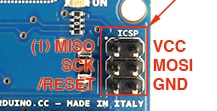
PIN NEWMONIC ISP BUS
2 INT *
52 SCK 3
53 MISO 1
51 MOSI 4
53 CS *
* neither the interrupt pin nor the Chip Select is present on the ISP connector.

image


image So here is how I will do it as I said before this is going to be a real hatchet job. Since the Shield will not plug into the Mega, I will have to do it the hard way.  I have to wire them together.  Sounds like fun doesn't it?? 

Later.

BTW, Both devices, the Ethernet Shield, and the Keyboard are using interrupts. "Wiznet chips have an interrupt pin, which is not currently used by the Ethernet library." In the Arduino Forum, I found the answer. "Getting Interrupts from Ethernet shield."

fins

Definition:
MPCD ::= Multi-Purpose Color Display

  • Sign in to reply
element14 Community

element14 is the first online community specifically for engineers. Connect with your peers and get expert answers to your questions.

  • Members
  • Learn
  • Technologies
  • Challenges & Projects
  • Products
  • Store
  • About Us
  • Feedback & Support
  • FAQs
  • Terms of Use
  • Privacy Policy
  • Legal and Copyright Notices
  • Sitemap
  • Cookies

An Avnet Company © 2026 Premier Farnell Limited. All Rights Reserved.

Premier Farnell Ltd, registered in England and Wales (no 00876412), registered office: Farnell House, Forge Lane, Leeds LS12 2NE.

ICP 备案号 10220084.

Follow element14

  • X
  • Facebook
  • linkedin
  • YouTube