


 |
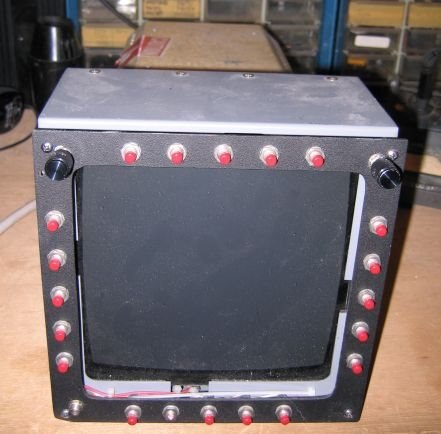
MPCD Prototype Figure 1 |
Well, here we are back at the MPCD, I have blogged twice before about this unit. First, where I got the pin-out for MPCD and got it working. Then I had to rewire the cable. Well, now it's the third time..
The Interface ( switches ) are arranged in 5 x 5 matrix, so I could just build a matrix, add diodes, and write a scan module. Nah, that's too much work! If you remember my CP-1252/ASN-128 CDU (Figure 2). I interfaced the CDU with an Arduino and the PS/2 interface. Good, this will simplify both my hardware development and software, REUSE the PS2 Keyboard code base. This gives me my code-base for both the CDU and the IOP.
The Set Up. Dah rules, there are just a few:
- Each key switch is connected to the PS2 Keyboard controller an SPST, normally off, momentary push, non-locking switch.
- Each key switch shall be referenced by its position on the bezel.
- Each key switch shall be labeled in the code base as KeySwitch.[letter] ie the busted switch on the bottom as KeySwitch.Q
- Each key switch shall be lit by an internal LED.
- Each LED shall be known as KeySwitchLED[letter] the same switch as before would now be KeySwitchLED.Q
- For reference, all the switches and LEDs shall have two (2) contacts each. My notation ::= is defined as
- Switch Common ::= 1
- Switch Active Leg ::= 2
- LED common ::= 3
- LED anode ::= 4
Since there are 20 keys, I only need to use three eight-bit, I2C, I/O expanders, the Texas Instruments PCF8574A.Now that means I have 4 extra pins on expander #3. I have a chart (Figure 3) consisting of ASCII output, expander, i/o pin. It is color codedto help keep it straight.
RIGHT
| LEFT (top down) | RIGHT (top down) | TOP (left to right | BOTTOM (left to right) |
| A.1.PO | F.1.P5 | K.2.P2 | P.2.P7 |
| B.1.P1 | G.1.P6 | L.2.P3 | Q.3.P0 |
| C.1.P2 | H.1.P7 | M.2.P4 | R.3.P1 |
| D.1.P3 | I.2.P0 | N.2.P5 | S.3.P2 |
| E.1.P4 | J.2.P1 | O.2.P6 | T.3.P3 |
| ADDENDUM: It seems that the switches are labeled counter-clockwise from the top-left. | |||
Interface Table | |||
TOP ROW LEFT TO RIGHT | LEFT ROW BOTTOM UP | BOTOM ROW RIGHT TO LEFT | RIGHT ROW TOP DOWN |
| S20.IC3.D LED20.IC.D | S15.IC2.G LED15.IC5.G | S10.IC2.B LED10.IC5.B | S1.IC1.A LED1.IC4.A |
| S19.IC3.C LED19.IC.C | S14.IC2.F LED14.IC5.F | S9.IC2.A LED9.IC5.A | S2.IC1.B LED2.IC4.B |
| S18.IC3.B LED17.IC6.B | S13.IC2.E LED13.IC.5.E | S8.IC1.H LED8.IC4.H | S3.IC1.C LED3.IC4.C |
| S17.IC3.A LED17.IC6.A | S12.IC2.D LED12.IC5.D | S7.IC1.G LED7.IC4.G | S4.IC1.D LED4.IC4.D |
| S16.IC2.H LED16.IC5.H | S11.IC2.C LED11.IC5.C | S6.IC1.F LED6.IC4.F | S5.IC1.E LED5.IC4.E |
 |
CP-1252/ASN-128 CDU Figure 2 |
The Communication. You should remember that I consider the Arduino rather stupid. So his function in life is to pass key presses to an IOP. The IOP has to generate the appropriate video and light the appropriate keys. So I want to make this device independent. So let's get on with the Key LED processing.
First let's write the function "MFD_LED" it will have two arguments: led_ID (char), Led_State (int)
and then the "LedDriver" it will have three arguments: expander_ID (int), Port_Number (int), led_state (int)
// defines
#define EXPANDER1 0x38
#define EXPANDER2 0x39
#define EXPANDER3 0x3A
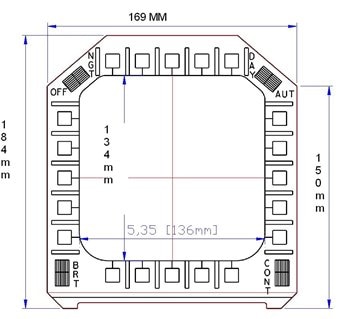 |
| Current Style Bezel Figure 4 |
LedDriver( int expander_ID, int PortNumber, int led_state );
void MFD_LED( char led_ID , int led_state ); // the void might be changed to an int.
MFD_LED( char led_ID , int led_state ){
if(led_state => A && led_state <= H){
LedDriver( EXPANDER4, PortNumber, led_state );}
if(led_state => I && led_state <= P){
LedDriver( EXPANDER5, PortNumber, led_state);}
if(led_state => Q && led_state <= T){
LedDriver( EXPANDER6, PortNumber, led_state );}
if(led_state > T){
// error or special.}
Wire.beginTransmission(expander_ID); //Begin the transmission to PCF8574A
Wire.send(led_state); //Send the data to PCF8574A
Wire.endTransmission(); //End the Transmission
}
SOFTWARE: In fact, I will be using three (3) different software libraries:
- Ps2 Keyboard library that just outputs ASCII characters (no IBM scan codes).
- Wire library that talks to the PCF8574A I/O Expanders. 3 output for the LEDs and one input for some switches.
- Serial library that lets the Arduino communicate with the world via a USB virtual serial connection.
Stay Tuned In, More To Come,
~~Cris 
