element14 Community
element14 Community
    Register Log In
  • Site
  • Search
  • Log In Register
  • Community Hub
    Community Hub
    • What's New on element14
    • Feedback and Support
    • Benefits of Membership
    • Personal Blogs
    • Members Area
    • Achievement Levels
  • Learn
    Learn
    • Ask an Expert
    • eBooks
    • element14 presents
    • Learning Center
    • Tech Spotlight
    • STEM Academy
    • Webinars, Training and Events
    • Learning Groups
  • Technologies
    Technologies
    • 3D Printing
    • FPGA
    • Industrial Automation
    • Internet of Things
    • Power & Energy
    • Sensors
    • Technology Groups
  • Challenges & Projects
    Challenges & Projects
    • Design Challenges
    • element14 presents Projects
    • Project14
    • Arduino Projects
    • Raspberry Pi Projects
    • Project Groups
  • Products
    Products
    • Arduino
    • Avnet & Tria Boards Community
    • Dev Tools
    • Manufacturers
    • Multicomp Pro
    • Product Groups
    • Raspberry Pi
    • RoadTests & Reviews
  • About Us
  • Store
    Store
    • Visit Your Store
    • Choose another store...
      • Europe
      •  Austria (German)
      •  Belgium (Dutch, French)
      •  Bulgaria (Bulgarian)
      •  Czech Republic (Czech)
      •  Denmark (Danish)
      •  Estonia (Estonian)
      •  Finland (Finnish)
      •  France (French)
      •  Germany (German)
      •  Hungary (Hungarian)
      •  Ireland
      •  Israel
      •  Italy (Italian)
      •  Latvia (Latvian)
      •  
      •  Lithuania (Lithuanian)
      •  Netherlands (Dutch)
      •  Norway (Norwegian)
      •  Poland (Polish)
      •  Portugal (Portuguese)
      •  Romania (Romanian)
      •  Russia (Russian)
      •  Slovakia (Slovak)
      •  Slovenia (Slovenian)
      •  Spain (Spanish)
      •  Sweden (Swedish)
      •  Switzerland(German, French)
      •  Turkey (Turkish)
      •  United Kingdom
      • Asia Pacific
      •  Australia
      •  China
      •  Hong Kong
      •  India
      • Japan
      •  Korea (Korean)
      •  Malaysia
      •  New Zealand
      •  Philippines
      •  Singapore
      •  Taiwan
      •  Thailand (Thai)
      • Vietnam
      • Americas
      •  Brazil (Portuguese)
      •  Canada
      •  Mexico (Spanish)
      •  United States
      Can't find the country/region you're looking for? Visit our export site or find a local distributor.
  • Translate
  • Profile
  • Settings
Personal Blogs
  • Community Hub
  • More
Personal Blogs
NexGen Flight Simuator Smarthab: Smart Wiring II
  • Blog
  • Documents
  • Mentions
  • Sub-Groups
  • Tags
  • More
  • Cancel
  • New
  • Share
  • More
  • Cancel
Group Actions
  • Group RSS
  • More
  • Cancel
Engagement
  • Author Author: phoenixcomm
  • Date Created: 12 Dec 2019 7:37 AM Date Created
  • Views 309 views
  • Likes 4 likes
  • Comments 0 comments
  • smarthab
  • voip wire
  • data wire
  • facial recognition
  • wiring reqirements
  • sarah
  • electrical home runs
Related
Recommended

Smarthab: Smart Wiring II

phoenixcomm
phoenixcomm
12 Dec 2019

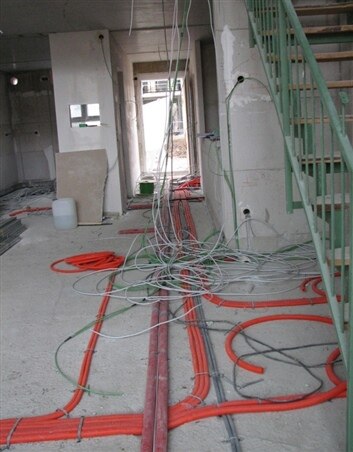
This photo is to show you what this person thinks a Smart House should be wired! And there is a ton of it. I don't consider this very smart! Rember in my last posts, I talked about smart wiring? So let us start with the Requirements for the Rooms first.image
  • Rooms that are about 15' to 20' square.Network Cables: 2 in most rooms
    • VoIP Cables: 2 in most rooms (2 phones as each phone is plugged in the VOIP switch 24port Cisco)
    • TV Cables: 2 in most rooms,
  • Larger rooms can but doubled
  • Office
    • 4 RJ45 Data jacks + 2 RJ45 VoIP jacks +  2 analog phones/fax
  • Shop
    • 4 RJ45 Data jacks per wall
    • 1 RJ45 VoIP jack per wall
  • Video Surveillance.
    • Cameras will have PO-Ethernet capability.
    • Facial Recognition by any exterior door.

Now we have to add the next layer which is the single network cable that is attached to the room controller to the House Controllers network switch.

Next, run the Power Home Runs for each room/ area controllers (This could be one per floor). So if you had a house with 2 floors, a basement, and a garage. This means that you only run one wire to each floor and then we distribute to the room controllers. So let us say you have 5 rooms on the top floor, and one is a bath. So somewhere on that floor, you could have the room controllers in one spot, behind a door, etc. Remember that each room has the sensors (thermostat, fire/smoke), switches (low voltage) which control the relays in the controller. The controller is also responsible for controlling dampers and ventilation system per room.

The biggest nightmare you will have is "Smart Things" Appliances, etc as you DO NOT want to use WIFI, as you can brake it within an hour with your cellphone outside your house.  The other part of this nightmare and even worse is they spy on you while waiting for there keyword,  In other words they get everything before the keyword, and it never sleeps. This really means you have lost your privacy to the Google, Facebook, and Apple.
To me this is unacceptable! The device should just listen for the keyword, and if not dump the words to the bit bucket. This is why SARAH Self Actuated Residential Automated Habitat does that!

SARAH will also here and respond to gun shots (not the tv), FIRE, and HELP! HELP! or INTRUDER ALERT! with out the Keyword 'SARAH'.

  • Sign in to reply
element14 Community

element14 is the first online community specifically for engineers. Connect with your peers and get expert answers to your questions.

  • Members
  • Learn
  • Technologies
  • Challenges & Projects
  • Products
  • Store
  • About Us
  • Feedback & Support
  • FAQs
  • Terms of Use
  • Privacy Policy
  • Legal and Copyright Notices
  • Sitemap
  • Cookies

An Avnet Company © 2026 Premier Farnell Limited. All Rights Reserved.

Premier Farnell Ltd, registered in England and Wales (no 00876412), registered office: Farnell House, Forge Lane, Leeds LS12 2NE.

ICP 备案号 10220084.

Follow element14

  • X
  • Facebook
  • linkedin
  • YouTube