


 Standardizing CanAerospace Network Connections - My Way
Ok, I have been using a pair of RJ-45 jacks. This was my Blond Moment! This was not a really good idea.
Ok, back to the spec. So here is what I ended up with:
| CanAerospace DB-9 Interface | |||
| PIN | Standard Values | Using USB vs RS-232 | |
| 1 | Power +28VDC | This can be changed to 5Vdc | |
| 2 | CAN Low | CAN Low | |
| 3 | CAN Ground | CAN Ground | |
| 4 | RS-232 TxD | USB HIGH | |
| 5 | Power Gnd | Power Gnd | |
| 6 | RS-232 RxD | USB LOW | |
| 7 | CAN High | CAN High | |
| 8 | Shield | Shield* | |
| 9 | RS-232 Gnd | N/C | |
You will notice that Pins 4 and 6 have been replaced with USB. Why do you ask? Well, the CPUs have a USB console port, which is a pain to get to inside the LRU, Line Replacable Unit, which are in a rack with a ton of wires to deal with. Now there are two DB-9f wired in parallel. This is how the network works lets say you only have 2 boxes, then both boxes need a termination resistor. Say you have 3 boxes, then the middle one does not need the termination restors. What I have come to realize I have to pull the LRU of the rack open it and change the stupid jumper. So I fixed this. The termination resistor is below one for the DB-9f, along with an LED and a mini-toggle DPST switch, on one side, which puts the resistor across the CAN bus, and of course, the LED turns on. Will wonders never cease?
This leaves me to jump across the DB-9s only the CAN-Low, CAN-Ground, CAN-High, and Shield, but more about that later. So only one of the DB-9s has the USB interface on it. I made a DB-9 Connector which has a USB-A female on it, on a cable, a few feet. The Switch and LED are below the interface that has the LED below the connector has the USB & CAN on it. I could expand the test jack with a CAN interface on the Test Plug; I have not implemented this as of yet.
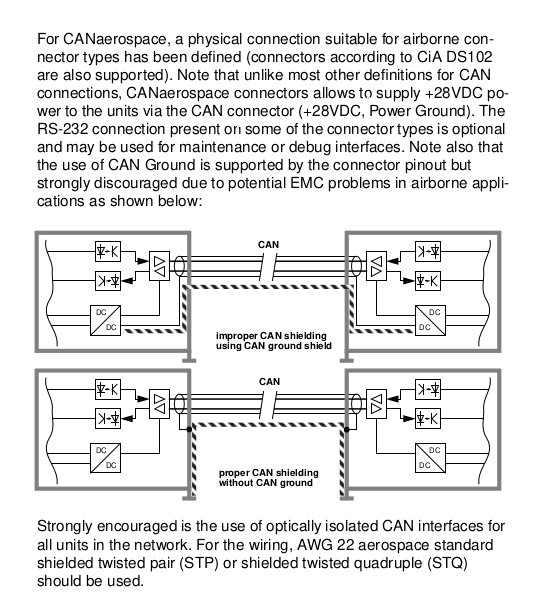
Now, let me talk about grounding and shielding. No, on second though I will append it from the spec.
Enjoy the Update