element14 Community
element14 Community
    Register Log In
  • Site
  • Search
  • Log In Register
  • Community Hub
    Community Hub
    • What's New on element14
    • Feedback and Support
    • Benefits of Membership
    • Personal Blogs
    • Members Area
    • Achievement Levels
  • Learn
    Learn
    • Ask an Expert
    • eBooks
    • element14 presents
    • Learning Center
    • Tech Spotlight
    • STEM Academy
    • Webinars, Training and Events
    • Learning Groups
  • Technologies
    Technologies
    • 3D Printing
    • FPGA
    • Industrial Automation
    • Internet of Things
    • Power & Energy
    • Sensors
    • Technology Groups
  • Challenges & Projects
    Challenges & Projects
    • Design Challenges
    • element14 presents Projects
    • Project14
    • Arduino Projects
    • Raspberry Pi Projects
    • Project Groups
  • Products
    Products
    • Arduino
    • Avnet & Tria Boards Community
    • Dev Tools
    • Manufacturers
    • Multicomp Pro
    • Product Groups
    • Raspberry Pi
    • RoadTests & Reviews
  • About Us
    About the element14 Community
  • Store
    Store
    • Visit Your Store
    • Choose another store...
      • Europe
      •  Austria (German)
      •  Belgium (Dutch, French)
      •  Bulgaria (Bulgarian)
      •  Czech Republic (Czech)
      •  Denmark (Danish)
      •  Estonia (Estonian)
      •  Finland (Finnish)
      •  France (French)
      •  Germany (German)
      •  Hungary (Hungarian)
      •  Ireland
      •  Israel
      •  Italy (Italian)
      •  Latvia (Latvian)
      •  
      •  Lithuania (Lithuanian)
      •  Netherlands (Dutch)
      •  Norway (Norwegian)
      •  Poland (Polish)
      •  Portugal (Portuguese)
      •  Romania (Romanian)
      •  Russia (Russian)
      •  Slovakia (Slovak)
      •  Slovenia (Slovenian)
      •  Spain (Spanish)
      •  Sweden (Swedish)
      •  Switzerland(German, French)
      •  Turkey (Turkish)
      •  United Kingdom
      • Asia Pacific
      •  Australia
      •  China
      •  Hong Kong
      •  India
      •  Japan
      •  Korea (Korean)
      •  Malaysia
      •  New Zealand
      •  Philippines
      •  Singapore
      •  Taiwan
      •  Thailand (Thai)
      •  Vietnam
      • Americas
      •  Brazil (Portuguese)
      •  Canada
      •  Mexico (Spanish)
      •  United States
      Can't find the country/region you're looking for? Visit our export site or find a local distributor.
  • Translate
  • Profile
  • Settings
Personal Blogs
  • Community Hub
  • More
Personal Blogs
Nico teWinkel's Blog Figuring out the CNC
  • Blog
  • Documents
  • Mentions
  • Sub-Groups
  • Tags
  • More
  • Cancel
  • New
  • Share
  • More
  • Cancel
Group Actions
  • Group RSS
  • More
  • Cancel
Engagement
  • Author Author: ntewinkel
  • Date Created: 2 Aug 2018 10:15 PM Date Created
  • Views 1391 views
  • Likes 10 likes
  • Comments 11 comments
  • sjoelbak
  • pcb
  • cnc
  • gcode
  • cat
  • mac
Related
Recommended

Figuring out the CNC

ntewinkel
ntewinkel
2 Aug 2018

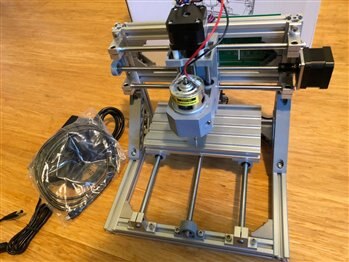
I was lucky enough to win a shopping cart prize earlier this year in the Arduino contest, and element14 was nice enough to send me this lovely little CNC machine:
image


Here is the link to it, by PCDuino: http://canada.newark.com/pcduino/108302018/cnc-engraver-assembled/dp/33AC0136

Sadly, I see it is no longer being manufactured. And I can't find any other cnc machines in this size or price range here. I do see you can get many just like them off eBay for similar pricing though. Some (lots of!) assembly required.

Thankfully the one from element14/Newark was fully assembled - I just had to tighten a few screws and bolts.


It's a small unit, the bed is 18cm x 10cm, but that's perfect for me to do most of the little things I've been wanting to try out.

Plus that size is much more convenient for storage and use.


And it fits nicely on my desk while I figure out how to get started!


Using this CNC machine turned out to be not as straight-forward as I had hoped, so it's taking me longer to get things figured out than I thought it would.


It seems to involve a few steps: 1. design (or grab an image), then 2. convert to gcode, and then 3. send gcode to the cnc machine.


Turns out each step has a number of software options available. Many open-source, many without very clear instructions, few that work quickly and easily on a Mac.

And it seems that I run into a handful of roadblocks and/or hurdles with every step. This might be easier on a Windows machine, but I shall persist!


So my next few blogs (when I have time for them again) will involve the steps I've taken to get this cnc machine playing nice. For now, this is just a summary (high-ish level overview) of what I did to get this far. Advice (for Mac especially) is warmly welcomed image


First things first: testing with a marker and paper.


I don't want a mess in my office, or the noise, or the extreme danger factor that comes with fast spinning sharp things near my cats - so I didn't install the router bit and I keep the router turned off, and I taped a marker to it instead.

The choice of marker is a really nice starting point for technical reasons too. It's quite forgiving as to the vertical position, a little bit lower just means a bigger line. And as I found out the hard way already, when I really screwed up the vertical position it just kinda squishes the marker tip but no real damage done.


The unit came with a power supply and a usb cable. I only just had to plug it in for power and into my MacBook. That part was easy.


First steps - I installed UGSPlatform for Mac (I'll try to get more detailed later when I have time), and promptly found it wasn't recognizing my CNC machine. sigh.

Turns out for Mac, with this particular type of controller, it needs to use a different serial library, which can be selected in settings (in UGSPlatform).


Then having finally connected the unit, I played around with the buttons on UGSPlatform for a while, to move the CNC machine around in all 3 dimensions. This also tests the limits and it tests to make sure that the unit was built squarely enough to not hang up anywhere in the work area. All that worked nicely and I didn't have to change the hardware at all (kudos to the assemblers at PCDuino!). Do keep in mind that the hardware and software do not have any stop sensors built on, so if you try to go beyond the end it will make some awful noises. Step slowly and carefully.


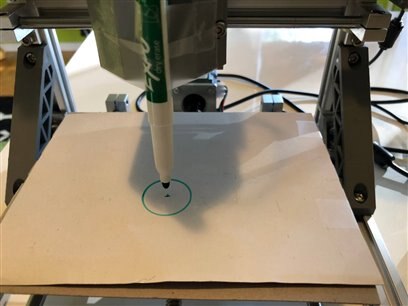
After being satisfied that the unit was working well in general, I grabbed "circle.gcode" as a test file (I forget where I got that. somewhere on github...), and after setting x,y,z to the proper starting positions, I drew a circle!
image


For the second step, I wanted to take an existing picture and draw it out. So I downloaded a few simple .dxf files. But sadly I wasn't able to get those converted to gcode. There are some websites out there that say they convert to gcode, but it appears that a variety of different types of cnc machines exist, and I wasn't able to figure out how to get that to work for this particular unit.


I did notice that Inkscape seems to be popular, so I installed that (and XQuartz so it can run on Mac), and started playing with it.


After messing around trying to get some other gcode exporter to work (unicorn something), I realized that Inkscape already comes with Gcodetools installed as an extension.

So just install Quartz and Inkscape and it should be good to go.

Gcodetools is a little tricky to get started with (I checked a few youtube videos, one with a snowman was pretty clear), but eventually I was able to get something drawn out by the CNC machine. You basically have to do a few steps in the proper order to make it work, but it doesn't guide you through it.


For the first Inkscape test I used the built-in spiral tool and basically just drew (plopped down) a spiral, resized it, and then exported it to gcode.

I did resize the document to begin with, to be the same size as my cnc bed (180mm x 100mm). That makes it easier to resize the object to fit the machine.

I'm not sure if this is important, but I think after drawing that spiral I had to select it and then choose "Path" - "Object to Path".


Then I used that first bit of software, UGSPlatform, to draw the gcode file out on the CNC machine. UGSPlatform shows a preview of what it is about to draw, so make sure you set the origin (starting point) to match what the preview shows.

The paper was bent so it skipped a small part, but that's ok and not a software or machine issue.


After that worked nicely I thought I'd try with text. Because I'm not very original I just typed "Test" image  I realized later that I should've typed "Cat" image


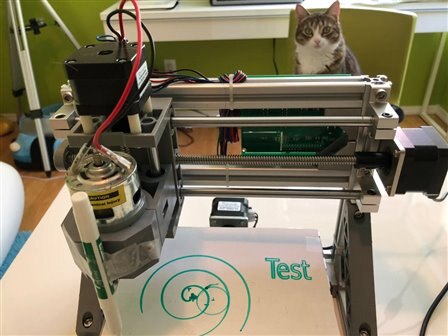
And here is the result (see picture). That messy bit in the center is where I had the Z (vertical) axis set wrong and it shoved the marker into the paper like a smoker snuffing a cigarette with much gusto.


Notice my manager looking on image

image


So far it's all 2 dimensional, which is a nice start for basic engraving and possibly for cutting things out of thin material.


My next step will likely involve taking this to the workshop and trying some small things using styrofoam - the type they use here for rigid insulation (not that beady stuff - that would get messy in a hurry!).


To get into 3 dimensions, I have installed Autodesk Fusion 360 (same makers as Eagle) and am going through this Instructables class: https://www.instructables.com/class/CNC-Class/

It's using a much bigger machine so I'm hoping I can just downsize it to a squirrel-sized table image


My ultimate first real goal is to make some new sjoel stenen (pucks) for my sjoel bak!  They are slightly concave, so that would be hard to do manually. I think I'm missing a handful in my current set.

ps, if anyone already has the files for sjoel stenen, please let me know!


Other thoughts:

* I'm using an older MacBook as controller right now, but I'd like to eventually use a Raspberry Pi to run the controller software. Maybe even mount it on the CNC machine.

* I've heard/read rumours that Eagle can export to gcode so I could carve a PCB out of copper plated boards. Definitely something I want to try.

* I still need to figure out how to convert pre-existing dxf files into something I can use with this CNC machine - there are so many cool and free designs out there in that format.


Cheers,

-Nico

  • Sign in to reply

Top Comments

  • jw0752
    jw0752 over 7 years ago +5
    Hi Nico, Some of the machines being sold remind me of the early micro computer days when the hardware would arrive and the software was up to the buyer. We are for the most part pretty spoiled with all…
  • michaelkellett
    michaelkellett over 7 years ago +5
    I have a full size CNC mill (Haas Tool Room Mill TM1) which I use to cut metal (and sometimes plastic). I have proper 3D cad software but I manually translate drawings to G code - software that is good…
  • DAB
    DAB over 7 years ago +4
    Nice post Nico. DAB
  • mcb1
    mcb1 over 7 years ago

    Nice idea using the marker pen ...


    GIMP may be able to do conversions, and it runs in Linux.


    I've started trying Fusion360 and followed the sketch video here

    help.autodesk.com/view/fusion360/ENU


    I still find many assume you know the terms and have changed from another software ... image


    Scott Moyse from Cadpro Systems (NZ distributor of Fusion) sent me this.

    I haven't watched it yet.

    https://www.youtube.com/watch?v=PFPpBGO-uJ4&list=PL5DoZumXk-1Kd78edRtm7gfzHJKChY79S&index=1


    He also provided this video on importing a tool library, and applying your first toolpath.

    HOWEVER it may only apply to Vertigo machines.

    https://youtu.be/8HkMguTbBoA


    BTW

    I asked the guys at Vertigo how they align machines, and the answer was you face off a piece of wasteboard so that any error on the bed is compensated for.

    Many people have commented that you need to ensure the workbench is flat, and this would apply to any machine, but more so the larger the size.


    Mark

    • Cancel
    • Vote Up +4 Vote Down
    • Sign in to reply
    • More
    • Cancel
  • fmilburn
    fmilburn over 7 years ago

    Very nice. Please continue to keep us posted.

    • Cancel
    • Vote Up +4 Vote Down
    • Sign in to reply
    • More
    • Cancel
  • jw0752
    jw0752 over 7 years ago

    Hi Nico,


    Some of the machines being sold remind me of the early micro computer days when the hardware would arrive and the software was up to the buyer. We are for the most part pretty spoiled with all the turn key things available nowdays. Thanks for the great post and I hope to see the results when you get it cutting 3D.


    John

    • Cancel
    • Vote Up +5 Vote Down
    • Sign in to reply
    • More
    • Cancel
  • shabaz
    shabaz over 7 years ago

    Hi Nico,


    Excellent post! It will be great to learn from your experiences!

    I'm hoping to set up a 2D machine at some point (just as an experiement for now), I ordered the XY table at Xmas but have been looking to find some time to explore it properly.

    I'm quite scared to go into 3 dimensions currently : ) Two are hard enough to think through for me : )

    • Cancel
    • Vote Up +4 Vote Down
    • Sign in to reply
    • More
    • Cancel
  • genebren
    genebren over 7 years ago

    Yeah, this CNC not work as easily as I thought either.  I have managed through some very strange assortment of steps (and a lot of help from a friend) to get something to work, but when I tried it again, I got a different result.  When I started with the 3D printer I was sure that it would require more hoops and jumps, but wow, it actually worked the first time out.  Once I get a shop up and running, I will unpack my small (not quite as small as yours) CNC and try again. Hopefully by then you will have it all figured out and well documented, so it will easy for the rest of us. image


    Great first steps.  I look forward to following along and learning everything that there is to know.


    Gene

    • Cancel
    • Vote Up +3 Vote Down
    • Sign in to reply
    • More
    • Cancel
<>
element14 Community

element14 is the first online community specifically for engineers. Connect with your peers and get expert answers to your questions.

  • Members
  • Learn
  • Technologies
  • Challenges & Projects
  • Products
  • Store
  • About Us
  • Feedback & Support
  • FAQs
  • Terms of Use
  • Privacy Policy
  • Legal and Copyright Notices
  • Sitemap
  • Cookies

An Avnet Company © 2026 Premier Farnell Limited. All Rights Reserved.

Premier Farnell Ltd, registered in England and Wales (no 00876412), registered office: Farnell House, Forge Lane, Leeds LS12 2NE.

ICP 备案号 10220084.

Follow element14

  • X
  • Facebook
  • linkedin
  • YouTube