


I recently started using an Adafruit FunHouse with CircuitPython Adafruit FunHouse and did a quick project for Mother's Day and my wife's birthday Adafruit FunHouse - Happy Mother's Day . When I did the Mother's Day project I had wanted to have pictures and sound, but did not get that part finished in time. I discovered later that the compiled slideshow library adafruit_slideshow.mpy was available for CircuitPython v6, I had just missed seeing it.
So, I decided to give it a try. In this demo, I'm going to use the PIR sensor to advance through the pictures. The NeoPixels start out Red and when motion is detected by the PIR, they switch to Green and the next picture is loaded.
Here is the code:
slideshow_pir.py
# SPDX-FileCopyrightText: 2021 ladyada for Adafruit Industries
# SPDX-License-Identifier: MIT

"""Basic demonstration script will create a slideshow
object that plays through once alphabetically."""
import board
import pulseio
import touchio
from digitalio import DigitalInOut, Direction, Pull
from adafruit_funhouse import FunHouse
from adafruit_slideshow import PlayBackOrder, SlideShow, PlayBackDirection

# use built in display (PyPortal, PyGamer, PyBadge, CLUE, etc.)
# see guide for setting up external displays (TFT / OLED breakouts, RGB matrices, etc.)
# https://learn.adafruit.com/circuitpython-display-support-using-displayio/display-and-display-bus
display = board.DISPLAY

# pylint: disable=no-member

funhouse = FunHouse(
    default_bg=0x0F0F00,
    scale=2,
)

# funhouse.peripherals.set_dotstars(0x800000, 0x808000, 0x008000, 0x000080, 0x800080)
funhouse.peripherals.set_dotstars(0x200000, 0x200000, 0x200000, 0x200000, 0x200000)

slideshow = SlideShow(
    board.DISPLAY,
    pulseio.PWMOut(board.TFT_BACKLIGHT),
    folder="/images/",
    auto_advance=False,
    # order=PlayBackOrder.ALPHABETICAL,
    dwell=0,
)

while True:
    if funhouse.peripherals.pir_sensor:
        funhouse.peripherals.set_dotstars(0x002000, 0x002000, 0x002000, 0x002000, 0x002000)
        slideshow.direction = PlayBackDirection.FORWARD
        slideshow.advance()
    else:
        funhouse.peripherals.set_dotstars(0x200000, 0x200000, 0x200000, 0x200000, 0x200000)
Demo Video - apologies for the background fan noise, I forgot to mute the audio. I'm out of the frame, but I'm moving in the background to advance the pictures.
I was surprised at how long the images took to load - seems about 5-6 seconds.
The other issue with this type of application using CircuitPython on the FunHouse is that I don't end up with much file storage space for pictures. The FunHouse has a 4MB Flash memory, but with CircuitPython loaded there is only about 1 MB left free for applications.
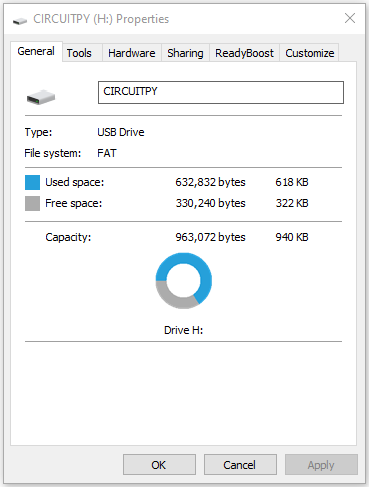
And each 240x240 bmp image takes 169KB, so I can only load a few images.

I'll need to look at adding external storage or maybe switch to programming it with the Arduino IDE.