element14 Community
element14 Community
    Register Log In
  • Site
  • Search
  • Log In Register
  • Community Hub
    Community Hub
    • What's New on element14
    • Feedback and Support
    • Benefits of Membership
    • Personal Blogs
    • Members Area
    • Achievement Levels
  • Learn
    Learn
    • Ask an Expert
    • eBooks
    • element14 presents
    • Learning Center
    • Tech Spotlight
    • STEM Academy
    • Webinars, Training and Events
    • Learning Groups
  • Technologies
    Technologies
    • 3D Printing
    • FPGA
    • Industrial Automation
    • Internet of Things
    • Power & Energy
    • Sensors
    • Technology Groups
  • Challenges & Projects
    Challenges & Projects
    • Design Challenges
    • element14 presents Projects
    • Project14
    • Arduino Projects
    • Raspberry Pi Projects
    • Project Groups
  • Products
    Products
    • Arduino
    • Avnet & Tria Boards Community
    • Dev Tools
    • Manufacturers
    • Multicomp Pro
    • Product Groups
    • Raspberry Pi
    • RoadTests & Reviews
  • About Us
  • Store
    Store
    • Visit Your Store
    • Choose another store...
      • Europe
      •  Austria (German)
      •  Belgium (Dutch, French)
      •  Bulgaria (Bulgarian)
      •  Czech Republic (Czech)
      •  Denmark (Danish)
      •  Estonia (Estonian)
      •  Finland (Finnish)
      •  France (French)
      •  Germany (German)
      •  Hungary (Hungarian)
      •  Ireland
      •  Israel
      •  Italy (Italian)
      •  Latvia (Latvian)
      •  
      •  Lithuania (Lithuanian)
      •  Netherlands (Dutch)
      •  Norway (Norwegian)
      •  Poland (Polish)
      •  Portugal (Portuguese)
      •  Romania (Romanian)
      •  Russia (Russian)
      •  Slovakia (Slovak)
      •  Slovenia (Slovenian)
      •  Spain (Spanish)
      •  Sweden (Swedish)
      •  Switzerland(German, French)
      •  Turkey (Turkish)
      •  United Kingdom
      • Asia Pacific
      •  Australia
      •  China
      •  Hong Kong
      •  India
      • Japan
      •  Korea (Korean)
      •  Malaysia
      •  New Zealand
      •  Philippines
      •  Singapore
      •  Taiwan
      •  Thailand (Thai)
      • Vietnam
      • Americas
      •  Brazil (Portuguese)
      •  Canada
      •  Mexico (Spanish)
      •  United States
      Can't find the country/region you're looking for? Visit our export site or find a local distributor.
  • Translate
  • Profile
  • Settings
Personal Blogs
  • Community Hub
  • More
Personal Blogs
Ralph Yamamoto's Blog Evaluating MiniZed with Vitis
  • Blog
  • Documents
  • Mentions
  • Sub-Groups
  • Tags
  • More
  • Cancel
  • New
  • Share
  • More
  • Cancel
Group Actions
  • Group RSS
  • More
  • Cancel
Engagement
  • Author Author: ralphjy
  • Date Created: 3 Jan 2020 1:43 AM Date Created
  • Views 1073 views
  • Likes 4 likes
  • Comments 3 comments
  • vitis
  • minized
Related
Recommended

Evaluating MiniZed with Vitis

ralphjy
ralphjy
3 Jan 2020

I recently attended an Avnet webinar Learn Embedded Design with the MiniZed (Win a MiniZed for Asking Questions!)  that discussed the MiniZed development board and its design ecosystem.  I also just completed the Path II Programmable training which used the Ultra96 board and the MiniZed seemed like a very capable lower cost alternative for developing less complex designs.  The MiniZed was used in the first Path to Programmable training course.  The MiniZed has been around since 2017 but there has been a lot of recent activity.  Besides the webinar, I noticed that Hackster is doing a 3 hour workshop event on January 30 https://events.hackster.io/mini-but-mighty which is based on a Hackster tutorial that Adam Taylor did on developing a motor control application on the MiniZed using the new Vitis toolset https://www.hackster.io/adam-taylor/mini-but-mighty-the-minized-and-vitis-for-motor-control-9c376b .

image


I decided to try out the MiniZed and use it as a vehicle to start learning about Vitis.  I'll use Adam Taylor's motor control tutorial to get started.


Vitis Installation requirements:

ComponentRequirement
Operating System

Linux, 64-bit:

  • Ubuntu 16.04.5 LTS, 16.04.6 LTS, 18.04.1 LTS, 18.04.2 LTS
  • CentOS 7.4, 7.5, 7.6
  • RHEL 7.4, 7.5, 7.6
System Memory

For Alveo cards: 64 GB (80 GB is recommended)

For embedded: 32 GB

Hard disk space100 GB


I've been using a VirtualBox VM for the Path II Programmable projects installed on a Windows 10, i7 computer with 16GB of memory (10 GB allocated to the VM).  I was somewhat surprised by the 32 GB minimum memory requirement as I have been relatively satisfied with using the 10 GB for Ultra96 development using Vivado, SDK and PetaLinux (the most time consuming activities are the PetaLinux builds).  I've ordered some additional memory to upgrade my computer to 64 GB but decided to see how far I could get with my existing hardware configuration.  I am using Ubuntu 16.04.4 with the 2018.3 tools in the VM to be compatible with the Path II Programmable training courses, so I needed to create a new VM using an Ubuntu version compatible with the 2019.2 Vitis tools.  I decided to use 18.04.2 but mistakenly downloaded and installed 18.04.  I did not realize my mistake until I was installing Vitis and got the incompatible OS warning.  Short of doing a complete installation, I don't know of a simple way to upgrade to a specific minor version so I decided just to upgrade to 18.04.03.  When I install the additional memory I'll go back and do the whole installation over with 18.04.2.  I will also try to get some quantitative memory usage data using the system monitor utility.  I'm hoping to be able to get a real profile of memory usage.


Here is my current VM configuration:

image


Vitis Installation

The Vitis installation was straightforward.  I basically followed the installation directions https://www.xilinx.com/html_docs/xilinx2019_2/vitis_doc/Chunk1858803630.html .

I chose to use the Single-File download method so that I would have the file available when I need to do another install.  The 2019.2 TAR/GZIP file is 30.76 GB so I made sure to check the MD5 sum after I downloaded it.  In addition to the Vitis software you need to install the Xilinx Runtime (XRT) package which is documented at the same link.  I put shortcuts to Vitis and Vivado on my Desktop using the method that I learned in the PIIP training.  The only glitch was the inconsistency of the icon names for the tools.  For Vivado the icon image is "vivado_logo.ico" and for Vitis it is "ide.icon.ico".  But that was a simple fix to the shell script.  I decided not to install PetaLinux as I'm probably going to have to re-install this whole setup due to my error in the Ubuntu minor version (installed 18.04.3 instead of 18.04.2).


Generating a new hardware description using Vivado

The next step was to generate a new hardware description for the MiniZed that I could use with Vitis.  I just followed the instructions in Adam's tutorial.  The only thing that surprised me was that the MiniZed board definition file was not included in the software that I installed so I had to go to the zedboard.org site and download it: MiniZed | Zedboard.   I'll need to do that for the Ultra96v2 also.  The other difference is that Vitus uses a different hardware description archive than the SDK does.  Vivado now exports an XSA (Xilinx Shell Architecture) file instead of an HDF file.  Apparently PetaLinux can use either file type.


Hello World using Vitis

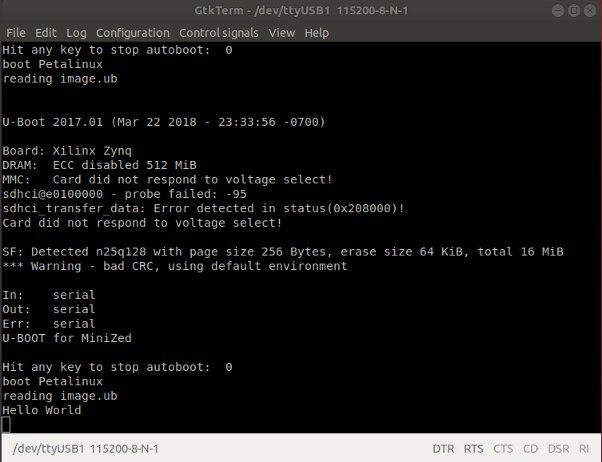
The standard "pipe cleaner" test to verify the software/hardware setup is the "Hello World" application and Adam's tutorial also goes through that process.  The program is run using a debug configuration through the JTAG/UART port on the MiniZed.  The program ran successfully but I got some error messages that refer to U-Boot trying to use the SD Card which doesn't exist on the MiniZed.  Not sure where that's coming from but I'll need to figure it out.  I don't see that mentioned in the tutorial so I have an error in my setup or I've missed a step.
image


I'll spend some time looking at that before continuing on.  I also don't have the Pmod HB3 H Bridge that is required to complete the tutorial.


I can tell that the biggest challenge in getting familiar with the MiniZed using Vitis is that almost all of the examples use the SDK tool flow and earlier versions of the tools.  Not to mention that Ubuntu 18.04 is different than 16.04.  I really do want to learn Vitis so I'm going to jump in and start reading all of Adam's recent blogs on Vitis and try to do something useful image.   I'm still using the 2018.3 tools on Ubuntu 16.04.04 for my Ultra96v2 project so I'm hoping that I can keep things sorted out.

  • Sign in to reply

Top Comments

  • clem57
    clem57 over 5 years ago +1
    Wow. It seems another leap to get into Vitas as if the initial setup is not enough. Thanks ralphjy . This will help me setup my computer which is a Ryzen 5 with 32GB SDRAM. Clem
  • drozwood90
    drozwood90 over 5 years ago +1
    Good write up! Thanks for sharing! Vitis does require more memory and we are working on generating new platforms, but there is a large infrastructure of documentation that also comes along with that (for…
  • phoenixcomm
    phoenixcomm over 5 years ago

    Too much work

    • Cancel
    • Vote Up 0 Vote Down
    • Sign in to reply
    • More
    • Cancel
  • drozwood90
    drozwood90 over 5 years ago

    Good write up!  Thanks for sharing!


    Vitis does require more memory and we are working on generating new platforms, but there is a large infrastructure of documentation that also comes along with that (for example, helping people setup their tools).

    I also recently found some strangeness with Xilinx build scripts that could cause some issues if you run too many jobs at once.  I'll be putting a blog together to let everyone know about it.


    As for supported versions, please note that there are specific versions of 18 that is supported.

    image

    I can also state that if you accidentally allow Ubuntu 18 (defaults to YES in 18) to update during install, it will swap the kernel to the one in 18.04.3+, which is not compatible with Vitis at this time.  I've been using 18.04.1 and that is what I will be releasing documentation around that.  So far, I've had quite a bit of success recently and have even been able to optimize by built times.  Running a MPSoC build for a 7EV seems to max out at 16GB of ram, so that is good!  I've 24GB assigned to the VM at this time.


    I've also used 16.04.2,16.04.4,16.04.6 without issue.


    If you suspect anything is off, use "lsb_release -a" to see what version of OS you are using (just in case a sneaky update got in there!).


    --Dan

    • Cancel
    • Vote Up +1 Vote Down
    • Sign in to reply
    • More
    • Cancel
  • clem57
    clem57 over 5 years ago

    Wow. It seems another leap to get into Vitas as if the initial setup is not enough.image Thanks ralphjy . This will help me setup my computer which is a Ryzen 5 with 32GB SDRAM.

    Clem

    • Cancel
    • Vote Up +1 Vote Down
    • Sign in to reply
    • More
    • Cancel
element14 Community

element14 is the first online community specifically for engineers. Connect with your peers and get expert answers to your questions.

  • Members
  • Learn
  • Technologies
  • Challenges & Projects
  • Products
  • Store
  • About Us
  • Feedback & Support
  • FAQs
  • Terms of Use
  • Privacy Policy
  • Legal and Copyright Notices
  • Sitemap
  • Cookies

An Avnet Company © 2026 Premier Farnell Limited. All Rights Reserved.

Premier Farnell Ltd, registered in England and Wales (no 00876412), registered office: Farnell House, Forge Lane, Leeds LS12 2NE.

ICP 备案号 10220084.

Follow element14

  • X
  • Facebook
  • linkedin
  • YouTube