element14 Community
element14 Community
    Register Log In
  • Site
  • Search
  • Log In Register
  • Community Hub
    Community Hub
    • What's New on element14
    • Feedback and Support
    • Benefits of Membership
    • Personal Blogs
    • Members Area
    • Achievement Levels
  • Learn
    Learn
    • Ask an Expert
    • eBooks
    • element14 presents
    • Learning Center
    • Tech Spotlight
    • STEM Academy
    • Webinars, Training and Events
    • Learning Groups
  • Technologies
    Technologies
    • 3D Printing
    • FPGA
    • Industrial Automation
    • Internet of Things
    • Power & Energy
    • Sensors
    • Technology Groups
  • Challenges & Projects
    Challenges & Projects
    • Design Challenges
    • element14 presents Projects
    • Project14
    • Arduino Projects
    • Raspberry Pi Projects
    • Project Groups
  • Products
    Products
    • Arduino
    • Avnet & Tria Boards Community
    • Dev Tools
    • Manufacturers
    • Multicomp Pro
    • Product Groups
    • Raspberry Pi
    • RoadTests & Reviews
  • About Us
  • Store
    Store
    • Visit Your Store
    • Choose another store...
      • Europe
      •  Austria (German)
      •  Belgium (Dutch, French)
      •  Bulgaria (Bulgarian)
      •  Czech Republic (Czech)
      •  Denmark (Danish)
      •  Estonia (Estonian)
      •  Finland (Finnish)
      •  France (French)
      •  Germany (German)
      •  Hungary (Hungarian)
      •  Ireland
      •  Israel
      •  Italy (Italian)
      •  Latvia (Latvian)
      •  
      •  Lithuania (Lithuanian)
      •  Netherlands (Dutch)
      •  Norway (Norwegian)
      •  Poland (Polish)
      •  Portugal (Portuguese)
      •  Romania (Romanian)
      •  Russia (Russian)
      •  Slovakia (Slovak)
      •  Slovenia (Slovenian)
      •  Spain (Spanish)
      •  Sweden (Swedish)
      •  Switzerland(German, French)
      •  Turkey (Turkish)
      •  United Kingdom
      • Asia Pacific
      •  Australia
      •  China
      •  Hong Kong
      •  India
      • Japan
      •  Korea (Korean)
      •  Malaysia
      •  New Zealand
      •  Philippines
      •  Singapore
      •  Taiwan
      •  Thailand (Thai)
      • Vietnam
      • Americas
      •  Brazil (Portuguese)
      •  Canada
      •  Mexico (Spanish)
      •  United States
      Can't find the country/region you're looking for? Visit our export site or find a local distributor.
  • Translate
  • Profile
  • Settings
Personal Blogs
  • Community Hub
  • More
Personal Blogs
Ralph Yamamoto's Blog Intel Movidius NCS on Ultra96v2 PYNQv2.5
  • Blog
  • Documents
  • Mentions
  • Sub-Groups
  • Tags
  • More
  • Cancel
  • New
  • Share
  • More
  • Cancel
Group Actions
  • Group RSS
  • More
  • Cancel
Engagement
  • Author Author: ralphjy
  • Date Created: 16 May 2020 10:16 PM Date Created
  • Views 438 views
  • Likes 3 likes
  • Comments 0 comments
  • ultra96v2
  • movidius
  • pynq
Related
Recommended

Intel Movidius NCS on Ultra96v2 PYNQv2.5

ralphjy
ralphjy
16 May 2020

I saw an interesting project on Hackster ultra96-skin-cancer-ai that uses the NCS with PYNQ on the Ultra96.  I had just finished installing the NCS on the PYNQ-Z2 board Intel Movidius NCS on PYNQ-Z2 and it would be useful to also use it with the Ultra96.  Since I'm using PYNQ V2.5 on both boards I expected that this would be straightforward since this is basically just an install of the NCS SDK.  I followed the same steps that I did with the PYNQ-Z2 getting all the necessary files from GitHub.


When I went to install ncsdk api I encountered the following error:

image

Apparently the dependencies for the Arm 64 bit architecture (aarch64) used on the Ultra96 were not defined for the ncsdk.  Luckily others have been down this road before me and in that Hackster project there was a link to a modified ncsdk installation on GitHub: https://github.com/markjay4k/ncsdk-aarch64.  After that the installation went smoothly and I also installed the NC APP ZOO.


My next surprise occurred when I went to test the YOLO webcam example that I had tried with the PYNQ-Z2.

image

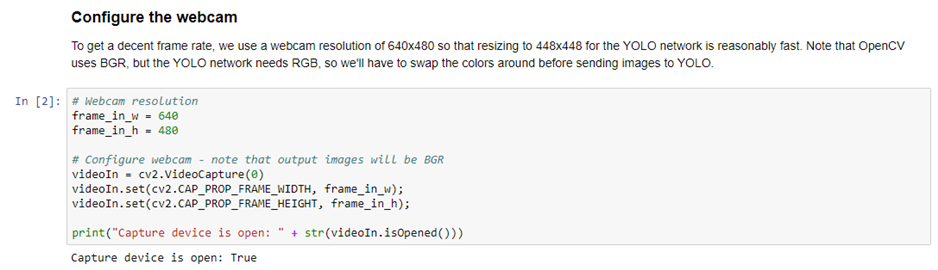
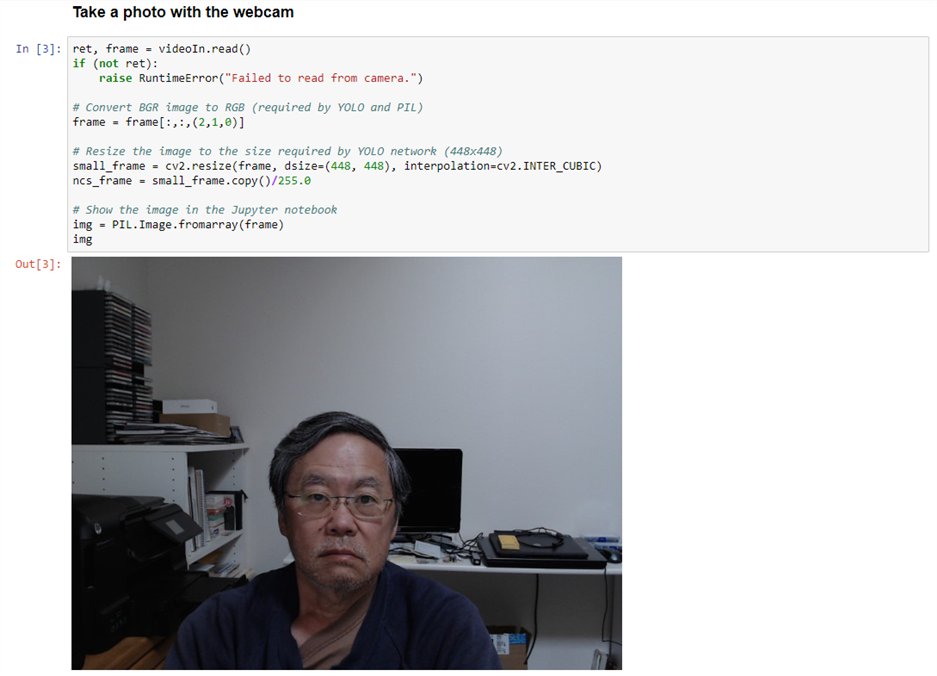
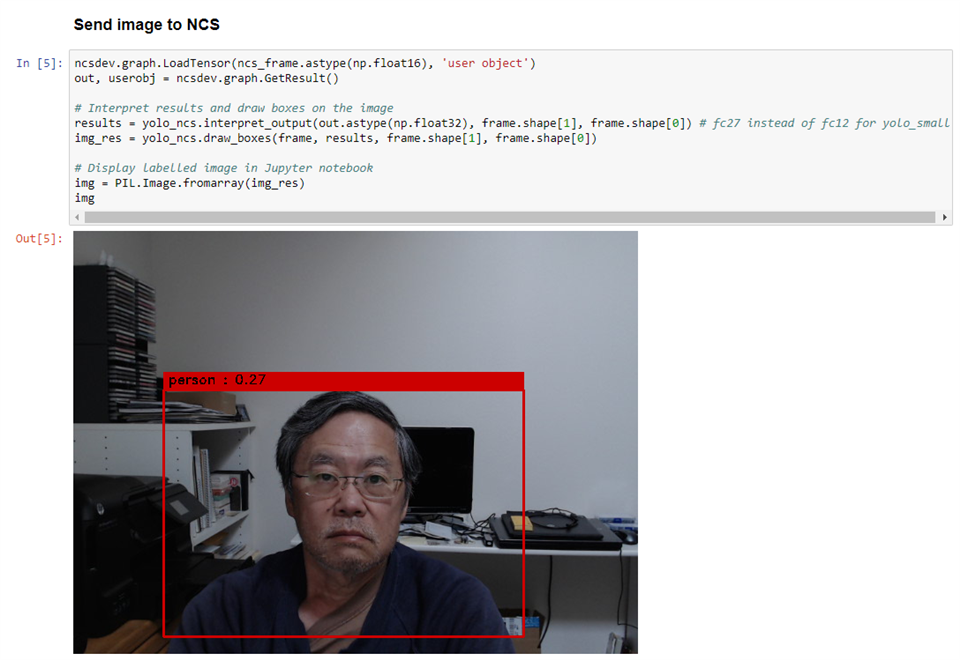
The PYNQ V2.5 image for the Ultra96 does not include a BaseOverlay (none of the Ultra96 versions do).  This notebook was using the BaseOverlay to send video to the HDMI output (DisplayPort).  I had previously used PYNQ on the Ultra96 with pynqOpenCV notebooks that do not use the HDMI output.  Once I commented out the BaseOverlay, I was able to run the non HDMI cells in the notebook.

image

image

image

image

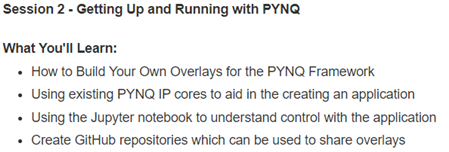
Now I need to come up with a project that uses the NCS on the Ultra96.  I'll need to see if there are existing overlays that I could use or I may need to build one.  The good news is that Adam Taylor is doing a workshop next Tuesday that includes building PYNQ overlays.  The workshop is using the PYNQ-Z2 but the methods should apply to the Ultra96.


PYNQ-Z2 Workshop: Getting Up and Running with PYNQ
image

  • Sign in to reply
element14 Community

element14 is the first online community specifically for engineers. Connect with your peers and get expert answers to your questions.

  • Members
  • Learn
  • Technologies
  • Challenges & Projects
  • Products
  • Store
  • About Us
  • Feedback & Support
  • FAQs
  • Terms of Use
  • Privacy Policy
  • Legal and Copyright Notices
  • Sitemap
  • Cookies

An Avnet Company © 2026 Premier Farnell Limited. All Rights Reserved.

Premier Farnell Ltd, registered in England and Wales (no 00876412), registered office: Farnell House, Forge Lane, Leeds LS12 2NE.

ICP 备案号 10220084.

Follow element14

  • X
  • Facebook
  • linkedin
  • YouTube