


This is a continuation of my previous post Using SensiML with Arduino Nano 33 BLE Sense - Additional Model Testing .
Now that a model has been built and tested, it's time to deploy it to the device.
Start within Analytics Studio using Download Model:

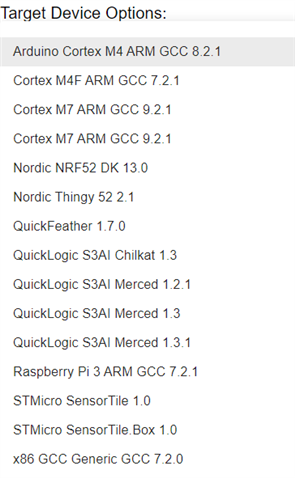
Need to specify the correct HW Platform. Here are the targets available in the pulldown menu:
This downloads a zip file that includes a knowledgepack directory with 2 subdirectories - knowledgepack_project and libsensiml.

You need to copy all of the files from libsensiml to the lib/sensiml directory in the platformio project and the sml_recognition_run.cpp file from the knowledgepack_project to the src directory of the platformio project.

After that, you just need to build the project and upload it to the device.
The classification information will display on the Serial Port when the device is running.
Short video showing change in classification from Idle (2) to UpDown (4). Sorry for the brevity of the video, I'm having some weird issues with my video capture and editing this morning  .
.