element14 Community
element14 Community
    Register Log In
  • Site
  • Search
  • Log In Register
  • Community Hub
    Community Hub
    • What's New on element14
    • Feedback and Support
    • Benefits of Membership
    • Personal Blogs
    • Members Area
    • Achievement Levels
  • Learn
    Learn
    • Ask an Expert
    • eBooks
    • element14 presents
    • Learning Center
    • Tech Spotlight
    • STEM Academy
    • Webinars, Training and Events
    • Learning Groups
  • Technologies
    Technologies
    • 3D Printing
    • FPGA
    • Industrial Automation
    • Internet of Things
    • Power & Energy
    • Sensors
    • Technology Groups
  • Challenges & Projects
    Challenges & Projects
    • Design Challenges
    • element14 presents Projects
    • Project14
    • Arduino Projects
    • Raspberry Pi Projects
    • Project Groups
  • Products
    Products
    • Arduino
    • Avnet & Tria Boards Community
    • Dev Tools
    • Manufacturers
    • Multicomp Pro
    • Product Groups
    • Raspberry Pi
    • RoadTests & Reviews
  • About Us
    About the element14 Community
  • Store
    Store
    • Visit Your Store
    • Choose another store...
      • Europe
      •  Austria (German)
      •  Belgium (Dutch, French)
      •  Bulgaria (Bulgarian)
      •  Czech Republic (Czech)
      •  Denmark (Danish)
      •  Estonia (Estonian)
      •  Finland (Finnish)
      •  France (French)
      •  Germany (German)
      •  Hungary (Hungarian)
      •  Ireland
      •  Israel
      •  Italy (Italian)
      •  Latvia (Latvian)
      •  
      •  Lithuania (Lithuanian)
      •  Netherlands (Dutch)
      •  Norway (Norwegian)
      •  Poland (Polish)
      •  Portugal (Portuguese)
      •  Romania (Romanian)
      •  Russia (Russian)
      •  Slovakia (Slovak)
      •  Slovenia (Slovenian)
      •  Spain (Spanish)
      •  Sweden (Swedish)
      •  Switzerland(German, French)
      •  Turkey (Turkish)
      •  United Kingdom
      • Asia Pacific
      •  Australia
      •  China
      •  Hong Kong
      •  India
      •  Japan
      •  Korea (Korean)
      •  Malaysia
      •  New Zealand
      •  Philippines
      •  Singapore
      •  Taiwan
      •  Thailand (Thai)
      •  Vietnam
      • Americas
      •  Brazil (Portuguese)
      •  Canada
      •  Mexico (Spanish)
      •  United States
      Can't find the country/region you're looking for? Visit our export site or find a local distributor.
  • Translate
  • Profile
  • Settings
Arduino
  • Products
  • More
Arduino
Blog Working with the Arduino IDE.. with a more traditional Arduino Theme
  • Blog
  • Forum
  • Documents
  • Quiz
  • Events
  • Polls
  • Files
  • Members
  • Mentions
  • Sub-Groups
  • Tags
  • More
  • Cancel
  • New
Join Arduino to participate - click to join for free!
  • Share
  • More
  • Cancel
Group Actions
  • Group RSS
  • More
  • Cancel
Engagement
  • Author Author: shabaz
  • Date Created: 28 Apr 2019 11:43 PM Date Created
  • Views 3436 views
  • Likes 17 likes
  • Comments 18 comments
  • arduino_theme
  • arduino ide
Related
Recommended

Working with the Arduino IDE.. with a more traditional Arduino Theme

shabaz
shabaz
28 Apr 2019

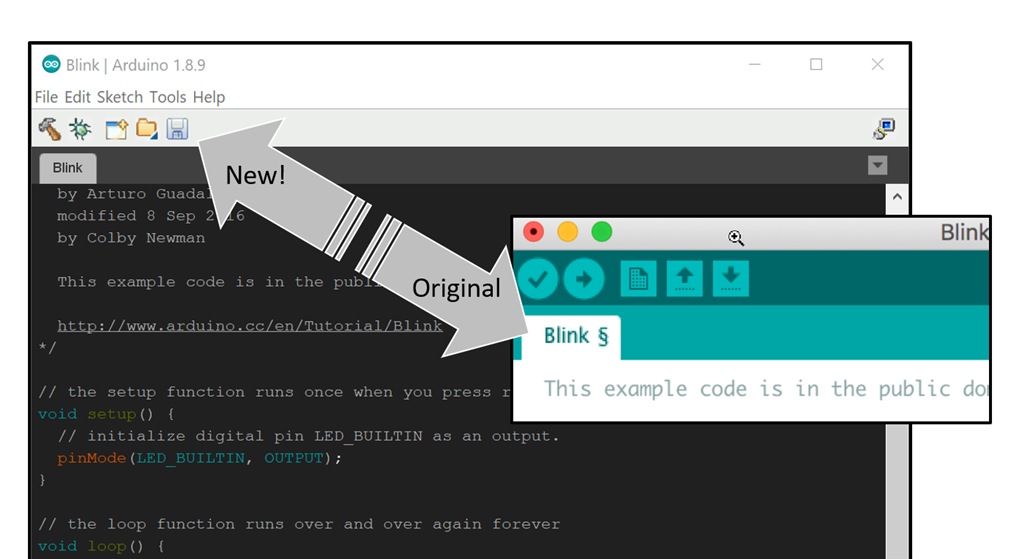
If (like me) you’re a relative newcomer to Arduino's integrated development environment (IDE) but not to programming, then the icons might surprise you!


The icons are targeted for beginners, but I cannot tell that the up-arrow means open, and the down-arrow means save! None of it is intuitive to me : (

However, I’m a lot more familiar with Eclipse IDE.. I wanted Eclipse style icons : )  (I appreciate that for newcomers to Eclipse, probably some of the icons there don’t make sense at all either : )


So, I set about finding a suitable Arduino dark theme to start with, and then edited it using the Eclipse icons. If you’re curious how to do this for your own designs, there is a buttons.png file that can be modified with a graphics editor, and a theme.txt file that contains colors in hexadecimal. There’s undoubtedly more to it for advanced theme creators, but that’s all I needed to know.


Anyway, in a nutshell, if you prefer Eclipse-style icons, then here’s how to do it:


First, find the theme folder on your PC (if you’ve installed Arduino via the Windows Store, this is hard! Better to uninstall the Arduino IDE, and install from zip file. The path should be C:\Program Files(x86)\Arduino\lib and you’ll find the theme folder there. If you’re using a Mac, then the folder will be ~/Applications/Arduino.app/Contents/Java/lib). Rename the folder to something else like (say) theme_orig.


Next, download the file attached to this blog post, unzip it, and there should be a theme folder! Copy it to the place where the old theme folder used to be.


Once you restart the Arduino IDE, it will automatically use the new theme! If you come up with new themes, please do share them : )
image

Attachments:
more-traditional-theme-v1.zip
  • Sign in to reply

Top Comments

  • ralphjy
    ralphjy over 6 years ago +8
    Very useful tip. I’ll have to give it a try. Although I have to admit I usually use the keyboard shortcuts. I guess the icons never made sense to me either. Ralph
  • jw0752
    jw0752 over 6 years ago +7
    Hi Shabaz, The true measure of a maker / technician is his ability to take what is wrong, what is broken or just what is not to his preferences and change it and make it his own. At this you are a master…
  • fmilburn
    fmilburn over 6 years ago +6
    Nice... now if only the debug icon actually made it debug :-) - the lack of a real debugger is my biggest complaint with the Arduino IDE. I used Energia (Arduino fork) for a while with the MSP430 and they…
  • three-phase
    three-phase over 6 years ago

    Interesting blog, I have seen the arrow symbols adopted by a few electrical software packages as the upload and download functions for talking to test instruments.


    Kind regards.

    • Cancel
    • Vote Up +3 Vote Down
    • Sign in to reply
    • More
    • Cancel
  • shabaz
    shabaz over 6 years ago in reply to beacon_dave

    Hi Dave,

    It's a good point.. I sometimes use this symbol below in diagrams, but even the cylinder-shape 'storage' icon as a candidate for load or save represents drive tech which is fast disappearing.

    image

    Microsoft apps have finally moved on to have monochrome icons for save, print etc., which is nice since they are less distracting than the multi-colour older styles, but they've not addressed the point you mention yet : (

    image

    • Cancel
    • Vote Up +5 Vote Down
    • Sign in to reply
    • More
    • Cancel
  • BigG
    BigG over 6 years ago

    Thank goodness of mouse "hover" to discover the meaning of life and everything image


    This customisation is very much a matter of personal taste. For me, it has to be Notepad++ for the best implementation of an IDE style configuration method and the resulting style outcome of course:


    image


    Still I love this idea of button image manipulation within Arduino IDE. Nice!

    • Cancel
    • Vote Up +5 Vote Down
    • Sign in to reply
    • More
    • Cancel
  • beacon_dave
    beacon_dave over 6 years ago

    "The icons are targeted for beginners, but I cannot tell that the up-arrow means open, and the down-arrow means save! None of it is intuitive to me : ("


    I suspect that the 3.5" floppy disk icon isn't really intuitive to a beginner these days either when the system they are using is unlikely to have such a device attached to it. It perhaps looks more like a desktop printer than a storage device these days.


    As you say, the arrows aren't that intuitive either, but I wonder what symbol is truly representative of load / save operations.

    • Cancel
    • Vote Up +6 Vote Down
    • Sign in to reply
    • More
    • Cancel
  • balearicdynamics
    balearicdynamics over 6 years ago in reply to Jan Cumps

    Me too. hahahaha


    From terminal, leaftpad, nano, ed, edit but not vi ;( ;( ;(

    • Cancel
    • Vote Up +4 Vote Down
    • Sign in to reply
    • More
    • Cancel
<>
element14 Community

element14 is the first online community specifically for engineers. Connect with your peers and get expert answers to your questions.

  • Members
  • Learn
  • Technologies
  • Challenges & Projects
  • Products
  • Store
  • About Us
  • Feedback & Support
  • FAQs
  • Terms of Use
  • Privacy Policy
  • Legal and Copyright Notices
  • Sitemap
  • Cookies

An Avnet Company © 2026 Premier Farnell Limited. All Rights Reserved.

Premier Farnell Ltd, registered in England and Wales (no 00876412), registered office: Farnell House, Forge Lane, Leeds LS12 2NE.

ICP 备案号 10220084.

Follow element14

  • X
  • Facebook
  • linkedin
  • YouTube