element14 Community
element14 Community
    Register Log In
  • Site
  • Search
  • Log In Register
  • Community Hub
    Community Hub
    • What's New on element14
    • Feedback and Support
    • Benefits of Membership
    • Personal Blogs
    • Members Area
    • Achievement Levels
  • Learn
    Learn
    • Ask an Expert
    • eBooks
    • element14 presents
    • Learning Center
    • Tech Spotlight
    • STEM Academy
    • Webinars, Training and Events
    • Learning Groups
  • Technologies
    Technologies
    • 3D Printing
    • FPGA
    • Industrial Automation
    • Internet of Things
    • Power & Energy
    • Sensors
    • Technology Groups
  • Challenges & Projects
    Challenges & Projects
    • Design Challenges
    • element14 presents Projects
    • Project14
    • Arduino Projects
    • Raspberry Pi Projects
    • Project Groups
  • Products
    Products
    • Arduino
    • Avnet & Tria Boards Community
    • Dev Tools
    • Manufacturers
    • Multicomp Pro
    • Product Groups
    • Raspberry Pi
    • RoadTests & Reviews
  • About Us
    About the element14 Community
  • Store
    Store
    • Visit Your Store
    • Choose another store...
      • Europe
      •  Austria (German)
      •  Belgium (Dutch, French)
      •  Bulgaria (Bulgarian)
      •  Czech Republic (Czech)
      •  Denmark (Danish)
      •  Estonia (Estonian)
      •  Finland (Finnish)
      •  France (French)
      •  Germany (German)
      •  Hungary (Hungarian)
      •  Ireland
      •  Israel
      •  Italy (Italian)
      •  Latvia (Latvian)
      •  
      •  Lithuania (Lithuanian)
      •  Netherlands (Dutch)
      •  Norway (Norwegian)
      •  Poland (Polish)
      •  Portugal (Portuguese)
      •  Romania (Romanian)
      •  Russia (Russian)
      •  Slovakia (Slovak)
      •  Slovenia (Slovenian)
      •  Spain (Spanish)
      •  Sweden (Swedish)
      •  Switzerland(German, French)
      •  Turkey (Turkish)
      •  United Kingdom
      • Asia Pacific
      •  Australia
      •  China
      •  Hong Kong
      •  India
      •  Japan
      •  Korea (Korean)
      •  Malaysia
      •  New Zealand
      •  Philippines
      •  Singapore
      •  Taiwan
      •  Thailand (Thai)
      •  Vietnam
      • Americas
      •  Brazil (Portuguese)
      •  Canada
      •  Mexico (Spanish)
      •  United States
      Can't find the country/region you're looking for? Visit our export site or find a local distributor.
  • Translate
  • Profile
  • Settings
Arduino
  • Products
  • More
Arduino
Blog Working with the Arduino IDE.. with a more traditional Arduino Theme
  • Blog
  • Forum
  • Documents
  • Quiz
  • Events
  • Polls
  • Files
  • Members
  • Mentions
  • Sub-Groups
  • Tags
  • More
  • Cancel
  • New
Join Arduino to participate - click to join for free!
  • Share
  • More
  • Cancel
Group Actions
  • Group RSS
  • More
  • Cancel
Engagement
  • Author Author: shabaz
  • Date Created: 28 Apr 2019 11:43 PM Date Created
  • Views 3868 views
  • Likes 17 likes
  • Comments 18 comments
  • arduino_theme
  • arduino ide
Related
Recommended

Working with the Arduino IDE.. with a more traditional Arduino Theme

shabaz
shabaz
28 Apr 2019

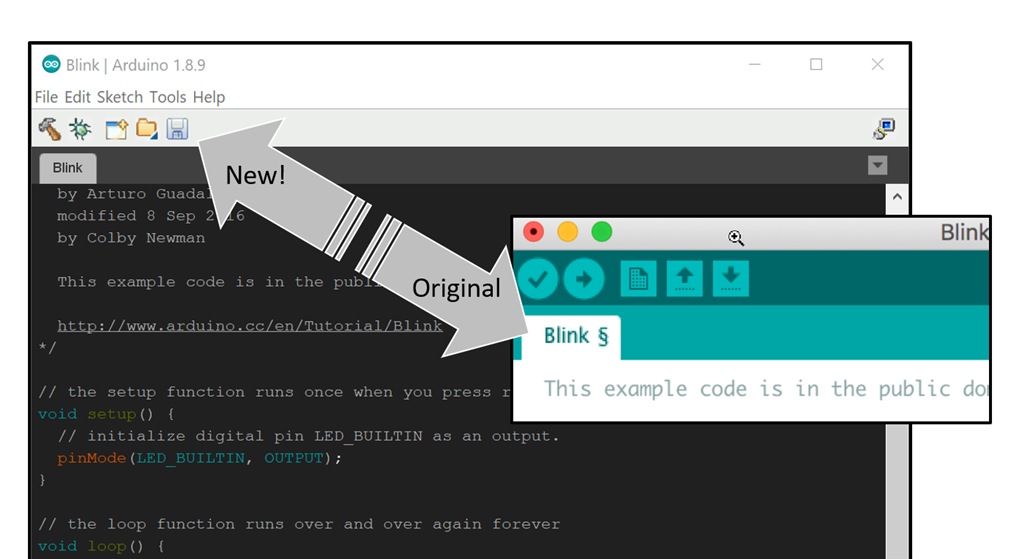
If (like me) you’re a relative newcomer to Arduino's integrated development environment (IDE) but not to programming, then the icons might surprise you!


The icons are targeted for beginners, but I cannot tell that the up-arrow means open, and the down-arrow means save! None of it is intuitive to me : (

However, I’m a lot more familiar with Eclipse IDE.. I wanted Eclipse style icons : )  (I appreciate that for newcomers to Eclipse, probably some of the icons there don’t make sense at all either : )


So, I set about finding a suitable Arduino dark theme to start with, and then edited it using the Eclipse icons. If you’re curious how to do this for your own designs, there is a buttons.png file that can be modified with a graphics editor, and a theme.txt file that contains colors in hexadecimal. There’s undoubtedly more to it for advanced theme creators, but that’s all I needed to know.


Anyway, in a nutshell, if you prefer Eclipse-style icons, then here’s how to do it:


First, find the theme folder on your PC (if you’ve installed Arduino via the Windows Store, this is hard! Better to uninstall the Arduino IDE, and install from zip file. The path should be C:\Program Files(x86)\Arduino\lib and you’ll find the theme folder there. If you’re using a Mac, then the folder will be ~/Applications/Arduino.app/Contents/Java/lib). Rename the folder to something else like (say) theme_orig.


Next, download the file attached to this blog post, unzip it, and there should be a theme folder! Copy it to the place where the old theme folder used to be.


Once you restart the Arduino IDE, it will automatically use the new theme! If you come up with new themes, please do share them : )
image

Attachments:
more-traditional-theme-v1.zip
  • Sign in to reply

Top Comments

  • ralphjy
    ralphjy over 7 years ago +8
    Very useful tip. I’ll have to give it a try. Although I have to admit I usually use the keyboard shortcuts. I guess the icons never made sense to me either. Ralph
  • jw0752
    jw0752 over 7 years ago +7
    Hi Shabaz, The true measure of a maker / technician is his ability to take what is wrong, what is broken or just what is not to his preferences and change it and make it his own. At this you are a master…
  • fmilburn
    fmilburn over 7 years ago +6
    Nice... now if only the debug icon actually made it debug :-) - the lack of a real debugger is my biggest complaint with the Arduino IDE. I used Energia (Arduino fork) for a while with the MSP430 and they…
  • genebren
    genebren over 7 years ago in reply to shabaz

    shabaz,


    I used VI for so many years that the keyboard commands are deeply embedded in my thought process.  I even use simulated UNIX environment on my PC (from time to time)  so I can work in an environment that I am comfortable with.


    Gene

    • Cancel
    • Vote Up +4 Vote Down
    • Sign in to reply
    • More
    • Cancel
  • Jan Cumps
    Jan Cumps over 7 years ago in reply to shabaz

    shabaz  wrote:


    ...

    I still prefer 'vi' rather than learn (say) EMACS since vi is 'good enough' : ) I might learn another text-editor in Linux one day!

    I will have to unfriend you

    • Cancel
    • Vote Up +5 Vote Down
    • Sign in to reply
    • More
    • Cancel
  • shabaz
    shabaz over 7 years ago in reply to kiri-ll

    Hi Kiri and everyone,


    Thanks! Hehe ordinarily I don't mind adapting a bit to the tools, but those icons had to go : )

    dubbie I know the feeling.. I still prefer 'vi' rather than learn (say) EMACS since vi is 'good enough' : ) I might learn another text-editor in Linux one day!

    • Cancel
    • Vote Up +3 Vote Down
    • Sign in to reply
    • More
    • Cancel
  • kiri-ll
    kiri-ll over 7 years ago

    These icons might be *really* annoying for you image


    That's so great that you adapt the tools for you, instead of adapting yourself for the tools! You are the master of your environment, like ninja

    • Cancel
    • Vote Up +5 Vote Down
    • Sign in to reply
    • More
    • Cancel
  • dubbie
    dubbie over 7 years ago

    I think I must fall into the category of Luddite. I tend to only use the drop down menus provided, mainly because I have had to master (?) so many different environments in the past, which are then upgraded regularly that I just stopped trying to be efficient/effective and just tried to stay at a state of knowledge when I can use the environments at all. For example, I've used Arduino IDE for years now and I didn't know what the up and down arrows did until just now!


    I'm not fast but I get there in the end.


    Dubbie


    PS Having said this I can still just about remember the original WordStar keyboard shortcuts, Cntrl KV and so on. Many of them still live on in other packages in slightly amended forms.

    • Cancel
    • Vote Up +6 Vote Down
    • Sign in to reply
    • More
    • Cancel
<>
element14 Community

element14 is the first online community specifically for engineers. Connect with your peers and get expert answers to your questions.

  • Members
  • Learn
  • Technologies
  • Challenges & Projects
  • Products
  • Store
  • About Us
  • Feedback & Support
  • FAQs
  • Terms of Use
  • Privacy Policy
  • Legal and Copyright Notices
  • Sitemap
  • Cookies

An Avnet Company © 2026 Premier Farnell Limited. All Rights Reserved.

Premier Farnell Ltd, registered in England and Wales (no 00876412), registered office: Farnell House, Forge Lane, Leeds LS12 2NE.

Follow element14

  • X
  • Facebook
  • linkedin
  • YouTube