element14 Community
element14 Community
    Register Log In
  • Site
  • Search
  • Log In Register
  • Community Hub
    Community Hub
    • What's New on element14
    • Feedback and Support
    • Benefits of Membership
    • Personal Blogs
    • Members Area
    • Achievement Levels
  • Learn
    Learn
    • Ask an Expert
    • eBooks
    • element14 presents
    • Learning Center
    • Tech Spotlight
    • STEM Academy
    • Webinars, Training and Events
    • Learning Groups
  • Technologies
    Technologies
    • 3D Printing
    • FPGA
    • Industrial Automation
    • Internet of Things
    • Power & Energy
    • Sensors
    • Technology Groups
  • Challenges & Projects
    Challenges & Projects
    • Design Challenges
    • element14 presents Projects
    • Project14
    • Arduino Projects
    • Raspberry Pi Projects
    • Project Groups
  • Products
    Products
    • Arduino
    • Avnet & Tria Boards Community
    • Dev Tools
    • Manufacturers
    • Multicomp Pro
    • Product Groups
    • Raspberry Pi
    • RoadTests & Reviews
  • About Us
    About the element14 Community
  • Store
    Store
    • Visit Your Store
    • Choose another store...
      • Europe
      •  Austria (German)
      •  Belgium (Dutch, French)
      •  Bulgaria (Bulgarian)
      •  Czech Republic (Czech)
      •  Denmark (Danish)
      •  Estonia (Estonian)
      •  Finland (Finnish)
      •  France (French)
      •  Germany (German)
      •  Hungary (Hungarian)
      •  Ireland
      •  Israel
      •  Italy (Italian)
      •  Latvia (Latvian)
      •  
      •  Lithuania (Lithuanian)
      •  Netherlands (Dutch)
      •  Norway (Norwegian)
      •  Poland (Polish)
      •  Portugal (Portuguese)
      •  Romania (Romanian)
      •  Russia (Russian)
      •  Slovakia (Slovak)
      •  Slovenia (Slovenian)
      •  Spain (Spanish)
      •  Sweden (Swedish)
      •  Switzerland(German, French)
      •  Turkey (Turkish)
      •  United Kingdom
      • Asia Pacific
      •  Australia
      •  China
      •  Hong Kong
      •  India
      •  Japan
      •  Korea (Korean)
      •  Malaysia
      •  New Zealand
      •  Philippines
      •  Singapore
      •  Taiwan
      •  Thailand (Thai)
      •  Vietnam
      • Americas
      •  Brazil (Portuguese)
      •  Canada
      •  Mexico (Spanish)
      •  United States
      Can't find the country/region you're looking for? Visit our export site or find a local distributor.
  • Translate
  • Profile
  • Settings
Arduino
  • Products
  • More
Arduino
Arduino Forum Have a question about Arduino? Ask me!
  • Blog
  • Forum
  • Documents
  • Quiz
  • Events
  • Polls
  • Files
  • Members
  • Mentions
  • Sub-Groups
  • Tags
  • More
  • Cancel
  • New
Join Arduino to participate - click to join for free!
Actions
  • Share
  • More
  • Cancel
Forum Thread Details
  • Replies 1914 replies
  • Subscribers 528 subscribers
  • Views 68406 views
  • Users 0 members are here
  • jeremy_blum
  • expert
  • student
  • arduino
Related

Have a question about Arduino? Ask me!

sciguy14
sciguy14 over 15 years ago

This thread has been closed to new questions.

However, we welcome you to Post Your Questionabout Arduino in the element14 Community Arduino group.  You'll find many fellow members and experts who have just the answer you're looking to find! 


Thank You, Your Friends at element14 Community


image

Jeremy Blum

Jeremy is an Electrical and Computer Engineering Student at Cornell University. He has been building microcontroller projects since high school, from a prototype prosthetic hand with a novel control scheme, to a nerf gun that fires at the intruders and uploads their picture to the web.
  • Sign in to reply
  • Cancel

Top Replies

  • billabott
    billabott over 13 years ago in reply to e14 Contributor +2
    @Brendan Your video is somewhat adequate for the intended purpose, however, from an engineer's point of view it is lacking in providing pertinent facts. Such as the part number, data sheet, and source…
  • e14 Contributor
    e14 Contributor over 15 years ago +1
    Jeremy, thanks for your intro videos. I am just getting started myself in Arduino though I have done some simple electronics projects using Atmel chips. Here is an example using ATTiny13 chips. www.youtube…
  • e14 Contributor
    e14 Contributor over 15 years ago +1
    Hi Jeremy I've built a device (see picture) with an Arduino and Ethernet shield that connects to our Network Monitor (Nagios) and moves an arrow to indicate if any of the computers we monitor are not responding…
Parents
  • e14 Contributor
    e14 Contributor over 15 years ago

    I am completley new to the arduino, dont even have one yet, but eager to start soon. one question that i have, and it's mostly software related. Using the arduino uno with a ethershield, can data from a weather station be uploaded to wunderground.com as personal weather station data? Here is the pws upload protocol...

    http://wiki.wunderground.com/index.php/PWS_-_Upload_Protocol

    Like i said, i am really new to the arduino, but have been working with the propeller for quite awhile, so i think my transition will be fairly painless. is there code examples that would show me how to do this? Thanks in advance!

    • Cancel
    • Vote Up 0 Vote Down
    • Sign in to reply
    • Cancel
  • sciguy14
    sciguy14 over 15 years ago in reply to e14 Contributor

    That should be fairly straightforward.  Grab the arduino ethernet library here: http://arduino.cc/en/Reference/Ethernet

    You'll need to have the IP of the weatherunderground server, you can find that with an http://who.is lookup.  Then connect to that server as a client:


    byte mac[] = { 0xAA, 0xAA, 0xAA, 0xAA, 0xAA, 0xAA }; //put your mac here
    byte ip[] = { 00, 0, 0, 000 }; //put your IP here

    byte server[] = { 00, 00, 00, 00 }; // Put the IP of weather underground here.

    Client client(server, 80); // create a client object


    in the setup function:

    Ethernet.begin(mac, ip);


    Then you can send an update in the loop using the info on the weather underground wiki:

    client.println("GET /weatherstation/updateweatherstation.php?action=something&id=something&PASSWORD=something&....");


    Hope that helps!  PS.  I also used the propeller before the arduino!

    • Cancel
    • Vote Up 0 Vote Down
    • Sign in to reply
    • Cancel
  • e14 Contributor
    e14 Contributor over 13 years ago in reply to sciguy14

    how to use this code for windows-7 ?

    • Cancel
    • Vote Up 0 Vote Down
    • Sign in to reply
    • Cancel
  • billabott
    billabott over 13 years ago in reply to e14 Contributor

    Chapter 10 Arduino Ethernet Programming

    in  Programming Arduino Getting Started with Sketches by Simon Monk.


    Also seek out the support files for ethernet shield vendors like spartfun and adafruit.

    • Cancel
    • Vote Up 0 Vote Down
    • Sign in to reply
    • Cancel
  • e14 Contributor
    e14 Contributor over 13 years ago in reply to sciguy14

    I am facing problem with my processing code.

    BASIC LOGIC-If we take our cursor into the rectangle (created by using processing1.5.1)LED connected to arduino board toggles it's state.

    I am using Arduino MEAGA 2560.This is my arduino code...

    "

    int outputPin = 12;

    int val;

    void setup()

    {

      Serial.begin(9600);

      pinMode(outputPin, OUTPUT);

      Serial.println("START");

    }

    void loop()

    {

      if (Serial.available())

      {

        val = Serial.read();

        if (val == 'H')

        {

          Serial.println("I have received 1");

          digitalWrite(outputPin, HIGH);

        }

        if (val == 'L')

        {

          Serial.println("I have received 0");

          digitalWrite(outputPin, LOW);

        }

       }

    }

    "

    It works correctly when tried through serial monitor.I have given 'H' or 'L' via serial monitor ,it works.

    But It is not working with processing code.....

    "

    // Demonstrates how to send data to the Arduino I/O board, in order to

    // turn ON a light if the mouse is over a rectangle and turn it off

    // if the mouse is not.


    import processing.serial.*;

    Serial port;

    void setup()

    {

    size(200, 200);

    noStroke();

    frameRate(10);

    // List all the available serial ports in the output pane.

    // You will need to choose the port that the Arduino board is

    // connected to from this list. The first port in the list is

    // port #0 and the third port in the list is port #2.

    println(Serial.list());

    // Open the port that the Arduino board is connected to (in this case #0)

    // Make sure to open the port at the same speed Arduino is using (9600bps)

    port = new Serial(this, Serial.list()[0], 9600);

    //port = new Serial(this, "COM7", 9600);

    }

    // function to test if mouse is over square

    boolean mouseOverRect()

    {

    return ((mouseX >= 50)&&(mouseX <= 150)&&(mouseY >= 50)&(mouseY <= 150));

    }

    void draw()

    {

    background(#222222);

    if(mouseOverRect()) // if mouse is over square

    {

    fill(#BBBBB0); // change color

    port.write('H'); // send an 'H' to indicate mouse is over square

    } else {

    fill(#666660); // change color

    port.write('L'); // send an 'L' otherwise

    }

    rect(50, 50, 100, 100); // draw square

    }

    "

    PORT selection is correct .

    Rectangle do changes color when cursor is taken in i.e. if case is satisfied.

    Other processing code works well thus no problem with software.

    • Cancel
    • Vote Up 0 Vote Down
    • Sign in to reply
    • Cancel
  • billabott
    billabott over 13 years ago in reply to e14 Contributor

    Wow. 

    Q: where does the Serial.println("I have received 0"); string get printed?

    That would have to be in the Processing Window because the Arduino Serial Monitor cannot be open at the same time.

    If you have the Serial Monitor open, close it, and keep it closed whenever Processing is running.

    Hope this helps.

    • Cancel
    • Vote Up 0 Vote Down
    • Sign in to reply
    • Cancel
Reply
  • billabott
    billabott over 13 years ago in reply to e14 Contributor

    Wow. 

    Q: where does the Serial.println("I have received 0"); string get printed?

    That would have to be in the Processing Window because the Arduino Serial Monitor cannot be open at the same time.

    If you have the Serial Monitor open, close it, and keep it closed whenever Processing is running.

    Hope this helps.

    • Cancel
    • Vote Up 0 Vote Down
    • Sign in to reply
    • Cancel
Children
  • e14 Contributor
    e14 Contributor over 13 years ago in reply to billabott

    I am using either processor window or arduino serial monitor ,one at a time only.

    'serialprint' was just to check arduino program conditions.

    Is there any other possible problem?My plan is to use the computer mouse to control bot direction.But my processing code is not helping me out.

    thank you very much  for reply.

    • Cancel
    • Vote Up 0 Vote Down
    • Sign in to reply
    • Cancel
  • billabott
    billabott over 13 years ago in reply to e14 Contributor

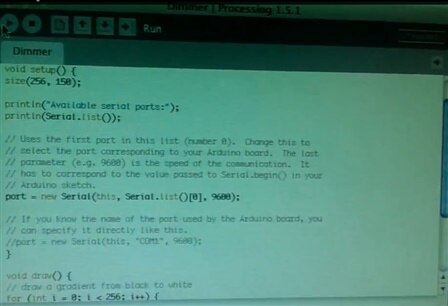
    That is Great.  I found something on youtube for you if you understand Japanese ....   http://www.youtube.com/watch?v=TdM0NZBi5mQ


    But you might get what you need from this screen capture:


    image

    • Cancel
    • Vote Up 0 Vote Down
    • Sign in to reply
    • Cancel
element14 Community

element14 is the first online community specifically for engineers. Connect with your peers and get expert answers to your questions.

  • Members
  • Learn
  • Technologies
  • Challenges & Projects
  • Products
  • Store
  • About Us
  • Feedback & Support
  • FAQs
  • Terms of Use
  • Privacy Policy
  • Legal and Copyright Notices
  • Sitemap
  • Cookies

An Avnet Company © 2026 Premier Farnell Limited. All Rights Reserved.

Premier Farnell Ltd, registered in England and Wales (no 00876412), registered office: Farnell House, Forge Lane, Leeds LS12 2NE.

Follow element14

  • X
  • Facebook
  • linkedin
  • YouTube