element14 Community
element14 Community
    Register Log In
  • Site
  • Search
  • Log In Register
  • Community Hub
    Community Hub
    • What's New on element14
    • Feedback and Support
    • Benefits of Membership
    • Personal Blogs
    • Members Area
    • Achievement Levels
  • Learn
    Learn
    • Ask an Expert
    • eBooks
    • element14 presents
    • Learning Center
    • Tech Spotlight
    • STEM Academy
    • Webinars, Training and Events
    • Learning Groups
  • Technologies
    Technologies
    • 3D Printing
    • FPGA
    • Industrial Automation
    • Internet of Things
    • Power & Energy
    • Sensors
    • Technology Groups
  • Challenges & Projects
    Challenges & Projects
    • Design Challenges
    • element14 presents Projects
    • Project14
    • Arduino Projects
    • Raspberry Pi Projects
    • Project Groups
  • Products
    Products
    • Arduino
    • Avnet & Tria Boards Community
    • Dev Tools
    • Manufacturers
    • Multicomp Pro
    • Product Groups
    • Raspberry Pi
    • RoadTests & Reviews
  • About Us
  • Store
    Store
    • Visit Your Store
    • Choose another store...
      • Europe
      •  Austria (German)
      •  Belgium (Dutch, French)
      •  Bulgaria (Bulgarian)
      •  Czech Republic (Czech)
      •  Denmark (Danish)
      •  Estonia (Estonian)
      •  Finland (Finnish)
      •  France (French)
      •  Germany (German)
      •  Hungary (Hungarian)
      •  Ireland
      •  Israel
      •  Italy (Italian)
      •  Latvia (Latvian)
      •  
      •  Lithuania (Lithuanian)
      •  Netherlands (Dutch)
      •  Norway (Norwegian)
      •  Poland (Polish)
      •  Portugal (Portuguese)
      •  Romania (Romanian)
      •  Russia (Russian)
      •  Slovakia (Slovak)
      •  Slovenia (Slovenian)
      •  Spain (Spanish)
      •  Sweden (Swedish)
      •  Switzerland(German, French)
      •  Turkey (Turkish)
      •  United Kingdom
      • Asia Pacific
      •  Australia
      •  China
      •  Hong Kong
      •  India
      • Japan
      •  Korea (Korean)
      •  Malaysia
      •  New Zealand
      •  Philippines
      •  Singapore
      •  Taiwan
      •  Thailand (Thai)
      • Vietnam
      • Americas
      •  Brazil (Portuguese)
      •  Canada
      •  Mexico (Spanish)
      •  United States
      Can't find the country/region you're looking for? Visit our export site or find a local distributor.
  • Translate
  • Profile
  • Settings
Arduino
  • Products
  • More
Arduino
Arduino Forum Trying to understand multiplexing
  • Blog
  • Forum
  • Documents
  • Quiz
  • Events
  • Polls
  • Files
  • Members
  • Mentions
  • Sub-Groups
  • Tags
  • More
  • Cancel
  • New
Join Arduino to participate - click to join for free!
Actions
  • Share
  • More
  • Cancel
Forum Thread Details
  • Replies 9 replies
  • Subscribers 404 subscribers
  • Views 826 views
  • Users 0 members are here
Related

Trying to understand multiplexing

Former Member
Former Member over 12 years ago

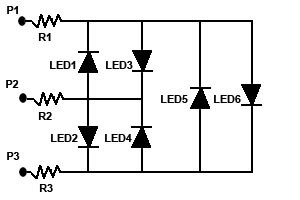
I think I understand the idea behind the schematic shown below.


image

The way I understand it is,....


If P1 is positive and P2 is negative, then LED3 will be turned on.

If that is reversed and P1 is made negative and P2 is made positive, then LED1 will be turned on.


By the same token, if P2 is positive and P3 is negative, then LED2 will be turned on.

Reversing the polarity of these two pins making P2 negative and P3 is positive, then LED4 will be turned on.

Same idea applies to P1 and P3 with LED5 and LED6.


What is baffling me is, when wiring these components and connecting to the pins on the Arduino, how do you reverse the polarity?

If pin1 is set HIGH (positive) and pin2 is connected to the ground pin, how can you reverse the polarity to switch LED3 off and turn on LED1?

This is probably something that an Arduino guru would know but as a newbie, it certainly has me baffled!

Of course, maybe I am just not really understanding the idea of multiplexing!


John

  • Sign in to reply
  • Cancel

Top Replies

  • johnbeetem
    johnbeetem over 12 years ago in reply to LuckyMrH +1
    There's an article on Charlieplexing at Wikipedia , with a section on the circuit you've shown.
Parents
  • LuckyMrH
    LuckyMrH over 12 years ago

    John,


    The circuit you have is commonly referred as a charlie plexing.


    You have the basics of pin 1 set high and pin 2 as low. However, to operate properly, P3 must be tri-stated. That is, it is neither 1 nor 0. This is accomplished different ways for different microcontrollers. I am not that big of an expert on Arduino, so I will not go into that.


    For Charlie Plexing to operate correctly, the microcontroller must have truly tri-state able ports.


    Steve

    • Cancel
    • Vote Up 0 Vote Down
    • Sign in to reply
    • Cancel
Reply
  • LuckyMrH
    LuckyMrH over 12 years ago

    John,


    The circuit you have is commonly referred as a charlie plexing.


    You have the basics of pin 1 set high and pin 2 as low. However, to operate properly, P3 must be tri-stated. That is, it is neither 1 nor 0. This is accomplished different ways for different microcontrollers. I am not that big of an expert on Arduino, so I will not go into that.


    For Charlie Plexing to operate correctly, the microcontroller must have truly tri-state able ports.


    Steve

    • Cancel
    • Vote Up 0 Vote Down
    • Sign in to reply
    • Cancel
Children
  • johnbeetem
    johnbeetem over 12 years ago in reply to LuckyMrH

    There's an article on Charlieplexing at Wikipedia, with a section on the circuit you've shown.

    • Cancel
    • Vote Up +1 Vote Down
    • Sign in to reply
    • Cancel
  • Nate1616
    Nate1616 over 12 years ago in reply to johnbeetem

    I agree with John you should read the Wki help but here is another quick quide that should help explain it.


    using three pins and six LEDs.

    Lets's say you have three LED control lines.  Call them A, B, and C.  Connect a pair of back-to-back LEDs between A and B, between B and C, and between A and C.


    Now start by setting pins A and B as outputs, and C as an input.

    Turn on LED AB1 by setting high on pin A and a low on pin B.  Turn on LED AB2 by reversing the polarities of A and B.

    Set pin B as an input and leave A as an output.  Set pin C as an output.

    Turn on LED AC1 by setting high on A and a low on C.  Turn on LED AC2 by reversing the polarities of pins A and C.

    Set pin A as an input, and B as an output.  Leave pin C as an output.

    Turn on LED BC1 by setting high on B and a low on C.  Turn on LED BC2 by reversing the polarities of pins B and C.

    • Cancel
    • Vote Up 0 Vote Down
    • Sign in to reply
    • Cancel
  • Former Member
    Former Member over 12 years ago in reply to johnbeetem

    Thanks John,


    I will read the wiki article and see if it helps.


    John

    • Cancel
    • Vote Up 0 Vote Down
    • Sign in to reply
    • Cancel
  • Former Member
    Former Member over 12 years ago in reply to Nate1616

    Thanks for the explanation Nate.  I'll play around with it tomorrow and see if I can do something with it.

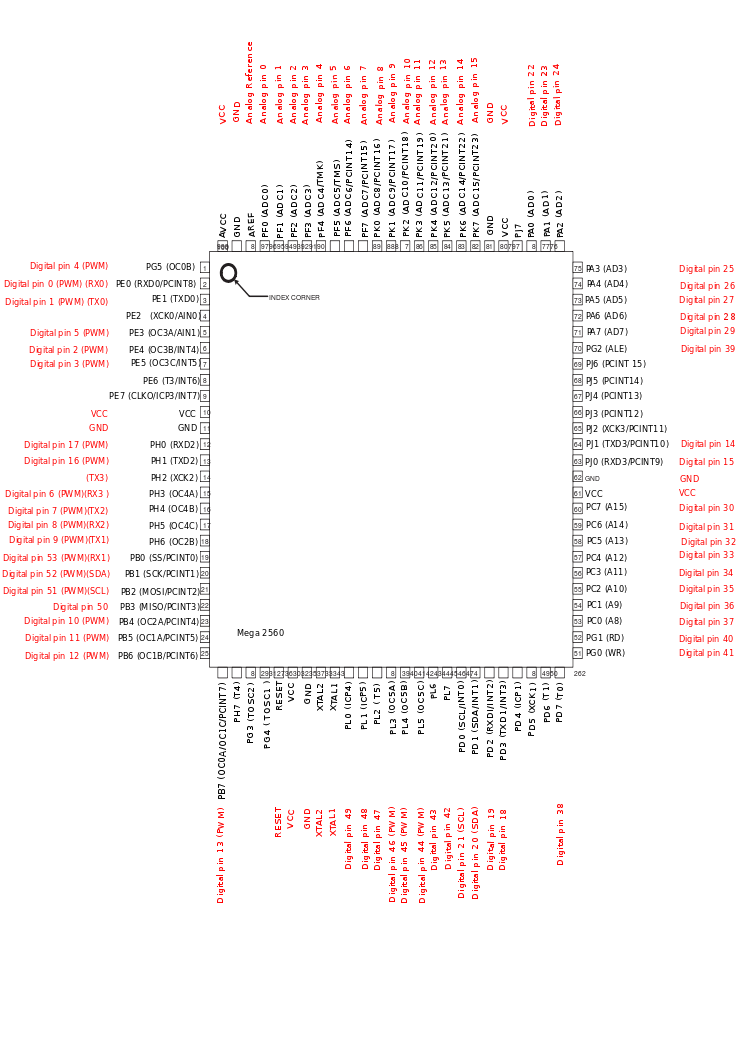
    What I am working on is a binary coded decimal clock.  I think they make a good conversation piece when guests come over but mainly I thought it would be a good learning project.  I am new to both Arduino and the 'C' language but I think I am getting a handle on the 'C'.  The clock would require 20 LEDs for seconds, minutes and hours. I was using the UNO but it does not have enough pins, hence the idea of multiplexing or Charlieplexing.  I do have a Mega 2560 as well but I am using port manipulation to control the pins and while I know that on the UNO, PORTD controls pins 1-7 and PORTB controls pins 8-13, I can't seem to locate much info for the ports on the Mega2560. I would prefer to use the UNO anyway.


    Thanks again for the example.  Much appreciated.


    John

    • Cancel
    • Vote Up 0 Vote Down
    • Sign in to reply
    • Cancel
  • Former Member
    Former Member over 12 years ago in reply to Former Member

    Hi,


    if you're looking for a pin mapping of the mega2560

    About the few pins on Uno, the use of shift register could help you maybe you can give it a try


    Good luck.


    http://arduino.cc/en/uploads/Hacking/PinMap2560.png

    • Cancel
    • Vote Up 0 Vote Down
    • Sign in to reply
    • Cancel
  • Former Member
    Former Member over 12 years ago in reply to Former Member

    Thanks for the pin mapping.


    I am trying to figure out which PORT controls which pins so that I can use port manipulation rather than digitalWrite().


    Seems to be a lot of infor regarding this on the UNO but very little on the Mega2560.  image


    Thanks again.


    John

    • Cancel
    • Vote Up 0 Vote Down
    • Sign in to reply
    • Cancel
  • Former Member
    Former Member over 12 years ago in reply to Former Member

    I've just watched some confusion on the map i gave you or maybe an old rev of the board


    if you want which Port control which pin (and that's the goal of pin mapping) take the schematic given by the arduino main site

    the link to the schematic page.

    http://arduino.cc/en/uploads/Main/arduino-mega2560_R3-schematic.pdf


    I've tested it and that one worked fine.


    Good luck.

    • Cancel
    • Vote Up 0 Vote Down
    • Sign in to reply
    • Cancel
  • Former Member
    Former Member over 12 years ago in reply to Former Member

    Ok, I got the pin map from the link that you provided.

    Thank you very much.  That should help a lot.


    John

    • Cancel
    • Vote Up 0 Vote Down
    • Sign in to reply
    • Cancel
element14 Community

element14 is the first online community specifically for engineers. Connect with your peers and get expert answers to your questions.

  • Members
  • Learn
  • Technologies
  • Challenges & Projects
  • Products
  • Store
  • About Us
  • Feedback & Support
  • FAQs
  • Terms of Use
  • Privacy Policy
  • Legal and Copyright Notices
  • Sitemap
  • Cookies

An Avnet Company © 2025 Premier Farnell Limited. All Rights Reserved.

Premier Farnell Ltd, registered in England and Wales (no 00876412), registered office: Farnell House, Forge Lane, Leeds LS12 2NE.

ICP 备案号 10220084.

Follow element14

  • X
  • Facebook
  • linkedin
  • YouTube