element14 Community
element14 Community
    Register Log In
  • Site
  • Search
  • Log In Register
  • Community Hub
    Community Hub
    • What's New on element14
    • Feedback and Support
    • Benefits of Membership
    • Personal Blogs
    • Members Area
    • Achievement Levels
  • Learn
    Learn
    • Ask an Expert
    • eBooks
    • element14 presents
    • Learning Center
    • Tech Spotlight
    • STEM Academy
    • Webinars, Training and Events
    • Learning Groups
  • Technologies
    Technologies
    • 3D Printing
    • FPGA
    • Industrial Automation
    • Internet of Things
    • Power & Energy
    • Sensors
    • Technology Groups
  • Challenges & Projects
    Challenges & Projects
    • Design Challenges
    • element14 presents Projects
    • Project14
    • Arduino Projects
    • Raspberry Pi Projects
    • Project Groups
  • Products
    Products
    • Arduino
    • Avnet & Tria Boards Community
    • Dev Tools
    • Manufacturers
    • Multicomp Pro
    • Product Groups
    • Raspberry Pi
    • RoadTests & Reviews
  • About Us
  • Store
    Store
    • Visit Your Store
    • Choose another store...
      • Europe
      •  Austria (German)
      •  Belgium (Dutch, French)
      •  Bulgaria (Bulgarian)
      •  Czech Republic (Czech)
      •  Denmark (Danish)
      •  Estonia (Estonian)
      •  Finland (Finnish)
      •  France (French)
      •  Germany (German)
      •  Hungary (Hungarian)
      •  Ireland
      •  Israel
      •  Italy (Italian)
      •  Latvia (Latvian)
      •  
      •  Lithuania (Lithuanian)
      •  Netherlands (Dutch)
      •  Norway (Norwegian)
      •  Poland (Polish)
      •  Portugal (Portuguese)
      •  Romania (Romanian)
      •  Russia (Russian)
      •  Slovakia (Slovak)
      •  Slovenia (Slovenian)
      •  Spain (Spanish)
      •  Sweden (Swedish)
      •  Switzerland(German, French)
      •  Turkey (Turkish)
      •  United Kingdom
      • Asia Pacific
      •  Australia
      •  China
      •  Hong Kong
      •  India
      • Japan
      •  Korea (Korean)
      •  Malaysia
      •  New Zealand
      •  Philippines
      •  Singapore
      •  Taiwan
      •  Thailand (Thai)
      • Vietnam
      • Americas
      •  Brazil (Portuguese)
      •  Canada
      •  Mexico (Spanish)
      •  United States
      Can't find the country/region you're looking for? Visit our export site or find a local distributor.
  • Translate
  • Profile
  • Settings
Arduino
  • Products
  • More
Arduino
Arduino Forum Home automation
  • Blog
  • Forum
  • Documents
  • Quiz
  • Events
  • Polls
  • Files
  • Members
  • Mentions
  • Sub-Groups
  • Tags
  • More
  • Cancel
  • New
Join Arduino to participate - click to join for free!
Actions
  • Share
  • More
  • Cancel
Forum Thread Details
  • Replies 10 replies
  • Subscribers 404 subscribers
  • Views 687 views
  • Users 0 members are here
Related

Home automation

Former Member
Former Member over 12 years ago

Hi, I have been looking into home automation lately with either a Arduino or Raspberry pi. I'm not sure how to accomplish this task or where to even start. I don't need anything to crazy dificuly I think. Mainly control some lights, and tv power. A bonus would be to incorporate some sort of sound activated LED lights strip to play around with. I would like to control this from my android phone either from a app or website. Any help is greatly appreciate thanks!


-Jake

  • Sign in to reply
  • Cancel
  • dirtdiver
    dirtdiver over 12 years ago

    I will be working on that too very soon, you might wanna check out the Bleduino http://www.kickstarter.com/projects/kytelabs/bleduino-bluetooth-40-ble-made-easy-arduino-compat?ref=live


    with it you can control everything with bluetooth usiing your android phone, all you need is a few relays and imagination for the rest image

    Good luck,

    Lubomir

    • Cancel
    • Vote Up 0 Vote Down
    • Sign in to reply
    • Cancel
  • fidelsalinas
    fidelsalinas over 12 years ago

    The RasPi has a couple of apps that you can program to control it's I/O pins over your network, with that and relays you could start your home automation project without having to develope an app. Raspberry Control is one of them that you can download on google play.


    F/S

    • Cancel
    • Vote Up 0 Vote Down
    • Sign in to reply
    • Cancel
  • Former Member
    Former Member over 12 years ago

    Alright, thank you for some good info you two.

    -Jake

    • Cancel
    • Vote Up 0 Vote Down
    • Sign in to reply
    • Cancel
  • GreenYamo
    GreenYamo over 12 years ago

    Jake, Also have a look at Xively (Nee Cosm) for Cloud based internet of things applications. I have done some simple stuff like feeding data up to the cloud using a Nanode and you can then set alerts for certain thresholds. From what I remember, you can also control from the cloud to your connected device.


    Steve

    • Cancel
    • Vote Up 0 Vote Down
    • Sign in to reply
    • Cancel
  • Former Member
    Former Member over 12 years ago in reply to GreenYamo

    Very interesting i'll look into that, thank you for sharing.

    -Jake

    • Cancel
    • Vote Up 0 Vote Down
    • Sign in to reply
    • Cancel
  • Former Member
    Former Member over 12 years ago in reply to Former Member

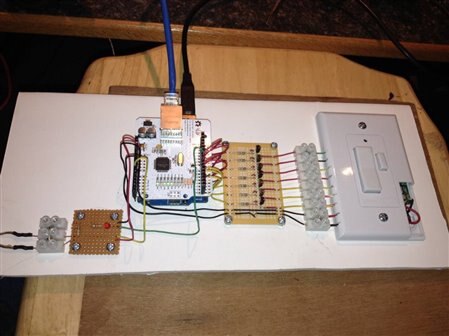
    Here is a project I did, and I have been using this for several months to control several lights in my house.  It uses Heath Zenith remote switches, I hacked one switch to control all the lights.  The Arduino Uno controls the dip swith and on/off/dim buttons.  It uses an ethernet sheild that I control by wifi from my Ipod.  I would think you can find a similar app for the Android.  The app has timers that I can use to turn lights on and off daily or one time.  I also added a photo sensor to turn lights on at dark. I can control the trigger point of the photo sensor from the app.  I mounted all on a peice of foam board and hang it above my PC, kind of electronic art.


    image

    I put the files that show the connections to the switch, a wiring diagram, screen shots of the app, and the Arduino sketch.  You can download it here:

    https://app.box.com/s/k8lttmm6w5ettg450y74


    Additional info:


    == Overview ==

    * Controls Radio Frequency lights switched by Heath/Zenith devices.  Control

    * is from an Ipod by wi-fi through a local server to the Arduino with Seeed

    * ethernet sheild.  The app is Arduino Manager

    *

    * == Operation ==

    *

    * Select a switch to control the associated light, then press the ON, OFF, or DIM

    * button to send the command.  The Dip LEDs indicate the dip switch setting for each

    * switch device.  Only one device can be selected at a time, the other will be

    * automaticly de-selected.

    *

    * The photosensor is mounted on a window facing outside to detect the daylight.  The

    * light level can be monitored by a Message widget or Graph widget. The trigger knob

    * controls the light level that triggers a light to turn on or off.

    * NOTE: Enter a "0" in the Cmd window to unlock the trigger control.  Enter a "1" to lock

    * the trigger.  The sensitivity of this level can be adjusted by the Trigger knob.

    * The photosensor activation switch is named "PsAct", this switch activates the photosensor

    * control.To disable photosensor light control, turn the PsAct switch off. 

    *

    *

    * The alarms can be set to turn on or off lights.  The AllOff turns off all lights.

    * ==================

    * Widgets Available:

    *

    * == Push Buttons ==

    * ON  

    * OFF

    * DIM

    *

    * == Switches ==

    * BDOOR - Back Door

    * LAMP - Front Yard Lamp

    * LROOM - Living Room Light Light

    * PsAct - Photosensor Activation for light control

    *

    * == Knobs ==

    * Trigger - Trigger light level to activate photosensor control

    *

    * == LEDs ==

    * On - On button status (on/off)

    * Off - Off button status (on/off)

    * Dim - Dimmer button status (on/off)

    * Dip1 - Dip Switch 1 position

    * Dip2 - Dip Switch 2 position

    * Dip3 - Dip Switch 3 position

    * Dip4 - Dip Switch 4 position

    * PsStatus - Status of photosensor control (on/off)

    *

    * == Alarms ==

    * AllOFF - turns all lights off

    * BdoorON - turns back door light on

    * BdoorOFF - turns back door light off

    * LampON - turns front yard lamp on

    * LampOFF - turns front yard lamp off

    * LroomOFF - turns living room light off

    * LroomON - turns living room light on

    *

    * == Messages ==

    * Msg - Display, for sending system messages

    * PS - Displays Photosensor Value

    *

    * == Graph ==

    * PS - Displays Photosensor Value

    *

    * == Command ==

    * Cmd - Command, for sending system messages

    *


    Dave

    • Cancel
    • Vote Up 0 Vote Down
    • Sign in to reply
    • Cancel
  • Former Member
    Former Member over 12 years ago in reply to Former Member

    wow, great post! Exactly what I was looking for, thank you for the download files and diagrams greatly appreciated! Now all I have to do is wait for my house to be finished being built haha. And im not to worried about if they have an app for me on the android market. I should be able to progam one myself I know alittle bit about it haha.


    -Jake

    • Cancel
    • Vote Up 0 Vote Down
    • Sign in to reply
    • Cancel
  • Former Member
    Former Member over 12 years ago in reply to Former Member

    I don't see the Arduino Manager App for the Android.  The sketch is based on the app example, and was quite a challenge to figure out, so the sketch may not be much use for your project. But it may give you some ideas for your project.


    If your house is still under construction and you want to use these wired RF switch or receptacle units, it may be a good time to have the electrican wire in the RF light switch or receptacle in place of a standard light switch or receptacle. Here is the link to the switches I used:


    http://www.heath-zenith.com/prod_listing.cgi?cat=3&type=0&value=3.0


    Good luck with your house project!


    Dave

    • Cancel
    • Vote Up 0 Vote Down
    • Sign in to reply
    • Cancel
  • Former Member
    Former Member over 12 years ago

    Jake,


    Take a look at Smartenit's HomAidPi: http://smartenit.com/homaidpi

    • Cancel
    • Vote Up 0 Vote Down
    • Sign in to reply
    • Cancel
  • Former Member
    Former Member over 12 years ago

    - David, yes my house is still under construction if i'am correct the electrical is being installed in 2 weeks so I will have them install some wired RF in about half of the wall units,


    -Dhawal, very interesting and greatly appreciated for the link I will look into that.

    • Cancel
    • Vote Up 0 Vote Down
    • Sign in to reply
    • Cancel
element14 Community

element14 is the first online community specifically for engineers. Connect with your peers and get expert answers to your questions.

  • Members
  • Learn
  • Technologies
  • Challenges & Projects
  • Products
  • Store
  • About Us
  • Feedback & Support
  • FAQs
  • Terms of Use
  • Privacy Policy
  • Legal and Copyright Notices
  • Sitemap
  • Cookies

An Avnet Company © 2025 Premier Farnell Limited. All Rights Reserved.

Premier Farnell Ltd, registered in England and Wales (no 00876412), registered office: Farnell House, Forge Lane, Leeds LS12 2NE.

ICP 备案号 10220084.

Follow element14

  • X
  • Facebook
  • linkedin
  • YouTube