element14 Community
element14 Community
    Register Log In
  • Site
  • Search
  • Log In Register
  • Community Hub
    Community Hub
    • What's New on element14
    • Feedback and Support
    • Benefits of Membership
    • Personal Blogs
    • Members Area
    • Achievement Levels
  • Learn
    Learn
    • Ask an Expert
    • eBooks
    • element14 presents
    • Learning Center
    • Tech Spotlight
    • STEM Academy
    • Webinars, Training and Events
    • Learning Groups
  • Technologies
    Technologies
    • 3D Printing
    • FPGA
    • Industrial Automation
    • Internet of Things
    • Power & Energy
    • Sensors
    • Technology Groups
  • Challenges & Projects
    Challenges & Projects
    • Design Challenges
    • element14 presents Projects
    • Project14
    • Arduino Projects
    • Raspberry Pi Projects
    • Project Groups
  • Products
    Products
    • Arduino
    • Avnet & Tria Boards Community
    • Dev Tools
    • Manufacturers
    • Multicomp Pro
    • Product Groups
    • Raspberry Pi
    • RoadTests & Reviews
  • About Us
  • Store
    Store
    • Visit Your Store
    • Choose another store...
      • Europe
      •  Austria (German)
      •  Belgium (Dutch, French)
      •  Bulgaria (Bulgarian)
      •  Czech Republic (Czech)
      •  Denmark (Danish)
      •  Estonia (Estonian)
      •  Finland (Finnish)
      •  France (French)
      •  Germany (German)
      •  Hungary (Hungarian)
      •  Ireland
      •  Israel
      •  Italy (Italian)
      •  Latvia (Latvian)
      •  
      •  Lithuania (Lithuanian)
      •  Netherlands (Dutch)
      •  Norway (Norwegian)
      •  Poland (Polish)
      •  Portugal (Portuguese)
      •  Romania (Romanian)
      •  Russia (Russian)
      •  Slovakia (Slovak)
      •  Slovenia (Slovenian)
      •  Spain (Spanish)
      •  Sweden (Swedish)
      •  Switzerland(German, French)
      •  Turkey (Turkish)
      •  United Kingdom
      • Asia Pacific
      •  Australia
      •  China
      •  Hong Kong
      •  India
      • Japan
      •  Korea (Korean)
      •  Malaysia
      •  New Zealand
      •  Philippines
      •  Singapore
      •  Taiwan
      •  Thailand (Thai)
      • Vietnam
      • Americas
      •  Brazil (Portuguese)
      •  Canada
      •  Mexico (Spanish)
      •  United States
      Can't find the country/region you're looking for? Visit our export site or find a local distributor.
  • Translate
  • Profile
  • Settings
Arduino
  • Products
  • More
Arduino
Arduino Forum I want an stand alone ATMEGA328.....
  • Blog
  • Forum
  • Documents
  • Quiz
  • Events
  • Polls
  • Files
  • Members
  • Mentions
  • Sub-Groups
  • Tags
  • More
  • Cancel
  • New
Join Arduino to participate - click to join for free!
Actions
  • Share
  • More
  • Cancel
Forum Thread Details
  • Replies 21 replies
  • Subscribers 404 subscribers
  • Views 1712 views
  • Users 0 members are here
  • arduino_tutorial
Related

I want an stand alone ATMEGA328.....

Former Member
Former Member over 12 years ago

Hi i'm a newbie here.... i have a question

can i programming an ATMEGA328 not ATMEGA328P chip

without using FTDI.....thank you!

  • Sign in to reply
  • Cancel
Parents
  • billabott
    billabott over 12 years ago

    Yes, you can.  Just throw out that old Bootloader and write code using AVR's tools (asm and C) and then load into chip using USBtinyisp or a USBasp (eBay).


    http://log.liminastudio.com/itp/physical-computing/programming-an-atmega-with-no-bootloader-using-the-usbtinyisp


    But then, it is no longer an Arduino, is it?

    • Cancel
    • Vote Up 0 Vote Down
    • Sign in to reply
    • Cancel
  • Former Member
    Former Member over 12 years ago in reply to billabott

    yeah... i tried using the EDITED board.txt file and the avrdude... i have successfully bootloaded the  atmega328 not(atmega328p)

    and now i'm struggling on how to put a program into the bootloaded atmega328....,

    • Cancel
    • Vote Up 0 Vote Down
    • Sign in to reply
    • Cancel
  • billabott
    billabott over 12 years ago in reply to Former Member

    That is fine.  However, unless you are going to use the standard USB/Serial upload mode then the bootloader is not needed.  This page from arduino.cc explains it pretty well.  The upload sequence using an external programmer is explained on another page from arduino.cc.  I have not actually done this procedure although I have purchased an USBasp.  Did you see the part about holding down the shift key when clicking on the Upload icon in the Arduino IDE?

    • Cancel
    • Vote Up 0 Vote Down
    • Sign in to reply
    • Cancel
  • Former Member
    Former Member over 12 years ago in reply to billabott

    finally i've tamed the atmega328 not(atmega328p),... there only few adjusments on the avrdude then, burn boothloader on it, and upload sketches,.

    • Cancel
    • Vote Up 0 Vote Down
    • Sign in to reply
    • Cancel
  • billabott
    billabott over 12 years ago in reply to Former Member

    That is great.  I have a couple of questions.


    Why do you need the bootloader installed?


    What is driving you to raise a distinction between atmega328 and the "p" attribute?


    Additional Reference: http://arduino.cc/en/Hacking/Programmer

    • Cancel
    • Vote Up 0 Vote Down
    • Sign in to reply
    • Cancel
Reply
  • billabott
    billabott over 12 years ago in reply to Former Member

    That is great.  I have a couple of questions.


    Why do you need the bootloader installed?


    What is driving you to raise a distinction between atmega328 and the "p" attribute?


    Additional Reference: http://arduino.cc/en/Hacking/Programmer

    • Cancel
    • Vote Up 0 Vote Down
    • Sign in to reply
    • Cancel
Children
  • Former Member
    Former Member over 12 years ago in reply to billabott

    1. I need to install a bootloader in order to upload sketches unto the atmega 328, bec. i'd tried to upload a program using "upload using programmer" and did all the connections and stuffs,as well as upload the arduino as ISP and it didn't work at all ..


    2. ATmega328 does'nt sync with the 328p?????, i've seen lots of tutorials on youtube on how to burn bootload and upload sketches, i've see one that uses arduino uno and atmega328p and did all the same connections and it work, there is also one tutorial using duemillanove that removes the mcu on his board and transfer it on a breadboard did all the connections and it work and use also a spare atmega328 chip burn bootload,upload sketches and it work, but in my case i have a cloned arduino uno board(gizduino uno) with a SMD  mcu which is 328p, those tutorials that i've mentioned above can't help me, bec. i have bought a atmega328 not 328p and it will not sync to the mcu on my board, and the second tutorial that i've mentioned does'nt help me either bec. i can't remove the mcu on my board,... so i'm totally screwed?, well not really, in order to make it work you just only fool the IDE and the 328  and make it think that it is a 328p so now my board and the mcu that i've bought will sync, and make it work!....


    CONCLUSION: atmega328 and 328p have only slight differences, one has picopower and the other one is NOT, ERRORs occur bec. of the IDE, it is programmed to work on a specified mcu,.

    • Cancel
    • Vote Up 0 Vote Down
    • Sign in to reply
    • Cancel
  • mcb1
    mcb1 over 12 years ago in reply to Former Member

    mark


    There are multiple versions of Arduino and "Arduino Derivatives".


    When the UNO came along, there was a new Bootloader.

    At the same time it used an Atmega chip instead of the FTDI to interface to the USB, which means different speeds.


    In your case the Gizduino uses a Prolific USB to serial chip (from the manual)

    Most computers will normally not be able to recognize the newly created Gizduino-to-PC USB connection

    initially. This is caused simply by the lack of the proper driver that handles the recognition of the hardware

    by the computer. The driver required by the Gizduino-to-PC connection is the PL-2303 USB-to-Serial driver

    (downloadable at http://www.prolific.com.tw/eng/downloads.asp?ID=31)

    So there are different board options in the IDE, and the manual shows using this....

    The Gizduino module is modeled after the Arduino Diecimila with the ATmega168.

    As such, select the ‘Arduino Diecimila, Duemilanove, Nano w/ ATmega168, Nano w/ ATmega328’.


    This not only sets the upload speed, but also the sketch size based on the bootloader.


    You haven't said that you can upload sketches to the board, so can we presume the computer setup and communication with your Gizduino is okay?


    For bootloader programming into blank chips, I found this fairly clear example on the official site.

    http://arduino.cc/en/Tutorial/ArduinoISP

    You should choose the options based on the board selection above.


    I hope this helps

    Mark

    • Cancel
    • Vote Up 0 Vote Down
    • Sign in to reply
    • Cancel
  • Former Member
    Former Member over 12 years ago in reply to mcb1

    thanks for your reply mark,

    yes everything you said is true,...

    the gizduino works perfectly fine in my PC, i have already make the standalone atmega328 WORK, there is no problem at all, i'm gonna upload a video on it soon on how to use it.  the connections on the tutorials are right but the software configuration doesnt work using my gizduino,.. so i made some few tweaks on the avrdude on the IDE and make the atmega328 thinks it is atmega328p,....well it works!

    • Cancel
    • Vote Up 0 Vote Down
    • Sign in to reply
    • Cancel
  • billabott
    billabott over 12 years ago in reply to Former Member

    Hey, Mark A. S. 

    It took you long enough to get around to saying GizDuino.  If you nubes want help you need to be more informative - WITH THE FIRST POST.

    • Cancel
    • Vote Up 0 Vote Down
    • Sign in to reply
    • Cancel
  • Former Member
    Former Member over 12 years ago in reply to billabott

    haha, sorry... but atleast i've make it work,...

    • Cancel
    • Vote Up 0 Vote Down
    • Sign in to reply
    • Cancel
  • mcb1
    mcb1 over 12 years ago in reply to Former Member

    Mark

    That great you've got it working.


    Perhaps you could post your 'tweaks' here and then mark it answered and acknowledge any helpful answers.


    As Billabot pointed out giving the important facts in the early post means the answers might come quicker.


    Mark

    • Cancel
    • Vote Up 0 Vote Down
    • Sign in to reply
    • Cancel
  • Former Member
    Former Member over 12 years ago in reply to mcb1

    hello Sir mark,

    sorry for late reply i've been so busy in our proj. at school.. thank YOU so much on helping about this standalone and as well as to "billabot" making this

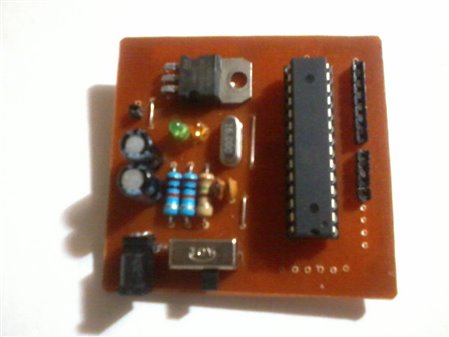
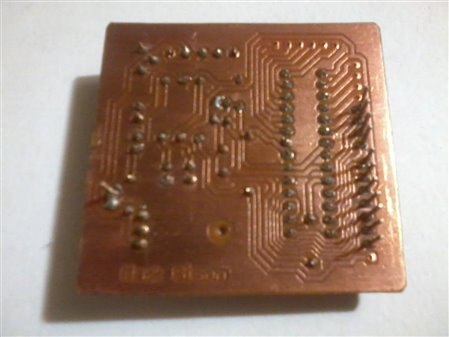
    standalone 328 possible,. I have also made a shield of it, so i can program it easily using the TONNER TRANSFER METHOD... take a look at this pic. imageimage

    • Cancel
    • Vote Up 0 Vote Down
    • Sign in to reply
    • Cancel
element14 Community

element14 is the first online community specifically for engineers. Connect with your peers and get expert answers to your questions.

  • Members
  • Learn
  • Technologies
  • Challenges & Projects
  • Products
  • Store
  • About Us
  • Feedback & Support
  • FAQs
  • Terms of Use
  • Privacy Policy
  • Legal and Copyright Notices
  • Sitemap
  • Cookies

An Avnet Company © 2025 Premier Farnell Limited. All Rights Reserved.

Premier Farnell Ltd, registered in England and Wales (no 00876412), registered office: Farnell House, Forge Lane, Leeds LS12 2NE.

ICP 备案号 10220084.

Follow element14

  • X
  • Facebook
  • linkedin
  • YouTube