element14 Community
element14 Community
    Register Log In
  • Site
  • Search
  • Log In Register
  • Community Hub
    Community Hub
    • What's New on element14
    • Feedback and Support
    • Benefits of Membership
    • Personal Blogs
    • Members Area
    • Achievement Levels
  • Learn
    Learn
    • Ask an Expert
    • eBooks
    • element14 presents
    • Learning Center
    • Tech Spotlight
    • STEM Academy
    • Webinars, Training and Events
    • Learning Groups
  • Technologies
    Technologies
    • 3D Printing
    • FPGA
    • Industrial Automation
    • Internet of Things
    • Power & Energy
    • Sensors
    • Technology Groups
  • Challenges & Projects
    Challenges & Projects
    • Design Challenges
    • element14 presents Projects
    • Project14
    • Arduino Projects
    • Raspberry Pi Projects
    • Project Groups
  • Products
    Products
    • Arduino
    • Avnet & Tria Boards Community
    • Dev Tools
    • Manufacturers
    • Multicomp Pro
    • Product Groups
    • Raspberry Pi
    • RoadTests & Reviews
  • About Us
  • Store
    Store
    • Visit Your Store
    • Choose another store...
      • Europe
      •  Austria (German)
      •  Belgium (Dutch, French)
      •  Bulgaria (Bulgarian)
      •  Czech Republic (Czech)
      •  Denmark (Danish)
      •  Estonia (Estonian)
      •  Finland (Finnish)
      •  France (French)
      •  Germany (German)
      •  Hungary (Hungarian)
      •  Ireland
      •  Israel
      •  Italy (Italian)
      •  Latvia (Latvian)
      •  
      •  Lithuania (Lithuanian)
      •  Netherlands (Dutch)
      •  Norway (Norwegian)
      •  Poland (Polish)
      •  Portugal (Portuguese)
      •  Romania (Romanian)
      •  Russia (Russian)
      •  Slovakia (Slovak)
      •  Slovenia (Slovenian)
      •  Spain (Spanish)
      •  Sweden (Swedish)
      •  Switzerland(German, French)
      •  Turkey (Turkish)
      •  United Kingdom
      • Asia Pacific
      •  Australia
      •  China
      •  Hong Kong
      •  India
      • Japan
      •  Korea (Korean)
      •  Malaysia
      •  New Zealand
      •  Philippines
      •  Singapore
      •  Taiwan
      •  Thailand (Thai)
      • Vietnam
      • Americas
      •  Brazil (Portuguese)
      •  Canada
      •  Mexico (Spanish)
      •  United States
      Can't find the country/region you're looking for? Visit our export site or find a local distributor.
  • Translate
  • Profile
  • Settings
Arduino
  • Products
  • More
Arduino
Arduino Forum Hi how to convert analogy signal to digital signal in arduino
  • Blog
  • Forum
  • Documents
  • Quiz
  • Events
  • Polls
  • Files
  • Members
  • Mentions
  • Sub-Groups
  • Tags
  • More
  • Cancel
  • New
Join Arduino to participate - click to join for free!
Actions
  • Share
  • More
  • Cancel
Forum Thread Details
  • Replies 11 replies
  • Subscribers 404 subscribers
  • Views 1563 views
  • Users 0 members are here
Related

Hi how to convert analogy signal to digital signal in arduino

Former Member
Former Member over 11 years ago

Hi! Can some one help me with Arduino codes for converting analog signal to digital signal.

There four input analog signal wishing to convert each them to digital signal.

  • Sign in to reply
  • Cancel
  • Former Member
    Former Member over 11 years ago

    what is your required sampling rate and resolution, also do you know the signal voltage range of the analog input is?

    • Cancel
    • Vote Up 0 Vote Down
    • Sign in to reply
    • Cancel
  • heliosoph
    heliosoph over 11 years ago in reply to Former Member

    If you need more information about the analog inputs of the arduino look at:


    http://arduino.cc/en/Tutorial/AnalogInputPins


    The analogRead instruction is described here:


    http://arduino.cc/en/Reference/AnalogRead


    When you have your arduino IDE installed look in the examples, analog section


    heliosoph

    • Cancel
    • Vote Up 0 Vote Down
    • Sign in to reply
    • Cancel
  • Former Member
    Former Member over 11 years ago in reply to heliosoph

    Thanx alot I have tried to code but I when I try to run my codes I encounter an error,so can any one help me to solve this issue.


    int inputPins[] = {2,3,4,5}; // create an array of pins for  inputs

    int lcdPins[] = {0,1,2,3,4,5,6,7}; // create array of output pins for LEDs

    void setup()

    {

    for(int index = 0; index < 3; index++)

    {

    pinMode(inputPins[index], INPUT); // declare  inputpins

    }

    }

    void loop(){

    for(int index = 0; index < 4; index++)

    {

    analogRead(inputPins[index]); // read input val

    }


    float val0=analogRead(inputPins[0]);

    float val1=analogRead(inputPins[1]);

    float val2=analogRead(inputPins[2]);

    float val3=analogRead(inputPins[3]);


    if(val0 >=0.2){

      digitalWrite( val0,HIGH); 

    }


    else if (val1>= 1.5){

       digitalWrite( val1,HIGH); 

    }

    else if (val2>val 3){

      digitalWrite(val2,HIGH);

    }


    else

    digitalWrite( val0,LOW );

    digitalWrite( val1,LOW );

    digitalWrite( val2,LOW );


    if (val0==LOW && val1==LOW && val2==LOW){

      Serial.println("Blood group O-");

    }

    else if (val0==LOW && val1==LOW && val2==HIGH){

      Serial.println("Blood group O+");

    }

    else if (val0==LOW && val1==HIGH && val2==LOW){

      Serial.println("Blood group B- ");

    }

    else if (val0==LOW && val1==HIGH && val2==HIGH){

      Serial.println("Blood group B+");

    }

    else if (val0==HIGH && val1==LOW && val2==LOW){

      Serial.println("Blood group A-");

      }

     else if (val0==HIGH && val1==LOW && val2==HIGH){

      Serial.println("Blood group A+");

    }

    else if (val0==HIGH && val1==HIGH && val2==LOW){

      Serial.println("Blood group AB-");

    }

    else if (val0==HIGH && val1==HIGH && val2==HIGH){

      Serial.println("Blood group AB+");

    }

    }

    • Cancel
    • Vote Up 0 Vote Down
    • Sign in to reply
    • Cancel
  • saurocksall
    saurocksall over 11 years ago

    Hi Francis,


    This video explains every thing you need https://www.youtube.com/watch?v=js4TK0U848I&index=5&list=SPA567CE235D39FA84

    Here is another one https://www.youtube.com/watch?v=y-_Pkw_GQ-c


    Best of luck..

    • Cancel
    • Vote Up 0 Vote Down
    • Sign in to reply
    • Cancel
  • Former Member
    Former Member over 11 years ago in reply to Former Member

    Hello Francis,


    you have only a little typo in your code:


    else if (val2>val 3){
      digitalWrite(val2,HIGH);
    }


    The space in "val 3" must be deleted:


    else if (val2>val3){
      digitalWrite(val2,HIGH);
    }


    This should work. :-)

    • Cancel
    • Vote Up 0 Vote Down
    • Sign in to reply
    • Cancel
  • Former Member
    Former Member over 11 years ago in reply to saurocksall

    thanx  for ur concern

    • Cancel
    • Vote Up 0 Vote Down
    • Sign in to reply
    • Cancel
  • Former Member
    Former Member over 11 years ago in reply to Former Member

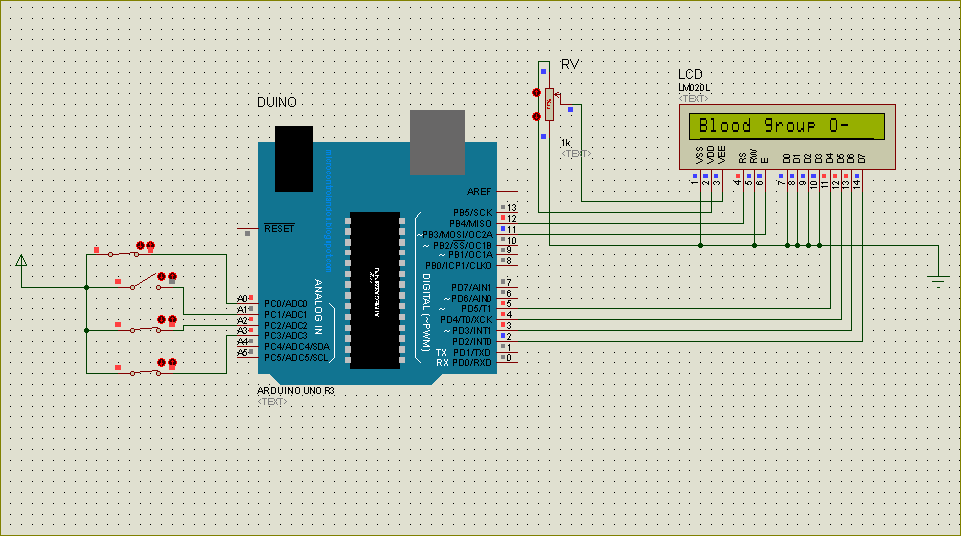
    Thanx I have runned codes but it only displays the single blood group  o- with reference to my circuit below when I try to alternate for swichtch states.

    image

    • Cancel
    • Vote Up 0 Vote Down
    • Sign in to reply
    • Cancel
  • heliosoph
    heliosoph over 11 years ago in reply to Former Member

    I think you have a mess with your variables:

      digitalWrite( val0,HIGH);

    val is your variable where you store your values from analogRead. In digitalWrite() you have to use a (digital) pin number. The pin you want to set to high.


    Elektrix

    • Cancel
    • Vote Up 0 Vote Down
    • Sign in to reply
    • Cancel
  • R_Phoenix
    R_Phoenix over 11 years ago

    First off, I don't see why you are using analogRead(), unless your switches in your schematic are just representations of something that outputs an actual analog signal - You are not reading Analog. Your pins will see either LOW (switch close) or HIGH, assuming the internal pullups are set. So why not use Digital pins for this?

    • Cancel
    • Vote Up 0 Vote Down
    • Sign in to reply
    • Cancel
  • Former Member
    Former Member over 11 years ago in reply to R_Phoenix

    My switches in my schematic are just representations of something that outputs analog signal,I  have set threshold value for each pin

    • Cancel
    • Vote Up 0 Vote Down
    • Sign in to reply
    • Cancel
>
element14 Community

element14 is the first online community specifically for engineers. Connect with your peers and get expert answers to your questions.

  • Members
  • Learn
  • Technologies
  • Challenges & Projects
  • Products
  • Store
  • About Us
  • Feedback & Support
  • FAQs
  • Terms of Use
  • Privacy Policy
  • Legal and Copyright Notices
  • Sitemap
  • Cookies

An Avnet Company © 2025 Premier Farnell Limited. All Rights Reserved.

Premier Farnell Ltd, registered in England and Wales (no 00876412), registered office: Farnell House, Forge Lane, Leeds LS12 2NE.

ICP 备案号 10220084.

Follow element14

  • X
  • Facebook
  • linkedin
  • YouTube