element14 Community
element14 Community
    Register Log In
  • Site
  • Search
  • Log In Register
  • Community Hub
    Community Hub
    • What's New on element14
    • Feedback and Support
    • Benefits of Membership
    • Personal Blogs
    • Members Area
    • Achievement Levels
  • Learn
    Learn
    • Ask an Expert
    • eBooks
    • element14 presents
    • Learning Center
    • Tech Spotlight
    • STEM Academy
    • Webinars, Training and Events
    • Learning Groups
  • Technologies
    Technologies
    • 3D Printing
    • FPGA
    • Industrial Automation
    • Internet of Things
    • Power & Energy
    • Sensors
    • Technology Groups
  • Challenges & Projects
    Challenges & Projects
    • Design Challenges
    • element14 presents Projects
    • Project14
    • Arduino Projects
    • Raspberry Pi Projects
    • Project Groups
  • Products
    Products
    • Arduino
    • Avnet & Tria Boards Community
    • Dev Tools
    • Manufacturers
    • Multicomp Pro
    • Product Groups
    • Raspberry Pi
    • RoadTests & Reviews
  • About Us
  • Store
    Store
    • Visit Your Store
    • Choose another store...
      • Europe
      •  Austria (German)
      •  Belgium (Dutch, French)
      •  Bulgaria (Bulgarian)
      •  Czech Republic (Czech)
      •  Denmark (Danish)
      •  Estonia (Estonian)
      •  Finland (Finnish)
      •  France (French)
      •  Germany (German)
      •  Hungary (Hungarian)
      •  Ireland
      •  Israel
      •  Italy (Italian)
      •  Latvia (Latvian)
      •  
      •  Lithuania (Lithuanian)
      •  Netherlands (Dutch)
      •  Norway (Norwegian)
      •  Poland (Polish)
      •  Portugal (Portuguese)
      •  Romania (Romanian)
      •  Russia (Russian)
      •  Slovakia (Slovak)
      •  Slovenia (Slovenian)
      •  Spain (Spanish)
      •  Sweden (Swedish)
      •  Switzerland(German, French)
      •  Turkey (Turkish)
      •  United Kingdom
      • Asia Pacific
      •  Australia
      •  China
      •  Hong Kong
      •  India
      • Japan
      •  Korea (Korean)
      •  Malaysia
      •  New Zealand
      •  Philippines
      •  Singapore
      •  Taiwan
      •  Thailand (Thai)
      • Vietnam
      • Americas
      •  Brazil (Portuguese)
      •  Canada
      •  Mexico (Spanish)
      •  United States
      Can't find the country/region you're looking for? Visit our export site or find a local distributor.
  • Translate
  • Profile
  • Settings
Arduino
  • Products
  • More
Arduino
Arduino Forum Complete beginner requiring help with Bluefruit Feather programming
  • Blog
  • Forum
  • Documents
  • Quiz
  • Events
  • Polls
  • Files
  • Members
  • Mentions
  • Sub-Groups
  • Tags
  • More
  • Cancel
  • New
Join Arduino to participate - click to join for free!
Actions
  • Share
  • More
  • Cancel
Forum Thread Details
  • State Suggested Answer
  • Replies 25 replies
  • Answers 18 answers
  • Subscribers 403 subscribers
  • Views 3738 views
  • Users 0 members are here
Related

Complete beginner requiring help with Bluefruit Feather programming

marks+
marks+ over 6 years ago

Hello, I’m completely new to the Arduino family of PCBs & I have no experience of using them. So I have found myself in at the deep end without a clue!


We use Bluefruit Feather PCB nRF52832 for our products. The software we’re using is the official Arduino software.


It appears we can plug the boards into the PC via a standard USB lead and program them by opening a “sketch” and select “upload”.

The software compiles the sketches and then attempts to transfer them to the Feather. We then start getting messages saying there are errors or we need to update the bootloader or the boards are not in “DFU”mode.


We have tried updating and looked up and tried DFU mode but have had no joy.


I believe I may have discovered that our USB cable maybe of the wrong type, so I have another I'm going to be trying in the morning.

I have also downloaded the software on a different laptop to see if that makes a difference.


I have no doubt I am doing something incredibly simply wrong but would appreciate some advice on how to proceed.


TIA

Mark

  • Sign in to reply
  • Cancel

Top Replies

  • fmilburn
    fmilburn over 6 years ago in reply to marks+ +5 suggested
    I have not used the Nrf Bluefruit feathers so can’t really comment on that. I have used a M0 and M4 express feather without a problem on Windows 10. They both came configured to use Circuit Python if I…
  • cstanton
    cstanton over 6 years ago in reply to marks+ +3 suggested
    marks+ , looks like you're getting two different error messages here. Your error message at https://www.element14.com/community/message/283091/l/re-complete-beginner-requiring-help-with-bluefruit-feather…
  • 14rhb
    14rhb over 6 years ago +2 suggested
    Hi marks+ Just to check, have you selected the correct board under the board manager tab? Looks like you need to set a few things up first as well: https://learn.adafruit.com/bluefruit-nrf52-feather-learning…
Parents
  • plowe
    0 plowe over 6 years ago

    stanto This is the issue that I spoke to you about last week...A member has appeared to try and help but I can't remember the link you showed me that you thought could help?


    Or anything further that you can think of that hasn't been suggested in this thread?? image


    Thanks!

    • Cancel
    • Vote Up +2 Vote Down
    • Sign in to reply
    • Verify Answer
    • Cancel
  • marks+
    0 marks+ over 6 years ago in reply to plowe

    So, just to recap....


    I'm confident I'm getting the board into DFU mode by grounding DFU and resetting, only one blinking red LED.

    Still get the same error message.


    So I need to know if I need to burn the bootloader and how. I have tried but as mentioned I'm completely new to this.

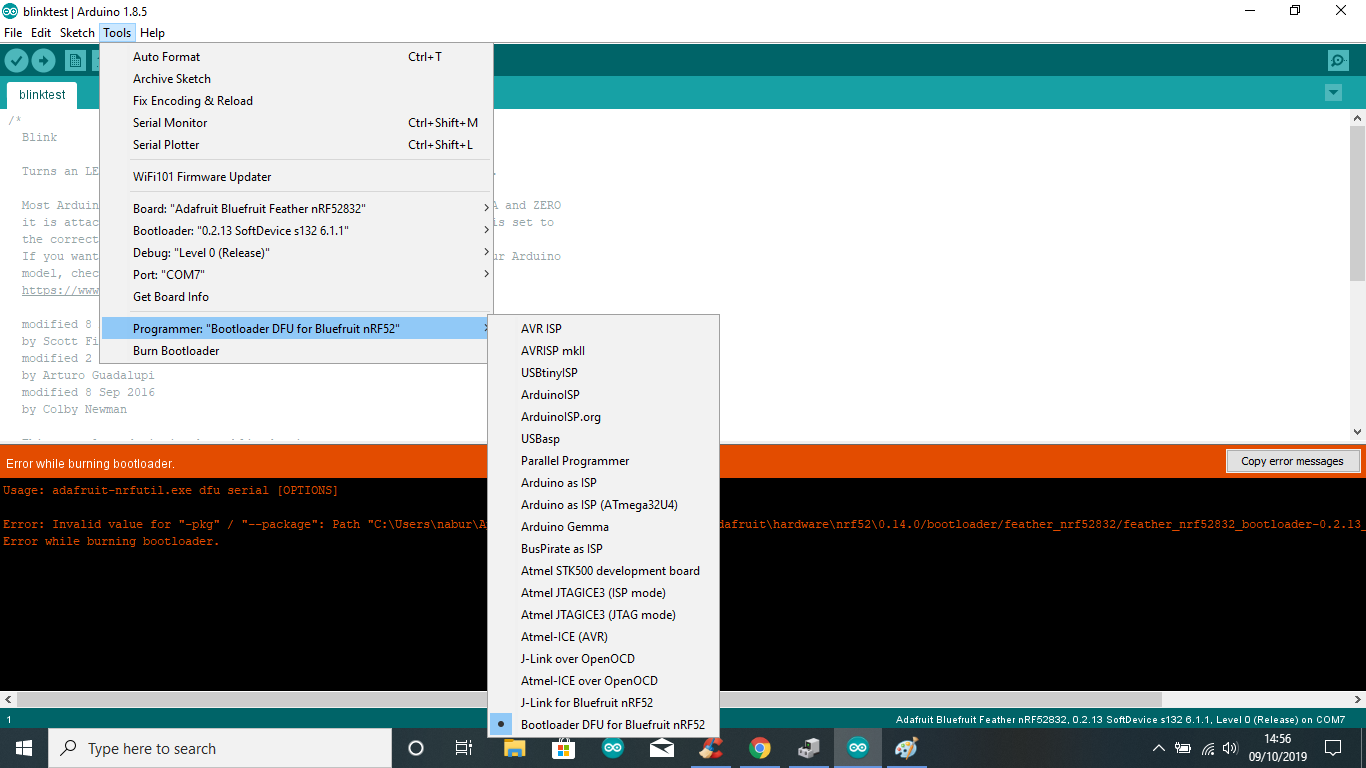
    Here is a screen shot of the error I get. Is this the root of my problem?


    image

    • Cancel
    • Vote Up +1 Vote Down
    • Sign in to reply
    • Verify Answer
    • Reject Answer
    • Cancel
Reply
  • marks+
    0 marks+ over 6 years ago in reply to plowe

    So, just to recap....


    I'm confident I'm getting the board into DFU mode by grounding DFU and resetting, only one blinking red LED.

    Still get the same error message.


    So I need to know if I need to burn the bootloader and how. I have tried but as mentioned I'm completely new to this.

    Here is a screen shot of the error I get. Is this the root of my problem?


    image

    • Cancel
    • Vote Up +1 Vote Down
    • Sign in to reply
    • Verify Answer
    • Reject Answer
    • Cancel
Children
  • cstanton
    0 cstanton over 6 years ago in reply to marks+

    marks+ , looks like you're getting two different error messages here.


    Your error message at https://www.element14.com/community/message/283091/l/re-complete-beginner-requiring-help-with-bluefruit-feather-programm… implies a communication problem with the board, that's related to the timing of sending the code from the software to the device, it hasn't 'caught' the device at the DFU bootloader and so it's being refused acknowledgement from the device.


    This is usually a matter of sending the code at the right time, usually I tell Arduino to send the code, and then reset the device immediately by shorting the right pins together or pressing a button on the board, then it usually works.


    Your error message in https://www.element14.com/community/message/283391/l/re-complete-beginner-requiring-help-with-bluefruit-feather-programm…  implies a different problem. Unfortunately for me you've covered over some of the error message but it implies that it can't find the right file or package to flash to the device, this's either due to something done since the initial installation or there's something wrong with the hardware support you installed.


    One thing I notice in the 'path' to the file, is that the slashes alternate in direction suddenly, so you can see c:\users\nabur suddenly turn into 0.14.0/bootloader/feather_nrf52832 (from backslashes to forward slashes). So you may have downloaded a file that is expecting to be used in something else other than Windows (say for Mac or Linux) in an attempt to fix problems, or this's a red herring and there's merely something amiss with the file.


    Seems however you had it setup the first time around may have been the better approach, and if nothing's changed since, then perhaps a different version of the Arduino IDE is in order.

    • Cancel
    • Vote Up +3 Vote Down
    • Sign in to reply
    • Verify Answer
    • Reject Answer
    • Cancel
  • marks+
    0 marks+ over 6 years ago in reply to cstanton

    Thanks for the feedback!


    I discovered early on that we were using a power only USB lead which would explain the early error message.

    A few days ago I also discovered we had two versions of the software on the same laptop, and wondered if that was the problem so I uninstalled both, re-installed but still had no joy.


    I'll try the reboot method you've suggested.


    I have since ordered a Trinket and at least we're now operational BUT I do need to get the feather boards working.

    We're going to try the Adafruit version too.


    I'll update the thread once I've tried another attempt.


    Cheers

    Mark

    • Cancel
    • Vote Up +1 Vote Down
    • Sign in to reply
    • Verify Answer
    • Reject Answer
    • Cancel
  • cstanton
    0 cstanton over 6 years ago in reply to marks+

    > A few days ago I also discovered we had two versions of the software on the same laptop, and wondered if that was the problem so I uninstalled both, re-installed but still had no joy.


    On windows, even if you were running two different versions of the Arduino IDE they may be looking in the same 'sketchbook' location, so if the library wasn't installed properly it would have the same issue in both scenarios. It's difficult to determine from the output being obscured by the menu on top of it.


    It depends where the hardware libraries were installed to as well, they may not have been extracted into the sketchbook folder (which is usually in the 'My Documents' folder for the current user) and may have been put into c:\users\<username>\appdata\<local/roaming/locallow>\arduino\<folder structure>\hardware which may also not be removed if you uninstall and reinstall everything.

    • Cancel
    • Vote Up +2 Vote Down
    • Sign in to reply
    • Verify Answer
    • Reject Answer
    • Cancel
element14 Community

element14 is the first online community specifically for engineers. Connect with your peers and get expert answers to your questions.

  • Members
  • Learn
  • Technologies
  • Challenges & Projects
  • Products
  • Store
  • About Us
  • Feedback & Support
  • FAQs
  • Terms of Use
  • Privacy Policy
  • Legal and Copyright Notices
  • Sitemap
  • Cookies

An Avnet Company © 2025 Premier Farnell Limited. All Rights Reserved.

Premier Farnell Ltd, registered in England and Wales (no 00876412), registered office: Farnell House, Forge Lane, Leeds LS12 2NE.

ICP 备案号 10220084.

Follow element14

  • X
  • Facebook
  • linkedin
  • YouTube