element14 Community
element14 Community
    Register Log In
  • Site
  • Search
  • Log In Register
  • Community Hub
    Community Hub
    • What's New on element14
    • Feedback and Support
    • Benefits of Membership
    • Personal Blogs
    • Members Area
    • Achievement Levels
  • Learn
    Learn
    • Ask an Expert
    • eBooks
    • element14 presents
    • Learning Center
    • Tech Spotlight
    • STEM Academy
    • Webinars, Training and Events
    • Learning Groups
  • Technologies
    Technologies
    • 3D Printing
    • FPGA
    • Industrial Automation
    • Internet of Things
    • Power & Energy
    • Sensors
    • Technology Groups
  • Challenges & Projects
    Challenges & Projects
    • Design Challenges
    • element14 presents Projects
    • Project14
    • Arduino Projects
    • Raspberry Pi Projects
    • Project Groups
  • Products
    Products
    • Arduino
    • Avnet & Tria Boards Community
    • Dev Tools
    • Manufacturers
    • Multicomp Pro
    • Product Groups
    • Raspberry Pi
    • RoadTests & Reviews
  • About Us
    About the element14 Community
  • Store
    Store
    • Visit Your Store
    • Choose another store...
      • Europe
      •  Austria (German)
      •  Belgium (Dutch, French)
      •  Bulgaria (Bulgarian)
      •  Czech Republic (Czech)
      •  Denmark (Danish)
      •  Estonia (Estonian)
      •  Finland (Finnish)
      •  France (French)
      •  Germany (German)
      •  Hungary (Hungarian)
      •  Ireland
      •  Israel
      •  Italy (Italian)
      •  Latvia (Latvian)
      •  
      •  Lithuania (Lithuanian)
      •  Netherlands (Dutch)
      •  Norway (Norwegian)
      •  Poland (Polish)
      •  Portugal (Portuguese)
      •  Romania (Romanian)
      •  Russia (Russian)
      •  Slovakia (Slovak)
      •  Slovenia (Slovenian)
      •  Spain (Spanish)
      •  Sweden (Swedish)
      •  Switzerland(German, French)
      •  Turkey (Turkish)
      •  United Kingdom
      • Asia Pacific
      •  Australia
      •  China
      •  Hong Kong
      •  India
      •  Japan
      •  Korea (Korean)
      •  Malaysia
      •  New Zealand
      •  Philippines
      •  Singapore
      •  Taiwan
      •  Thailand (Thai)
      •  Vietnam
      • Americas
      •  Brazil (Portuguese)
      •  Canada
      •  Mexico (Spanish)
      •  United States
      Can't find the country/region you're looking for? Visit our export site or find a local distributor.
  • Translate
  • Profile
  • Settings
Arduino
  • Products
  • More
Arduino
Arduino Forum Creating High School Lesson Plans to Share with the World. Using Python, Raspberry PI, Arduino, 3D Printing.
  • Blog
  • Forum
  • Documents
  • Quiz
  • Events
  • Polls
  • Files
  • Members
  • Mentions
  • Sub-Groups
  • Tags
  • More
  • Cancel
  • New
Join Arduino to participate - click to join for free!
Actions
  • Share
  • More
  • Cancel
Forum Thread Details
  • State Not Answered
  • Replies 2 replies
  • Subscribers 416 subscribers
  • Views 447 views
  • Users 0 members are here
Related

Creating High School Lesson Plans to Share with the World. Using Python, Raspberry PI, Arduino, 3D Printing.

e14 Contributor
e14 Contributor over 13 years ago

Hi everyone!


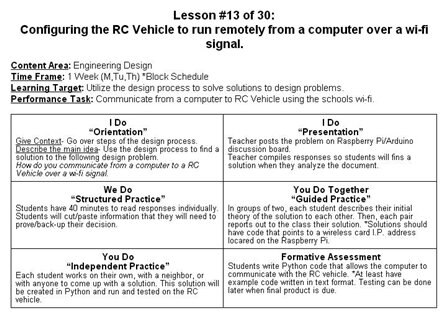
  1. My name is Kevin Crossett and I’m an Engineering Design teacher at a high school in Southern California. I have a B.S. in Technology Education and a Masters degree in Education Technology. I would like to develop professional systematic lesson plans that I can share with teachers around the world in regard to creating products using the Arduino, Raspberry Pi and Python in conjunction with 3D Printing. My experience level with Python, Arduino, and Raspberry Pi is a beginner level, and I am reaching out to get any support I can.  The problem I have given my  20 high school engineering students is that they must design, build, and test a 1/10th scaled remote controlled (RC) vehicle that can be controlled remotely over the schools wi-fi signal by the computer in the classroom. We also want a live video feed using a webcam.  We have a BFB 3000 3D printer (we are getting a Makerbot in 6 months) and a computer lab. Students are currently using SketchUp and create .stl files of their wheels and chassis for their RC vehicles and we have printed out their wheels and chassis so far.


*We are developing a website so we can share our progress. (Still under development). Will be done Jan. 2013.


My first set of questions:

Do I need to buy an Arduino and a Raspberry Pi? We have learned that the Arduino is for sensors and Raspberry Pi will be used to run the Python program.


What else do I need for this project?

  • - Camera: (I have found the Playstation Eye is best. Can anyone confirm this?)
  • - Any idea on Wireless cards? Has anyone had luck with Eye-Fi SD cards? I’m guessing I should stick to a wireless card. Which one should we get?
  • - Does anyone have lines of Python code I can copy and paste?
  • - Is it a good idea to use Portable Python, or should I just download Python to the hard drive. I’m guessing I should just download it.
  • - What other accessories do I need for a project like this? Flashdrive? LAN Flashdrive? Cables? Sensors? Wireless card on the computer?


Any advice? Do you know a better way?

- Instead of schools wifi is Bluetooth a better option? GPS? Our range is 3 football fields.


Does anyone know of any links that would help us out?


Thank you for your time and we look forward to your response.
 

image

  • Sign in to reply
  • Cancel
Parents
  • ntewinkel
    0 ntewinkel over 13 years ago

    That sounds like a really good project, fun and challenging too.


    The only thing I can think of as a basic starting point for Arduino is this Oomlout open source tutorial: http://www.oomlout.com/a/products/ardx/


    Not sure if your students are already beyond all that level, but it does provide a simple example of most of the basic pieces required to build the robot.


    I don't think you would need a Pi if you will be controlling the Arduino/Robot from a full computer already.


    Bluetooth range is not enough to reach 3 football fields, so I think wifi is probably your best option.


    You can buy nrf24l01 wireless transceivers quite inexpensively, and they are already supported for Arduino: http://playground.arduino.cc/InterfacingWithHardware/Nrf24L01

    I'm pretty sure you would need an Arduino on both ends, with one Arduino connected to the controlling computer.


    In terms of cameras, I would look for one that already has support for Arduino. It looks like this Adafruit tutorial covers how to use one: http://learn.adafruit.com/ttl-serial-camera/


    To interface with a computer, you could also use Processing, as in this tutorial: http://playground.arduino.cc/Interfacing/Processing

    I'm sure similar can be done with Python. You might just need to search around a bit.


    Cheers,

    -Nico

    • Cancel
    • Vote Up 0 Vote Down
    • Sign in to reply
    • Verify Answer
    • Cancel
Reply
  • ntewinkel
    0 ntewinkel over 13 years ago

    That sounds like a really good project, fun and challenging too.


    The only thing I can think of as a basic starting point for Arduino is this Oomlout open source tutorial: http://www.oomlout.com/a/products/ardx/


    Not sure if your students are already beyond all that level, but it does provide a simple example of most of the basic pieces required to build the robot.


    I don't think you would need a Pi if you will be controlling the Arduino/Robot from a full computer already.


    Bluetooth range is not enough to reach 3 football fields, so I think wifi is probably your best option.


    You can buy nrf24l01 wireless transceivers quite inexpensively, and they are already supported for Arduino: http://playground.arduino.cc/InterfacingWithHardware/Nrf24L01

    I'm pretty sure you would need an Arduino on both ends, with one Arduino connected to the controlling computer.


    In terms of cameras, I would look for one that already has support for Arduino. It looks like this Adafruit tutorial covers how to use one: http://learn.adafruit.com/ttl-serial-camera/


    To interface with a computer, you could also use Processing, as in this tutorial: http://playground.arduino.cc/Interfacing/Processing

    I'm sure similar can be done with Python. You might just need to search around a bit.


    Cheers,

    -Nico

    • Cancel
    • Vote Up 0 Vote Down
    • Sign in to reply
    • Verify Answer
    • Cancel
Children
No Data
element14 Community

element14 is the first online community specifically for engineers. Connect with your peers and get expert answers to your questions.

  • Members
  • Learn
  • Technologies
  • Challenges & Projects
  • Products
  • Store
  • About Us
  • Feedback & Support
  • FAQs
  • Terms of Use
  • Privacy Policy
  • Legal and Copyright Notices
  • Sitemap
  • Cookies

An Avnet Company © 2026 Premier Farnell Limited. All Rights Reserved.

Premier Farnell Ltd, registered in England and Wales (no 00876412), registered office: Farnell House, Forge Lane, Leeds LS12 2NE.

Follow element14

  • X
  • Facebook
  • linkedin
  • YouTube