element14 Community
element14 Community
    Register Log In
  • Site
  • Search
  • Log In Register
  • Community Hub
    Community Hub
    • What's New on element14
    • Feedback and Support
    • Benefits of Membership
    • Personal Blogs
    • Members Area
    • Achievement Levels
  • Learn
    Learn
    • Ask an Expert
    • eBooks
    • element14 presents
    • Learning Center
    • Tech Spotlight
    • STEM Academy
    • Webinars, Training and Events
    • Learning Groups
  • Technologies
    Technologies
    • 3D Printing
    • FPGA
    • Industrial Automation
    • Internet of Things
    • Power & Energy
    • Sensors
    • Technology Groups
  • Challenges & Projects
    Challenges & Projects
    • Design Challenges
    • element14 presents Projects
    • Project14
    • Arduino Projects
    • Raspberry Pi Projects
    • Project Groups
  • Products
    Products
    • Arduino
    • Avnet & Tria Boards Community
    • Dev Tools
    • Manufacturers
    • Multicomp Pro
    • Product Groups
    • Raspberry Pi
    • RoadTests & Reviews
  • About Us
  • Store
    Store
    • Visit Your Store
    • Choose another store...
      • Europe
      •  Austria (German)
      •  Belgium (Dutch, French)
      •  Bulgaria (Bulgarian)
      •  Czech Republic (Czech)
      •  Denmark (Danish)
      •  Estonia (Estonian)
      •  Finland (Finnish)
      •  France (French)
      •  Germany (German)
      •  Hungary (Hungarian)
      •  Ireland
      •  Israel
      •  Italy (Italian)
      •  Latvia (Latvian)
      •  
      •  Lithuania (Lithuanian)
      •  Netherlands (Dutch)
      •  Norway (Norwegian)
      •  Poland (Polish)
      •  Portugal (Portuguese)
      •  Romania (Romanian)
      •  Russia (Russian)
      •  Slovakia (Slovak)
      •  Slovenia (Slovenian)
      •  Spain (Spanish)
      •  Sweden (Swedish)
      •  Switzerland(German, French)
      •  Turkey (Turkish)
      •  United Kingdom
      • Asia Pacific
      •  Australia
      •  China
      •  Hong Kong
      •  India
      • Japan
      •  Korea (Korean)
      •  Malaysia
      •  New Zealand
      •  Philippines
      •  Singapore
      •  Taiwan
      •  Thailand (Thai)
      • Vietnam
      • Americas
      •  Brazil (Portuguese)
      •  Canada
      •  Mexico (Spanish)
      •  United States
      Can't find the country/region you're looking for? Visit our export site or find a local distributor.
  • Translate
  • Profile
  • Settings
Arduino
  • Products
  • More
Arduino
Arduino Forum Wiring an LCD shield
  • Blog
  • Forum
  • Documents
  • Quiz
  • Events
  • Polls
  • Files
  • Members
  • Mentions
  • Sub-Groups
  • Tags
  • More
  • Cancel
  • New
Join Arduino to participate - click to join for free!
Actions
  • Share
  • More
  • Cancel
Forum Thread Details
  • State Suggested Answer
  • Replies 5 replies
  • Answers 1 answer
  • Subscribers 403 subscribers
  • Views 719 views
  • Users 0 members are here
  • lcd
  • solder
  • wire
  • shield
Related

Wiring an LCD shield

Former Member
Former Member over 12 years ago

Hi Everyone,

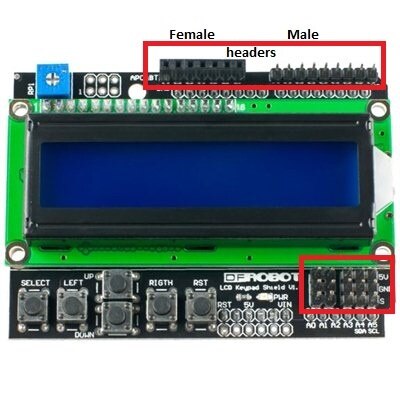
I'm new here and just purchased the lcd shield from dfrobot.  Now that I've finished the programming I'm ready to connect some inputs.  I need to use digital pins 10-12, 5v and ground on my arduino uno.  I'm sure I have to solder the connection on the lcd shield, but I want to make sure before applying the heat (I have very limited experience with soldering).  I was hoping to find a video show exactly how to do so, but have not found anything on youtube.  Can someone help me out?


Thanks,

Onyx

8)

  • Sign in to reply
  • Cancel
  • Former Member
    0 Former Member over 12 years ago

    If you have a temperature controlled soldering iron, set it to between 600F and 650F.  Be sure the tip is hot enough to melt the solder before trying to use it.  Wipe the tip on a damp sponge or paper towel to get rid of the oxidized solder then wet the tip with a little solder.  Place the tip next to the wire on the pad at the same time and apply the solder.  Don't hold it on any longer than 5 seconds.  Don't put so much solder on that it balls up.  Just a little more than enough to fill the hole.

    • Cancel
    • Vote Up 0 Vote Down
    • Sign in to reply
    • Verify Answer
    • Cancel
  • mcb1
    0 mcb1 over 12 years ago in reply to Former Member

    Adafruit has one of the best tutorials I've seen.

    It explains what the tools are, then a couple of pages in shows the process in detail.


    http://learn.adafruit.com/adafruit-guide-excellent-soldering/tools


    Many beginners forget to heat the surface that the wire has to attach to, and hence have problems.


    You'll need to strip and then twist the wires before 'tinning' them. (Tinning is applying solder to the wire.)

    Cut them to a suitable length as the insulation sometimes shrinks back.


    I would also suggest you apply a little solder to the shield pins, and then add the tinned wires.


    You can practice on something else first.

    The secret is not too much heat on the wires. If it isn't going right, stop and let the joint and wire cool down, then try again.


    Mark

    • Cancel
    • Vote Up 0 Vote Down
    • Sign in to reply
    • Verify Answer
    • Cancel
  • fidelsalinas
    0 fidelsalinas over 12 years ago

    If you have the DFrobot LCD keypad sheild V1.0 the pins Allocated pins are Digital pins 4-10 and Anolog 0. So you'd have to use a different pin then D10, here are the Shematics for the shield and the Manual. Mark has the right good advice about soldering but I'd suggest soldering male or female headers on the shield for easier prototyping, hope this helps.


    Fidel Salinas

    image

    • Cancel
    • Vote Up 0 Vote Down
    • Sign in to reply
    • Verify Answer
    • Reject Answer
    • Cancel
  • Former Member
    0 Former Member over 12 years ago in reply to fidelsalinas

    This is great, but I am looking to put this as part of a working project.  Having the connections above and close to the lcd is a problem I am trying to over come.  I would like a way to get the connections from under shield....and over the uno.  I'm thinking I can put connectors on a proto-board above and below to accomplish this.  I would like a better solution.


    Thanks!!

    • Cancel
    • Vote Up 0 Vote Down
    • Sign in to reply
    • Verify Answer
    • Cancel
  • fidelsalinas
    0 fidelsalinas over 12 years ago in reply to Former Member

    If thats the case you can always just solder the wire stright on to the pads on the sheild under or over it, just remember D10 is being used by the sheild. If you don't want to go straight and solder on the shield practic on these protoboards. One you've got the hang of it move on to the LCD sheild. just solder the wires to the same points you would have the headers, like i said over or under it wont matter. Hope this helps.


    Fidel Salinas

    • Cancel
    • Vote Up 0 Vote Down
    • Sign in to reply
    • Verify Answer
    • Cancel
element14 Community

element14 is the first online community specifically for engineers. Connect with your peers and get expert answers to your questions.

  • Members
  • Learn
  • Technologies
  • Challenges & Projects
  • Products
  • Store
  • About Us
  • Feedback & Support
  • FAQs
  • Terms of Use
  • Privacy Policy
  • Legal and Copyright Notices
  • Sitemap
  • Cookies

An Avnet Company © 2025 Premier Farnell Limited. All Rights Reserved.

Premier Farnell Ltd, registered in England and Wales (no 00876412), registered office: Farnell House, Forge Lane, Leeds LS12 2NE.

ICP 备案号 10220084.

Follow element14

  • X
  • Facebook
  • linkedin
  • YouTube