element14 Community
element14 Community
    Register Log In
  • Site
  • Search
  • Log In Register
  • Community Hub
    Community Hub
    • What's New on element14
    • Feedback and Support
    • Benefits of Membership
    • Personal Blogs
    • Members Area
    • Achievement Levels
  • Learn
    Learn
    • Ask an Expert
    • eBooks
    • element14 presents
    • Learning Center
    • Tech Spotlight
    • STEM Academy
    • Webinars, Training and Events
    • Learning Groups
  • Technologies
    Technologies
    • 3D Printing
    • FPGA
    • Industrial Automation
    • Internet of Things
    • Power & Energy
    • Sensors
    • Technology Groups
  • Challenges & Projects
    Challenges & Projects
    • Design Challenges
    • element14 presents Projects
    • Project14
    • Arduino Projects
    • Raspberry Pi Projects
    • Project Groups
  • Products
    Products
    • Arduino
    • Avnet & Tria Boards Community
    • Dev Tools
    • Manufacturers
    • Multicomp Pro
    • Product Groups
    • Raspberry Pi
    • RoadTests & Reviews
  • About Us
  • Store
    Store
    • Visit Your Store
    • Choose another store...
      • Europe
      •  Austria (German)
      •  Belgium (Dutch, French)
      •  Bulgaria (Bulgarian)
      •  Czech Republic (Czech)
      •  Denmark (Danish)
      •  Estonia (Estonian)
      •  Finland (Finnish)
      •  France (French)
      •  Germany (German)
      •  Hungary (Hungarian)
      •  Ireland
      •  Israel
      •  Italy (Italian)
      •  Latvia (Latvian)
      •  
      •  Lithuania (Lithuanian)
      •  Netherlands (Dutch)
      •  Norway (Norwegian)
      •  Poland (Polish)
      •  Portugal (Portuguese)
      •  Romania (Romanian)
      •  Russia (Russian)
      •  Slovakia (Slovak)
      •  Slovenia (Slovenian)
      •  Spain (Spanish)
      •  Sweden (Swedish)
      •  Switzerland(German, French)
      •  Turkey (Turkish)
      •  United Kingdom
      • Asia Pacific
      •  Australia
      •  China
      •  Hong Kong
      •  India
      • Japan
      •  Korea (Korean)
      •  Malaysia
      •  New Zealand
      •  Philippines
      •  Singapore
      •  Taiwan
      •  Thailand (Thai)
      • Vietnam
      • Americas
      •  Brazil (Portuguese)
      •  Canada
      •  Mexico (Spanish)
      •  United States
      Can't find the country/region you're looking for? Visit our export site or find a local distributor.
  • Translate
  • Profile
  • Settings
Arduino
  • Products
  • More
Arduino
Arduino Forum LC Studio SD Breakout with Due - RESOLVED
  • Blog
  • Forum
  • Documents
  • Quiz
  • Events
  • Polls
  • Files
  • Members
  • Mentions
  • Sub-Groups
  • Tags
  • More
  • Cancel
  • New
Join Arduino to participate - click to join for free!
Actions
  • Share
  • More
  • Cancel
Forum Thread Details
  • State Verified Answer
  • Replies 4 replies
  • Subscribers 401 subscribers
  • Views 548 views
  • Users 0 members are here
  • help
  • lc
  • storage
  • flash
  • due
  • arduino_due
  • arduino
  • sd
  • studio
Related

LC Studio SD Breakout with Due - RESOLVED

kizin
kizin over 11 years ago

I have the LC Studio SD Breakout and an Arduino Due. http://www.amazon.com/gp/product/B008B52QQC/ref=oh_details_o00_s01_i00?ie=UTF8&psc=1

I used my multimeter on the ICSP header to locate the 5V. I'm not sure which header I should be using, SPI or ICSP, but I have tried them both after locating their 5V pin.

I posted this question on the Playground and have gotten nothing. No one seems to know if it's even hooked up correctly, so I am posting here.


Here are my connections:


With Due power connector at the bottom left:


|  a  b  |

|  c  d  |

|  e  f  |

"ICSP"


Pin e is 5v.


Due    |    SD

c         |    MOSI

d         |    SCK

f          |  MISO

pin 10 |  CS

5v       |  +5

(nc)    | +3.3

GND   | GND (next to +3.3)


I have also tried, without success:

I/F Board     Arduino Pin

CS               10

MOSI           11

SCK            13

MISO           12

I have read that those pins don't work that way with the Due, but I really need this to work so my project can move forward, so I tried anyway.


I have tried 4 different cards: 1 GB PNY - FAT, 16 GB SDHC SanDisk Ultra (micro-SD w/adapter) - FAT32, 4 GB SanDisk (micro-SD w/adapter) - FAT32, 2 GB Generic (micro-SD w/adapter) - FAT


I've used two different sketches, setting 10 as CS: CardInfo example, SimpleAudioPlayer example


I get

CardInfo:

Initializing SD card...initialization failed. Things to check:

* is a card is inserted?

* Is your wiring correct?

* did you change the chipSelect pin to match your shield or module?


SimpleAudioPlayer:

Initializing SD card... failed!


So, here are my initial questions:

1. Is it connected correctly?

2. What else might be wrong?


Thanks for any assistance.

  • Sign in to reply
  • Cancel
Parents
  • neilk
    0 neilk over 11 years ago

    Hi kizin


    Not familiar with Due, but have tried to use the LCD Studio board and failed, because I was using an incompatible SD card. I have used a different SD Card breakout board successfully.


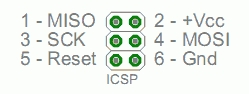
    Below are the  pinouts for the SPI bus header; yours seem to be different


    ICSPHeader.jpg

    The pinout image is taken from: http://arduino.cc/en/Reference/SPI


    Hope this helps


    Best wishes


    Neil


    PS - doesn't the Due run on 3.3v?

    • Cancel
    • Vote Up 0 Vote Down
    • Sign in to reply
    • Verify Answer
    • Cancel
  • kizin
    0 kizin over 11 years ago in reply to neilk

    Thank you very much for your response.

    I went ahead and tested the cards on my Uno using my LinkSprite SD Shield. All of the cards worked.

    I'm embarrassed to say, but my OP was wrong. I labeled MOSI and MISO backwards. I have fixed it in the OP.

    +5 volts is on pin "e" (from the OP).

    The pinout looks like this now:

    |  a  b  |    6  5

    |  c  d  |     4  3

    |  e  f  |     2  1

    "ICSP"


    Is that numbering correct? It's caused a lot of confusion for me.


    Due    |    SD

    c         |    MOSI

    d         |    SCK

    f          |  MISO


    The Due does run at 3.3v, and sends 3.3v signals. It does supply 5v on the ICSP, SPI, and through a pin on the board itself, but I'm pretty sure they are all just used to power boards that require 5v as a power supply. Could 3.3v signals be a problem?


    I took out my cheap-ish multimeter to make sure all the connections are good. I found +3.3v on MOSI, SCK, and MISO. If that helps any.

    • Cancel
    • Vote Up 0 Vote Down
    • Sign in to reply
    • Verify Answer
    • Cancel
Reply
  • kizin
    0 kizin over 11 years ago in reply to neilk

    Thank you very much for your response.

    I went ahead and tested the cards on my Uno using my LinkSprite SD Shield. All of the cards worked.

    I'm embarrassed to say, but my OP was wrong. I labeled MOSI and MISO backwards. I have fixed it in the OP.

    +5 volts is on pin "e" (from the OP).

    The pinout looks like this now:

    |  a  b  |    6  5

    |  c  d  |     4  3

    |  e  f  |     2  1

    "ICSP"


    Is that numbering correct? It's caused a lot of confusion for me.


    Due    |    SD

    c         |    MOSI

    d         |    SCK

    f          |  MISO


    The Due does run at 3.3v, and sends 3.3v signals. It does supply 5v on the ICSP, SPI, and through a pin on the board itself, but I'm pretty sure they are all just used to power boards that require 5v as a power supply. Could 3.3v signals be a problem?


    I took out my cheap-ish multimeter to make sure all the connections are good. I found +3.3v on MOSI, SCK, and MISO. If that helps any.

    • Cancel
    • Vote Up 0 Vote Down
    • Sign in to reply
    • Verify Answer
    • Cancel
Children
  • neilk
    0 neilk over 11 years ago in reply to kizin

    Hi kizin,


    I think this link may have the answer for you:


    http://21stdigitalhome.blogspot.co.uk/2013/02/arduino-due-hardware-spi.html


    In short, ICSP and SPI on the Due are very different; the link states that you should be using the SPI connector for your SD Card breakout, NOT the ICSP header. The image in this link makes the pin connections quite clear, I think!


    I found the link here:  http://forum.arduino.cc/index.php?topic=150084.0


    When I get into difficulties with my Arduinos, , I find it useful to go back to something simpler: will the LCD Studio board actually work with a UNO, connecting directly to the Digital pins 10.11.12 & 13, as you described in your original post. The SD Card breakout board I use is connected directly to these pins. I DON'T use the ICSP header on my UNO.


    Good luck


    Neil

    • Cancel
    • Vote Up 0 Vote Down
    • Sign in to reply
    • Reject Answer
    • Cancel
  • kizin
    0 kizin over 11 years ago in reply to neilk

    Neil,


    Thank you for your help. Obviously using the wrong header would have been a problem. After reading the linked blog entry, I connected the board to the SPI header using the schematic on the arduino.cc forum topic you linked. Unfortunately, that did not solve the problem. So I did as you suggested and tried it on my Uno. It did not work.


    With your help, I have determined I have a bad board; which, from what I have read, is not entirely uncommon for these cheap units. Next time I'll know right away how to connect it, too! Thanks again!


    image

    • Cancel
    • Vote Up 0 Vote Down
    • Sign in to reply
    • Verify Answer
    • Cancel
element14 Community

element14 is the first online community specifically for engineers. Connect with your peers and get expert answers to your questions.

  • Members
  • Learn
  • Technologies
  • Challenges & Projects
  • Products
  • Store
  • About Us
  • Feedback & Support
  • FAQs
  • Terms of Use
  • Privacy Policy
  • Legal and Copyright Notices
  • Sitemap
  • Cookies

An Avnet Company © 2025 Premier Farnell Limited. All Rights Reserved.

Premier Farnell Ltd, registered in England and Wales (no 00876412), registered office: Farnell House, Forge Lane, Leeds LS12 2NE.

ICP 备案号 10220084.

Follow element14

  • X
  • Facebook
  • linkedin
  • YouTube