element14 Community
element14 Community
    Register Log In
  • Site
  • Search
  • Log In Register
  • Community Hub
    Community Hub
    • What's New on element14
    • Feedback and Support
    • Benefits of Membership
    • Personal Blogs
    • Members Area
    • Achievement Levels
  • Learn
    Learn
    • Ask an Expert
    • eBooks
    • element14 presents
    • Learning Center
    • Tech Spotlight
    • STEM Academy
    • Webinars, Training and Events
    • Learning Groups
  • Technologies
    Technologies
    • 3D Printing
    • FPGA
    • Industrial Automation
    • Internet of Things
    • Power & Energy
    • Sensors
    • Technology Groups
  • Challenges & Projects
    Challenges & Projects
    • Design Challenges
    • element14 presents Projects
    • Project14
    • Arduino Projects
    • Raspberry Pi Projects
    • Project Groups
  • Products
    Products
    • Arduino
    • Avnet & Tria Boards Community
    • Dev Tools
    • Manufacturers
    • Multicomp Pro
    • Product Groups
    • Raspberry Pi
    • RoadTests & Reviews
  • About Us
  • Store
    Store
    • Visit Your Store
    • Choose another store...
      • Europe
      •  Austria (German)
      •  Belgium (Dutch, French)
      •  Bulgaria (Bulgarian)
      •  Czech Republic (Czech)
      •  Denmark (Danish)
      •  Estonia (Estonian)
      •  Finland (Finnish)
      •  France (French)
      •  Germany (German)
      •  Hungary (Hungarian)
      •  Ireland
      •  Israel
      •  Italy (Italian)
      •  Latvia (Latvian)
      •  
      •  Lithuania (Lithuanian)
      •  Netherlands (Dutch)
      •  Norway (Norwegian)
      •  Poland (Polish)
      •  Portugal (Portuguese)
      •  Romania (Romanian)
      •  Russia (Russian)
      •  Slovakia (Slovak)
      •  Slovenia (Slovenian)
      •  Spain (Spanish)
      •  Sweden (Swedish)
      •  Switzerland(German, French)
      •  Turkey (Turkish)
      •  United Kingdom
      • Asia Pacific
      •  Australia
      •  China
      •  Hong Kong
      •  India
      • Japan
      •  Korea (Korean)
      •  Malaysia
      •  New Zealand
      •  Philippines
      •  Singapore
      •  Taiwan
      •  Thailand (Thai)
      • Vietnam
      • Americas
      •  Brazil (Portuguese)
      •  Canada
      •  Mexico (Spanish)
      •  United States
      Can't find the country/region you're looking for? Visit our export site or find a local distributor.
  • Translate
  • Profile
  • Settings
Arduino
  • Products
  • More
Arduino
Arduino Forum Arduino I/O Pins
  • Blog
  • Forum
  • Documents
  • Quiz
  • Events
  • Polls
  • Files
  • Members
  • Mentions
  • Sub-Groups
  • Tags
  • More
  • Cancel
  • New
Join Arduino to participate - click to join for free!
Actions
  • Share
  • More
  • Cancel
Forum Thread Details
  • State Verified Answer
  • Replies 14 replies
  • Answers 2 answers
  • Subscribers 403 subscribers
  • Views 1560 views
  • Users 0 members are here
  • helpme
  • make
  • diy
  • led
  • arduino
Related

Arduino I/O Pins

Former Member
Former Member over 12 years ago

I'm making a button project that need about 10 leds and 12 buttons,

I'm using an arduino uno, but there just arn't enough I/O pins, I'm fairly

new to arduino, so it may be that I just dont know to to properly wire one up and porperly code it to make it work perfectly.


The project is this:


The idea is to have a project box with about 10 buttons on the project box and little LEDs next to them, wherever the LEDs are placed, there will be pieces of paper indicating what each button represents next to the LEDs . The box would also have 2 buttons on the side of the project box, one would be used to turn on the leds that had their corresponding buttons pushed and the other

would reset the system so it could be used with different combonations.


This is my code,

Don't pay attention to the comments!


// this constant won't change:

const int buttonPin = 2;

const int buttonPin2 = 8;

const int buttonPin3 = 3;

const int buttonPin4 = 5;

const int buttonPin5 = 6;

int buttonReset2 = 10;

// the pin that the pushbutton is attached to

int ledPin = 13;

int ledPin2 = 12;

int ledPin3 = 4;

int ledPin4 = 7;

int ledPin5 = 11;

int ledShow2 = 9;

// the pin that the LED is attached to


// Variables will change:

int buttonPushCounter = 0;

int buttonPushCounter2 = 0;

int buttonPushCounter3 = 0;

int buttonPushCounter4 = 0;

int buttonPushCounter5 = 0;


// counter for the number of button presses

int ledShow = 0;

int buttonState = 0;

int buttonState2 = 0;

int buttonState3 = 0;

int buttonState4 = 0;

int buttonState5 = 0;


int buttonReset = 0;

// current state of the button

int lastButtonState = 0;

int lastButtonState2 = 0;

int lastButtonState3 = 0;

int lastButtonState4 = 0;

int lastButtonState5 = 0;


void setup() {

  // initialize the button pin as a input:

  pinMode(ledShow, INPUT);

  pinMode(buttonPin, INPUT);

  pinMode(buttonPin2, INPUT);

  pinMode(buttonPin3, INPUT);

  pinMode(buttonPin4, INPUT);

  pinMode(buttonPin5, INPUT);

  // initialize the LED as an output:

  pinMode(ledPin, OUTPUT);

  pinMode(ledPin2, OUTPUT);

  pinMode(ledPin3, OUTPUT);

  pinMode(ledPin4, OUTPUT);

  pinMode(ledPin5, OUTPUT);

  // initialize serial communication:

  Serial.begin(9600);

}


void loop() {

  // read the pushbutton input pin:

  buttonReset = digitalRead(buttonReset2);


  ledShow = digitalRead(ledShow2);


  buttonState = digitalRead(buttonPin);


  buttonState2 = digitalRead(buttonPin2);


  buttonState3 = digitalRead(buttonPin3);


  buttonState4 = digitalRead(buttonPin4);


  buttonState5 = digitalRead(buttonPin5);


  // compare the buttonState to its previous state

  if (buttonState != lastButtonState) {

    // if the state has changed, increment the counter

    if (buttonState == 1) {

      // if the current state is HIGH then the button

      // wend from off to on:

      buttonPushCounter++;

    }

    else {

      // if the current state is LOW then the button

      // wend from on to off:

      delay(1);

    }

  }

  // save the current state as the last state,

  //for next time through the loop

  lastButtonState = buttonState;


  // turns on the LED every four button pushes by

  // checking the modulo of the button push counter.

  // the modulo function gives you the remainder of

  // the division of two numbers:

  if (buttonPushCounter % 2 == 0) {

    digitalWrite(ledPin, HIGH);

  } else {

   digitalWrite(ledPin, LOW);

   }

     // compare the buttonState to its previous state

  if (buttonState2 != lastButtonState2) {

    // if the state has changed, increment the counter

    if (buttonState2 == 1) {

      // if the current state is HIGH then the button

      // wend from off to on:

      buttonPushCounter2++;

    }

    else {

      // if the current state is LOW then the button

      // wend from on to off:

      delay(1);

    }

  }

  // save the current state as the last state,

  //for next time through the loop

  lastButtonState2 = buttonState2;


  // turns on the LED every four button pushes by

  // checking the modulo of the button push counter.

  // the modulo function gives you the remainder of

  // the division of two numbers:

  if (buttonPushCounter2 % 2 == 0) {

    digitalWrite(ledPin2, HIGH);

  } else {

   digitalWrite(ledPin2, LOW);

   }


  // compare the buttonState to its previous state

  if (buttonState3 != lastButtonState3) {

    // if the state has changed, increment the counter

    if (buttonState3 == 1) {

      // if the current state is HIGH then the button

      // wend from off to on:

      buttonPushCounter3++;

    }

    else {

      // if the current state is LOW then the button

      // wend from on to off:

      delay(1);

    }

  }

  // save the current state as the last state,

  //for next time through the loop

  lastButtonState3 = buttonState3;


  // turns on the LED every four button pushes by

  // checking the modulo of the button push counter.

  // the modulo function gives you the remainder of

  // the division of two numbers:

  if (buttonPushCounter3 % 2 == 0) {

    digitalWrite(ledPin3, HIGH);

  } else {

   digitalWrite(ledPin3, LOW);

   }


  // compare the buttonState to its previous state

  if (buttonState4 != lastButtonState4) {

    // if the state has changed, increment the counter

    if (buttonState4 == 1) {

      // if the current state is HIGH then the button

      // wend from off to on:

      buttonPushCounter4++;

    }

    else {

      // if the current state is LOW then the button

      // wend from on to off:

      delay(1);

    }

  }

  // save the current state as the last state,

  //for next time through the loop

  lastButtonState4 = buttonState4;


  // turns on the LED every four button pushes by

  // checking the modulo of the button push counter.

  // the modulo function gives you the remainder of

  // the division of two numbers:

  if (buttonPushCounter4 % 2 == 0) {

    digitalWrite(ledPin4, HIGH);

  } else {

   digitalWrite(ledPin4, LOW);

   }


  // compare the buttonState to its previous state

  if (buttonState5 != lastButtonState5) {


    if (buttonState5 == 1) {


      buttonPushCounter5++;

    }

    else {


      delay(1);

    }

  }

  lastButtonState5 = buttonState5;


  if (buttonPushCounter5 % 2 == 0) {

    digitalWrite(ledPin5, HIGH);

  } else {

   digitalWrite(ledPin5, LOW);

   }


   if (buttonReset == 1 && buttonPushCounter > 0){

     buttonPushCounter--;

   }

   else{

     delay(1);

     if (buttonReset == 1 && buttonPushCounter2 > 0){

     buttonPushCounter--;

   }

   else{

     delay(1);

     if (buttonReset == 1 && buttonPushCounter3 > 0){

     buttonPushCounter--;

   }

   else{

     delay(1);

   }

     if (buttonReset == 1 && buttonPushCounter4 > 0){

     buttonPushCounter--;

   }

   else{

     delay(1);

     if (buttonReset == 1 && buttonPushCounter5 > 0){

     buttonPushCounter--;

   }

   else{

     delay(1);

   }

   if (ledPin == 1 && ledShow == 0){

     ledPin--;

     if(ledPin == 0 && ledShow ==1){

       ledPin++;

     }

     else{

       delay(1);

   }

   }else{

   }

     delay(1);


     if (buttonReset == 1 && buttonState == 1){

       buttonState++;

     }

     else{

       delay(1);

     }

     if (buttonReset == 1 && buttonState2 == 1){

       buttonState++;

     }

     else{

       delay(1);

     }

     if (buttonReset == 1 && buttonState3 == 1){

       buttonState++;

     }

     else{

       delay(1);

     }

     if (buttonReset == 1 && buttonState4 == 1){

       buttonState++;

     }

     else{

       delay(1);

     }

     if (buttonReset == 1 && buttonState5 == 1){

       buttonState++;

     }

     else{

       delay(1);


     }

   }

}

   }

   }


Do not pay attention to the comments!

  • Sign in to reply
  • Cancel

Top Replies

  • mcb1
    mcb1 over 12 years ago in reply to Former Member +2
    Michael You could always connect the buttons to the Analogue inputs, across a resistor ladder. You can easily have 6 buttons on one input. There is some discussion here http://forum.arduino.cc/index.php…
  • shabaz
    shabaz over 12 years ago in reply to Former Member +1 verified
    Hi Michael, Ways to do it with no additional parts are more complicated and less straightforward if the number of inputs and outputs exceeds the number of pins; it may be possible using multiplexing (again…
  • ntewinkel
    ntewinkel over 12 years ago +1
    You could also try the Arduino library for a "matrix keyboard" - I haven't tried it myself yet, but it looks like it will make it easier to handle multiple buttons. http://playground.arduino.cc/Main/KeypadTutorial…
Parents
  • billabott
    0 billabott over 12 years ago

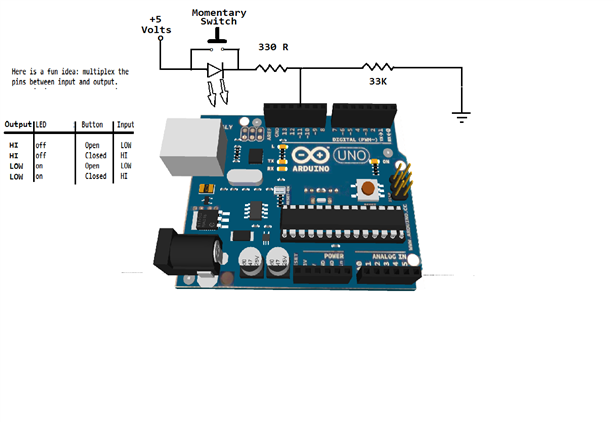
    Click on image to open a higher resolution view.

    image


    Q: Were these 10 LEDs going to  be low current (2 mA)  SMD type  or were you planning on 25 mA super bright 5mm LEDs?     All on at the same time is pulling 250 mA just for the LEDs .....


    Found at Arduino forum:

    "Bear in mind that 200mA is the absolute maximum for the PROCESSOR; not just the things connected to it.  That means you need to account for the current the processor itself uses (about 30 mA)." 

    Coding Badly image

    Global Moderator

    • Cancel
    • Vote Up 0 Vote Down
    • Sign in to reply
    • Verify Answer
    • Reject Answer
    • Cancel
  • mcb1
    0 mcb1 over 12 years ago in reply to billabott

    Nice idea

    However its confusing enough now for new users, without having to switch rapidly between input, and output modes.


    Especially if you multiply it by 10 (or 12) .....


    BTW I have yet to see why you need to drive most LED's beyond 10 or 12mA.

    Sure if you are using them as a torch, but not in general useage, as modern LEDs are Extemely High brightness compared to 5 or so years ago.

    Most are painful to look at, and the contrast of the background/surrounding mounting can have a major difference.


    Mark

    • Cancel
    • Vote Up 0 Vote Down
    • Sign in to reply
    • Verify Answer
    • Cancel
Reply
  • mcb1
    0 mcb1 over 12 years ago in reply to billabott

    Nice idea

    However its confusing enough now for new users, without having to switch rapidly between input, and output modes.


    Especially if you multiply it by 10 (or 12) .....


    BTW I have yet to see why you need to drive most LED's beyond 10 or 12mA.

    Sure if you are using them as a torch, but not in general useage, as modern LEDs are Extemely High brightness compared to 5 or so years ago.

    Most are painful to look at, and the contrast of the background/surrounding mounting can have a major difference.


    Mark

    • Cancel
    • Vote Up 0 Vote Down
    • Sign in to reply
    • Verify Answer
    • Cancel
Children
  • billabott
    0 billabott over 12 years ago in reply to mcb1

    Agreed.   So if the proper resistors are installed to limit current to  10 mA per LED -  Aal izz well.

    • Cancel
    • Vote Up 0 Vote Down
    • Sign in to reply
    • Verify Answer
    • Cancel
element14 Community

element14 is the first online community specifically for engineers. Connect with your peers and get expert answers to your questions.

  • Members
  • Learn
  • Technologies
  • Challenges & Projects
  • Products
  • Store
  • About Us
  • Feedback & Support
  • FAQs
  • Terms of Use
  • Privacy Policy
  • Legal and Copyright Notices
  • Sitemap
  • Cookies

An Avnet Company © 2025 Premier Farnell Limited. All Rights Reserved.

Premier Farnell Ltd, registered in England and Wales (no 00876412), registered office: Farnell House, Forge Lane, Leeds LS12 2NE.

ICP 备案号 10220084.

Follow element14

  • X
  • Facebook
  • linkedin
  • YouTube