element14 Community
element14 Community
    Register Log In
  • Site
  • Search
  • Log In Register
  • Community Hub
    Community Hub
    • What's New on element14
    • Feedback and Support
    • Benefits of Membership
    • Personal Blogs
    • Members Area
    • Achievement Levels
  • Learn
    Learn
    • Ask an Expert
    • eBooks
    • element14 presents
    • Learning Center
    • Tech Spotlight
    • STEM Academy
    • Webinars, Training and Events
    • Learning Groups
  • Technologies
    Technologies
    • 3D Printing
    • FPGA
    • Industrial Automation
    • Internet of Things
    • Power & Energy
    • Sensors
    • Technology Groups
  • Challenges & Projects
    Challenges & Projects
    • Design Challenges
    • element14 presents Projects
    • Project14
    • Arduino Projects
    • Raspberry Pi Projects
    • Project Groups
  • Products
    Products
    • Arduino
    • Avnet & Tria Boards Community
    • Dev Tools
    • Manufacturers
    • Multicomp Pro
    • Product Groups
    • Raspberry Pi
    • RoadTests & Reviews
  • About Us
  • Store
    Store
    • Visit Your Store
    • Choose another store...
      • Europe
      •  Austria (German)
      •  Belgium (Dutch, French)
      •  Bulgaria (Bulgarian)
      •  Czech Republic (Czech)
      •  Denmark (Danish)
      •  Estonia (Estonian)
      •  Finland (Finnish)
      •  France (French)
      •  Germany (German)
      •  Hungary (Hungarian)
      •  Ireland
      •  Israel
      •  Italy (Italian)
      •  Latvia (Latvian)
      •  
      •  Lithuania (Lithuanian)
      •  Netherlands (Dutch)
      •  Norway (Norwegian)
      •  Poland (Polish)
      •  Portugal (Portuguese)
      •  Romania (Romanian)
      •  Russia (Russian)
      •  Slovakia (Slovak)
      •  Slovenia (Slovenian)
      •  Spain (Spanish)
      •  Sweden (Swedish)
      •  Switzerland(German, French)
      •  Turkey (Turkish)
      •  United Kingdom
      • Asia Pacific
      •  Australia
      •  China
      •  Hong Kong
      •  India
      • Japan
      •  Korea (Korean)
      •  Malaysia
      •  New Zealand
      •  Philippines
      •  Singapore
      •  Taiwan
      •  Thailand (Thai)
      • Vietnam
      • Americas
      •  Brazil (Portuguese)
      •  Canada
      •  Mexico (Spanish)
      •  United States
      Can't find the country/region you're looking for? Visit our export site or find a local distributor.
  • Translate
  • Profile
  • Settings
Avnet Boards Forums
  • Products
  • Dev Tools
  • Avnet & Tria Boards Community
  • Avnet Boards Forums
  • More
  • Cancel
Avnet Boards Forums
Avnet Boards General Questions about EMIO pin number in example code of Chapter 3, CTT
  • Forum
  • Documents
  • Members
  • Mentions
  • Sub-Groups
  • Tags
  • More
  • Cancel
  • New
Join Avnet Boards Forums to participate - click to join for free!
Actions
  • Share
  • More
  • Cancel
Forum Thread Details
  • State Verified Answer
  • Replies 4 replies
  • Subscribers 356 subscribers
  • Views 632 views
  • Users 0 members are here
Related

Questions about EMIO pin number in example code of Chapter 3, CTT

Former Member
Former Member over 9 years ago

Hi, all.


In the sample code of Chapter 3, ZedBoard: Zynq-7000 AP SoC Concepts, Tools, and Techniques (Vivado 2014.2), the LED LD9 is accessed by EMIO pin number 7, and the button BTNR is accessed by EMIO pin number 54.


Following the instructions of Chapter 3, I didn't set the pin numbers at all. Why the pin number 7 and 54 are chosen for accessing LD9 and BTNR?  Are they the default settings for ZedBoard?


Thanks in advance.


Best regards,

feng


  • Sign in to reply
  • Cancel
  • jafoste4
    0 jafoste4 over 9 years ago

    Hi Zhangfeng,

    If you look at the pdf document that you reffered to in your question, on page  84 in the source code of hello world is where LED LD9 is assigned EMIO pin number 7, and on page 85 you can see were BTNR is accessed by EMIO pin number 54.

    --Josh

    • Cancel
    • Vote Up 0 Vote Down
    • Sign in to reply
    • Verify Answer
    • Cancel
  • Former Member
    0 Former Member over 9 years ago in reply to jafoste4

    Thanks for your reply, Josh.


    In the sample code helloworld.c, the pin number 7 and 54 are used to access the LD9 and BNTR.


    But I don't know why pin number 7 and 54 are chosen. On the ZedBoard, "MIO7" is printed near "LD9",

    so I think MIO7 is connected to LD9 by default.


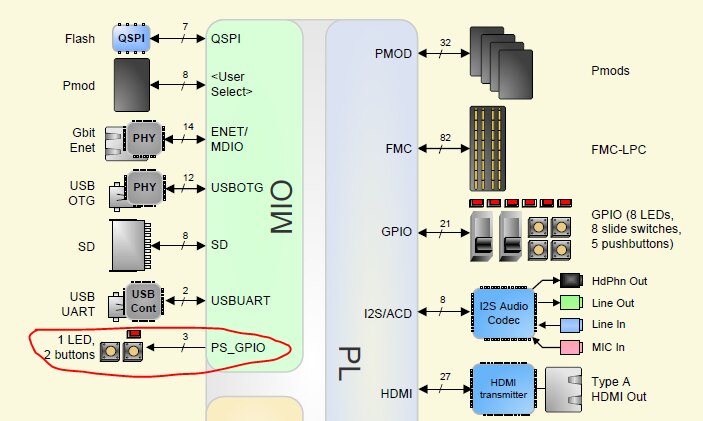
    According to the "Figure 1 – ZedBoard Block Diagram", "ZedBoard (ZynqTm Evaluation and Development) Hardware User’s Guide "  as below,


    image

     PS GPIO is connected to 1 LED and 2 buttons.  I think the "1 LED" is LD9, am I right?


    And how can I find that settings in Vivado or SDK ?


    Best regards,

    feng

    • Cancel
    • Vote Up 0 Vote Down
    • Sign in to reply
    • Verify Answer
    • Cancel
  • Former Member
    0 Former Member over 9 years ago in reply to Former Member

    Can you see the pictures now?


    /sites/default/files/u112956/emio.PNG

    • Cancel
    • Vote Up 0 Vote Down
    • Sign in to reply
    • Verify Answer
    • Cancel
  • Former Member
    0 Former Member over 9 years ago in reply to Former Member

    Hi, guys.


    I found this answer solved my problem. 

    http://zedboard.org/content/emio-pins

    • Cancel
    • Vote Up 0 Vote Down
    • Sign in to reply
    • Reject Answer
    • Cancel
element14 Community

element14 is the first online community specifically for engineers. Connect with your peers and get expert answers to your questions.

  • Members
  • Learn
  • Technologies
  • Challenges & Projects
  • Products
  • Store
  • About Us
  • Feedback & Support
  • FAQs
  • Terms of Use
  • Privacy Policy
  • Legal and Copyright Notices
  • Sitemap
  • Cookies

An Avnet Company © 2026 Premier Farnell Limited. All Rights Reserved.

Premier Farnell Ltd, registered in England and Wales (no 00876412), registered office: Farnell House, Forge Lane, Leeds LS12 2NE.

ICP 备案号 10220084.

Follow element14

  • X
  • Facebook
  • linkedin
  • YouTube