


I've setup a minimal project in Vivado, basically I only have the a GPIO block connected to one of the RGB LEDs on the board:
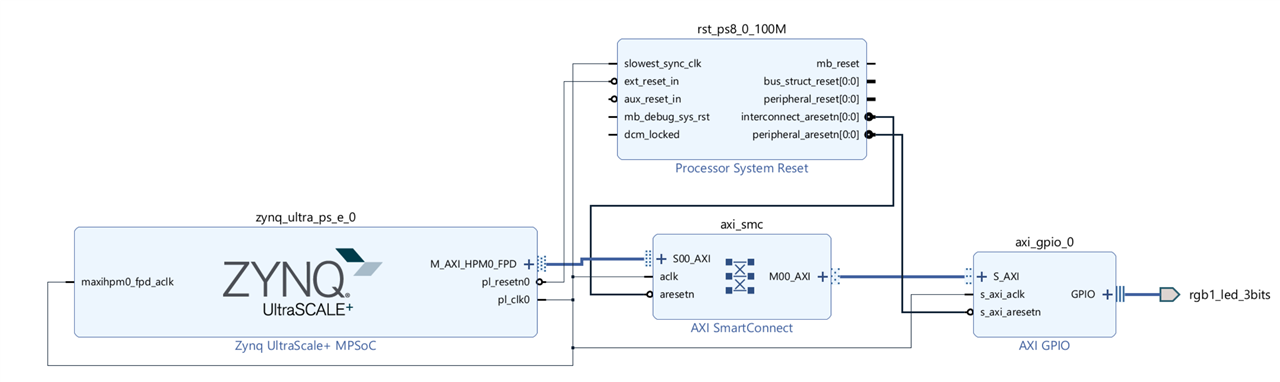
Next, I tried modifying an example code so I can toggle the LED, but once I execute a command that tried reading or writing to the PL side (AXI?) the debugging halts and I must stop debugging to reset the system. The hardware export from Vivado includes the bit file.
Here is the code that I'm running, it will hang on: XGpio_SetDataDirection(&Gpio, 1, 0);
I'll appreciate it greatly if anyone could point out what's wrong here. I'm using the latest Vivado & Vitis.
#include "xparameters.h"
#include "xgpio.h"
#include "xstatus.h"
#include "xplatform_info.h"
#include <xil_io.h>
#include <xil_printf.h>
#define XGPIOPS_BASEADDR    XPAR_XGPIO_0_BASEADDR

#define LED_DELAY       10000000

#define LED_MAX_BLINK       0x10    /* Number of times the LED Blinks */

#define printf          xil_printf  /* Smalller foot-print printf */

static int GpioOutputExample(void);
static int GpioInputExample(u32 *DataRead);
#ifndef SDT
int GpioPolledExample(u16 DeviceId, u32 *DataRead);
#else
int GpioPolledExample(UINTPTR BaseAddress, u32 *DataRead);
#endif

static u32 Input_Pin; /* Switch button */
static u32 Output_Pin; /* LED button */

XGpio Gpio; /* The driver instance for GPIO Device. */

/*****************************************************************************/
/**
*
* Main function to call the example.
*
*
* @return
*       - XST_SUCCESS if the example has completed successfully.
*       - XST_FAILURE if the example has failed.
*
* @note     None
*
******************************************************************************/
int main(void)
{
    int Status;
    u32 InputData;

    printf("GPIO Polled Mode Example Test \r\n");
#ifndef SDT
    Status = GpioPolledExample(GPIO_DEVICE_ID, &InputData);
#else
    Status = GpioPolledExample(XGPIOPS_BASEADDR, &InputData);
#endif
    if (Status != XST_SUCCESS) {
        printf("GPIO Polled Mode Example Test Failed\r\n");
        return XST_FAILURE;
    }

    printf("Data read from GPIO Input is  0x%x \n\r", (int)InputData);
    printf("Successfully ran GPIO Polled Mode Example Test\r\n");
    return XST_SUCCESS;
}

/*****************************************************************************/
/**
*
* The purpose of this function is to illustrate how to use the GPIO driver to
* turn on/off an LED and read the inputs using the pin APIs.
*
* @param    DeviceId is the XPAR_<GPIO_instance>_DEVICE_ID value from
*       xparameters.h
* @param    DataRead is the pointer where the data read from GPIO Input is
*       returned.
*
* @return
*       - XST_SUCCESS if the example has completed successfully.
*       - XST_FAILURE if the example has failed.
*
* @note     This function will not return if the test is running.
*
******************************************************************************/
#ifndef SDT
int GpioPolledExample(u16 DeviceId, u32 *DataRead)
#else
int GpioPolledExample(UINTPTR BaseAddress, u32 *DataRead)
#endif
{
    int Status;
    XGpio_Config *ConfigPtr;
    int Type_of_board;

    /* Initialize the GPIO driver. */
#ifndef SDT
    //ConfigPtr = XGpio_LookupConfig(GPIO_DEVICE_ID);
#else
    ConfigPtr = XGpio_LookupConfig(BaseAddress);
#endif
    Type_of_board = XGetPlatform_Info();
    switch (Type_of_board) {
        case XPLAT_ZYNQ_ULTRA_MP:
            Input_Pin = 1;
            Output_Pin = 0;
            break;

        case XPLAT_ZYNQ:
            Input_Pin = 14;
            Output_Pin = 10;
            break;
#ifdef versal
        case XPLAT_VERSAL:
            /* Accessing PMC GPIO by setting field to 1 */
            Gpio.PmcGpio =  1;
            Input_Pin    = 56;
            Output_Pin   = 52;
            break;
#endif
    }

    Status = XGpio_CfgInitialize(&Gpio, ConfigPtr,
                       ConfigPtr->BaseAddress);
    if (Status != XST_SUCCESS) {
        return XST_FAILURE;
    }

    Status = XGpio_Initialize(&Gpio, XPAR_XGPIO_0_BASEADDR);

    if (Status != XST_SUCCESS) {
        return XST_FAILURE;
    }

    /* Run the Output Example. */
    Status = GpioOutputExample();
    if (Status != XST_SUCCESS) {
        return XST_FAILURE;
    }

    return XST_SUCCESS;
}

/*****************************************************************************/
/**
*
* This function does a minimal test on the GPIO device configured as OUTPUT.
*
* @param    None.
*
* @return   - XST_SUCCESS if the example has completed successfully.
*       - XST_FAILURE if the example has failed.
*
* @note     None.
*
****************************************************************************/
static int GpioOutputExample(void)
{
    u32 Data;
    volatile int Delay;
    u32 LedLoop;

    /*
     * Set the direction for the pin to be output and
     * Enable the Output enable for the LED Pin.
     */

    XGpio_SetDataDirection(&Gpio, 1, 0);

    /* Set the GPIO output to be low. */
    XGpio_DiscreteWrite(&Gpio, 1, 0);


    for (LedLoop = 0; LedLoop < LED_MAX_BLINK; LedLoop ++) {

#ifndef __SIM__
        /* Wait a small amount of time so the LED is visible. */
        for (Delay = 0; Delay < LED_DELAY; Delay++);

#endif
        /* Set the GPIO Output to High. */
        XGpio_DiscreteWrite(&Gpio, 1, 0b111);
        /*
         * Read the state of the data and verify. If the data
         * read back is not the same as the data written then
         * return FAILURE.
         */


#ifndef __SIM__
        /* Wait a small amount of time so the LED is visible. */
        for (Delay = 0; Delay < LED_DELAY; Delay++);

#endif

        /* Clear the GPIO Output. */
        XGpio_DiscreteWrite(&Gpio, 1, 0);

        /*
         * Read the state of the data and verify. If the data
         * read back is not the same as the data written then
         * return FAILURE.
         */

    }
    return XST_SUCCESS;
}