element14 Community
element14 Community
    Register Log In
  • Site
  • Search
  • Log In Register
  • Community Hub
    Community Hub
    • What's New on element14
    • Feedback and Support
    • Benefits of Membership
    • Personal Blogs
    • Members Area
    • Achievement Levels
  • Learn
    Learn
    • Ask an Expert
    • eBooks
    • element14 presents
    • Learning Center
    • Tech Spotlight
    • STEM Academy
    • Webinars, Training and Events
    • Learning Groups
  • Technologies
    Technologies
    • 3D Printing
    • FPGA
    • Industrial Automation
    • Internet of Things
    • Power & Energy
    • Sensors
    • Technology Groups
  • Challenges & Projects
    Challenges & Projects
    • Design Challenges
    • element14 presents Projects
    • Project14
    • Arduino Projects
    • Raspberry Pi Projects
    • Project Groups
  • Products
    Products
    • Arduino
    • Avnet & Tria Boards Community
    • Dev Tools
    • Manufacturers
    • Multicomp Pro
    • Product Groups
    • Raspberry Pi
    • RoadTests & Reviews
  • About Us
  • Store
    Store
    • Visit Your Store
    • Choose another store...
      • Europe
      •  Austria (German)
      •  Belgium (Dutch, French)
      •  Bulgaria (Bulgarian)
      •  Czech Republic (Czech)
      •  Denmark (Danish)
      •  Estonia (Estonian)
      •  Finland (Finnish)
      •  France (French)
      •  Germany (German)
      •  Hungary (Hungarian)
      •  Ireland
      •  Israel
      •  Italy (Italian)
      •  Latvia (Latvian)
      •  
      •  Lithuania (Lithuanian)
      •  Netherlands (Dutch)
      •  Norway (Norwegian)
      •  Poland (Polish)
      •  Portugal (Portuguese)
      •  Romania (Romanian)
      •  Russia (Russian)
      •  Slovakia (Slovak)
      •  Slovenia (Slovenian)
      •  Spain (Spanish)
      •  Sweden (Swedish)
      •  Switzerland(German, French)
      •  Turkey (Turkish)
      •  United Kingdom
      • Asia Pacific
      •  Australia
      •  China
      •  Hong Kong
      •  India
      • Japan
      •  Korea (Korean)
      •  Malaysia
      •  New Zealand
      •  Philippines
      •  Singapore
      •  Taiwan
      •  Thailand (Thai)
      • Vietnam
      • Americas
      •  Brazil (Portuguese)
      •  Canada
      •  Mexico (Spanish)
      •  United States
      Can't find the country/region you're looking for? Visit our export site or find a local distributor.
  • Translate
  • Profile
  • Settings
GIZMO 2
  • Products
  • Dev Tools
  • Single-Board Computers
  • GIZMO 2
  • More
  • Cancel
GIZMO 2
Forum Ubuntu Linux?
  • Blog
  • Forum
  • Documents
  • Files
  • Members
  • Mentions
  • Sub-Groups
  • Tags
  • More
  • Cancel
  • New
Join GIZMO 2 to participate - click to join for free!
Actions
  • Share
  • More
  • Cancel
Forum Thread Details
  • State Not Answered
  • Replies 18 replies
  • Subscribers 12 subscribers
  • Views 2298 views
  • Users 0 members are here
Related

Ubuntu Linux?

Former Member
Former Member over 10 years ago

If I don't find a solution on installing Windows 7, I'll have to try something else as I have a deadline. Has anyone tried Ubuntu Linux?

  • Sign in to reply
  • Cancel

Top Replies

  • Former Member
    Former Member over 10 years ago in reply to bobalexander +1
    It's odd that the guide is not easily accessible from the main pages. Or am I using the site the wrong way? Anyway, thank you. I was extremely frustrated at this point, just straight up destroyed that…
  • shabaz
    shabaz over 10 years ago in reply to Former Member +1
    Hi Mark, You can install the latest drivers after the Linux install. The steps to install the driver are described in this blog post , navigate to the section "Upgrading the Graphics Driver for the Gizmo…
  • Former Member
    Former Member over 10 years ago in reply to shabaz +1
    I don't really understand why the documentation is so lacking, but I'm glad there's a forum like this to the rescue. Anyway, install was successful. The video playback and WebGL test were quite slow for…
Parents
  • Former Member
    0 Former Member over 10 years ago

    Still no luck installing the graphics driver.

    • Cancel
    • Vote Up 0 Vote Down
    • Sign in to reply
    • Verify Answer
    • Cancel
Reply
  • Former Member
    0 Former Member over 10 years ago

    Still no luck installing the graphics driver.

    • Cancel
    • Vote Up 0 Vote Down
    • Sign in to reply
    • Verify Answer
    • Cancel
Children
  • shabaz
    0 shabaz over 10 years ago in reply to Former Member

    Hi Mark,


    Am traveling so response is a bit brief but could you check the file to see what it states is the issue?

    • Cancel
    • Vote Up 0 Vote Down
    • Sign in to reply
    • Verify Answer
    • Cancel
  • Former Member
    0 Former Member over 10 years ago in reply to shabaz

    And so I did. The log said I had some dependencies missing and explained how to install them.

    Oddly I had to repeat this several times as each time the log mentioned new dependencies I was missing.

    In the end I got the installer, waited for 20 minutes and did "aticonfig --initial" as the guide said.


    But after rebooting Ubuntu is in "limited graphics mode" and I can't see what it's says because of how small the texts are.

    I think it says "What would you like to do" and there are 4 options. Mouse is not working...


    EDIT: Okay, I'm back to step 1. I uninstalled the proprietary driver and could go to the usual desktop again. How to recover from 14.04 fglrx driver install failure? - Ask Ubuntu

    However, I still don't have the driver for my OpenGL program to run faster and the whole system is slow, with 90%+ of CPU taken by default.

    Not to mention, now I'm greeted with a very vague ''an error has happened'' message each time, forcing me to reinstall the OS.

    See, this is why I wanted Windows to work...

    • Cancel
    • Vote Up 0 Vote Down
    • Sign in to reply
    • Verify Answer
    • Cancel
  • shabaz
    0 shabaz over 10 years ago in reply to Former Member

    Hi Mark,


    There are multiple issues here.

    Mark Legault wrote:


    And so I did. The log said I had some dependencies missing and explained how to install them.

    Oddly I had to repeat this several times as each time the log mentioned new dependencies I was missing.

    I think the log file just appends, it may not overwrite, so you're seeing historical messages there too. These can be deleted if you like once you've resolved them.

    Unfortunately with Linux this is a typical thing; you may well have to update or install certain versions of libraries before you can install other software. It can be frustrating but is also powerful; the vast amount of libraries means you can do virtually anything you like with Linux with little coding effort if you find the right libraries for your desired tasks, and bugs can be fixed in libraries independently by other people, saving you effort.


    But after rebooting Ubuntu is in "limited graphics mode" and I can't see what it's says because of how small the texts are.

    I think it says "What would you like to do" and there are 4 options. Mouse is not working...


    I used a normal logitech mouse, it worked fine. Could you try an alternate mouse (perhaps a wired one if you're currently using a wireless one), and also do you have anything else plugged in that could have high current draw causing (say) power supply issues? This is just a guess though - there could also be some hardware fault I suppose. A different USB socket should eliminate that but I'm sure you've already tried that.

    Mark Legault wrote:


    EDIT: Okay, I'm back to step 1. I uninstalled the proprietary driver and could go to the usual desktop again. How to recover from 14.04 fglrx driver install failure? - Ask Ubuntu

    However, I still don't have the driver for my OpenGL program to run faster and the whole system is slow, with 90%+ of CPU taken by default.

    With the driver uninstalled, there will be no acceleration and part of the CPU consumption may be due to that. There is usually a README or INSTALL file or some other documentation with the driver that may provide the answer, but otherwise all I can suggest is to examine the log file mentioned earlier and try to resolve the messages that appear there. It is a good 20 minutes or more delay while it gets installed, and should not be aborted.

    Regarding the 90% CPU thing, there are Linux tools that could help, e.g. 'top' and 'ps' to examine what processes are running and what is hogging CPU. Without using them, it is just guesswork I'm afraid : (


    Not to mention, now I'm greeted with a very vague ''an error has happened'' message each time, forcing me to reinstall the OS.

    There may be a log in /var/log or a subfolder, it is worth checking to see which file was last modified in that folder, and seeing if some more useful error message was appended to a file there.


    See, this is why I wanted Windows to work...


    Certainly more of the community will have experience with Linux on Gizmo 2 than Windows, so if you need community support then on balance of probabilities you may get more of a response (hopefully useful, but not always the case since we're all fallible) if you go with Linux. If you use Windows, then probably you may need to do much more of the troubleshooting and problem-solving, or seek assistance from Gizmosphere or Microsoft or from some embedded systems consultancy, or Windows-related forums. I am not best-placed to suggest the optimum option (Linux or Windows or even some other platform), it is really down to you.

    • Cancel
    • Vote Up 0 Vote Down
    • Sign in to reply
    • Verify Answer
    • Cancel
  • Former Member
    0 Former Member over 10 years ago in reply to shabaz

    Nothing fast is connected to the Gizmo. In fact, only keyboard, mouse and the mSATA.


    OK, so this is what I did:


    1) Uninstalled, installed Lubuntu.


    2) Installed the proprietary GPU driver from the menu.


    Seems to run the OpenGL apps.


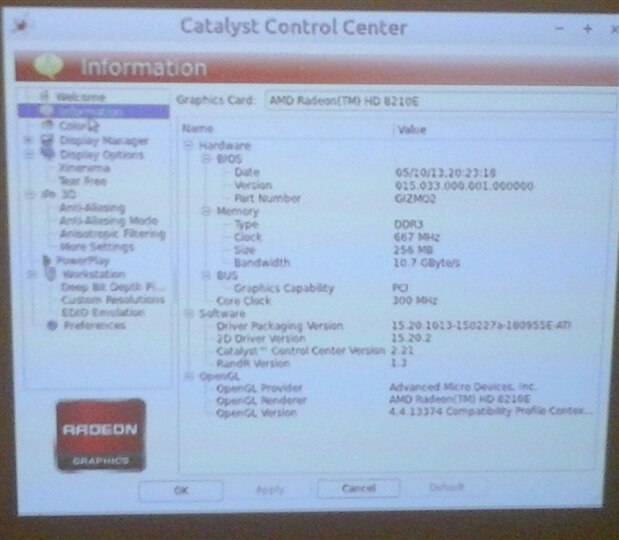
    typing ''fglrxinfo'' in the terminal gives this:


    [code]

    OpenGL vendor string: Advanced Micro Devices, Inc.

    OpenGL renderer string: AMD Radeon(TM) HD 8210E

    OpenGL version string: 4.4.13374 Compatibility Profile Context 15.20.1013

    [/code]


    Is there any reason to download the driver from the AMD site manually and do it the other way?

    • Cancel
    • Vote Up 0 Vote Down
    • Sign in to reply
    • Verify Answer
    • Cancel
  • shabaz
    0 shabaz over 10 years ago in reply to Former Member

    Hi Mark,


    I don't know. If it works for you, great. I did need to install a driver for my requirement, I used Ubuntu, and the process mentioned worked for me.

    However if you're succeeding without updating the driver, then stick with whatever works.

    • Cancel
    • Vote Up 0 Vote Down
    • Sign in to reply
    • Verify Answer
    • Cancel
  • Former Member
    0 Former Member over 10 years ago in reply to shabaz

    It did work, but I dont know if its the correct driver or as optimized.

    Maybe comparing the output strings of ''fglrxinfo'' will answer that?

    • Cancel
    • Vote Up 0 Vote Down
    • Sign in to reply
    • Verify Answer
    • Cancel
  • Former Member
    0 Former Member over 10 years ago in reply to Former Member

    image

    Here's what it shows for me. Can you compare to yours?

    • Cancel
    • Vote Up 0 Vote Down
    • Sign in to reply
    • Verify Answer
    • Cancel
element14 Community

element14 is the first online community specifically for engineers. Connect with your peers and get expert answers to your questions.

  • Members
  • Learn
  • Technologies
  • Challenges & Projects
  • Products
  • Store
  • About Us
  • Feedback & Support
  • FAQs
  • Terms of Use
  • Privacy Policy
  • Legal and Copyright Notices
  • Sitemap
  • Cookies

An Avnet Company © 2025 Premier Farnell Limited. All Rights Reserved.

Premier Farnell Ltd, registered in England and Wales (no 00876412), registered office: Farnell House, Forge Lane, Leeds LS12 2NE.

ICP 备案号 10220084.

Follow element14

  • X
  • Facebook
  • linkedin
  • YouTube