element14 Community
element14 Community
    Register Log In
  • Site
  • Search
  • Log In Register
  • Community Hub
    Community Hub
    • What's New on element14
    • Feedback and Support
    • Benefits of Membership
    • Personal Blogs
    • Members Area
    • Achievement Levels
  • Learn
    Learn
    • Ask an Expert
    • eBooks
    • element14 presents
    • Learning Center
    • Tech Spotlight
    • STEM Academy
    • Webinars, Training and Events
    • Learning Groups
  • Technologies
    Technologies
    • 3D Printing
    • FPGA
    • Industrial Automation
    • Internet of Things
    • Power & Energy
    • Sensors
    • Technology Groups
  • Challenges & Projects
    Challenges & Projects
    • Design Challenges
    • element14 presents Projects
    • Project14
    • Arduino Projects
    • Raspberry Pi Projects
    • Project Groups
  • Products
    Products
    • Arduino
    • Avnet & Tria Boards Community
    • Dev Tools
    • Manufacturers
    • Multicomp Pro
    • Product Groups
    • Raspberry Pi
    • RoadTests & Reviews
  • About Us
    About the element14 Community
  • Store
    Store
    • Visit Your Store
    • Choose another store...
      • Europe
      •  Austria (German)
      •  Belgium (Dutch, French)
      •  Bulgaria (Bulgarian)
      •  Czech Republic (Czech)
      •  Denmark (Danish)
      •  Estonia (Estonian)
      •  Finland (Finnish)
      •  France (French)
      •  Germany (German)
      •  Hungary (Hungarian)
      •  Ireland
      •  Israel
      •  Italy (Italian)
      •  Latvia (Latvian)
      •  
      •  Lithuania (Lithuanian)
      •  Netherlands (Dutch)
      •  Norway (Norwegian)
      •  Poland (Polish)
      •  Portugal (Portuguese)
      •  Romania (Romanian)
      •  Russia (Russian)
      •  Slovakia (Slovak)
      •  Slovenia (Slovenian)
      •  Spain (Spanish)
      •  Sweden (Swedish)
      •  Switzerland(German, French)
      •  Turkey (Turkish)
      •  United Kingdom
      • Asia Pacific
      •  Australia
      •  China
      •  Hong Kong
      •  India
      •  Japan
      •  Korea (Korean)
      •  Malaysia
      •  New Zealand
      •  Philippines
      •  Singapore
      •  Taiwan
      •  Thailand (Thai)
      •  Vietnam
      • Americas
      •  Brazil (Portuguese)
      •  Canada
      •  Mexico (Spanish)
      •  United States
      Can't find the country/region you're looking for? Visit our export site or find a local distributor.
  • Translate
  • Profile
  • Settings
BeagleBoard
  • Products
  • Dev Tools
  • Single-Board Computers
  • BeagleBoard
  • More
  • Cancel
BeagleBoard
Blog BBB - Building a DAC
  • Blog
  • Forum
  • Documents
  • Quiz
  • Polls
  • Files
  • Members
  • Mentions
  • Sub-Groups
  • Tags
  • More
  • Cancel
  • New
Join BeagleBoard to participate - click to join for free!
  • Share
  • More
  • Cancel
Group Actions
  • Group RSS
  • More
  • Cancel
Engagement
  • Author Author: shabaz
  • Date Created: 6 Jul 2013 7:19 PM Date Created
  • Views 16222 views
  • Likes 8 likes
  • Comments 126 comments
  • onsemi
  • audio
  • dac
  • bbb
  • texas_instruments
  • bb_black
  • beagle_bone_black
  • ti
Related
Recommended

BBB - Building a DAC

shabaz
shabaz
6 Jul 2013

Introduction

This project was about getting audio out of the BeagleBone Black. The aim was to have stereo audio, at least as good as an iPod. See further below for the circuit, and also a video showing it working.

Later, this project was used to build a PCB design (see below for the link to this part 2, and then the PCB was used to make a home Sonos-type hi-fi audio player (see the link to part 3 below).


The BBB has an on-board I2S interface, which makes interfacing an external DAC easy. The I2S interface is connected from the AM3359 processor to the HDMI chip (TDA19988) but it is not required for HDMI to be used in order to make use of the I2S interface. The I2S interface is brought out to some pins on port P9 (see here for details). It was encouraging that Technoshaman and Donald Miller had some success with the interface, so I wanted to try it out and I got some time today.


Part 2 to this post, which implements the prototype, can be found by clicking here.
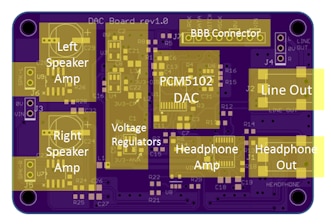
image

Part 3 implements a complete design in an enclosure for a Sonos-like solution.
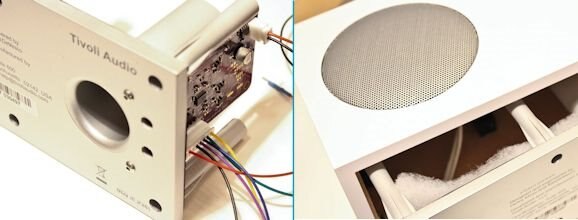
image

See Creating an Internet Radio for a complete project by the EAGLE team including board layouts
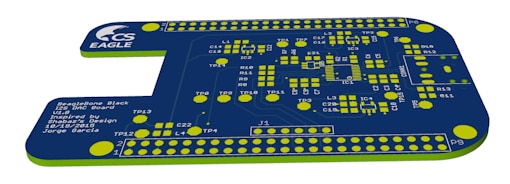
image


Parts Selection

Since the interface is capable of 24-bit/192kHz audio, it was worthwhile picking a nice DAC. A good but not over-the-top device seemed to be the Texas Instrument's PCM5101 which is nice because it has reasonable specs and also provides a built-in charge pump so that it can function from a single supply. A headphone amp was connected, and this was ON Semi's NCP2811A. The combination of PCM5101 (actually my prototype used PCM5101A which can also function from 1.8V, but this was not needed)  and NCP2811A was chosen so that the entire circuit could operate from the BBB supply if desired, even if it was from a Li-Ion battery that was powering the BBB, and for low noise and distortion. The only problem is that the PCM5101 has quite a high output (clearly a good thing!) but the audio amp minimum recommended gain is 1 and it cannot meet the required output voltage, and it means that it will distort at high volume. So, at a lower volume (and lower SNR) it will be fine, and I prefer this particular amp because of the very low distortion. The ON semi datasheet was sparse though.


Building It

This is the DAC prototype:
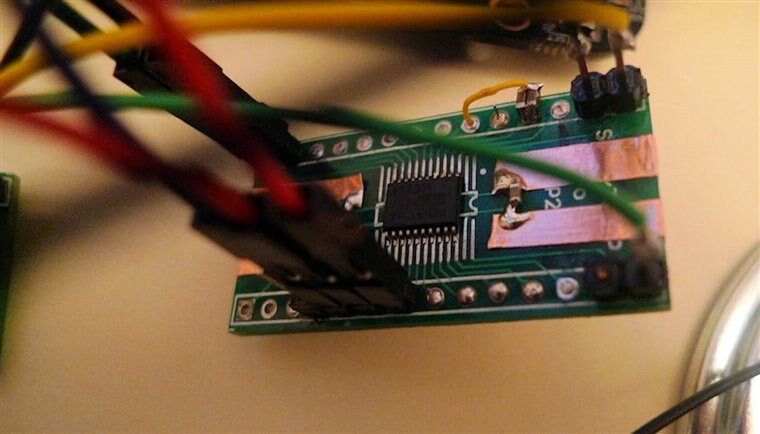
image

This is the whole thing connected up:
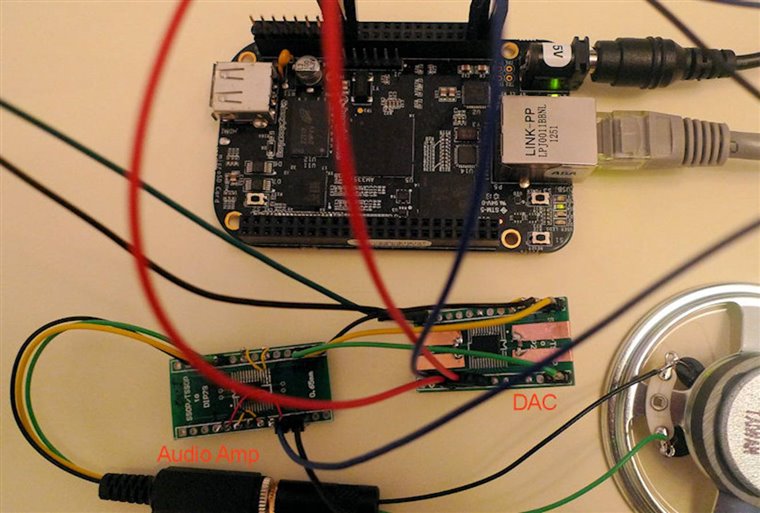
image

This is the rear of the board - a bit messier! It was built on a SMD to DIP adapter board with some copper tape for supply rails:
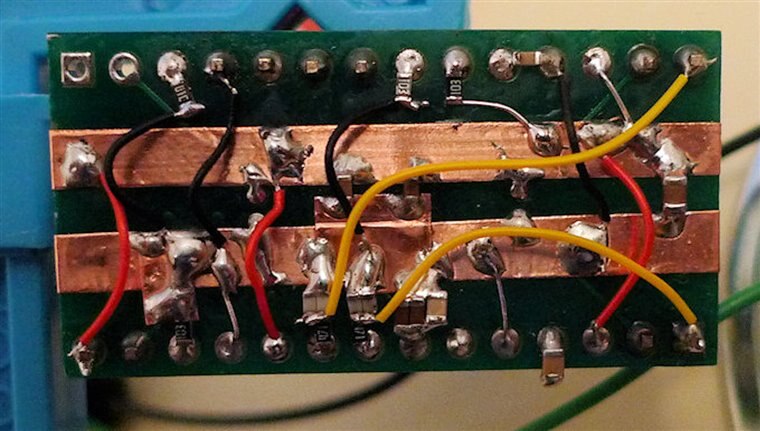
image

This is the audio amp - not a lot to it, since it is so integrated.
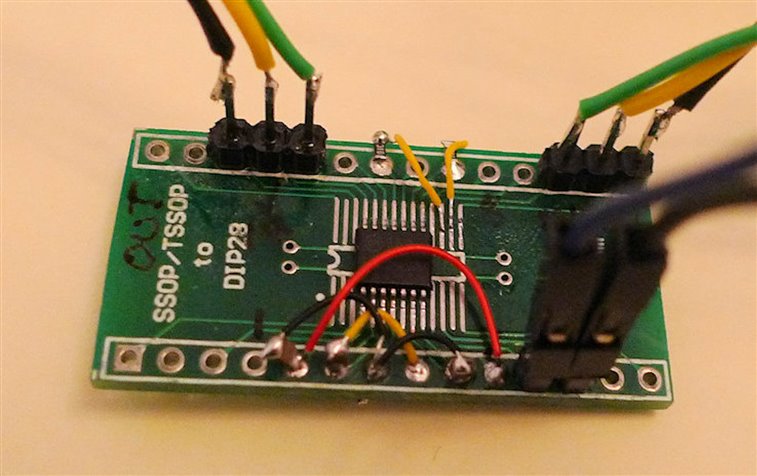
image


Testing It

I made a recording, but excuse the quality. The audio is from a small 64 ohm speaker picked up by a simple camera in-built microphone so it sounds bad, but connecting to headphones is a different story - it sounds as good as an ipod (although this is subjective - I don't have a way to measure). Another thing I still need to check is that originally I thought the data was read on the falling edge of the bitclock on the BBB, but I2S specifies the opposite. Maybe I made a mistake in my initial observations (I have not had a chance to re-check), or maybe it changed in a build. But the circuit as shown here works for me.


This is running on an not-recent Angstrom downloaded build (maybe a few weeks old image), and I still hear some very slight audio issues - it sounds like perhaps a break for a few tens of milliseconds occasionally, only if you're listening closely. I really hope it is resolved in a build soon (or maybe it is due to ffmpeg - perhaps avconv gives better results).

EDIT: I've since been using mplayer (command line is mplayer -ao alsa -volume 4 AmyWinehouse-BackToBlack.mp3  and either I'm not noticing any audio issues or they have disappeared). I've concluded it sounds at least as capable as my old ipod touch, maybe better).


I played audio using the command line:

ffmpeg -i AmyWinehouse-YouKnowImNoGood.mp3 -f alsa "default:CARD=Black" -re -vol 150

and it reported the stream as:

Stream #0.0: Audio: pcm_s16le, 44100 Hz, stereo, s16, 1411 kb/s


You don't have permission to edit metadata of this video.
Edit media
x
image
Upload Preview
image


Circuit Diagram

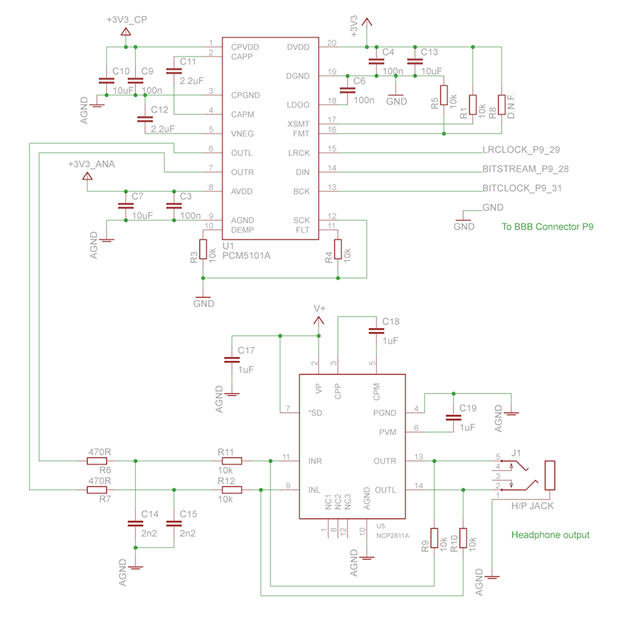
This is the circuit. All the 3.3V supplies were connected together for the prototype (I wouldn't do that for real, although it sounded very good in my limited tests). The amplifier V+ can be connected to 3.3V or the 5V supply (or the Li-Ion battery directly).

Note 16th Jan 2014: See the comments section below for more detail; the SCK pin on the PCM5101A was disconnected from 0V and instead connected to the BBB P9 pin 25. This will provide the lowest jitter by disabling the DAC's internal PLL. A sample capture of the audio quality (captured from the headphone output of the NCP2811A, just to give an approximate idea of what it sounds like from headphones) is attached to the post below, in the zip file dac-output.zip. More info on it in the comments section below.

Note 2: Please add a logic inverter to the bitclock connection. For more detail, see the comments below (search for the word 'bitclock' to make it easier to find). See the part 2 blog post, and the attached file there called dac-documentation.zip for the circuit diagram, showing the bitclock inversion. More recent BBB images may not need it, but it was certainly needed for the images I tested with.
image


Experiments with FLAC

I've also tried a FLAC file, but I'm hitting some limitation with ffmpeg it seems, and it picks a 16-bit format when it ought to be 24-bit. Meanwhile, avconv I couldn't get to work for MP3 or FLAC (it reported 'av_interleaved_write_frame(): Resource temporarily unavailable'). If anyone knows, any tips on how to play FLAC at 24-bit would be gratefully appreciated.


root@beaglebone:~# ffmpeg -i Taxman_2009_Digital_Remaster.flac -f alsa "default:CARD=Black" -re -vol 5
ffmpeg version v0.8.4, Copyright (c) 2000-2012 the Libav developers
  built on May 20 2013 13:00:42 with gcc 4.7.3 20130205 (prerelease)
This program is not developed anymore and is only provided for compatibility. Use avconv instead (see Changelog for the list of incompatible changes).
[flac @ 0x2da80] max_analyze_duration reached
Input #0, flac, from 'Taxman_2009_Digital_Remaster.flac':
  Metadata:
    ORIGREFERENCE   : 6C05C9F79EE74052A7991B9669B98533
    ORIGDATE        : 2009:09:14
    ORIGTIME        : 11:57:01
    TIMEREFERENCE   : 5292000
    CODINGHISTORY   : A=PCM,F=44100,W=24,M=stereo,T=SADiE5
    ORGANIZATION    : EMI
    TITLE           : Taxman
    track           : 1
    ARTIST          : The Beatles
    ALBUM           : Revolver (24 BIT Remastered)
    DATE            : 2009
  Duration: 00:02:37.85, bitrate: 1892 kb/s
    Stream #0.0: Audio: flac, 44100 Hz, 2 channels, s32
Incompatible sample format 's32' for codec 'pcm_s16le', auto-selecting format 's16'
Output #0, alsa, to 'default:CARD=Black':
  Metadata:
    ORIGREFERENCE   : 6C05C9F79EE74052A7991B9669B98533
    ORIGDATE        : 2009:09:14
    ORIGTIME        : 11:57:01
    TIMEREFERENCE   : 5292000
    CODINGHISTORY   : A=PCM,F=44100,W=24,M=stereo,T=SADiE5
    ORGANIZATION    : EMI
    TITLE           : Taxman
    track           : 1
    ARTIST          : The Beatles
    ALBUM           : Revolver (24 BIT Remastered)
    DATE            : 2009
    encoder         : Lavf53.21.0
    Stream #0.0: Audio: pcm_s16le, 44100 Hz, 2 channels, s16, 1411 kb/s
Stream mapping:
  Stream #0.0 -> #0.0

Attachments:
dac-output.zip
  • Sign in to reply

Top Comments

  • Former Member
    Former Member over 12 years ago in reply to Former Member +2
    Current test rig. BBB ($45), cs4271 on breadboard (about $15 parts and dozens of hours of labor), Cary Audio SE-1 amp (about $1K), pair of B&W DM302 speakers (about $200). I assembled this system that…
  • shabaz
    shabaz over 8 years ago in reply to shabaz +2
    Also, unrelated, but for after you have resolved the device tree issue, I just wanted to confirm, if you're following the circuit, make sure you include the 'bitclock inversion' functionality. The BBB…
  • shabaz
    shabaz over 8 years ago in reply to jithu_element14 +2
    Hi Jithu, Just to follow up on this, I re-tried on another image too, but still no luck. I've posted a request for help on the Beagleboard.org BBB-Wireless forum, in case anyone else has had success. Reproducing…
  • shabaz
    shabaz over 8 years ago in reply to jithu_element14

    Hi Jithu,


    I tried on a BeagleBone Black Wireless, and I couldn't get it to work. The old slot system is changed, now they use some 'U-Boot Overlay' method. So I tried that, and in /var/log/messages I see:

    [pulseaudio] module-udev-detect.c: Tried to configure /devices/platform/sound/sound/card0 (alsa_card.platform-sound) more often than 5 times in 10s

    but I couldn't find out the reason. The syslog has lots of junk too, whenever I try to use the audio commands.

    I had made these changes to uEnv.sh:

    root@beaglebone:/boot# diff uEnv.txt_orig uEnv.txt
    26c26
    < #dtb_overlay=/lib/firmware/.dtbo
    ---
    > dtb_overlay=/lib/firmware/jorge-audio-cape-00A0.dtbo
    30c30
    < #disable_uboot_overlay_video=1
    ---
    > disable_uboot_overlay_video=1


    So, in summary, there are still configuration issues. But I don't know the solution. Your best bet is to grab the debug (messages, syslog) and see if there is anything google'able there. There is also the BeagleBone support forum here: https://groups.google.com/forum/?fromgroups#!categories/beagleboard/beaglebone-black in case anyone there recognises the issue. I'm just not familiar enough with the recent changes to the device tree stuff. It's a shame, a lot of the older documentation does not work because of these changes.

    • Cancel
    • Vote Up +1 Vote Down
    • Sign in to reply
    • More
    • Cancel
  • jithu_element14
    jithu_element14 over 8 years ago in reply to shabaz

    Hi Shabaz,

    I tried to flash 8.7 debian onto BBB wireless and just tried to echo capes to slots file without doing any modifications in uEnv.txt file.(basically trying to load overlays temporarily.once rebooted,the overlays will be automatically unloaded also.

    root@beaglebone:/sys/devices/platform/bone_capemgr# cat slots
    0: PF----  -1
    1: PF----  -1
    2: PF----  -1
    3: PF----  -1
    root@beaglebone:/sys/devices/platform/bone_capemgr# echo BB-UART1 > slots
    [  117.395335] bone_capemgr bone_capemgr: part_number 'BB-UART1', version 'N/A'
    [  117.402606] bone_capemgr bone_capemgr: slot #4: override
    [  117.408156] bone_capemgr bone_capemgr: Using override eeprom data at slot 4
    [  117.415293] bone_capemgr bone_capemgr: slot #4: 'Override Board Name,00A0,Override Manuf,BB-UART1'
    [  117.457308] 48022000.serial: ttyS1 at MMIO 0x48022000 (irq = 197, base_baud = 3000000) is a 8250
    [  117.484445] bone_capemgr bone_capemgr: slot #4: dtbo 'BB-UART1-00A0.dtbo' loaded; overlay id #0
    root@beaglebone:/sys/devices/platform/bone_capemgr# cat slots
    0: PF----  -1
    1: PF----  -1
    2: PF----  -1
    3: PF----  -1
    4: P-O-L-   0 Override Board Name,00A0,Override Manuf,BB-UART1
    soot@beaglebone:/sys/devices/platform/bone_capemgr# echo jorge-audio-cape > slot
    [  200.366926] bone_capemgr bone_capemgr: part_number 'jorge-audio-cape', version 'N/A'
    [  200.375183] bone_capemgr bone_capemgr: slot #5: override
    [  200.380728] bone_capemgr bone_capemgr: Using override eeprom data at slot 5
    [  200.387858] bone_capemgr bone_capemgr: slot #5: 'Override Board Name,00A0,Override Manuf,jorge-audio-cape'
    [  200.415656] __of_adjust_tree_phandle_references: Illegal property (size) 'fixup' @/__local_fixups__
    [  200.424952] bone_capemgr bone_capemgr: slot #5: Failed to resolve tree
    -bash: echo: write error: Invalid argument
    root@beaglebone:/sys/devices/platform/bone_capemgr# cat slots
    0: PF----  -1
    1: PF----  -1
    2: PF----  -1
    3: PF----  -1
    4: P-O-L-   0 Override Board Name,00A0,Override Manuf,BB-UART1

    So as you can see when I tried loading BB-UART1,it got loaded successfully but when I tried loading this particular audio-cape,it gives some errors.Iam unable to figure out this error. What do you suggest? may be any errors in compiling the .dts file to .dtbo file?

    • Cancel
    • Vote Up 0 Vote Down
    • Sign in to reply
    • More
    • Cancel
  • jithu_element14
    jithu_element14 over 8 years ago in reply to shabaz

    Sure.Thanks alot.

    Jithu

    • Cancel
    • Vote Up 0 Vote Down
    • Sign in to reply
    • More
    • Cancel
  • shabaz
    shabaz over 8 years ago in reply to jithu_element14

    Hi Jithu,


    No worries, I didn't understand the approach to debugging, by changing hardware, because the issue seemed to be device tree related. Now I understand.

    That's interesting. Let me try on a BBB-wireless later today (I might not be able to connect up the DAC, but I can try compiling the dts file and installing it), and get back to you.

    • Cancel
    • Vote Up +1 Vote Down
    • Sign in to reply
    • More
    • Cancel
  • jithu_element14
    jithu_element14 over 8 years ago in reply to jithu_element14

    So it is showing the peripherals which i have enabled in the uEnv.txt. So earlier the problem was because of latest 9.1 debian image? But i wanted to run this on BBB wireless which will support images above 8.6 Debian. 

    • Cancel
    • Vote Up 0 Vote Down
    • Sign in to reply
    • More
    • Cancel
<>
element14 Community

element14 is the first online community specifically for engineers. Connect with your peers and get expert answers to your questions.

  • Members
  • Learn
  • Technologies
  • Challenges & Projects
  • Products
  • Store
  • About Us
  • Feedback & Support
  • FAQs
  • Terms of Use
  • Privacy Policy
  • Legal and Copyright Notices
  • Sitemap
  • Cookies

An Avnet Company © 2026 Premier Farnell Limited. All Rights Reserved.

Premier Farnell Ltd, registered in England and Wales (no 00876412), registered office: Farnell House, Forge Lane, Leeds LS12 2NE.

ICP 备案号 10220084.

Follow element14

  • X
  • Facebook
  • linkedin
  • YouTube