element14 Community
element14 Community
    Register Log In
  • Site
  • Search
  • Log In Register
  • Community Hub
    Community Hub
    • What's New on element14
    • Feedback and Support
    • Benefits of Membership
    • Personal Blogs
    • Members Area
    • Achievement Levels
  • Learn
    Learn
    • Ask an Expert
    • eBooks
    • element14 presents
    • Learning Center
    • Tech Spotlight
    • STEM Academy
    • Webinars, Training and Events
    • Learning Groups
  • Technologies
    Technologies
    • 3D Printing
    • FPGA
    • Industrial Automation
    • Internet of Things
    • Power & Energy
    • Sensors
    • Technology Groups
  • Challenges & Projects
    Challenges & Projects
    • Design Challenges
    • element14 presents Projects
    • Project14
    • Arduino Projects
    • Raspberry Pi Projects
    • Project Groups
  • Products
    Products
    • Arduino
    • Avnet & Tria Boards Community
    • Dev Tools
    • Manufacturers
    • Multicomp Pro
    • Product Groups
    • Raspberry Pi
    • RoadTests & Reviews
  • About Us
  • Store
    Store
    • Visit Your Store
    • Choose another store...
      • Europe
      •  Austria (German)
      •  Belgium (Dutch, French)
      •  Bulgaria (Bulgarian)
      •  Czech Republic (Czech)
      •  Denmark (Danish)
      •  Estonia (Estonian)
      •  Finland (Finnish)
      •  France (French)
      •  Germany (German)
      •  Hungary (Hungarian)
      •  Ireland
      •  Israel
      •  Italy (Italian)
      •  Latvia (Latvian)
      •  
      •  Lithuania (Lithuanian)
      •  Netherlands (Dutch)
      •  Norway (Norwegian)
      •  Poland (Polish)
      •  Portugal (Portuguese)
      •  Romania (Romanian)
      •  Russia (Russian)
      •  Slovakia (Slovak)
      •  Slovenia (Slovenian)
      •  Spain (Spanish)
      •  Sweden (Swedish)
      •  Switzerland(German, French)
      •  Turkey (Turkish)
      •  United Kingdom
      • Asia Pacific
      •  Australia
      •  China
      •  Hong Kong
      •  India
      • Japan
      •  Korea (Korean)
      •  Malaysia
      •  New Zealand
      •  Philippines
      •  Singapore
      •  Taiwan
      •  Thailand (Thai)
      • Vietnam
      • Americas
      •  Brazil (Portuguese)
      •  Canada
      •  Mexico (Spanish)
      •  United States
      Can't find the country/region you're looking for? Visit our export site or find a local distributor.
  • Translate
  • Profile
  • Settings
RIoTboard
  • Products
  • Dev Tools
  • Single-Board Computers
  • RIoTboard
  • More
  • Cancel
RIoTboard
Blog RIoT Board
  • Blog
  • Forum
  • Documents
  • Files
  • Members
  • Mentions
  • Sub-Groups
  • Tags
  • More
  • Cancel
  • New
Join RIoTboard to participate - click to join for free!
  • Share
  • More
  • Cancel
Group Actions
  • Group RSS
  • More
  • Cancel
Engagement
  • Author Author: mconners
  • Date Created: 7 Sep 2014 2:21 PM Date Created
  • Views 3832 views
  • Likes 2 likes
  • Comments 31 comments
Related
Recommended

RIoT Board

mconners
mconners
7 Sep 2014

Recently Element 14 was kind enough to provide me with a RIoT board to evaluate and eventually share my thoughts on the device here on the site.


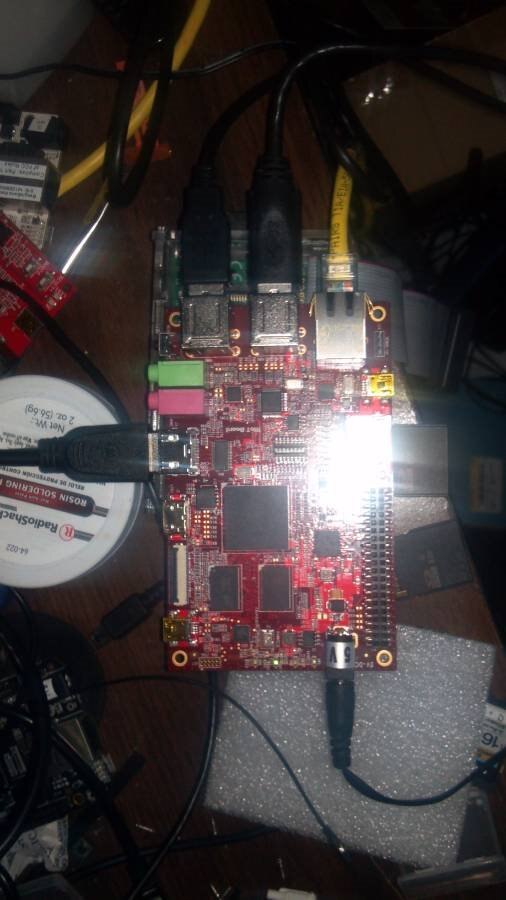
Out of the box it looks like most other development boards that I have encountered. A little larger form factor than the Beagle Bone or Raspberry Pi, so you're not going to fit it in an Altoids tin.
 

image


The core of the RIoT Board is the Freescale Semiconductor i.MX 6Solo, a ARM Cortex-A9 running at 1 GHz. It features a wide array of peripherals that are available to the user, such as :

1GB DDR3 RAM

10/100/Gb Ethernet

HDMI

LVDS

Headphone jack

Microphone jack

SD card interface

uSD card interface

4 USB ports

4 Serial (TTL) ports

JTAG

2 Camera interfaces

Expansion port featuring I2C, SPI, GPIO

2 user defined LEDs


This is already more capable than desktop computers I have owned in my lifetime.


Out of the box the RIoT Board is configured with Android 4.3 (Jelly Bean). For initial checkout I connected my monitor to the HDMI port and booted the system into the supplied Android OS. I spent a few minutes playing around in there and noted the capabiilities. It immediately recognized my Logitech wireless keyboard an mouse combo that I had plugged into the USB port. This made navigation a breeze. As expected the RJ45 network connection was recognized an I was able to do a few typical things I might do on a tablet, such as browse the web and run a few applications. I disconnected the wired ethernet connection and tried to connect to the network via a wireless dongle plugged into a USB port but was unsuccessful. My guess is that it is the lack of a driver for the particular device I had selected, but I wasn't really interested in pursuing it much further.


My real interest in this board was as a computer running Linux. I was able to look around the web as well as the Element 14 site and find some good information on running Linux on this board. I was able to find some instructions on booting Debian Linux directly from the uSD without having to modify the supplied firmware, this seemed like I good option so that was where I started.


I found some source to a bootloader, built it and copied it to the SD card. I didn't have a uSD card available, so I went with the full size. Followed some instructions to build a 3.15 kernel, installed a Debian release on the SD card and was off and running. But I wasn't satisfied. I was able to modify the instructions slightly and find a version of Ubuntu that was compatible with the ARM A9 and get that running with minimal effort. Here it is after logging in to the Unity interface


image


That is running Ubuntu 12.04 LTS. Logging into the system this morning I am seeing a notice that 14.04.1 LTS is currently available. I may have to try that.


I was able to hook a 500 GB USB drive to the board so I can see this device becoming a NAS, or a media streamer or finding another purpose around my home as a Thing on the Internet. I had written a device driver years ago for a USB temperature probe and was able to easily move the source to the RIoT Board and recompile with little effort, so it's possible this little device could become a temperature monitor for a critical system in my home (the beer cooler). With the full power of a modern operating system behind it there are few limitations on this device. It can serve web pages, maintain a DB, tweet status, send me emails, the list goes on. With little effort I could have it flash a light or sound a klaxon alerting me that the beer in my cooler is reaching dangerous temperatures.


Bottom line, I haven't decided what role this device will play in my life. I can think of many applications. Some temperature related as I have described, or perhaps as a modern BBQ aid. Perhaps in a role to conserve electricity or water by monitoring other less critical systems in my home.  Taking advantage of the camera interface to monitor activity around my front door or the rest of my property. At $79 US, there are a multitude of tasks that can be inexpensively completed, monitored, and reported with minimal effort. The device is probably more limited by my imagination than by its physical capabilities.


Once again I thank Element 14 for giving me the opportunity to try out this board.

  • Sign in to reply

Top Comments

  • mconners
    mconners over 11 years ago in reply to johnbeetem +1
    Thanks John. Honestly I don't really think it is adequate as a desktop replacement. It was still a little laggy. TBH, I generally run most of these boards headless. That pic was just for demonstration…
  • tusharp
    tusharp over 11 years ago in reply to mconners +1
    But there is documentation on other sites I posted a glossary with all content till date .
  • mconners
    mconners over 11 years ago in reply to mconners +1
    You know John, one other thought I had on this, I find the Ubuntu Unity interface laggy on even my desktop machines. I always end up installing gnome instead. Perhaps with something light weight like chrome…
  • mconners
    mconners over 11 years ago in reply to kylemills

    Unfortunately I followed a different process. The steps for which are no longer available on E14. I did hear that the code changes were worked into the mainline u-boot, here. I'm thinking your issue is with uboot and that kernel image.


    my bootscript is:


    fdt_high=0xffffffff

    initrd_high=0xffffffff

    #ethaddr=enter your mac address here, then uncomment this line


    extlinux=/extlinux.conf


    loadkernel=load ${dtype} ${disk}:${bootpart} ${kernel_addr_r} /boot/zImage


    bargs=setenv bootargs console=${console},115200n8 rootwait root=PARTUUID=${btpart}


    loadfdt=load ${dtype} ${disk}:1 ${fdt_addr_r} /boot/${fdt_file}


    do_sysboot=sysboot ${dtype} ${disk}:1 any 0x11008000 ${extlinux}


    do_boot=if run loadkernel; then echo kernel_loaded ; if run loadfdt; then echo fdt_loaded; bootz ${kernel_addr_r} - ${fdt_addr_r} ; else echo fail1; fi ; fi


    doboot=part uuid ${dtype} ${disk}:${bootpart} btpart ; run bargs ; if test -e ${dtype} ${disk}:${bootpart} ${extlinux}; then run do_sysboot ; else run do_boot ; fi


    And that worked with a version of the above linked u-boot. I won't have time to dig into this until this weekend. Maybe someone can help you before then.


    Do you have the serial console connected? If not it is an essential tool for debugging boot issues.


    Mike

    • Cancel
    • Vote Up 0 Vote Down
    • Sign in to reply
    • More
    • Cancel
  • kylemills
    kylemills over 11 years ago in reply to mconners

    I tried to have updated kernel + ubuntu in my ubuntu pc

    below steps i followed.


    uboot : https://github.com/embest-tech/linux-imx/tree/embest_imx_3.0.35_4.0.0

    kernel compilation (3.16) : http://www.element14.com/community/message/125855/l/re-linux-on-riot#125855

    file system : oneiric.tgz from element14 package ~1.6GB .

    bootscript : http://radisserver.ddns.net/riotboard/Linux/bootscript (by otto) .


    flash uboot:

    dd if=u-boot.bin of=/dev/mmcblk0


    create file system partition:

    fdisk /dev/mmcblk0

    following steps ...


    copy file system:

    mount /dev/mmcblk0p1 /mnt/

    tar zxvf oneiric.tgz -C /mnt/

    cp bootscript /mnt/boot

    cp zImage /mnt/boot

    umount /mnt/


    uboot is not able to find kernel image after booting.


    do i nned to change boot script??

    do i nned to update uboot for new kernel to work ?? any thoughts..

    • Cancel
    • Vote Up 0 Vote Down
    • Sign in to reply
    • More
    • Cancel
  • mconners
    mconners over 11 years ago in reply to kylemills

    Set up the sdcard is a little vague. What issues are you having?


    Mike

    • Cancel
    • Vote Up 0 Vote Down
    • Sign in to reply
    • More
    • Cancel
  • radiatortwo
    radiatortwo over 11 years ago in reply to kylemills

    If you are using MFGTool to flash everything, you can look into my blog here:

    Mainline Kernel and U-Boot with MFGTool


    At the end there is the whole ucl2.xml and a bootscript.
    Everything else you need is a kernel image the device tree blob and the root filesystem as a "oneiric.tar.gz".


    With that you can get the newest kernel running with your desired rootfs.


    To create a minimal Debian rootfs. I described that here:

    Re: Hard Float on RIoTboard

    • Cancel
    • Vote Up 0 Vote Down
    • Sign in to reply
    • More
    • Cancel
  • kylemills
    kylemills over 11 years ago

    how did u setup the sdcard for new kernel and ubuntu .

    i am struggling with mine image

    • Cancel
    • Vote Up 0 Vote Down
    • Sign in to reply
    • More
    • Cancel
<>
element14 Community

element14 is the first online community specifically for engineers. Connect with your peers and get expert answers to your questions.

  • Members
  • Learn
  • Technologies
  • Challenges & Projects
  • Products
  • Store
  • About Us
  • Feedback & Support
  • FAQs
  • Terms of Use
  • Privacy Policy
  • Legal and Copyright Notices
  • Sitemap
  • Cookies

An Avnet Company © 2026 Premier Farnell Limited. All Rights Reserved.

Premier Farnell Ltd, registered in England and Wales (no 00876412), registered office: Farnell House, Forge Lane, Leeds LS12 2NE.

ICP 备案号 10220084.

Follow element14

  • X
  • Facebook
  • linkedin
  • YouTube