element14 Community
element14 Community
    Register Log In
  • Site
  • Search
  • Log In Register
  • Community Hub
    Community Hub
    • What's New on element14
    • Feedback and Support
    • Benefits of Membership
    • Personal Blogs
    • Members Area
    • Achievement Levels
  • Learn
    Learn
    • Ask an Expert
    • eBooks
    • element14 presents
    • Learning Center
    • Tech Spotlight
    • STEM Academy
    • Webinars, Training and Events
    • Learning Groups
  • Technologies
    Technologies
    • 3D Printing
    • FPGA
    • Industrial Automation
    • Internet of Things
    • Power & Energy
    • Sensors
    • Technology Groups
  • Challenges & Projects
    Challenges & Projects
    • Design Challenges
    • element14 presents Projects
    • Project14
    • Arduino Projects
    • Raspberry Pi Projects
    • Project Groups
  • Products
    Products
    • Arduino
    • Avnet & Tria Boards Community
    • Dev Tools
    • Manufacturers
    • Multicomp Pro
    • Product Groups
    • Raspberry Pi
    • RoadTests & Reviews
  • About Us
    About the element14 Community
  • Store
    Store
    • Visit Your Store
    • Choose another store...
      • Europe
      •  Austria (German)
      •  Belgium (Dutch, French)
      •  Bulgaria (Bulgarian)
      •  Czech Republic (Czech)
      •  Denmark (Danish)
      •  Estonia (Estonian)
      •  Finland (Finnish)
      •  France (French)
      •  Germany (German)
      •  Hungary (Hungarian)
      •  Ireland
      •  Israel
      •  Italy (Italian)
      •  Latvia (Latvian)
      •  
      •  Lithuania (Lithuanian)
      •  Netherlands (Dutch)
      •  Norway (Norwegian)
      •  Poland (Polish)
      •  Portugal (Portuguese)
      •  Romania (Romanian)
      •  Russia (Russian)
      •  Slovakia (Slovak)
      •  Slovenia (Slovenian)
      •  Spain (Spanish)
      •  Sweden (Swedish)
      •  Switzerland(German, French)
      •  Turkey (Turkish)
      •  United Kingdom
      • Asia Pacific
      •  Australia
      •  China
      •  Hong Kong
      •  India
      •  Japan
      •  Korea (Korean)
      •  Malaysia
      •  New Zealand
      •  Philippines
      •  Singapore
      •  Taiwan
      •  Thailand (Thai)
      •  Vietnam
      • Americas
      •  Brazil (Portuguese)
      •  Canada
      •  Mexico (Spanish)
      •  United States
      Can't find the country/region you're looking for? Visit our export site or find a local distributor.
  • Translate
  • Profile
  • Settings
RIoTboard
  • Products
  • Dev Tools
  • Single-Board Computers
  • RIoTboard
  • More
  • Cancel
RIoTboard
Blog Riotboard Yocto  : Part1 : Environment setup and initial build
  • Blog
  • Forum
  • Documents
  • Files
  • Members
  • Mentions
  • Sub-Groups
  • Tags
  • More
  • Cancel
  • New
Join RIoTboard to participate - click to join for free!
  • Share
  • More
  • Cancel
Group Actions
  • Group RSS
  • More
  • Cancel
Engagement
  • Author Author: tusharp
  • Date Created: 22 Sep 2014 6:55 PM Date Created
  • Views 6947 views
  • Likes 1 like
  • Comments 36 comments
  • tusharp
  • Ubuntu
  • yocto
  • image
  • bitbake
  • freescale
  • imx6
  • riotboard
  • embedded
  • setup
  • riot
  • recipes
  • cortex-a9
  • bsp
  • mx-6s
  • arm
  • linux
Related
Recommended

Riotboard Yocto  : Part1 : Environment setup and initial build

tusharp
tusharp
22 Sep 2014

Contents:

Part1 : Environment setup and initial build  <-- You are here
Part2 : Build u-boot using Yocto
Part3 : Build Kernel using Yocto
Part4 : Package Development using Yocto
Part5 : Application Development using ADT


In this blog series we will walk you through the process of getting BSP source archives, cross-compiling , generating binaries for targets , developing system packages and creating sdcard for targets  using yocto tool.


A bit on yocto:

The Yocto Project is an open source project that provides templates, tools and methods to create custom Linux-based systems for embedded products.

The framework helps in cross-compilation by providing tools and packages for the build process and generation of images for target platform.

The yocto toolset has a number of recipes and it is maintained by the Yocto community and developed by Freescale for i.MX platforms.


In this blog we will build a sdcard image for  Riotboard using available sources on Yocto project.

I am using an Ubuntu 14.04 32bit host for this activity.


Updating host system with  required packages to support yocto build framework.

sudo apt-get install gawk wget git-core diffstat unzip texinfo libsdl1.2-dev build-essential chrpath\

    sed wget cvs subversion git-core coreutils \

    unzip texi2html texinfo libsdl1.2-dev docbook-utils gawk \

    python-pysqlite2 diffstat help2man make gcc build-essential \

    g++ desktop-file-utils chrpath libgl1-mesa-dev libglu1-mesa-dev \

    mercurial autoconf automake groff libtool xterm curl lzop asciidoc


We need to have a tool to pull the packages, we are using repo here :

wget https://raw.github.com/android/tools_repo/stable/repo 

sudo mv repo /bin/repo 

sudo chmod 0755 /bin/repo


downloading yocto sources from official repository:

mkdir ~/fsl-arm-yocto-bsp

cd ~/fsl-arm-yocto-bsp

sudo repo init -u git://github.com/embest-tech/fsl-arm-yocto-bsp.git -b embest_imx-3.10.17-1.0.0_ga

repo sync

not using sudo in the above repo command will result in below error :

2uyixlf.jpg


Next we need to configure yocto to generate BSP images for Riotboard

~/fsl-arm-yocto-bsp$ MACHINE=riotboard source fsl-setup-release.sh -b build -e fb


A directory named build will be created inside  fsl-arm-yocto-bsp .

This contains the layers/directories used by bitbake to search for recipe while building package/image.

These recipe files can be configured (later in the blog series) according to our requirement.


The Riotboard config  is at : “sources/meta-fsl-arm-extra/conf/machine/riotboard.conf ”


the local.conf in build/conf can be configured to add more libraries to image (we will see that later)

local.conf

~/fsl-arm-yocto-bsp/build$ cat conf/local.conf | grep 'MACHINE\|THREAD\|IMAGE'

MACHINE ??= 'riotboard'

EXTRA_IMAGE_FEATURES = "debug-tweaks"

BB_NUMBER_THREADS = '4'

IMAGE_INSTALL_append = " mysql5 "


Lets build

~/fsl-arm-yocto-bsp/build$ bitbake fsl-image-fb


You will get a warning like below, which can be safely ignored

8z061e.jpg


The build will take couple of hours image ,


after build you will get below images in build/tmp/deploy/images/riotboard


Image Name

Description

u-boot.imx

bootloader

uImage

Kernel image

uImage-imx6solo_RIoTboard.dtb

Device Tree blob

fsl-image-fb-riotboard.tar.bz2

RootFileSystem

fsl-image-fb-riotboard.sdcard

Sdcard Image


Now the above image is ready to be flashed.


To flash sdcard image :

cd tmp/deploy/images/riotboard

sudo dd if=fsl-image-fb-riotboard.sdcard of=/dev/mmcblk0 bs=1M


make sure the boot switch is set to boot from sdcard
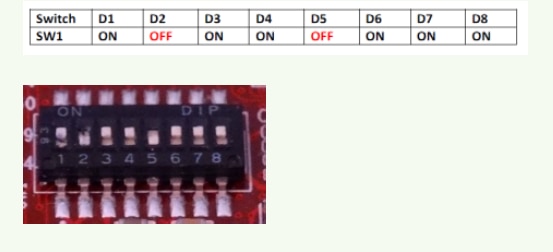
image


For more instructions on sdcard setup, check here.

flashing sdcard image from windows, check here.

  • Sign in to reply
  • e14 Contributor
    e14 Contributor over 11 years ago in reply to e14 Contributor

    Gitorius has been acquired by Gitlab and Linux-CAN has moved to github.

    I fixed this in my build by updating the link (git.gitorius.org to github.com) in the recipe file.


    fsl-arm-yocto-bsp/sources/meta-fsl-bsp-release/imx/meta-fsl-demos/recipes-connectivity/can-utils/can-utils_1.0.bb

    SRC_URI = "git://github.com/linux-can/can-utils.git;protocol=git"


    Unfortunately, this doesn't fix the build for me - just gets me to the error encountered by James Taylor above.

    • Cancel
    • Vote Up 0 Vote Down
    • Sign in to reply
    • More
    • Cancel
  • e14 Contributor
    e14 Contributor over 11 years ago

    How can I fix this issue?

    WARNING: Failed to fetch URL git://git.gitorious.org/linux-can/can-utils.git;protocol=git, attempting MIRRORS if available

    ERROR: Fetcher failure: Fetch command failed with exit code 128, output:

    Cloning into bare repository '/home/rwp908/fsl-arm-yocto-bsp/downloads//git2/git.gitorious.org.linux-can.can-utils.git'...

    fatal: Could not read from remote repository.


    Please make sure you have the correct access rights

    and the repository exists.


    ERROR: Function failed: Fetcher failure for URL: 'git://git.gitorious.org/linux-can/can-utils.git;protocol=git'. Unable to fetch URL from any source.

    ERROR: Logfile of failure stored in: /home/rwp908/fsl-arm-yocto-bsp/build/tmp/work/cortexa9hf-vfp-neon-poky-linux-gnueabi/can-utils/1.0-r0/temp/log.do_fetch.16220

    ERROR: Task 1961 (/home/rwp908/fsl-arm-yocto-bsp/sources/meta-fsl-bsp-release/imx/meta-fsl-demos/recipes-connectivity/can-utils/can-utils_1.0.bb, do_fetch) failed with exit code '1'

    NOTE: Tasks Summary: Attempted 2305 tasks of which 2301 didn't need to be rerun and 1 failed.

    Waiting for 0 running tasks to finish:

    • Cancel
    • Vote Up 0 Vote Down
    • Sign in to reply
    • More
    • Cancel
  • e14 Contributor
    e14 Contributor over 11 years ago in reply to clem57

    Thanks Clem. What I need is the path to the bin file since the recipe I'm using uses a path that is no longer viable. The error I get is:

    ERROR: Fetcher failure: Fetch command failed with exit code 8, output:

    http://www.freescale.com/lgfiles/NMG/MAD/YOCTO/imx-test-hdcp-3.10.17-1.0.0.bin:

    2015-03-24 08:57:45 ERROR 404: Not Found.

    • Cancel
    • Vote Up 0 Vote Down
    • Sign in to reply
    • More
    • Cancel
  • clem57
    clem57 over 11 years ago in reply to e14 Contributor

    http://layers.openembedded.org/layerindex/recipe/25707/ Is this what you need?

    Clem

    • Cancel
    • Vote Up 0 Vote Down
    • Sign in to reply
    • More
    • Cancel
  • e14 Contributor
    e14 Contributor over 11 years ago

    I can't get http://www.freescale.com/lgfiles/NMG/MAD/YOCTO//imx-test-hdcp-3.10.17-1.0.0.bin to resolve. Any ideas on where this file is so I can change the recipe?


    Thanks

    • Cancel
    • Vote Up 0 Vote Down
    • Sign in to reply
    • More
    • Cancel
<>
element14 Community

element14 is the first online community specifically for engineers. Connect with your peers and get expert answers to your questions.

  • Members
  • Learn
  • Technologies
  • Challenges & Projects
  • Products
  • Store
  • About Us
  • Feedback & Support
  • FAQs
  • Terms of Use
  • Privacy Policy
  • Legal and Copyright Notices
  • Sitemap
  • Cookies

An Avnet Company © 2026 Premier Farnell Limited. All Rights Reserved.

Premier Farnell Ltd, registered in England and Wales (no 00876412), registered office: Farnell House, Forge Lane, Leeds LS12 2NE.

Follow element14

  • X
  • Facebook
  • linkedin
  • YouTube