element14 Community
element14 Community
    Register Log In
  • Site
  • Search
  • Log In Register
  • Community Hub
    Community Hub
    • What's New on element14
    • Feedback and Support
    • Benefits of Membership
    • Personal Blogs
    • Members Area
    • Achievement Levels
  • Learn
    Learn
    • Ask an Expert
    • eBooks
    • element14 presents
    • Learning Center
    • Tech Spotlight
    • STEM Academy
    • Webinars, Training and Events
    • Learning Groups
  • Technologies
    Technologies
    • 3D Printing
    • FPGA
    • Industrial Automation
    • Internet of Things
    • Power & Energy
    • Sensors
    • Technology Groups
  • Challenges & Projects
    Challenges & Projects
    • Design Challenges
    • element14 presents Projects
    • Project14
    • Arduino Projects
    • Raspberry Pi Projects
    • Project Groups
  • Products
    Products
    • Arduino
    • Avnet & Tria Boards Community
    • Dev Tools
    • Manufacturers
    • Multicomp Pro
    • Product Groups
    • Raspberry Pi
    • RoadTests & Reviews
  • About Us
    About the element14 Community
  • Store
    Store
    • Visit Your Store
    • Choose another store...
      • Europe
      •  Austria (German)
      •  Belgium (Dutch, French)
      •  Bulgaria (Bulgarian)
      •  Czech Republic (Czech)
      •  Denmark (Danish)
      •  Estonia (Estonian)
      •  Finland (Finnish)
      •  France (French)
      •  Germany (German)
      •  Hungary (Hungarian)
      •  Ireland
      •  Israel
      •  Italy (Italian)
      •  Latvia (Latvian)
      •  
      •  Lithuania (Lithuanian)
      •  Netherlands (Dutch)
      •  Norway (Norwegian)
      •  Poland (Polish)
      •  Portugal (Portuguese)
      •  Romania (Romanian)
      •  Russia (Russian)
      •  Slovakia (Slovak)
      •  Slovenia (Slovenian)
      •  Spain (Spanish)
      •  Sweden (Swedish)
      •  Switzerland(German, French)
      •  Turkey (Turkish)
      •  United Kingdom
      • Asia Pacific
      •  Australia
      •  China
      •  Hong Kong
      •  India
      •  Japan
      •  Korea (Korean)
      •  Malaysia
      •  New Zealand
      •  Philippines
      •  Singapore
      •  Taiwan
      •  Thailand (Thai)
      •  Vietnam
      • Americas
      •  Brazil (Portuguese)
      •  Canada
      •  Mexico (Spanish)
      •  United States
      Can't find the country/region you're looking for? Visit our export site or find a local distributor.
  • Translate
  • Profile
  • Settings
RIoTboard
  • Products
  • Dev Tools
  • Single-Board Computers
  • RIoTboard
  • More
  • Cancel
RIoTboard
Blog Riotboard Yocto  : Part1 : Environment setup and initial build
  • Blog
  • Forum
  • Documents
  • Files
  • Members
  • Mentions
  • Sub-Groups
  • Tags
  • More
  • Cancel
  • New
Join RIoTboard to participate - click to join for free!
  • Share
  • More
  • Cancel
Group Actions
  • Group RSS
  • More
  • Cancel
Engagement
  • Author Author: tusharp
  • Date Created: 22 Sep 2014 6:55 PM Date Created
  • Views 6955 views
  • Likes 1 like
  • Comments 36 comments
  • tusharp
  • Ubuntu
  • yocto
  • image
  • bitbake
  • freescale
  • imx6
  • riotboard
  • embedded
  • setup
  • riot
  • recipes
  • cortex-a9
  • bsp
  • mx-6s
  • arm
  • linux
Related
Recommended

Riotboard Yocto  : Part1 : Environment setup and initial build

tusharp
tusharp
22 Sep 2014

Contents:

Part1 : Environment setup and initial build  <-- You are here
Part2 : Build u-boot using Yocto
Part3 : Build Kernel using Yocto
Part4 : Package Development using Yocto
Part5 : Application Development using ADT


In this blog series we will walk you through the process of getting BSP source archives, cross-compiling , generating binaries for targets , developing system packages and creating sdcard for targets  using yocto tool.


A bit on yocto:

The Yocto Project is an open source project that provides templates, tools and methods to create custom Linux-based systems for embedded products.

The framework helps in cross-compilation by providing tools and packages for the build process and generation of images for target platform.

The yocto toolset has a number of recipes and it is maintained by the Yocto community and developed by Freescale for i.MX platforms.


In this blog we will build a sdcard image for  Riotboard using available sources on Yocto project.

I am using an Ubuntu 14.04 32bit host for this activity.


Updating host system with  required packages to support yocto build framework.

sudo apt-get install gawk wget git-core diffstat unzip texinfo libsdl1.2-dev build-essential chrpath\

    sed wget cvs subversion git-core coreutils \

    unzip texi2html texinfo libsdl1.2-dev docbook-utils gawk \

    python-pysqlite2 diffstat help2man make gcc build-essential \

    g++ desktop-file-utils chrpath libgl1-mesa-dev libglu1-mesa-dev \

    mercurial autoconf automake groff libtool xterm curl lzop asciidoc


We need to have a tool to pull the packages, we are using repo here :

wget https://raw.github.com/android/tools_repo/stable/repo 

sudo mv repo /bin/repo 

sudo chmod 0755 /bin/repo


downloading yocto sources from official repository:

mkdir ~/fsl-arm-yocto-bsp

cd ~/fsl-arm-yocto-bsp

sudo repo init -u git://github.com/embest-tech/fsl-arm-yocto-bsp.git -b embest_imx-3.10.17-1.0.0_ga

repo sync

not using sudo in the above repo command will result in below error :

2uyixlf.jpg


Next we need to configure yocto to generate BSP images for Riotboard

~/fsl-arm-yocto-bsp$ MACHINE=riotboard source fsl-setup-release.sh -b build -e fb


A directory named build will be created inside  fsl-arm-yocto-bsp .

This contains the layers/directories used by bitbake to search for recipe while building package/image.

These recipe files can be configured (later in the blog series) according to our requirement.


The Riotboard config  is at : “sources/meta-fsl-arm-extra/conf/machine/riotboard.conf ”


the local.conf in build/conf can be configured to add more libraries to image (we will see that later)

local.conf

~/fsl-arm-yocto-bsp/build$ cat conf/local.conf | grep 'MACHINE\|THREAD\|IMAGE'

MACHINE ??= 'riotboard'

EXTRA_IMAGE_FEATURES = "debug-tweaks"

BB_NUMBER_THREADS = '4'

IMAGE_INSTALL_append = " mysql5 "


Lets build

~/fsl-arm-yocto-bsp/build$ bitbake fsl-image-fb


You will get a warning like below, which can be safely ignored

8z061e.jpg


The build will take couple of hours image ,


after build you will get below images in build/tmp/deploy/images/riotboard


Image Name

Description

u-boot.imx

bootloader

uImage

Kernel image

uImage-imx6solo_RIoTboard.dtb

Device Tree blob

fsl-image-fb-riotboard.tar.bz2

RootFileSystem

fsl-image-fb-riotboard.sdcard

Sdcard Image


Now the above image is ready to be flashed.


To flash sdcard image :

cd tmp/deploy/images/riotboard

sudo dd if=fsl-image-fb-riotboard.sdcard of=/dev/mmcblk0 bs=1M


make sure the boot switch is set to boot from sdcard
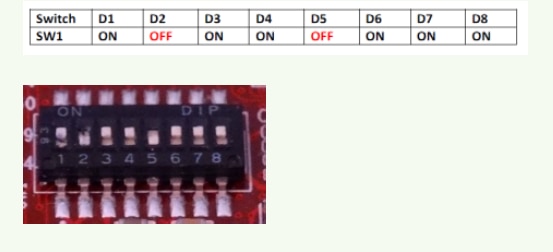
image


For more instructions on sdcard setup, check here.

flashing sdcard image from windows, check here.

  • Sign in to reply
  • tusharp
    tusharp over 11 years ago in reply to e14 Contributor

    install stalls when looking for Debian wheezy on a disc

            elaborate this...

            screen-shot or log file will be good enough, plz share


    you may need more than 32GB in future GUI builds .

    virtual machine should not be an issue, its just a build process.

    • Cancel
    • Vote Up 0 Vote Down
    • Sign in to reply
    • More
    • Cancel
  • tusharp
    tusharp over 11 years ago in reply to e14 Contributor

    try the below

    git config --global user.email "your_name@example.com"

    git config --global user.name "your_name"


    then run   "sudo repo init -u git://github.com/embest-tech/fsl-arm-yocto-bsp.git -b embest_imx-3.10.17-1.0.0_ga"

    &

    repo sync

    • Cancel
    • Vote Up 0 Vote Down
    • Sign in to reply
    • More
    • Cancel
  • e14 Contributor
    e14 Contributor over 11 years ago

    Hi,

    I am complete newbie at this.  I am running Debian wheezy on a virtual machine (32G) and am trying to install the required packages, but the install stalls when looking for Debian wheezy on a disc?  How do I tell it where to look?

    Thanks

    • Cancel
    • Vote Up 0 Vote Down
    • Sign in to reply
    • More
    • Cancel
  • e14 Contributor
    e14 Contributor over 11 years ago

    HI,

    I have trouble with repo. After i execute "repo sync" i get following error.

    "

    error: command 'sync' requires repo to be installed first.
             Use "repo init" to install it here."

    I tried these two commands, " repo init & repo sync" by root and my own user but no success achieved, "repo init" take long time and utilize 100 percent of cpu but it appear it does not download anything when if check disk usage.

    Anyway i am new in RIOTBOARD even Yocto and  it make the  work harder for me.

    Any help and comment appreciated.

    Regards 

    • Cancel
    • Vote Up 0 Vote Down
    • Sign in to reply
    • More
    • Cancel
  • tusharp
    tusharp over 11 years ago in reply to omeier

    having build a lot of the packages image mine looks like some 54GB image

    image

    • Cancel
    • Vote Up 0 Vote Down
    • Sign in to reply
    • More
    • Cancel
<>
element14 Community

element14 is the first online community specifically for engineers. Connect with your peers and get expert answers to your questions.

  • Members
  • Learn
  • Technologies
  • Challenges & Projects
  • Products
  • Store
  • About Us
  • Feedback & Support
  • FAQs
  • Terms of Use
  • Privacy Policy
  • Legal and Copyright Notices
  • Sitemap
  • Cookies

An Avnet Company © 2026 Premier Farnell Limited. All Rights Reserved.

Premier Farnell Ltd, registered in England and Wales (no 00876412), registered office: Farnell House, Forge Lane, Leeds LS12 2NE.

Follow element14

  • X
  • Facebook
  • linkedin
  • YouTube