element14 Community
element14 Community
    Register Log In
  • Site
  • Search
  • Log In Register
  • Community Hub
    Community Hub
    • What's New on element14
    • Feedback and Support
    • Benefits of Membership
    • Personal Blogs
    • Members Area
    • Achievement Levels
  • Learn
    Learn
    • Ask an Expert
    • eBooks
    • element14 presents
    • Learning Center
    • Tech Spotlight
    • STEM Academy
    • Webinars, Training and Events
    • Learning Groups
  • Technologies
    Technologies
    • 3D Printing
    • FPGA
    • Industrial Automation
    • Internet of Things
    • Power & Energy
    • Sensors
    • Technology Groups
  • Challenges & Projects
    Challenges & Projects
    • Design Challenges
    • element14 presents Projects
    • Project14
    • Arduino Projects
    • Raspberry Pi Projects
    • Project Groups
  • Products
    Products
    • Arduino
    • Avnet & Tria Boards Community
    • Dev Tools
    • Manufacturers
    • Multicomp Pro
    • Product Groups
    • Raspberry Pi
    • RoadTests & Reviews
  • About Us
    About the element14 Community
  • Store
    Store
    • Visit Your Store
    • Choose another store...
      • Europe
      •  Austria (German)
      •  Belgium (Dutch, French)
      •  Bulgaria (Bulgarian)
      •  Czech Republic (Czech)
      •  Denmark (Danish)
      •  Estonia (Estonian)
      •  Finland (Finnish)
      •  France (French)
      •  Germany (German)
      •  Hungary (Hungarian)
      •  Ireland
      •  Israel
      •  Italy (Italian)
      •  Latvia (Latvian)
      •  
      •  Lithuania (Lithuanian)
      •  Netherlands (Dutch)
      •  Norway (Norwegian)
      •  Poland (Polish)
      •  Portugal (Portuguese)
      •  Romania (Romanian)
      •  Russia (Russian)
      •  Slovakia (Slovak)
      •  Slovenia (Slovenian)
      •  Spain (Spanish)
      •  Sweden (Swedish)
      •  Switzerland(German, French)
      •  Turkey (Turkish)
      •  United Kingdom
      • Asia Pacific
      •  Australia
      •  China
      •  Hong Kong
      •  India
      •  Japan
      •  Korea (Korean)
      •  Malaysia
      •  New Zealand
      •  Philippines
      •  Singapore
      •  Taiwan
      •  Thailand (Thai)
      •  Vietnam
      • Americas
      •  Brazil (Portuguese)
      •  Canada
      •  Mexico (Spanish)
      •  United States
      Can't find the country/region you're looking for? Visit our export site or find a local distributor.
  • Translate
  • Profile
  • Settings
RIoTboard
  • Products
  • Dev Tools
  • Single-Board Computers
  • RIoTboard
  • More
  • Cancel
RIoTboard
Blog Upgrading RIoTboard with Yocto BSP and Kernel 3.10.17 (Linux Host)
  • Blog
  • Forum
  • Documents
  • Files
  • Members
  • Mentions
  • Sub-Groups
  • Tags
  • More
  • Cancel
  • New
Join RIoTboard to participate - click to join for free!
  • Share
  • More
  • Cancel
Group Actions
  • Group RSS
  • More
  • Cancel
Engagement
  • Author Author: tusharp
  • Date Created: 31 Jul 2014 2:34 PM Date Created
  • Views 3369 views
  • Likes 1 like
  • Comments 17 comments
  • tusharp
  • Ubuntu
  • kernel3.10
  • freescale
  • imx6
  • rootfs
  • mx-6
  • riotboard
  • embedded
  • riot
  • root
  • cortex-a9
  • bsp
  • mx-6s
  • glossary
  • arm
  • arm9
  • linux
Related
Recommended

Upgrading RIoTboard with Yocto BSP and Kernel 3.10.17 (Linux Host)

tusharp
tusharp
31 Jul 2014

Announcing the availability of an updated 3.10.17 kernel for RIoTboard.It has been available for quite some time in github repository.

https://github.com/embest-tech/linux-imx/tree/embest_imx_3.10.17_1.0.0_ga


The release has been in sync with official i.MX releases.


All the commits can be found in the repository providing support for LCD and other accessories.


We made our major release on this heavily tested and optimised kernel which carries number of advancements over the older releases.

With new kernel we get the most sought feature, the Device Tree, which contributes to smaller amount of BSP code to merge and greater ability to customise physical devices on new boards.


To setup we need to download a SDCARD image with an updated kernel first.

The updated kernel source can be found here.


We will be downloading the fsl-image-fb-riotboard.sdcard image.

https://www.dropbox.com/sh/8ebbtcork0l2cua/AACH4U7ovJYIJvge1VLdWueJa/image.rar


image

The SVN2652 has


Image NameDescription

fsl-image-fb-riotboard.sdcard

SDCARD image for RIoTboard

fsl-image-fb-riotboard.tar.bz2

Root File System bundle.

imx6solo_RIoTboard.dtb

Device Tree Binary

u-boot.imx

Bootloader

uImage3.10.17 kernel


First we need to detect the memory device.

I am using in built-in SDCARD adapter in my laptop and it shows SD card as mmcblk device.


# ll /dev/mmc*

brw-rw---- 1 root disk 179, 0 Jul 29 17:19 /dev/mmcblk0


Using a USB-SD adapter shows a sdb device .
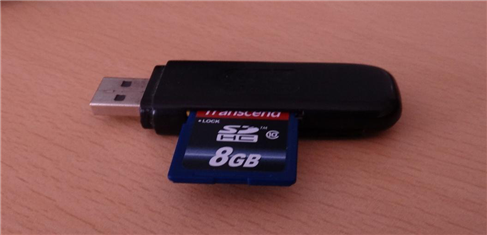


image


# ll /dev/sd*

brw-rw---- 1 root disk 8, 0 Jul 29 11:26 /dev/sda

brw-rw---- 1 root disk 8, 3 Jul 29 11:26 /dev/sda3

brw-rw---- 1 root disk 8, 5 Jul 29 11:26 /dev/sda5

brw-rw---- 1 root disk 8, 6 Jul 29 11:26 /dev/sda6

brw-rw---- 1 root disk 8, 7 Jul 29 11:26 /dev/sda7

brw-rw---- 1 root disk 8, 8 Jul 29 11:26 /dev/sda8

brw-rw---- 1 root disk 8, 16 Jul 29 16:45 /dev/sdb


CAUTION: Most Linux machines shows harddisk as sda. Our device will be mostly something like sdb,sdc ....

                       We will be carefully selecting our device so that we don't wipe out our SDA harddisk partition


to confirm our device name, plug in and plug out the card reader and execute the command ( ll /dev/sd* )  to determine the device number.


If the device is mounted by default , manually unmount the device  before proceeding.


# umount /dev/sdb


Once we have completed the device detection , we will use below command to setup a kernel 3.10.17 based bootable sdcard.


# sudo dd if=fsl-image-fb-riotboard.sdcard of=/dev/sdX bs=1M

      (where sdX is the detected sdcard device)


Once the command completes, power down the card, remove it, plug it into J6 of RIoTboard and power on the board.


Make sure the boot switch are in SDCARD mode before powering on.

2a4xxlx.jpg


1111gz9.jpg


Once Powered on it will boot with Kernel 3.10.17.

You will see a boot log as below:

U-Boot 2013.04 (Jul 04 2014 - 09:45:23)


CPU:   Freescale i.MX6SOLO rev1.1 at 792 MHz

CPU:   Temperature 42 C, calibration data: 0x5a151a5f

Reset cause: POR

Board: MX6SOLO RIoTboard

I2C:   ready

DRAM:  1 GiB

MMC:   FSL_SDHC: 0, FSL_SDHC: 1, FSL_SDHC: 2

*** Warning - bad CRC, using default environment


No panel detected: default to HDMI

Display: HDMI (640x480)

In:    serial

Out:   serial

Err:   serial

mmc0 is current device

Net:   FEC [PRIME]

Warning: failed to set MAC address


Normal Boot

Hit any key to stop autoboot:  0

mmc0 is current device

reading boot.scr

** Unable to read file boot.scr **

reading uImage

5275824 bytes read in 250 ms (20.1 MiB/s)

Booting from mmc ...

reading imx6solo_RIoTboard.dtb

43553 bytes read in 21 ms (2 MiB/s)

## Booting kernel from Legacy Image at 12000000 ...

   Image Name:   Linux-3.10.17_1.0.0_RIoTboard+g1

   Image Type:   ARM Linux Kernel Image (uncompressed)

   Data Size:    5275760 Bytes = 5 MiB

   Load Address: 10008000

   Entry Point:  10008000

   Verifying Checksum ... OK

## Flattened Device Tree blob at 18000000

   Booting using the fdt blob at 0x18000000

   Loading Kernel Image ... OK

OK

   Using Device Tree in place at 18000000, end 1800da20


Starting kernel ...


It will stop at login promt

riotboard login:

Enter root as the username , no password is required.


riotboard login: root

root@riotboard:~#


Verifying the kernel version details:

root@riotboard:~# uname -a


Linux riotboard 3.10.17_1.0.0_RIoTboard+g14571fa #1 SMP PREEMPT Fri Jul 4 09:49:22 CST 2014 armv7l GNU/Linux


So we got an updated 3.10 kernel for RIoTboard .


A video guide :

You don't have permission to edit metadata of this video.
Edit media
x
image
Upload Preview
image


  • Sign in to reply
  • gereds
    gereds over 11 years ago in reply to tusharp

    I installed the image you mentioned (kernel 3.10.17), but it is almost unusable because apt-get doesn't exist on it. For example:

    root@riotboard:~# apt-get install mc

    -sh: apt-get: command not found

    • Cancel
    • Vote Up 0 Vote Down
    • Sign in to reply
    • More
    • Cancel
  • tusharp
    tusharp over 11 years ago in reply to pfinucan

    the sdcard image has been removed .


    You can try the Mfgtools_SVN2777 bundled with an Yocto based rootfs and 3.10.17 kernel.

    • Cancel
    • Vote Up 0 Vote Down
    • Sign in to reply
    • More
    • Cancel
  • pfinucan
    pfinucan over 11 years ago

    the Dropbox link is broken.  Does this work anymore or is it out of date?

    • Cancel
    • Vote Up 0 Vote Down
    • Sign in to reply
    • More
    • Cancel
  • tusharp
    tusharp over 11 years ago in reply to Former Member

    as mentioned by otto plz check the boot mode setting and share your printenv from uboot.

    I hv updated dip switches in document.


    Does anyone know the correct U-boot env string and dip switches?

       Uboot need not be changed for this sdcard image to boot.


      However in cases NAND being detected as mmc0 gets booted, check this guide Pg12,13 for more info.

    • Cancel
    • Vote Up 0 Vote Down
    • Sign in to reply
    • More
    • Cancel
  • radiatortwo
    radiatortwo over 11 years ago in reply to Former Member

    The following are the dip switch settings:


    To boot from sd card (Will also boot from eMMC if there is no sd card)

    2 4 5 7 Off

    1 3 6 8 On


    To boot from internal eMMC only

    2 5 Off

    1 3 4 6 7 8 On


    U-Boot is starting?

    This means the Dip Switches are correct.

    Just check if it boots from the sd card and not from the eMMC.

    Right after the start you should see a few lines like this (The line with "Boot Device:" tells you what is booted from):

    Board: i.MX6DL/Solo-SABRESD: unknown-board Board: 0x61011 [POR ]

    Boot Device: SD

    I2C: ready

    DRAM: 1 GB

    MMC: FSL_USDHC: 0,FSL_USDHC: 1,FSL_USDHC: 2,FSL_USDHC: 3

    *** Warning - bad CRC or MMC, using default environment

    You can check your u-boot variables with the command printenv when in u-boot mode.

    Can´t tell you if there is a boot variable for this, since that image isn´t mine.

    Don´t know if the uImage is written onto the beginning of the card itself and has no file either.


    Also if I missed something ... it´s 2 AM here right now so I´m a bit tired ...

    • Cancel
    • Vote Up 0 Vote Down
    • Sign in to reply
    • More
    • Cancel
<>
element14 Community

element14 is the first online community specifically for engineers. Connect with your peers and get expert answers to your questions.

  • Members
  • Learn
  • Technologies
  • Challenges & Projects
  • Products
  • Store
  • About Us
  • Feedback & Support
  • FAQs
  • Terms of Use
  • Privacy Policy
  • Legal and Copyright Notices
  • Sitemap
  • Cookies

An Avnet Company © 2026 Premier Farnell Limited. All Rights Reserved.

Premier Farnell Ltd, registered in England and Wales (no 00876412), registered office: Farnell House, Forge Lane, Leeds LS12 2NE.

ICP 备案号 10220084.

Follow element14

  • X
  • Facebook
  • linkedin
  • YouTube