element14 Community
element14 Community
    Register Log In
  • Site
  • Search
  • Log In Register
  • Community Hub
    Community Hub
    • What's New on element14
    • Feedback and Support
    • Benefits of Membership
    • Personal Blogs
    • Members Area
    • Achievement Levels
  • Learn
    Learn
    • Ask an Expert
    • eBooks
    • element14 presents
    • Learning Center
    • Tech Spotlight
    • STEM Academy
    • Webinars, Training and Events
    • Learning Groups
  • Technologies
    Technologies
    • 3D Printing
    • FPGA
    • Industrial Automation
    • Internet of Things
    • Power & Energy
    • Sensors
    • Technology Groups
  • Challenges & Projects
    Challenges & Projects
    • Design Challenges
    • element14 presents Projects
    • Project14
    • Arduino Projects
    • Raspberry Pi Projects
    • Project Groups
  • Products
    Products
    • Arduino
    • Avnet & Tria Boards Community
    • Dev Tools
    • Manufacturers
    • Multicomp Pro
    • Product Groups
    • Raspberry Pi
    • RoadTests & Reviews
  • About Us
  • Store
    Store
    • Visit Your Store
    • Choose another store...
      • Europe
      •  Austria (German)
      •  Belgium (Dutch, French)
      •  Bulgaria (Bulgarian)
      •  Czech Republic (Czech)
      •  Denmark (Danish)
      •  Estonia (Estonian)
      •  Finland (Finnish)
      •  France (French)
      •  Germany (German)
      •  Hungary (Hungarian)
      •  Ireland
      •  Israel
      •  Italy (Italian)
      •  Latvia (Latvian)
      •  
      •  Lithuania (Lithuanian)
      •  Netherlands (Dutch)
      •  Norway (Norwegian)
      •  Poland (Polish)
      •  Portugal (Portuguese)
      •  Romania (Romanian)
      •  Russia (Russian)
      •  Slovakia (Slovak)
      •  Slovenia (Slovenian)
      •  Spain (Spanish)
      •  Sweden (Swedish)
      •  Switzerland(German, French)
      •  Turkey (Turkish)
      •  United Kingdom
      • Asia Pacific
      •  Australia
      •  China
      •  Hong Kong
      •  India
      • Japan
      •  Korea (Korean)
      •  Malaysia
      •  New Zealand
      •  Philippines
      •  Singapore
      •  Taiwan
      •  Thailand (Thai)
      • Vietnam
      • Americas
      •  Brazil (Portuguese)
      •  Canada
      •  Mexico (Spanish)
      •  United States
      Can't find the country/region you're looking for? Visit our export site or find a local distributor.
  • Translate
  • Profile
  • Settings
RIoTboard
  • Products
  • Dev Tools
  • Single-Board Computers
  • RIoTboard
  • More
  • Cancel
RIoTboard
Forum Linux on RIoT
  • Blog
  • Forum
  • Documents
  • Files
  • Members
  • Mentions
  • Sub-Groups
  • Tags
  • More
  • Cancel
  • New
Join RIoTboard to participate - click to join for free!
Actions
  • Share
  • More
  • Cancel
Forum Thread Details
  • Replies 31 replies
  • Subscribers 25 subscribers
  • Views 4352 views
  • Users 0 members are here
  • riot_board
  • riotboard
  • riot
  • linux
Related

Linux on RIoT

Former Member
Former Member over 11 years ago

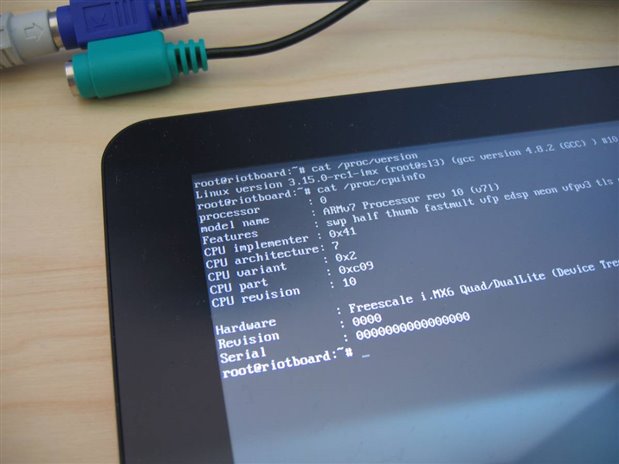
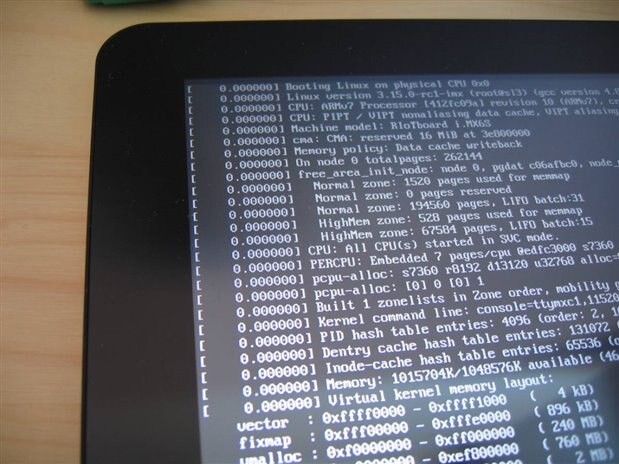
Yep folks, it's possible to have a current linux kernel on the RIoTboard


Fullscreen contentimage_38322.html Download
<html><head><title>Jive SBS</title></head>
<body><font face="arial,helvetica,sans-serif">
<b>Error</b><br><font size="-1">
An general error occurred while processing your request.
</font></font></body></html>
image

image


Oh, and I really, really hate shiny screens image

  • Sign in to reply
  • Cancel
Parents
  • kylemills
    kylemills over 11 years ago

    If really needed I could write a blog entry on how to do this.


    hi Otto Römmich  sir ,

    where can i find that blog??


    i got this board and looking for a debian support like in BBB image.


    @gerrie

    same here,  the ubuntu is pretty old, debian & arch linux are good.


    • Cancel
    • Vote Up 0 Vote Down
    • Sign in to reply
    • Cancel
  • radiatortwo
    radiatortwo over 11 years ago in reply to kylemills

    You can´t find it because I didn´t write it.
    I think I can write it tomorrow though.


    By the way if you only need debian, I had something to create a somwhat minimal debian system.

    I described there how to create an image file with that you can replace the original oneiric.tgz when flashing with MFGTool.

    Re: Hard Float on RIoTboard

    Then you have the embest kernel, but a Debian rootfs system.

    This is abolutely minimal. Nothing installed but the essential stuff.
    But apt is working.

    • Cancel
    • Vote Up 0 Vote Down
    • Sign in to reply
    • Cancel
  • Former Member
    Former Member over 11 years ago in reply to radiatortwo

    Ok, I manage to build the 3.17 kernel doing the following ( I also attach the extra file required to process this procedure).


    I cross complied with the linaro toolchain ( google to install it). I installed it in my home directory home/gerrie/riot/fsl-linaro-toolchain/bin.


    The attach script will create a linux folder in the directory where you run the script, it could be anywhere on the linux PC., remember to make it executable (chmod +x crossit.sh)


    Note: first just run the get_image, then copy the file, and then run the rest of the script.


    #!/bin/sh

    #--------------------------------------

    get_image () {

      git clone git://git.kernel.org/pub/scm/linux/kernel/git/torvalds/linux.git

      cd linux

      git remote add sgo git://git.kernel.org/pub/scm/linux/kernel/git/shawnguo/linux.git

      git fetch sgo

      git checkout -b imx v3.16

      git merge sgo/for-next

    }

    #----------------------

    export PATH=/home/gerrie/riot/fsl-linaro-toolchain/bin/:$PATH

    export ARCH=arm

    export CROSS_COMPILE=arm-none-linux-gnueabi-


    CC=arm-none-linux-gnueabi-


    # uncomment to get the latest image for the kernel

    get_image


    The above will clone the latest kernel and merge with Shawn latest commits.


    Please note the CROSS_COMPILE '-'  in arm-none-linux-gnueabi-, this is correct, the make file will attach the rest of the command, like gcc etc, this took me a while, as everybody thinks everybody knows this, but it just confused me.


    One should now have the latest source code, copy the attache riot_defconfig  into /linux/arch/arm/configs before proceeding. You might want to change this config during menu-config, but this might be a good starting point.


    Run the rest of the script file now, ( I usually just copy comment the get_image to prevent it to run again.. Note the cloning, make kernel and module shall take a while, so be prepared


    I first did this on the RiOT itself, but this takes a loooooong time, if you want to use the RiOT, just remove the ARCH..= and CROSS...= from the script


    echo ">===== Clean it up ============================="

    make ARCH=arm CROSS_COMPILE=${CC} distclean

    make ARCH=arm CROSS_COMPILE=${CC} riot_defconfig

    make ARCH=arm CROSS_COMPILE=${CC} menuconfig


    echo ">===== Compile it .. time for pizza & coffee ==="

    make ARCH=arm CROSS_COMPILE=${CC} -j4 bzImage


    echo ">===== Create Outputs & Modules ==============="

    mkdir -p output/boot

    cp arch/arm/boot/zImage output/boot/

    cp System.map output/boot


    make ARCH=arm CROSS_COMPILE=${CC} modules

    make ARCH=arm CROSS_COMPILE=${CC} modules_install INSTALL_MOD_PATH=output


    echo ">===== Create Kernel Headers ==================="

    make ARCH=arm CROSS_COMPILE=${CC} headers_install INSTALL_HDR_PATH=output/usr


    echo ">===== Create Device Tree======================="

    make ARCH=arm CROSS_COMPILE=${CC} dtbs

    cp arch/arm/boot/dts/imx6dl-riotboard.dtb output/boot

    cd output


    tar jcf ../linux-kernel-3.17-riot.txz *


    You now should have a image ready in the output directory. It boot up with


    Debian Linux 7 riotboard ttymxc1


    riotboard login: root

    Password:

    Last login: Sat Sep  6 21:26:11 UTC 2014 on ttymxc1

    Linux riotboard 3.17.0-rc3+ #1 SMP Sat Sep 6 15:57:42 SAST 2014 armv7l

    root@riotboard:~#


    Please note, I am not a Linux guru, any comments is welcome, I could not yet get my LVDS working yet, but maybe someone can help.

    Attachments:
    riot_defconfig.zip
    https://community.element14.com/cfs-file/__key/communityserver-discussions-components-files/95/crossit.sh
    • Cancel
    • Vote Up 0 Vote Down
    • Sign in to reply
    • Cancel
  • kylemills
    kylemills over 11 years ago in reply to Former Member

    how did you add the debian fiel system  to it ??


    Regards

    Kyle

    • Cancel
    • Vote Up 0 Vote Down
    • Sign in to reply
    • Cancel
  • Former Member
    Former Member over 11 years ago in reply to kylemills

    I was fortunate enough to download and create the Selsinork one, but all was deleted from the element14 web site. I am not sure If I can re-distribute it.

    • Cancel
    • Vote Up 0 Vote Down
    • Sign in to reply
    • Cancel
  • kylemills
    kylemills over 11 years ago in reply to Former Member

    i can build the kernel but unable to put it into sdcard, bootloader doesn't find it image.

    i tried some arm file systems available in armhf.com.


    the link http://s3.armhf.com/dist/basefs/ubuntu-trusty-14.04-armhf.com-20140603.tar.xz.


    copied into card but not response image.


    i am stuck up with this board image.

    • Cancel
    • Vote Up 0 Vote Down
    • Sign in to reply
    • Cancel
Reply
  • kylemills
    kylemills over 11 years ago in reply to Former Member

    i can build the kernel but unable to put it into sdcard, bootloader doesn't find it image.

    i tried some arm file systems available in armhf.com.


    the link http://s3.armhf.com/dist/basefs/ubuntu-trusty-14.04-armhf.com-20140603.tar.xz.


    copied into card but not response image.


    i am stuck up with this board image.

    • Cancel
    • Vote Up 0 Vote Down
    • Sign in to reply
    • Cancel
Children
  • radiatortwo
    radiatortwo over 11 years ago in reply to kylemills
    i can build the kernel but unable to put it into sdcard, bootloader doesn't find it

    This depends on your u-boot configuration.


    The u-boot you get from e14 doesn´t search for a file, but for a specific starting sector on the sdcard.

    But this does not use the device tree blob file.


    The u-boot you can compile from the mainline source, uses a bootscript.


    This bootscript is located in the u-boot environment variables. (Most likely /boot on the root partition)

    You have to put the bootscript and the kernel with the dtb file into this folder.


    Have you read my blog here?

    Mainline Kernel and U-Boot with MFGTool


    I describe there pretty precisely what the steps are to get your own compiled kernel with your own compiled u-boot and your own rootfs to run on the board.


    I describe it using MFGTool.

    But if you understand the xml commands you will also know how to do this in Linux directly on an sdcard. (If you want that of course)

    • Cancel
    • Vote Up 0 Vote Down
    • Sign in to reply
    • Cancel
  • Former Member
    Former Member over 11 years ago in reply to radiatortwo

    I used the following using OpenSuse on Linux:

    You need :

    1. u-boot.imx

    2. linux-kernel-xxx.txz

    3. rootfs_xxx.txz

    4. a blank uSD/SD card

    A. Run

        fdisk -l

         >> should list all available device, usually the last one

    to get the SD card device x = b,c...g etc  Identify the device /dev/sdx


         dd if=/dev/zero of=/dev/sdx bs=1M count=100


    100+0 records in

    100+0 records out

    104857600 bytes (105 MB) copied, 17,2134 s, 6,1 MB/s


    B. Write the u-boot.imx

        dd if=u-boot.imx of=/dev/mmcblk0 bs=1k seek=1

    323+0 records in

    323+0 records out

    330752 bytes (331 kB) copied, 0,116274 s, 2,8 MB/s


    C. Create a filesystem on our newly created partition.

    run

        mkfs.ext4 /dev/sdx


    Mount the partition:

        mount /dev/sdx /mnt


    D. Untar the filesystem into our newly mounted partition

       tar xf xxx-rootfs.txz -C /mnt

        ls /mnt

        >> should produce  

    bin/   dev/  home/  lost+found/  mnt/  proc/  run/   selinux/  sys/  usr/

    boot/  etc/  lib/   media/       opt/  root/  sbin/  srv/      tmp/  var/ etc


    E.   tar xf linux-kernel-imx-xxx.txz -C /mnt

      ls /mnt/boot

       >> should produce

    System.map  imx6dl-riotboard.dtb  zImage*


    F. Unmount the uSD card (SD card)

      umount /dev/sdx


    Done!


    Make sure boot switches to boot from uSD/SD


    Reboot

       and check UBoot messages on the 'TTL' serial port


       U-Boot 2014.04-00075-g4057f9f-dirty (May 31 2014 - 14:21:56)


    Starting kernel ...

    • Cancel
    • Vote Up 0 Vote Down
    • Sign in to reply
    • Cancel
  • Former Member
    Former Member over 11 years ago in reply to Former Member

    Forgot, Step C need a

           fdisk /dev/sdx

    before the mkfs

           new partition, primary  1, etc bla bla bla

    The start is very important, it must be 2048, the rest could be default


    Device         Boot    Start       End  Blocks  Id System

    /dev/sdx                  2048   xxxx       yyy   83 Linux

    • Cancel
    • Vote Up 0 Vote Down
    • Sign in to reply
    • Cancel
  • radiatortwo
    radiatortwo over 11 years ago in reply to Former Member

    Hi Gerrie,


    I´m trying right now to get u-boot to boot my kernel.

    I´ve got this to work a hundred times before. But now it won´t work anymore.

    As always I compiled u-boot myself, but they changed something.

    Looking at the u-boot args I think it´s expecting an extra partition in fat32 where the bootscript and kernel is located.

    (Similar to the raspberry pi I think.)

    I don´t like that. Not at all...


    Could you upload your u-boot.imx so I can compare yours with mine?


    And also have you created it yourself from the source at http://git.denx.de/u-boot.git?

    Or is it some other file?

    • Cancel
    • Vote Up 0 Vote Down
    • Sign in to reply
    • Cancel
  • Former Member
    Former Member over 11 years ago in reply to radiatortwo

    Attached the image  am using . Unfortunately I have not yet compile my own UBoot yet, but this might be helpfull

    v2014.04 has no support of the RIoT. However Eric Bénard posted patches Gmane --  PATCH v2 4 8  RiOTboard and MarSBoard: add new boards support .

    Gmane -- PATCH v2 4 8 RiOTboard and MarSBoard: add new boards support

    dd if=/dev/zero of=/dev/sdx bs=1M count=100
    Write our newly created u-boot.imx file onto the card.

    dd if=u-boot.imx of=/dev/mmcblk0 bs=1k seek=1

    Hope this help

    • Cancel
    • Vote Up 0 Vote Down
    • Sign in to reply
    • Cancel
  • Former Member
    Former Member over 11 years ago in reply to Former Member

    The image I have

    Attachments:
    5241.u-boot.imx.zip
    • Cancel
    • Vote Up 0 Vote Down
    • Sign in to reply
    • Cancel
  • radiatortwo
    radiatortwo over 11 years ago in reply to Former Member

    Thanks for the file.

    But I already sorted that out though. image


    The patches you mentioned are already in mainline code by the way.

    So that´s not a problem.


    The reason I asked is I´m writing some blogs where you compile everything yourself.

    Starting with u-boot over to the kernel, a debian rootfs and and then flashing everything together.


    And I have been using the mainline code since the patches are in there.

    But they changed the boot process in u-boot completely.


    That´s something I hate with u-boot by the way. Wasn´t the first time they changed it so previous methods wouldn´t work anymore...

    (They even removed a command i used in my bootscript)


    I first didn´t want´to describe on how to change the boot process.

    But I decided that I take this as a chance and teach in these blogs additionally how u-boot works and will write what has to be changed.


    Thanks again for the reply

    • Cancel
    • Vote Up 0 Vote Down
    • Sign in to reply
    • Cancel
element14 Community

element14 is the first online community specifically for engineers. Connect with your peers and get expert answers to your questions.

  • Members
  • Learn
  • Technologies
  • Challenges & Projects
  • Products
  • Store
  • About Us
  • Feedback & Support
  • FAQs
  • Terms of Use
  • Privacy Policy
  • Legal and Copyright Notices
  • Sitemap
  • Cookies

An Avnet Company © 2026 Premier Farnell Limited. All Rights Reserved.

Premier Farnell Ltd, registered in England and Wales (no 00876412), registered office: Farnell House, Forge Lane, Leeds LS12 2NE.

ICP 备案号 10220084.

Follow element14

  • X
  • Facebook
  • linkedin
  • YouTube