element14 Community
element14 Community
    Register Log In
  • Site
  • Search
  • Log In Register
  • Community Hub
    Community Hub
    • What's New on element14
    • Feedback and Support
    • Benefits of Membership
    • Personal Blogs
    • Members Area
    • Achievement Levels
  • Learn
    Learn
    • Ask an Expert
    • eBooks
    • element14 presents
    • Learning Center
    • Tech Spotlight
    • STEM Academy
    • Webinars, Training and Events
    • Learning Groups
  • Technologies
    Technologies
    • 3D Printing
    • FPGA
    • Industrial Automation
    • Internet of Things
    • Power & Energy
    • Sensors
    • Technology Groups
  • Challenges & Projects
    Challenges & Projects
    • Design Challenges
    • element14 presents Projects
    • Project14
    • Arduino Projects
    • Raspberry Pi Projects
    • Project Groups
  • Products
    Products
    • Arduino
    • Avnet & Tria Boards Community
    • Dev Tools
    • Manufacturers
    • Multicomp Pro
    • Product Groups
    • Raspberry Pi
    • RoadTests & Reviews
  • About Us
  • Store
    Store
    • Visit Your Store
    • Choose another store...
      • Europe
      •  Austria (German)
      •  Belgium (Dutch, French)
      •  Bulgaria (Bulgarian)
      •  Czech Republic (Czech)
      •  Denmark (Danish)
      •  Estonia (Estonian)
      •  Finland (Finnish)
      •  France (French)
      •  Germany (German)
      •  Hungary (Hungarian)
      •  Ireland
      •  Israel
      •  Italy (Italian)
      •  Latvia (Latvian)
      •  
      •  Lithuania (Lithuanian)
      •  Netherlands (Dutch)
      •  Norway (Norwegian)
      •  Poland (Polish)
      •  Portugal (Portuguese)
      •  Romania (Romanian)
      •  Russia (Russian)
      •  Slovakia (Slovak)
      •  Slovenia (Slovenian)
      •  Spain (Spanish)
      •  Sweden (Swedish)
      •  Switzerland(German, French)
      •  Turkey (Turkish)
      •  United Kingdom
      • Asia Pacific
      •  Australia
      •  China
      •  Hong Kong
      •  India
      • Japan
      •  Korea (Korean)
      •  Malaysia
      •  New Zealand
      •  Philippines
      •  Singapore
      •  Taiwan
      •  Thailand (Thai)
      • Vietnam
      • Americas
      •  Brazil (Portuguese)
      •  Canada
      •  Mexico (Spanish)
      •  United States
      Can't find the country/region you're looking for? Visit our export site or find a local distributor.
  • Translate
  • Profile
  • Settings
Dev Tools
  • Products
  • More
Dev Tools
Documents Chipkit Pi
  • Forum
  • Documents
  • Files
  • Members
  • Mentions
  • Sub-Groups
  • Tags
  • More
  • Cancel
  • New
Join Dev Tools to participate - click to join for free!
Actions
  • Share
  • More
  • Cancel
Engagement
  • Author Author: atomar
  • Date Created: 5 Aug 2013 2:30 AM Date Created
  • Last Updated Last Updated: 5 Aug 2013 11:10 PM
  • Views 5143 views
  • Likes 1 like
  • Comments 19 comments
Related
Recommended

Chipkit Pi

  • Chipkit Pi
  • Chipkit Pi
  • Chipkit Pi
  • Chipkit Pi
Features
Ships With
Required Tools
Accessories
Other Tools
Blog Posts
Discussions
Downloads
Schematics / Layout files
Schematic File for ChipKit Pi (pdf)
Training Video
Training Video on ChipKit Pi
Technical Docs
General
Safety Instruction for chipKIT Pi (pdf)
Quick Start Guide
Quick Start Guide for ChipKit Pi (pdf)

Overview

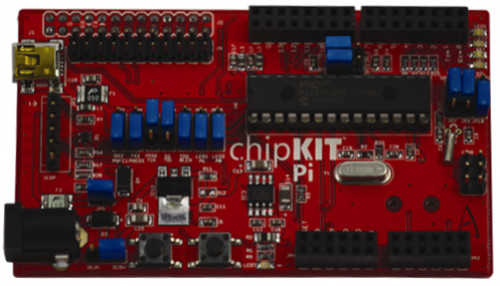
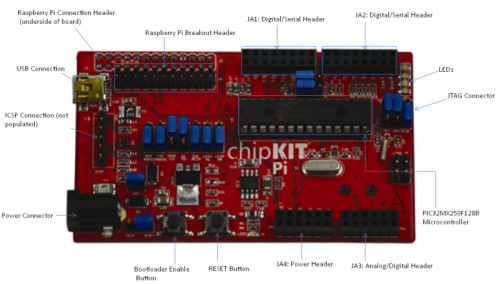
The chipKITTm Pi is the latest ArduinoTm compatible chipKITTm platform from Microchip and element14 specially designed for Raspberry Pi. It features a 32-bit PIC32MX2xx microcontroller in a prototyping-friendly, low pin count SPDIP package. The PIC32’s performance, memory and integrated peripherals allow users to create applications including touch sensing, audio processing and advanced control. The board is supported by the free chipKITTm Multi-Platform IDE (MPIDE) that can be hosted on the Raspberry Pi and allows users to create, compile and program Arduino sketch-based chipKITTm applications within the Raspberry Pi operating system. This software development was completed by voumnteers from the chipKITTm and Arduino communities.

chipKITTm Pi is the world’s first to enable the development of 3.3V Arduino compatible applications for the Raspberry Pi using a 32-bit, high-performance PIC32 MCU in a prototyping-friendly package. Because the Raspberry Pi’s processor is a 3.3V chip, its digital I/O and communications (I2CTm, UART, SPI) pins require 3.3V. Hence the existing prototyping-friendly Arduino boards, which are all based on 5V 8-bit MCUs, require users to create or purchase additional components to translate the voltages. The chipKITTm Pi can interface directly to the Raspberry Pi I/O Expansion header without any additional components, reducing both cost and design complexity.

The chipKITTm development platform is an open-source hardware and software solution intended for beginners and users with little or no knowledge of embedded controllers wanting to explore embedded applications. The chipKITTm environment advances the art of open-source, physical computing by expanding support to more chip platforms and introducing new, high-performance libraries. It combines low-cost hardware with free software that is fast, powerful, and extendable.

Key Applications: Touch sensing, audio processing and advanced control.

Features

  • Designed exclusively for the Raspberry Pi and Arduino ecosystems
  • Features a Microchip 32-bit PIC32 microcontroller (MCU) in a prototyping-friendly, low pin count SPDIP package
  • Supports the chipKITTm Multi-Platform IDE (MPIDE)
  • MPIDE is open source and compatible with the Arduino programming language and development environment
  • Allows users to create, compile and program Arduino sketch-based chipKITTm applications within the Raspberry Pi operating system
  • Enables the development of 3.3V Arduino compatible applications for the Raspberry Pi using PIC32 MCU

Ships With

  • chipKIT Pi Board Only

Required Tools

Accessories

Other Tools

Blog Posts

Discussions

  • chipkit
  • Share
  • History
  • More
  • Cancel
  • Sign in to reply
  • Former Member
    Former Member over 12 years ago in reply to tony1tf

    I am running just as user "pi" launching from the following Desktop file called MPIDE.desktop


    [Desktop Entry]

    Name=MPIDE

    Comment=ChipKitPi Integrated Development Environment

    Exec=/home/pi/mpide-0023-raspberrypi-20130920/mpide

    Icon=/usr/share/indiecity/pistore/clienticon.xpm

    Terminal=false

    MultipleArgs=false

    Type=Application

    Categories=Application;Other;

    StartupNotify=true

    MimeType=x-scheme-handler/indiecity;


    Please note the newer IDE I found on the website you just listed


    mpide-0023-raspberrypi-20130920


    this one has the correct avrdude configuration file for the PIC32 chip used, you still need to put in your startup link to the serial library. Obviously it is Year-Month-Day format.


    I used the "blink without delay demo" but with the following tweak as pin-13 seems to have no LED on it, which is different to Arduino


    // constants won't change. Used here to

    // set pin numbers:

    const int ledPin =  14;      // the number of the LED-1 pin

    //const int ledPin =  15;      // the number of the LED-2 pin


    I am using a fresh install on a RPI 512 V2 with the new Raspbian Image with a 16GB flash card.

    The demo now uploads and works as advertised!  image    image 


    I would upload a text file of the compiler output I gleaned from a terminal launch but I cannot see how to do it.


    Now to find out how to make a suitable "shield" for my CNC activities.....

    • Cancel
    • Vote Up 0 Vote Down
    • Sign in to reply
    • More
    • Cancel
  • tony1tf
    tony1tf over 12 years ago

    Hi David again


    Am making some progress - found a blog with useful info, having Googled for parts of that error message:

    http://colinharrington.net/blog/tag/microcontroller/

    So following his advice, I changed the permissions on the pic32 folder.

    Now the sketch compiles but then falls over at the size determining phase - java-io.IOException: Cannot run program "avr-size" error=2, No such file or directory0. This error also appears in the java debugging terminal window.

    I have searched the Pi for avr-size, and it doesn't exist.

    This post seems to have the answer to this:

    http://www.chipkit.org/forum/viewtopic.php?f=6&t=90

    Installed gcc-avr package (sudo apt-get install gcc-avr) - another 43.6MB of damn disc space used - annoying, because I like PICs and have steered away from AVR micros, so I didnt expect to have to download their library as well.

    I selected the chipKIT UNO32 - not sure if that is right - doesnt seem to be a definiton for the Pi one.

    Yippeee - that worked. Its very slow, though, to compile such a short program - mind you the size is pretty big as well - binary sketch size 5980 bytes.

    Then I tried uploading the binary after putting the kit into load mode - no error, and some minute or so later it said it had Done uploading.

    However resetting doesnt show a blinking LED - maybe have to study the circuit to see if the sketch is correct.

    Getting there slowly and painfully.

    Tony

    • Cancel
    • Vote Up 0 Vote Down
    • Sign in to reply
    • More
    • Cancel
  • tony1tf
    tony1tf over 12 years ago in reply to Former Member

    Hi David


    I hope we havn't scared Ankur away - he doesn't seem to be putting his head over the parapet right now ;-)

    Thanks for the other image file name. I had a job finding it, but eventually found it in a collection of XML structures on:


    http://chipkit.s3.amazonaws.com/index.html


    I downloaded and unarchived on my Pi. I added that export link to the mpide script, and all ran nicely from a debug window as before.

    However, when I try and compile the Blink script I get exactly the same error - no errors in the debug window from java, but the following on the Blink | Mpide window:


    Cannot run program "/home/pi/mpide-mpide-0023-raspberrypi-20130817-test/hardware/pic32-tools/bin/pic32-g++":error=13, Permission denied


    So I am not getting as far as you. Presumably there is something wrong in my java permissions. Unfortunately, I am no expert, so debugging tends to be done by determined Googling! Let me now if you have done something else to make it work as far as you have got.


    Tony

    • Cancel
    • Vote Up 0 Vote Down
    • Sign in to reply
    • More
    • Cancel
  • Former Member
    Former Member over 12 years ago in reply to tony1tf

    Tony, I had more success with


    mpide-0023-raspberrypi-20130817-test.tgz


    unpacked into a local folder in the pi directory of the flash card, a later version methinks.


    This compiled OK once MPIDE decided on the serial port, was trying for ttyS1 instead of ttyS0 even though I followed Ankur's Getting Started Guide.


    When I tried to upload a compiled sketch ( blink demo ) I got the following error....


    Binary sketch size: 5632 bytes (of a 122880 byte maximum)

    avrdude: AVR Part "32MX250F128B" not found.


    I thank you for your idea of exporting the LD_LIBRARY_PATH=$LD_LIBRARY_PATH:/usr/lib/jni idea, in the MPIDE start file, it worked well. image


    So now I need to know from Ankur what version of avrdude he is using, the current Raspbian one is version 5.11.1-1, or is there some configuration file that needs fiddling?


    Close to working but not quite there.

    • Cancel
    • Vote Up 0 Vote Down
    • Sign in to reply
    • More
    • Cancel
  • tony1tf
    tony1tf over 12 years ago in reply to tony1tf

    Hi Ankur


    Progress....

    Managed to download the mpide-0023-linux-20120903, onto my Pi which had java for armhf already installed. Also had to install librxtx-java.

    Also had to add a path in the mpide bash script in order to find rxtxserial:

    export LD_LIBRARY_PATH=$LD_LIBRARY_PATH:/usr/lib/jni

    Then it sort of works when I type ./mpide from the mpide.... directory.

    Can load and edit the sample sketches etc, but cannot compile due to a permission denied error.

    Running mpide with sudo doesnt seem to be an option because it then cant find java.

    Help gratefully received


    Tony

    • Cancel
    • Vote Up 0 Vote Down
    • Sign in to reply
    • More
    • Cancel
  • tony1tf
    tony1tf over 12 years ago in reply to atomar

    Hi Ankur


    In addition, I found a problem with the NOOBS image - its too big for my 4GB card - writing from my Mac, I get this error:

    dd: /dev/rdisk1: short write on character device

    dd: /dev/rdisk1: Input/output error

    3782+0 records in

    3781+1 records out

    3965190144 bytes transferred in 467.537095 secs (8481017 bytes/sec)

    Then trying to boot this image on the Pi, we get a Kernel panic because the 'block count 644608  exceeds size of device (642432)'

    and unknown block (179,6)

    So it woud be good if you made it a slightly smaller image to fit on all SD cards (mine is a SanDisk Ultra 4GB 200X SDHC card).

    Doing a repair on the Pi by holding the shift key down while booting gets the image repaired, but without the ChipKIT installation, so quite pointless!


    regards

    Tony Abbey

    • Cancel
    • Vote Up 0 Vote Down
    • Sign in to reply
    • More
    • Cancel
  • atomar
    atomar over 12 years ago in reply to Former Member

    Hi David,


    If you dont want to download 2GB NOOBS image, you can still have the MPIDE on RPi from the below link:


    MPIDE:

    https://github.com/chipKIT32/chipKIT32-MAX/downloads


    Installation Steps:

    http://chipkit.net/started/install-chipkit-software/install-mpide-linux/


    Regards

    Ankur Tomar

    • Cancel
    • Vote Up 0 Vote Down
    • Sign in to reply
    • More
    • Cancel
  • Former Member
    Former Member over 12 years ago in reply to Former Member

    Thank you Ankur, pretty much all I was after.


    I was thinking of just updating my Raspbian and using the Java Linux version of MPIDE that works on my x86 PC but transferred to the Pi.


    Is there anyway of getting the C compiler which is a set of binaries compiled for the Pi ARM V6 cpu without having to download that 2GB NOOBS image?


    Is it in the Raspbian Repositry as a deb package?


    A link to a website repositry would do but just the compiler package as a gz file added to this website would be better.....

    • Cancel
    • Vote Up 0 Vote Down
    • Sign in to reply
    • More
    • Cancel
  • Former Member
    Former Member over 12 years ago

    OK, purchased two boards.


    Now need to know what I/O it has got and how to program it.


    Downloaded MPIDE for my Linux X86 Computer and it runs fine.

    For use on the Pi I suppose a different compiler binary is needed?


    Could do with a circuit diagram and some sort of user Manual !!


    What shields work with it when installed on a Pi, do you have any in stock?


    Where do I get the Manual for the Microchip Pic32 used on the board?

    • Cancel
    • Vote Up 0 Vote Down
    • Sign in to reply
    • More
    • Cancel
<
element14 Community

element14 is the first online community specifically for engineers. Connect with your peers and get expert answers to your questions.

  • Members
  • Learn
  • Technologies
  • Challenges & Projects
  • Products
  • Store
  • About Us
  • Feedback & Support
  • FAQs
  • Terms of Use
  • Privacy Policy
  • Legal and Copyright Notices
  • Sitemap
  • Cookies

An Avnet Company © 2026 Premier Farnell Limited. All Rights Reserved.

Premier Farnell Ltd, registered in England and Wales (no 00876412), registered office: Farnell House, Forge Lane, Leeds LS12 2NE.

ICP 备案号 10220084.

Follow element14

  • X
  • Facebook
  • linkedin
  • YouTube