element14 Community
element14 Community
    Register Log In
  • Site
  • Search
  • Log In Register
  • Community Hub
    Community Hub
    • What's New on element14
    • Feedback and Support
    • Benefits of Membership
    • Personal Blogs
    • Members Area
    • Achievement Levels
  • Learn
    Learn
    • Ask an Expert
    • eBooks
    • element14 presents
    • Learning Center
    • Tech Spotlight
    • STEM Academy
    • Webinars, Training and Events
    • Learning Groups
  • Technologies
    Technologies
    • 3D Printing
    • FPGA
    • Industrial Automation
    • Internet of Things
    • Power & Energy
    • Sensors
    • Technology Groups
  • Challenges & Projects
    Challenges & Projects
    • Design Challenges
    • element14 presents Projects
    • Project14
    • Arduino Projects
    • Raspberry Pi Projects
    • Project Groups
  • Products
    Products
    • Arduino
    • Avnet & Tria Boards Community
    • Dev Tools
    • Manufacturers
    • Multicomp Pro
    • Product Groups
    • Raspberry Pi
    • RoadTests & Reviews
  • About Us
    About the element14 Community
  • Store
    Store
    • Visit Your Store
    • Choose another store...
      • Europe
      •  Austria (German)
      •  Belgium (Dutch, French)
      •  Bulgaria (Bulgarian)
      •  Czech Republic (Czech)
      •  Denmark (Danish)
      •  Estonia (Estonian)
      •  Finland (Finnish)
      •  France (French)
      •  Germany (German)
      •  Hungary (Hungarian)
      •  Ireland
      •  Israel
      •  Italy (Italian)
      •  Latvia (Latvian)
      •  
      •  Lithuania (Lithuanian)
      •  Netherlands (Dutch)
      •  Norway (Norwegian)
      •  Poland (Polish)
      •  Portugal (Portuguese)
      •  Romania (Romanian)
      •  Russia (Russian)
      •  Slovakia (Slovak)
      •  Slovenia (Slovenian)
      •  Spain (Spanish)
      •  Sweden (Swedish)
      •  Switzerland(German, French)
      •  Turkey (Turkish)
      •  United Kingdom
      • Asia Pacific
      •  Australia
      •  China
      •  Hong Kong
      •  India
      •  Japan
      •  Korea (Korean)
      •  Malaysia
      •  New Zealand
      •  Philippines
      •  Singapore
      •  Taiwan
      •  Thailand (Thai)
      •  Vietnam
      • Americas
      •  Brazil (Portuguese)
      •  Canada
      •  Mexico (Spanish)
      •  United States
      Can't find the country/region you're looking for? Visit our export site or find a local distributor.
  • Translate
  • Profile
  • Settings
Altium CircuitStudio
  • Products
  • Manufacturers
  • Altium CircuitStudio
  • More
  • Cancel
Altium CircuitStudio
Blog CircuitStudio 1.5 Is Now Available
  • Blog
  • Forum
  • Documents
  • Events
  • Polls
  • Members
  • Mentions
  • Sub-Groups
  • Tags
  • More
  • Cancel
  • New
Join Altium CircuitStudio to participate - click to join for free!
  • Share
  • More
  • Cancel
Group Actions
  • Group RSS
  • More
  • Cancel
Engagement
  • Author Author: alexsander_altium
  • Date Created: 24 May 2018 11:23 PM Date Created
  • Views 4788 views
  • Likes 1 like
  • Comments 12 comments
  • circuitstudio
  • update
Related
Recommended

CircuitStudio 1.5 Is Now Available

alexsander_altium
alexsander_altium
24 May 2018

We’re happy to announce an update for CircuitStudio, CircuitStudio 1.5. Although this is not a major feature packed release -that's on its way- its still an important, and to be honest a much needed one. CircuitStudio is alive and still being developed. What this means is more regular updates, we even have planned another update to CircuitStudio by the end of this year.


I’m sure you guys want to know what’s new and what’s coming. So let me just jump into it. CircuitStudio 1.5 is currently out and ready for you to enjoy. In addition to general maintenance, there are three main features for this release of you should be aware of:


Selection Filter

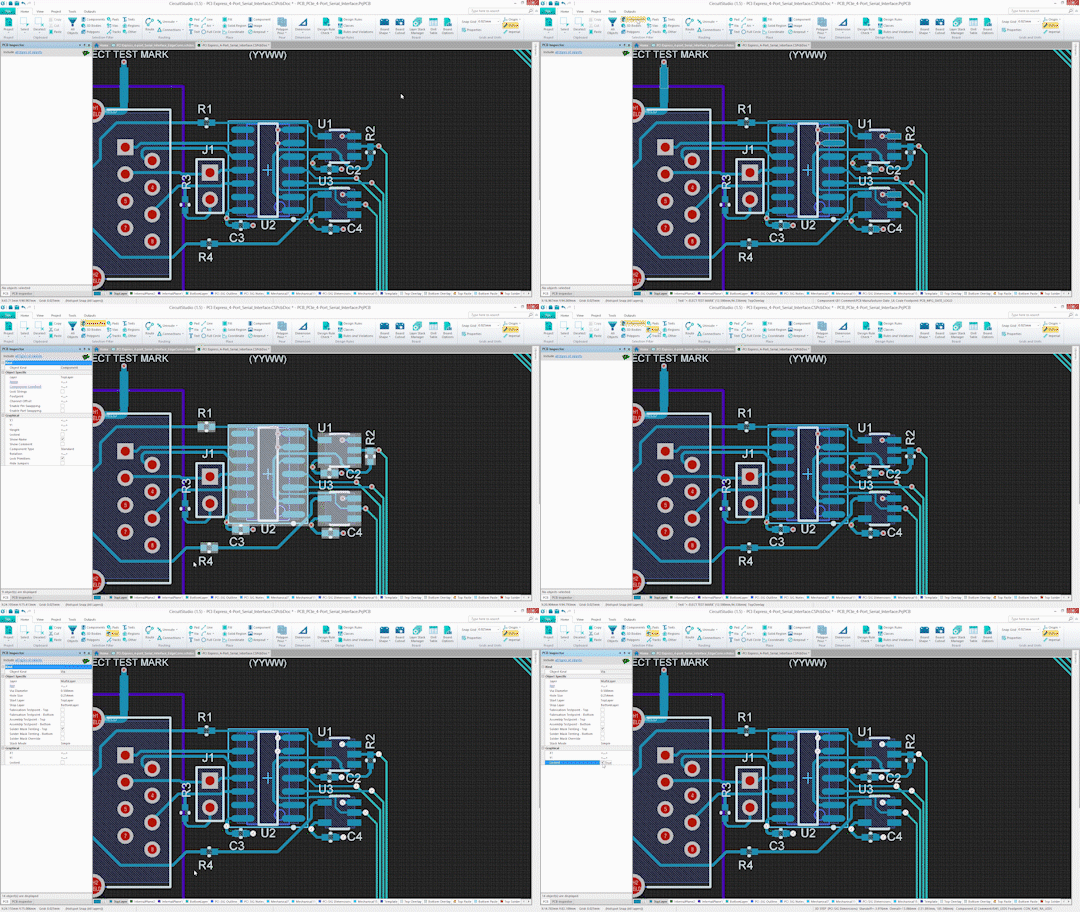
Define what you want selected before you make a selection. This preselection filter enables you to accurately select everything you need, and nothing you don’t. This is a great filter when you want to pick out a certain type of object on a crowded board. For instance you can select a certain group of vias and then change the hole size for all the vias at once.


The selection filter can be accessed from the Home tab. To select a specific type of object click on the object type from the list. You may select one or multiple types of objects at once. To be able to select all object types select All Objects.
 

image


Layer sets

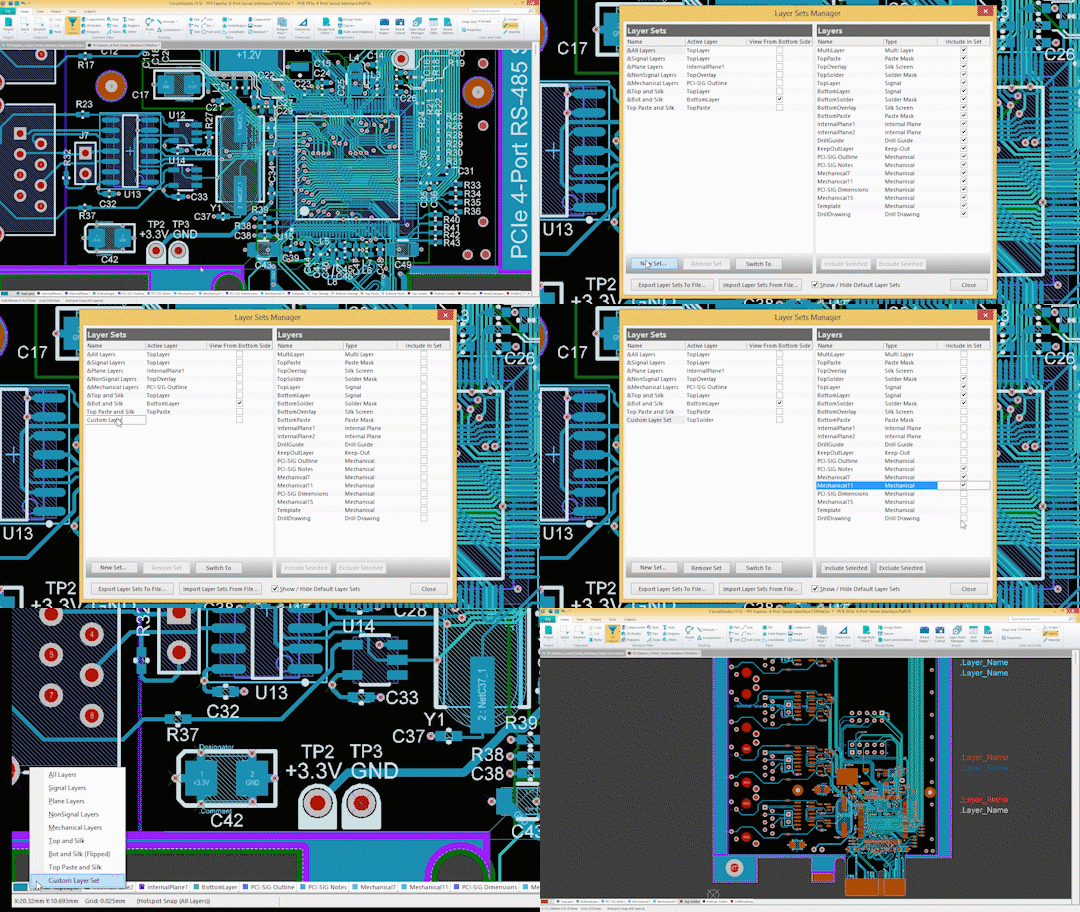
The Layer Sets Manager dialog allows designers to create, edit, and remove layer sets. Using layer sets allows designers to view only specific layers included in these sets. This is useful when only working on specific layers to help reduce clutter in the workspace.


To access the Layer Sets Manager right click on the layer tabs bar on the bottom of the workspace. Then click on Layer Sets > Board Layer Sets… Once the Layer Sets Manager is open you may create a new set or edit an existing one by checking the layers you want to include from the right.
 

image


3D PDF

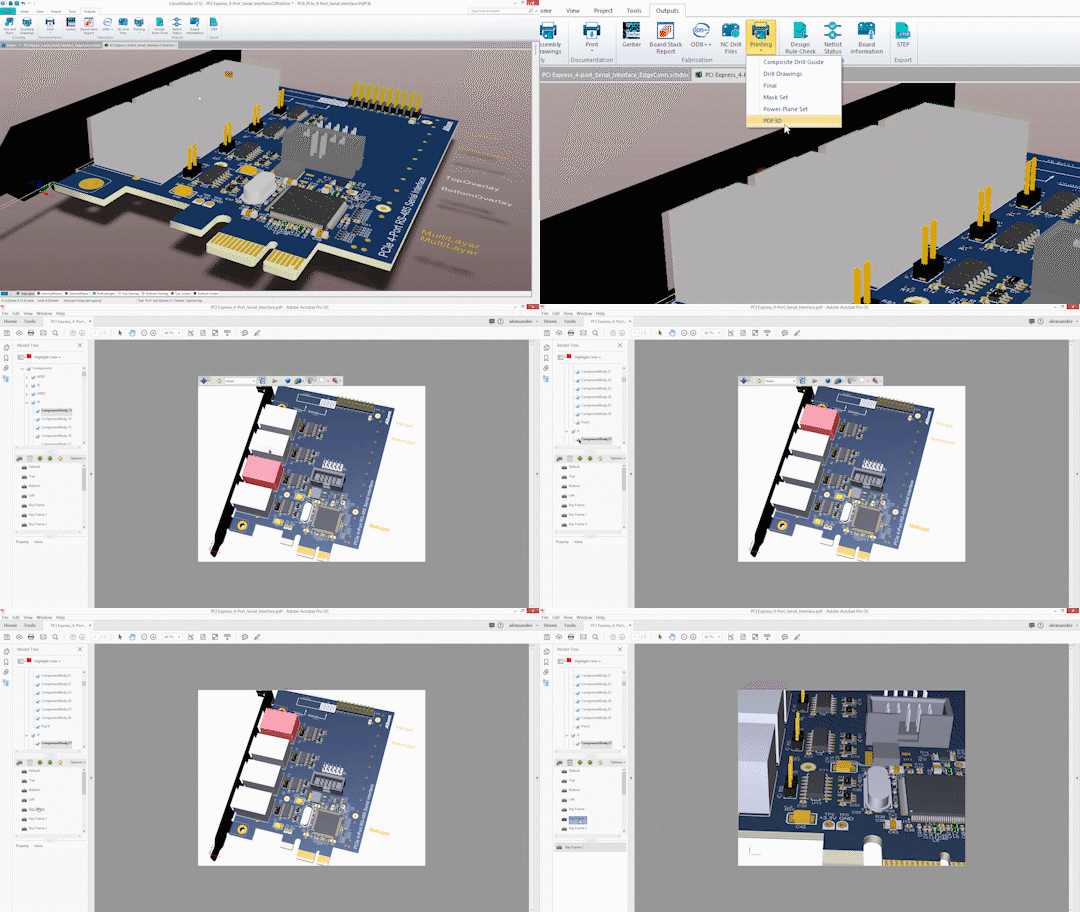
Give you fabricators and project managers a much better understanding of your design intent by sharing with them a 3D PDF. Allow anyone on the team to view your PCB design with 3D PDFs as part of your output documentation. Interactively view board shape and components from any compatible PDF viewer.


A 3D PDF may be created as part of a batch output by using the Generate outputs button on the Project tab or by itself through the Printing button on the Outputs tab. Once the file is generated it will be ready to be sent or opened.
image


In addition to the good news above, we have even more good news for you. There is a roadmap for CircuitStudio and yes we will be releasing this. We want everyone to be up to date with CircuitStudio, no more wondering what’s going to happen. We’re excited to continue to improve CircuitStudio and empower the community with a powerful yet affordable design tool.


How To Install


You are able to update directly within CircuitStudio or have a clean installation by going to our download page. If you prefer to update your CircuitStudio installation:


  1. Select View>>Start to open the Home page
  2. While signed in, select Extensions and Updates from the My Account pull-down menu
  3. From the Extensions & Updates page, click the Updates tab
  4. Click the CircuitStudio 1.5.0 (Build 13) update link to start the update process
  5. Restart CircuitStudio (restart notification window will pop up)


New to CircuitStudio?


Why not download the free 30 day evaluation and give it a try, discover what you've been missing!


Expired Maintenance?


It's quick and easy to renew your maintenancerenew your maintenance to get access to this update. Don't worry if it your existing maintenance subscription has lapsed, you can purchase a new 12-month maintenance subscription and it will start from the date of purchase (no back dating, no surcharges, no fuss).

  • Sign in to reply

Top Comments

  • juhaszzs
    juhaszzs over 7 years ago +2
    I think the CircuitStudio users this wants... and not that what we got. Altium CircuitStudio Community Poll Q2) If you could improve something, or add a single feature to CircuitStudio, what would you…
  • voltsandjolts
    voltsandjolts over 7 years ago +1
    Layer Sets!!! Excellent, thank you.
  • craigarno
    craigarno over 7 years ago in reply to Sparkylabs

    I use Circuit Studio on a 43" 4K monitor since CS 1.4, and it works well.  Getting the hardware acceleration settings right was a little bit of a bear, but it now works smoothly and well.


    And 3D PDF and STEP output is important if you're working with mechanical CAD people, and trying to help managers quickly understand what you're doing to help your electronic design fit in the case.  Yeah, they think what you do is easy too, so whats taking you so long?  If you're a one man shop you may not care, but if you have to communicate with clients and other fabrication facilities, 3D really helps.  Be good to the mech CAD guy, he can help you with your 3D modeling of non-standard parts.


    I renewed my support.  I'm hoping next round will include GIT VCS.  Adding new features, making them work right, and operate problem free takes a lot of software development effort.  Don't take that for granted, it's not "Free", and is where your support money goes.  If you need -everything- put -your- money down for Designer 18/19.

    • Cancel
    • Vote Up 0 Vote Down
    • Sign in to reply
    • More
    • Cancel
  • juhaszzs
    juhaszzs over 7 years ago

    I think the CircuitStudio users this wants... and not that what we got.


    Altium CircuitStudio Community Poll


    Q2) If you could improve something, or add a single feature to CircuitStudio, what would you add?


    Poll Results 

      You voted on May 15, 2017 

    • Tool to Find Similar Objects - Aid in selection of multiple similar objects for use with Object Inspector for global edits (19%)
        18/94 


    • Footprint Manager - Tool to view and modify footprint selections for all schematics in hierarchy (15%)

        14/94 

    • Parameter Manager - Tool to view and modify all parameters within schematic hierarchy and/or schematic library. (12%)

        11/94 

    • EagleTm Export capability (13%)

        12/94 

    • Dynamic updates between PCB and Schematic versus controlled ECO (17%)

        16/94 

    • More direct MCAD/3D Collaboration tools (10%)

        9/94 

    • Other (Please post below) (15%)


    Q4) Do you feel there is value in providing a scripting or user language interface?


    Poll Results 

      You voted on May 15, 2017 

    • Yes (69%)
        64/93 


    • No (31%)
    • Cancel
    • Vote Up +2 Vote Down
    • Sign in to reply
    • More
    • Cancel
  • Sparkylabs
    Sparkylabs over 7 years ago

    Really? this is the long awaited update? the selection filter already existed in some form you just used the "PCB filter" and could then select stuff, ok this feature is slightly easier to use but this is called anew feature? more like a macro....


    I don't know about the layer sets as it's not the sort of thing I have needed.


    Export to 3D PDF ? seriously, we waited a year for a non feature to be added, This is simply some sort of plugin Altium have bought that takes a step export and puts it into a 3D PDF.......


    We have waited a year and are expected to renew our subscription for this???? 3 barely plausible features and the mention of one bug fix, was anything else done? obviously 4K monitor support is a no.....


    Hopefully that road map is serious as is the promise to pull ones finger out...

    • Cancel
    • Vote Up 0 Vote Down
    • Sign in to reply
    • More
    • Cancel
  • optoeng
    optoeng over 7 years ago

    Positioning the Filter tools on the left of the Home tab may confuse some, but the new features look good. Biggest disappointment: ODB output still crashes ODB viewers, because file folder and file names include upper case characters, forbidden for ODB++. This seems like it should be an easy fix.

    • Cancel
    • Vote Up 0 Vote Down
    • Sign in to reply
    • More
    • Cancel
  • velias
    velias over 7 years ago

    Wish you could have an always in-focus layer/configurations window, to instantly, in real time, click layers on and off like in Altium Designer.  I hate how it works now where you have to double click the active layer box in the bottom layer ribbon to open the view configurations window (and nothing else works until you close it). and then have to click ok or apply to change the viewing of them.


    Why wouldn't you copy what works in Designer?


    Having that layer View Configurations window open keeps you from doing anything else in the main CircuitStudio until the Configurations window is closed.

    I just want an always on menu of layers that i can just click click click and instantly turn them on or off without taking the main window out of focus.

    Copy how Designer does it.


    Does anyone else agree?

    • Cancel
    • Vote Up 0 Vote Down
    • Sign in to reply
    • More
    • Cancel
<>
element14 Community

element14 is the first online community specifically for engineers. Connect with your peers and get expert answers to your questions.

  • Members
  • Learn
  • Technologies
  • Challenges & Projects
  • Products
  • Store
  • About Us
  • Feedback & Support
  • FAQs
  • Terms of Use
  • Privacy Policy
  • Legal and Copyright Notices
  • Sitemap
  • Cookies

An Avnet Company © 2026 Premier Farnell Limited. All Rights Reserved.

Premier Farnell Ltd, registered in England and Wales (no 00876412), registered office: Farnell House, Forge Lane, Leeds LS12 2NE.

ICP 备案号 10220084.

Follow element14

  • X
  • Facebook
  • linkedin
  • YouTube