element14 Community
element14 Community
    Register Log In
  • Site
  • Search
  • Log In Register
  • Community Hub
    Community Hub
    • What's New on element14
    • Feedback and Support
    • Benefits of Membership
    • Personal Blogs
    • Members Area
    • Achievement Levels
  • Learn
    Learn
    • Ask an Expert
    • eBooks
    • element14 presents
    • Learning Center
    • Tech Spotlight
    • STEM Academy
    • Webinars, Training and Events
    • Learning Groups
  • Technologies
    Technologies
    • 3D Printing
    • FPGA
    • Industrial Automation
    • Internet of Things
    • Power & Energy
    • Sensors
    • Technology Groups
  • Challenges & Projects
    Challenges & Projects
    • Design Challenges
    • element14 presents Projects
    • Project14
    • Arduino Projects
    • Raspberry Pi Projects
    • Project Groups
  • Products
    Products
    • Arduino
    • Avnet & Tria Boards Community
    • Dev Tools
    • Manufacturers
    • Multicomp Pro
    • Product Groups
    • Raspberry Pi
    • RoadTests & Reviews
  • About Us
  • Store
    Store
    • Visit Your Store
    • Choose another store...
      • Europe
      •  Austria (German)
      •  Belgium (Dutch, French)
      •  Bulgaria (Bulgarian)
      •  Czech Republic (Czech)
      •  Denmark (Danish)
      •  Estonia (Estonian)
      •  Finland (Finnish)
      •  France (French)
      •  Germany (German)
      •  Hungary (Hungarian)
      •  Ireland
      •  Israel
      •  Italy (Italian)
      •  Latvia (Latvian)
      •  
      •  Lithuania (Lithuanian)
      •  Netherlands (Dutch)
      •  Norway (Norwegian)
      •  Poland (Polish)
      •  Portugal (Portuguese)
      •  Romania (Romanian)
      •  Russia (Russian)
      •  Slovakia (Slovak)
      •  Slovenia (Slovenian)
      •  Spain (Spanish)
      •  Sweden (Swedish)
      •  Switzerland(German, French)
      •  Turkey (Turkish)
      •  United Kingdom
      • Asia Pacific
      •  Australia
      •  China
      •  Hong Kong
      •  India
      • Japan
      •  Korea (Korean)
      •  Malaysia
      •  New Zealand
      •  Philippines
      •  Singapore
      •  Taiwan
      •  Thailand (Thai)
      • Vietnam
      • Americas
      •  Brazil (Portuguese)
      •  Canada
      •  Mexico (Spanish)
      •  United States
      Can't find the country/region you're looking for? Visit our export site or find a local distributor.
  • Translate
  • Profile
  • Settings
Altium CircuitStudio
  • Products
  • Manufacturers
  • Altium CircuitStudio
  • More
  • Cancel
Altium CircuitStudio
Altium CircuitStudio Forum Annotate messes up multi-part component
  • Blog
  • Forum
  • Documents
  • Events
  • Polls
  • Members
  • Mentions
  • Sub-Groups
  • Tags
  • More
  • Cancel
  • New
Join Altium CircuitStudio to participate - click to join for free!
Actions
  • Share
  • More
  • Cancel
Forum Thread Details
  • Locked Locked
  • Replies 5 replies
  • Subscribers 89 subscribers
  • Views 2040 views
  • Users 0 members are here
  • multi-part
Related
This discussion has been locked.
You can no longer post new replies to this discussion. If you have a question you can start a new discussion

Annotate messes up multi-part component

dbemmann
dbemmann over 5 years ago

I have defined a component for a 74HC08 Quad AND gate. My component consists of 5 parts:

Part A:  AND gate 1 (inputs A1, B1, output Y1)

Part B:  AND gate 2 (inputs A2, B2, output Y2)

Part C:  AND gate 3 (inputs A3, B3, output Y3)

Part D:  AND gate 4 (inputs A4, B4, output Y4)

Part E:  Ports GND, VCC


When I use the function "Annotate quietly", it messes up the circuit by exchanging Part A with Part E (which are obviously not interchangable). How can I fix this?

  • Cancel

Top Replies

  • mc6800
    mc6800 over 5 years ago +1
    The other way is to configure part swapping in the library. Open the schematic library, and type "swap" in the search box. Click on "Tools->Configure Swapping". This presents a dialog box with all multi…
  • tarribred61
    tarribred61 over 5 years ago

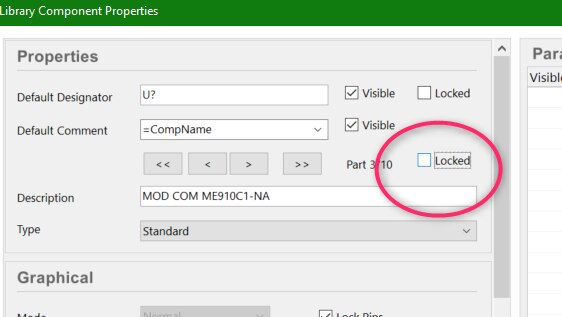
    Have you tried locking the parts.  You can do this in the library or at the schematic level.  If you are gate swapping for placement purposes you might want to control this.

    image

    • Cancel
    • Vote Up 0 Vote Down
    • Cancel
  • dbemmann
    dbemmann over 5 years ago in reply to tarribred61

    So I need to set this to locked in the library, for all parts of that component?

    • Cancel
    • Vote Up 0 Vote Down
    • Cancel
  • tarribred61
    tarribred61 over 5 years ago in reply to dbemmann

    If you set it in the library then you also need to update the schematic instances from the library.  Or you can lock it on the schematic and leave the library alone.

    • Cancel
    • Vote Up 0 Vote Down
    • Cancel
  • mc6800
    mc6800 over 5 years ago

    The other way is to configure part swapping in the library. Open the schematic library, and type "swap" in the search box. Click on "Tools->Configure Swapping". This presents a dialog box with all multi-part components. Choose one, and select "configure conmponent". On the "part swapping" tab, assign  a number to any parts that can be swapped, and a different number for other parts. Also use the sequence id to identify which pins are funtioanly identical (eg AB for inputs, Y for outputs). Save the library, and update the schematic from the library component to get the changes.


    You can also right-click a component in a schematic, and choose Part Actions -> Configure Pin Swapping to change things.

    • Cancel
    • Vote Up +1 Vote Down
    • Cancel
  • dbemmann
    dbemmann over 5 years ago in reply to mc6800

    Great. I think this is the way to go.

    • Cancel
    • Vote Up 0 Vote Down
    • Cancel
element14 Community

element14 is the first online community specifically for engineers. Connect with your peers and get expert answers to your questions.

  • Members
  • Learn
  • Technologies
  • Challenges & Projects
  • Products
  • Store
  • About Us
  • Feedback & Support
  • FAQs
  • Terms of Use
  • Privacy Policy
  • Legal and Copyright Notices
  • Sitemap
  • Cookies

An Avnet Company © 2025 Premier Farnell Limited. All Rights Reserved.

Premier Farnell Ltd, registered in England and Wales (no 00876412), registered office: Farnell House, Forge Lane, Leeds LS12 2NE.

ICP 备案号 10220084.

Follow element14

  • X
  • Facebook
  • linkedin
  • YouTube