element14 Community
element14 Community
    Register Log In
  • Site
  • Search
  • Log In Register
  • Community Hub
    Community Hub
    • What's New on element14
    • Feedback and Support
    • Benefits of Membership
    • Personal Blogs
    • Members Area
    • Achievement Levels
  • Learn
    Learn
    • Ask an Expert
    • eBooks
    • element14 presents
    • Learning Center
    • Tech Spotlight
    • STEM Academy
    • Webinars, Training and Events
    • Learning Groups
  • Technologies
    Technologies
    • 3D Printing
    • FPGA
    • Industrial Automation
    • Internet of Things
    • Power & Energy
    • Sensors
    • Technology Groups
  • Challenges & Projects
    Challenges & Projects
    • Design Challenges
    • element14 presents Projects
    • Project14
    • Arduino Projects
    • Raspberry Pi Projects
    • Project Groups
  • Products
    Products
    • Arduino
    • Avnet & Tria Boards Community
    • Dev Tools
    • Manufacturers
    • Multicomp Pro
    • Product Groups
    • Raspberry Pi
    • RoadTests & Reviews
  • About Us
  • Store
    Store
    • Visit Your Store
    • Choose another store...
      • Europe
      •  Austria (German)
      •  Belgium (Dutch, French)
      •  Bulgaria (Bulgarian)
      •  Czech Republic (Czech)
      •  Denmark (Danish)
      •  Estonia (Estonian)
      •  Finland (Finnish)
      •  France (French)
      •  Germany (German)
      •  Hungary (Hungarian)
      •  Ireland
      •  Israel
      •  Italy (Italian)
      •  Latvia (Latvian)
      •  
      •  Lithuania (Lithuanian)
      •  Netherlands (Dutch)
      •  Norway (Norwegian)
      •  Poland (Polish)
      •  Portugal (Portuguese)
      •  Romania (Romanian)
      •  Russia (Russian)
      •  Slovakia (Slovak)
      •  Slovenia (Slovenian)
      •  Spain (Spanish)
      •  Sweden (Swedish)
      •  Switzerland(German, French)
      •  Turkey (Turkish)
      •  United Kingdom
      • Asia Pacific
      •  Australia
      •  China
      •  Hong Kong
      •  India
      • Japan
      •  Korea (Korean)
      •  Malaysia
      •  New Zealand
      •  Philippines
      •  Singapore
      •  Taiwan
      •  Thailand (Thai)
      • Vietnam
      • Americas
      •  Brazil (Portuguese)
      •  Canada
      •  Mexico (Spanish)
      •  United States
      Can't find the country/region you're looking for? Visit our export site or find a local distributor.
  • Translate
  • Profile
  • Settings
Altium CircuitStudio
  • Products
  • Manufacturers
  • Altium CircuitStudio
  • More
  • Cancel
Altium CircuitStudio
Altium CircuitStudio Forum Schematics are missing in 1.5.2 version
  • Blog
  • Forum
  • Documents
  • Events
  • Polls
  • Members
  • Mentions
  • Sub-Groups
  • Tags
  • More
  • Cancel
  • New
Join Altium CircuitStudio to participate - click to join for free!
Actions
  • Share
  • More
  • Cancel
Forum Thread Details
  • Locked Locked
  • Replies 3 replies
  • Subscribers 89 subscribers
  • Views 647 views
  • Users 0 members are here
Related
This discussion has been locked.
You can no longer post new replies to this discussion. If you have a question you can start a new discussion

Schematics are missing in 1.5.2 version

shastri
shastri over 5 years ago

Hi


I am using Circuit Studio 1.5.2 version.


During power outages, some schematics are missing or details are not displayed even though the project is compiled, saved.


Some component libraries are missing after a power outage or a PC reboot, despite all of them being compiled and saved previously.


Would request Circuit Studio experts to suggest a solution.


Best Regards


Vijay

  • Cancel
  • tarribred61
    tarribred61 over 5 years ago

    Hi,


    Based on your post I am unclear as to whether the files (schematic and libraries) actually are missing from your computer or wherever they are stored OR if the CircuitStudio project is reporting them as missing and cannot locate them.


    If the files exist on your computer, you should be able to add them again as existing files to your project.  If the files are in fact no longer there or are corrupted and cannot be read in, then you would need to use your backups or perhaps check the history folder of your CircuitStudio project.


    I think once you save the project again the reported missing files go away.


    First thing to do is probably make a back up copy of your project folder structure so you can protect yourself from further corruption as you try to recover.


    Good luck and sorry to hear about your problems.

    • Cancel
    • Vote Up 0 Vote Down
    • Cancel
  • shastri
    shastri over 5 years ago in reply to tarribred61

    Hi Thomas


    We see this issue when we take the schematics, compile it and take it to the PCB layout editor.


    When we go back, sometimes the components in the schematics page are missing.


    Shall send you the snapshots next time when this issue occurs.


    Thanks for the support.


    Best Regards


    Vijay

    • Cancel
    • Vote Up 0 Vote Down
    • Cancel
  • tarribred61
    tarribred61 over 5 years ago in reply to shastri

    Hi,


    What you newly describe is different than lost information due to a power outage.

    I have not experienced unexplained removal of parts otherwise.


    I know that CircuitStudio and Altium Designer, will remove (delete) parts on a PCB if they are not on the schematic as part of updating the PCB from the schematic.  You must check the proper boxes in the process steps to prevent removal.  There may be something similar when you update schematics from the PCB as you would do when back annotating the schematics from the PCB.


    For example, if you put mounting holes or fiducials on the PCB and they are not in the schematic then they may be removed.  If you forget about this you may make a PCB without the mounting holes.  Therefore, I would recommend making schematic symbols for mounting holes, fiducials, test points and such that you want to ensure stay synchronized.


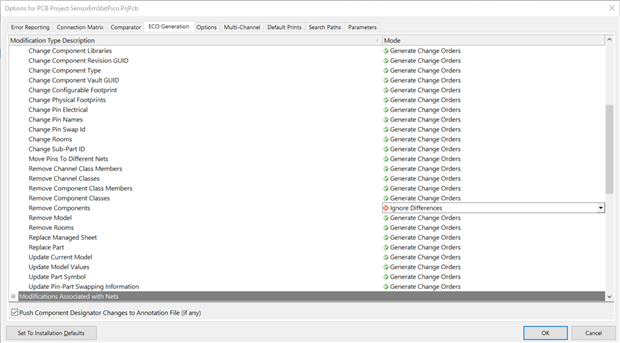
    There is an optional setting in software to disable this automatic removal.  Other users may find this better for them.  To find this, open the options for the project and find the ECO Generation tab and the Remove Components item.  Change it from Generate Change Orders to Ignore Differences.  There may be other settings you want to customize for your use.


    image


    You can get to this from the tool ribbon Project > Options or go to the search window and type project options


    Hopefully, this helps you.

    • Cancel
    • Vote Up 0 Vote Down
    • Cancel
element14 Community

element14 is the first online community specifically for engineers. Connect with your peers and get expert answers to your questions.

  • Members
  • Learn
  • Technologies
  • Challenges & Projects
  • Products
  • Store
  • About Us
  • Feedback & Support
  • FAQs
  • Terms of Use
  • Privacy Policy
  • Legal and Copyright Notices
  • Sitemap
  • Cookies

An Avnet Company © 2026 Premier Farnell Limited. All Rights Reserved.

Premier Farnell Ltd, registered in England and Wales (no 00876412), registered office: Farnell House, Forge Lane, Leeds LS12 2NE.

ICP 备案号 10220084.

Follow element14

  • X
  • Facebook
  • linkedin
  • YouTube