element14 Community
element14 Community
    Register Log In
  • Site
  • Search
  • Log In Register
  • Community Hub
    Community Hub
    • What's New on element14
    • Feedback and Support
    • Benefits of Membership
    • Personal Blogs
    • Members Area
    • Achievement Levels
  • Learn
    Learn
    • Ask an Expert
    • eBooks
    • element14 presents
    • Learning Center
    • Tech Spotlight
    • STEM Academy
    • Webinars, Training and Events
    • Learning Groups
  • Technologies
    Technologies
    • 3D Printing
    • FPGA
    • Industrial Automation
    • Internet of Things
    • Power & Energy
    • Sensors
    • Technology Groups
  • Challenges & Projects
    Challenges & Projects
    • Design Challenges
    • element14 presents Projects
    • Project14
    • Arduino Projects
    • Raspberry Pi Projects
    • Project Groups
  • Products
    Products
    • Arduino
    • Avnet & Tria Boards Community
    • Dev Tools
    • Manufacturers
    • Multicomp Pro
    • Product Groups
    • Raspberry Pi
    • RoadTests & Reviews
  • About Us
  • Store
    Store
    • Visit Your Store
    • Choose another store...
      • Europe
      •  Austria (German)
      •  Belgium (Dutch, French)
      •  Bulgaria (Bulgarian)
      •  Czech Republic (Czech)
      •  Denmark (Danish)
      •  Estonia (Estonian)
      •  Finland (Finnish)
      •  France (French)
      •  Germany (German)
      •  Hungary (Hungarian)
      •  Ireland
      •  Israel
      •  Italy (Italian)
      •  Latvia (Latvian)
      •  
      •  Lithuania (Lithuanian)
      •  Netherlands (Dutch)
      •  Norway (Norwegian)
      •  Poland (Polish)
      •  Portugal (Portuguese)
      •  Romania (Romanian)
      •  Russia (Russian)
      •  Slovakia (Slovak)
      •  Slovenia (Slovenian)
      •  Spain (Spanish)
      •  Sweden (Swedish)
      •  Switzerland(German, French)
      •  Turkey (Turkish)
      •  United Kingdom
      • Asia Pacific
      •  Australia
      •  China
      •  Hong Kong
      •  India
      • Japan
      •  Korea (Korean)
      •  Malaysia
      •  New Zealand
      •  Philippines
      •  Singapore
      •  Taiwan
      •  Thailand (Thai)
      • Vietnam
      • Americas
      •  Brazil (Portuguese)
      •  Canada
      •  Mexico (Spanish)
      •  United States
      Can't find the country/region you're looking for? Visit our export site or find a local distributor.
  • Translate
  • Profile
  • Settings
Altium CircuitStudio
  • Products
  • Manufacturers
  • Altium CircuitStudio
  • More
  • Cancel
Altium CircuitStudio
Altium CircuitStudio Forum Generating laser-printer outputs for DIY fabrication
  • Blog
  • Forum
  • Documents
  • Events
  • Polls
  • Members
  • Mentions
  • Sub-Groups
  • Tags
  • More
  • Cancel
  • New
Join Altium CircuitStudio to participate - click to join for free!
Actions
  • Share
  • More
  • Cancel
Forum Thread Details
  • State Suggested Answer
  • Locked Locked
  • Replies 5 replies
  • Answers 3 answers
  • Subscribers 91 subscribers
  • Views 1576 views
  • Users 0 members are here
  • pcb prototype fabrication
Related
This discussion has been locked.
You can no longer post new replies to this discussion. If you have a question you can start a new discussion

Generating laser-printer outputs for DIY fabrication

awardautomation
awardautomation over 8 years ago

I have finished the layout of my board, now I want to etch using photo sensitive etch-resist.

For this I will need to print the top and bottom layer on a transparent sheet, expose the board, develop, and etch

I can print the multilayer composite print from the "Generate output files" dialogue but I need to print the layers individually.

If I use Printing -> Final (from the outputs ribbon):  I get individual layers but they are scaled incorrectly and there doesn't seem to be an option to change this.

What am I missing?

  • Cancel
  • e14softwareuk
    0 e14softwareuk over 8 years ago

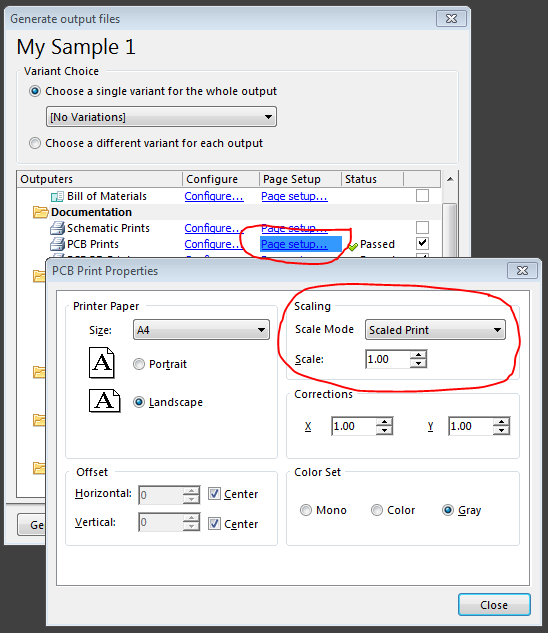
    If using Generate Outputs you set the scaling option, either fill the sheet or print at a specified scale factor.

    image

    • Cancel
    • Vote Up 0 Vote Down
    • Cancel
  • awardautomation
    0 awardautomation over 8 years ago in reply to e14softwareuk

    Thanks Peter

    I did find that but it wanted to give me a composite output with all layers on one page, what I needed to generate individual layers on separate sheets was right click and select Create Final.

    What I'm struggling to do now is to create a negative image that I can print onto transparent sheet for photo etching.

    Is this possible or do I need some third party software?


    • Cancel
    • Vote Up 0 Vote Down
    • Cancel
  • e14softwareuk
    0 e14softwareuk over 8 years ago in reply to awardautomation

    Have you tried using the Configure link (next to page setup)? If you right click on the dialog that opens you get to add in more prints and have a choice of what to print on the page, this might get you what you need.

    • Cancel
    • Vote Up 0 Vote Down
    • Cancel
  • jimku
    0 jimku over 8 years ago

    It may be a round about way to accomplish what you want but I know you can output the gerber files (one for each layer) then use a free gerber viewer, then print from the viewer. I use Viewmate by PentaLogix. It gives the ability to print black on white or white on black for each gerber file. It can also be set to print to scale but I do not know how accurate it actually prints to scale. I printed off a layer with a connector with 0.1 inch spacing and matched up with my ruler for at least 1.5 inches.

    • Cancel
    • Vote Up 0 Vote Down
    • Cancel
  • jcbottorff@pmatrix.com
    0 jcbottorff@pmatrix.com over 8 years ago

    One option seems to be using a Gerber to PDF converter. See https://sourceforge.net/projects/gerber2pdf/


    You can specify white on black/black on white and can set mirroring options for the back side. The Windows powershell command would be like .\Downloads\Gerber2pdf.exe --% -output=c:\temp\pulse_gen.pdf -background=0,0,0 -colour=255,255,255 C:\temp\pulse_gen.GTL


    The --% tells powershell to not parse what follows, which is needed to get these command line options exactly passed to the program.


    You can then print the PDF with 100% scaling.

    • Cancel
    • Vote Up 0 Vote Down
    • Cancel
element14 Community

element14 is the first online community specifically for engineers. Connect with your peers and get expert answers to your questions.

  • Members
  • Learn
  • Technologies
  • Challenges & Projects
  • Products
  • Store
  • About Us
  • Feedback & Support
  • FAQs
  • Terms of Use
  • Privacy Policy
  • Legal and Copyright Notices
  • Sitemap
  • Cookies

An Avnet Company © 2026 Premier Farnell Limited. All Rights Reserved.

Premier Farnell Ltd, registered in England and Wales (no 00876412), registered office: Farnell House, Forge Lane, Leeds LS12 2NE.

ICP 备案号 10220084.

Follow element14

  • X
  • Facebook
  • linkedin
  • YouTube