element14 Community
element14 Community
    Register Log In
  • Site
  • Search
  • Log In Register
  • Community Hub
    Community Hub
    • What's New on element14
    • Feedback and Support
    • Benefits of Membership
    • Personal Blogs
    • Members Area
    • Achievement Levels
  • Learn
    Learn
    • Ask an Expert
    • eBooks
    • element14 presents
    • Learning Center
    • Tech Spotlight
    • STEM Academy
    • Webinars, Training and Events
    • Learning Groups
  • Technologies
    Technologies
    • 3D Printing
    • FPGA
    • Industrial Automation
    • Internet of Things
    • Power & Energy
    • Sensors
    • Technology Groups
  • Challenges & Projects
    Challenges & Projects
    • Design Challenges
    • element14 presents Projects
    • Project14
    • Arduino Projects
    • Raspberry Pi Projects
    • Project Groups
  • Products
    Products
    • Arduino
    • Avnet & Tria Boards Community
    • Dev Tools
    • Manufacturers
    • Multicomp Pro
    • Product Groups
    • Raspberry Pi
    • RoadTests & Reviews
  • About Us
  • Store
    Store
    • Visit Your Store
    • Choose another store...
      • Europe
      •  Austria (German)
      •  Belgium (Dutch, French)
      •  Bulgaria (Bulgarian)
      •  Czech Republic (Czech)
      •  Denmark (Danish)
      •  Estonia (Estonian)
      •  Finland (Finnish)
      •  France (French)
      •  Germany (German)
      •  Hungary (Hungarian)
      •  Ireland
      •  Israel
      •  Italy (Italian)
      •  Latvia (Latvian)
      •  
      •  Lithuania (Lithuanian)
      •  Netherlands (Dutch)
      •  Norway (Norwegian)
      •  Poland (Polish)
      •  Portugal (Portuguese)
      •  Romania (Romanian)
      •  Russia (Russian)
      •  Slovakia (Slovak)
      •  Slovenia (Slovenian)
      •  Spain (Spanish)
      •  Sweden (Swedish)
      •  Switzerland(German, French)
      •  Turkey (Turkish)
      •  United Kingdom
      • Asia Pacific
      •  Australia
      •  China
      •  Hong Kong
      •  India
      • Japan
      •  Korea (Korean)
      •  Malaysia
      •  New Zealand
      •  Philippines
      •  Singapore
      •  Taiwan
      •  Thailand (Thai)
      • Vietnam
      • Americas
      •  Brazil (Portuguese)
      •  Canada
      •  Mexico (Spanish)
      •  United States
      Can't find the country/region you're looking for? Visit our export site or find a local distributor.
  • Translate
  • Profile
  • Settings
Altium CircuitStudio
  • Products
  • Manufacturers
  • Altium CircuitStudio
  • More
  • Cancel
Altium CircuitStudio
Altium CircuitStudio Forum Problem creating opamp with spice data
  • Blog
  • Forum
  • Documents
  • Events
  • Polls
  • Members
  • Mentions
  • Sub-Groups
  • Tags
  • More
  • Cancel
  • New
Join Altium CircuitStudio to participate - click to join for free!
Actions
  • Share
  • More
  • Cancel
Forum Thread Details
  • State Not Answered
  • Locked Locked
  • Replies 2 replies
  • Subscribers 89 subscribers
  • Views 810 views
  • Users 0 members are here
  • simulation
  • spice
  • circuit studio
Related
This discussion has been locked.
You can no longer post new replies to this discussion. If you have a question you can start a new discussion

Problem creating opamp with spice data

dexter23
dexter23 over 7 years ago

Let me start by saying that i'm new to using simulation tools, so it's probably a rookie mistake, but.


In my design i have a LM385(DR) (dual) opamp and want to simulate the circuit.

I 'created' the schematic symbol, i downloaded the spice model from the Texas instruments website, i added it to the symbol (like in this video).

I ran in to problems,

1) The LM385 is a dual opamp so i made the symbol with two opamp parts and 1 power supply part

  I have not been able to get the power pins connected, keep getting error that the part has to few pins.... i can't get past this error and can't save the symbol with simulation data.

2) Created a new symbol with 2 opamp parts with the power pins in the same symbol (like in the video)

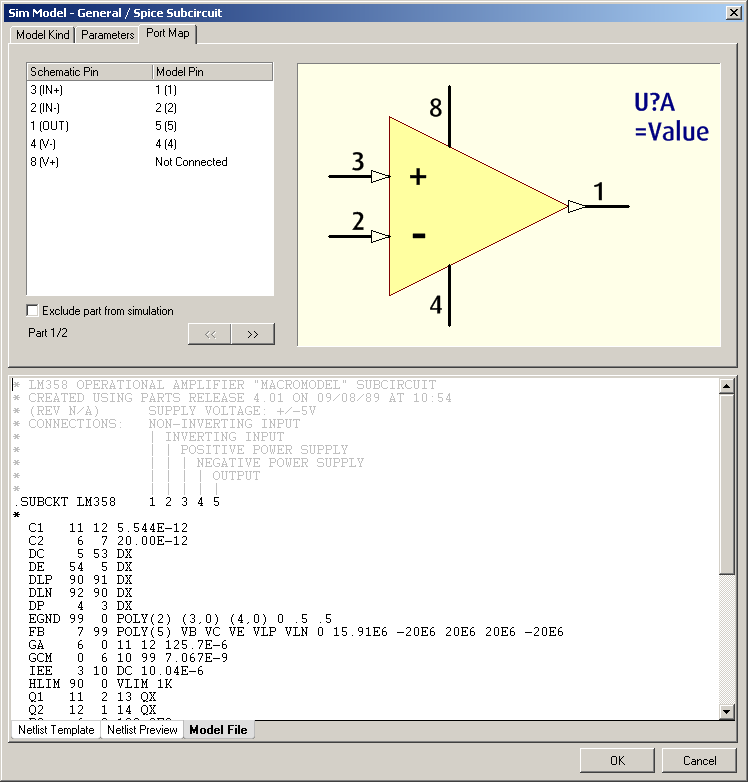
  That seemed to go a lot better, i entered the link to the simulation data, edited the pin mapping data and was able to save the symbol + sim data.


However when trying to run the simulation i got an error that (simulation) pin 3 (that is V+) was not connected, strange, i know i entered it.

Back to the sim edit, it showed that power pin 8 (= spice model pin 3) was not connected, so i changed it to pin 8, checked the other opamp and saved it.

Just for fun i re-opened the editor and checked it again, what do you know... pin 8 (should be model pin 3) was again not connected....


What am i doing wrong here (in symbol variant 1 and 2) ????


image


image


image

  • Cancel
  • csiemer
    0 csiemer over 7 years ago

    From the images it looks like you have duplicate pins for 4 and 8.  Instead of placing duplicate pins in each sub part, if you want them to display on both parts, assign them to the special Part Zero.  This way there will only be one actual pin, but they can displayed on the individual parts.  Remove the duplicates from the other part and remap the pins, and the mapping should stick.


    The setting for which part a pin belongs to can be found in the Pin Properties, open this, and change the Part Number field to 0 if you want to use this special pin mode.


    Another alternative, which I see more commonly used, is to create a 3rd part of the package to hold the power pins.


    I hope that helps.

    • Cancel
    • Vote Up 0 Vote Down
    • Cancel
  • dexter23
    0 dexter23 over 7 years ago in reply to csiemer

    Thank Colby,


    You solution works for my 'problem 2', but your alternative solution equals my 'problem 1'.

    For the simulation a made a second version of my opamp so that worked.


    But i would also like to know how to do it (right) with a separate part for the power pins, as described i keep getting error messages.

    • Cancel
    • Vote Up 0 Vote Down
    • Cancel
element14 Community

element14 is the first online community specifically for engineers. Connect with your peers and get expert answers to your questions.

  • Members
  • Learn
  • Technologies
  • Challenges & Projects
  • Products
  • Store
  • About Us
  • Feedback & Support
  • FAQs
  • Terms of Use
  • Privacy Policy
  • Legal and Copyright Notices
  • Sitemap
  • Cookies

An Avnet Company © 2025 Premier Farnell Limited. All Rights Reserved.

Premier Farnell Ltd, registered in England and Wales (no 00876412), registered office: Farnell House, Forge Lane, Leeds LS12 2NE.

ICP 备案号 10220084.

Follow element14

  • X
  • Facebook
  • linkedin
  • YouTube