element14 Community
element14 Community
    Register Log In
  • Site
  • Search
  • Log In Register
  • Community Hub
    Community Hub
    • What's New on element14
    • Feedback and Support
    • Benefits of Membership
    • Personal Blogs
    • Members Area
    • Achievement Levels
  • Learn
    Learn
    • Ask an Expert
    • eBooks
    • element14 presents
    • Learning Center
    • Tech Spotlight
    • STEM Academy
    • Webinars, Training and Events
    • Learning Groups
  • Technologies
    Technologies
    • 3D Printing
    • FPGA
    • Industrial Automation
    • Internet of Things
    • Power & Energy
    • Sensors
    • Technology Groups
  • Challenges & Projects
    Challenges & Projects
    • Design Challenges
    • element14 presents Projects
    • Project14
    • Arduino Projects
    • Raspberry Pi Projects
    • Project Groups
  • Products
    Products
    • Arduino
    • Avnet & Tria Boards Community
    • Dev Tools
    • Manufacturers
    • Multicomp Pro
    • Product Groups
    • Raspberry Pi
    • RoadTests & Reviews
  • About Us
  • Store
    Store
    • Visit Your Store
    • Choose another store...
      • Europe
      •  Austria (German)
      •  Belgium (Dutch, French)
      •  Bulgaria (Bulgarian)
      •  Czech Republic (Czech)
      •  Denmark (Danish)
      •  Estonia (Estonian)
      •  Finland (Finnish)
      •  France (French)
      •  Germany (German)
      •  Hungary (Hungarian)
      •  Ireland
      •  Israel
      •  Italy (Italian)
      •  Latvia (Latvian)
      •  
      •  Lithuania (Lithuanian)
      •  Netherlands (Dutch)
      •  Norway (Norwegian)
      •  Poland (Polish)
      •  Portugal (Portuguese)
      •  Romania (Romanian)
      •  Russia (Russian)
      •  Slovakia (Slovak)
      •  Slovenia (Slovenian)
      •  Spain (Spanish)
      •  Sweden (Swedish)
      •  Switzerland(German, French)
      •  Turkey (Turkish)
      •  United Kingdom
      • Asia Pacific
      •  Australia
      •  China
      •  Hong Kong
      •  India
      • Japan
      •  Korea (Korean)
      •  Malaysia
      •  New Zealand
      •  Philippines
      •  Singapore
      •  Taiwan
      •  Thailand (Thai)
      • Vietnam
      • Americas
      •  Brazil (Portuguese)
      •  Canada
      •  Mexico (Spanish)
      •  United States
      Can't find the country/region you're looking for? Visit our export site or find a local distributor.
  • Translate
  • Profile
  • Settings
Altium CircuitStudio
  • Products
  • Manufacturers
  • Altium CircuitStudio
  • More
  • Cancel
Altium CircuitStudio
Altium CircuitStudio Forum Update schematics from schematic library strips added parameters
  • Blog
  • Forum
  • Documents
  • Events
  • Polls
  • Members
  • Mentions
  • Sub-Groups
  • Tags
  • More
  • Cancel
  • New
Join Altium CircuitStudio to participate - click to join for free!
Actions
  • Share
  • More
  • Cancel
Forum Thread Details
  • State Verified Answer
  • Locked Locked
  • Replies 3 replies
  • Subscribers 90 subscribers
  • Views 834 views
  • Users 0 members are here
  • best practices
  • schematic library
  • update schematic
  • component
  • circuitstudio
Related
This discussion has been locked.
You can no longer post new replies to this discussion. If you have a question you can start a new discussion

Update schematics from schematic library strips added parameters

jaza_tom
jaza_tom over 7 years ago

I think there is a problem with CircuitStudio, or at least in my understanding of how to use CircuitStudio to manage generic parts (like resistors, for example).


Here is a video that shows the problem:

https://youtu.be/FgHOMr96urA


Boils down to this:


  • Place a component from a local library
  • Edit some of the schematic sheet placed component's parameters (for example, its resistance Value parameter)
  • Edit the component in the schematic library (e.g. add text to graphical display)
  • Click Udpdate Schematics button
  • All parameters that you have just added or altered are now overwritten/deleted and replace with a clone of the parameters of the schematic library component


If this is the expected behavior of the Update Schematics button then can someone please explain to me how to use generic components that get their parameters changed when placed in a schematic sheet (i.e. generic 0805 resistor that gets placed and then assigned a value).

  • Cancel

Top Replies

  • e14softwareuk
    e14softwareuk over 7 years ago +1 verified
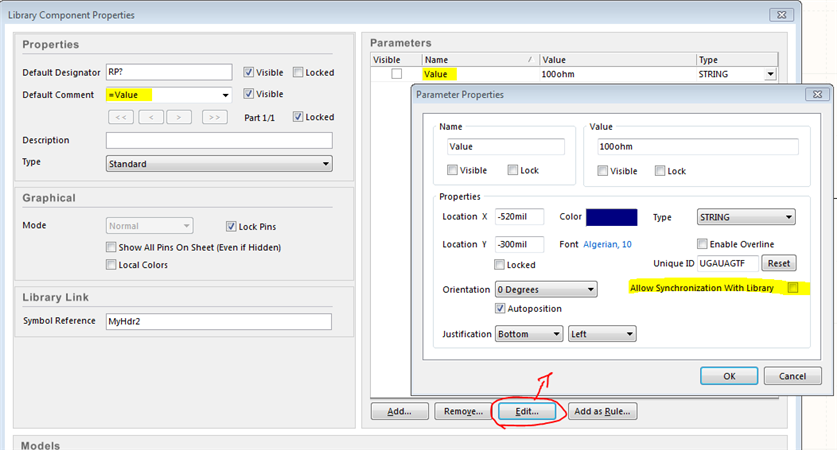
    Thanks for the very interesting question. This can be solved by breaking the synchronisation link between the library component and the schematic for selected parameters. In the library editor example…
  • e14softwareuk
    0 e14softwareuk over 7 years ago

    Thanks for the very interesting question. This can be solved by breaking the synchronisation link between the library component and the schematic for selected parameters. In the library editor example below the resistance value is set using a parameter ("value") and the Edit dialog is used to prevent the value in the schematic being overwritten whenever the component is updated.

    image

    • Cancel
    • Vote Up +1 Vote Down
    • Cancel
  • mars01
    0 mars01 over 7 years ago

    Peter's answer is the best one as it address your question but bear in mind that the philosophy behind Altium libraries is that every component (every value) has to be individual in the library and not an universal one.


    Having to do the edit mentioned by Peter may be OK for a small schematic but doing it for a complex schematic will be tedious.

    Not to mention that each component has to have an parameter with the manufacturer PN, Farnell PN (or Digikey, Mouser, TME etc) and so on, which will make sourcing easier if you do it as a hobby and a mandatory requirement for professionals.


    I also add for each component the HelpURL parameter having as value the URL for the datasheet which make it easy to access the datasheet from the schematic: you just hover the mouse over the symbol and hit F1 key and the datasheet is opened in the browser.


    It may seem easier at the first glance to just use, let's say, one resistor and then copy it over the schematic, but in the long run it is better to make for each one, a component in your library.

    • Cancel
    • Vote Up 0 Vote Down
    • Cancel
  • jaza_tom
    0 jaza_tom over 7 years ago in reply to mars01

    mars01  wrote:

    It may seem easier at the first glance to just use, let's say, one resistor and then copy it over the schematic, but in the long run it is better to make for each one, a component in your library.

    OK taken under advisement!


    @Peter Barnard thanks for your response as well.  Looks like I have some options here.

    • Cancel
    • Vote Up 0 Vote Down
    • Cancel
element14 Community

element14 is the first online community specifically for engineers. Connect with your peers and get expert answers to your questions.

  • Members
  • Learn
  • Technologies
  • Challenges & Projects
  • Products
  • Store
  • About Us
  • Feedback & Support
  • FAQs
  • Terms of Use
  • Privacy Policy
  • Legal and Copyright Notices
  • Sitemap
  • Cookies

An Avnet Company © 2026 Premier Farnell Limited. All Rights Reserved.

Premier Farnell Ltd, registered in England and Wales (no 00876412), registered office: Farnell House, Forge Lane, Leeds LS12 2NE.

ICP 备案号 10220084.

Follow element14

  • X
  • Facebook
  • linkedin
  • YouTube