element14 Community
element14 Community
    Register Log In
  • Site
  • Search
  • Log In Register
  • Community Hub
    Community Hub
    • What's New on element14
    • Feedback and Support
    • Benefits of Membership
    • Personal Blogs
    • Members Area
    • Achievement Levels
  • Learn
    Learn
    • Ask an Expert
    • eBooks
    • element14 presents
    • Learning Center
    • Tech Spotlight
    • STEM Academy
    • Webinars, Training and Events
    • Learning Groups
  • Technologies
    Technologies
    • 3D Printing
    • FPGA
    • Industrial Automation
    • Internet of Things
    • Power & Energy
    • Sensors
    • Technology Groups
  • Challenges & Projects
    Challenges & Projects
    • Design Challenges
    • element14 presents Projects
    • Project14
    • Arduino Projects
    • Raspberry Pi Projects
    • Project Groups
  • Products
    Products
    • Arduino
    • Avnet & Tria Boards Community
    • Dev Tools
    • Manufacturers
    • Multicomp Pro
    • Product Groups
    • Raspberry Pi
    • RoadTests & Reviews
  • About Us
  • Store
    Store
    • Visit Your Store
    • Choose another store...
      • Europe
      •  Austria (German)
      •  Belgium (Dutch, French)
      •  Bulgaria (Bulgarian)
      •  Czech Republic (Czech)
      •  Denmark (Danish)
      •  Estonia (Estonian)
      •  Finland (Finnish)
      •  France (French)
      •  Germany (German)
      •  Hungary (Hungarian)
      •  Ireland
      •  Israel
      •  Italy (Italian)
      •  Latvia (Latvian)
      •  
      •  Lithuania (Lithuanian)
      •  Netherlands (Dutch)
      •  Norway (Norwegian)
      •  Poland (Polish)
      •  Portugal (Portuguese)
      •  Romania (Romanian)
      •  Russia (Russian)
      •  Slovakia (Slovak)
      •  Slovenia (Slovenian)
      •  Spain (Spanish)
      •  Sweden (Swedish)
      •  Switzerland(German, French)
      •  Turkey (Turkish)
      •  United Kingdom
      • Asia Pacific
      •  Australia
      •  China
      •  Hong Kong
      •  India
      • Japan
      •  Korea (Korean)
      •  Malaysia
      •  New Zealand
      •  Philippines
      •  Singapore
      •  Taiwan
      •  Thailand (Thai)
      • Vietnam
      • Americas
      •  Brazil (Portuguese)
      •  Canada
      •  Mexico (Spanish)
      •  United States
      Can't find the country/region you're looking for? Visit our export site or find a local distributor.
  • Translate
  • Profile
  • Settings
Altium CircuitStudio
  • Products
  • Manufacturers
  • Altium CircuitStudio
  • More
  • Cancel
Altium CircuitStudio
Altium CircuitStudio Forum Output generation error: error ocurred deleting previous output
  • Blog
  • Forum
  • Documents
  • Events
  • Polls
  • Members
  • Mentions
  • Sub-Groups
  • Tags
  • More
  • Cancel
  • New
Join Altium CircuitStudio to participate - click to join for free!
Actions
  • Share
  • More
  • Cancel
Forum Thread Details
  • State Suggested Answer
  • Locked Locked
  • Replies 5 replies
  • Answers 1 answer
  • Subscribers 90 subscribers
  • Views 1826 views
  • Users 0 members are here
  • error
  • generate outputs
Related
This discussion has been locked.
You can no longer post new replies to this discussion. If you have a question you can start a new discussion

Output generation error: error ocurred deleting previous output

lamabrew
lamabrew over 7 years ago

(yes the error message spells it wrong)


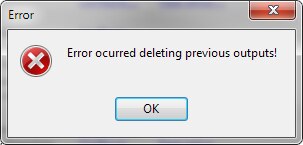
In Circuitstudio trying to generate outputs (schematic, PCB, gerber, drill, 3D, etc) immediately returns:
 

image


This is about the 4th time this has happened (in 1.4 and 1.5x). Previously I tried some random combination of quit, reboot, directory deletion, etc. and was able to get output. Whatever the magic combination is I can't seem to do it and am stuck trying to release a board. There's no info in messages nor in the project log file about why it thinks it can't generate any output. It just fails.


This time I'm putting the failure here so that if it happens again I can remember the workaround.  I do wonder though that there seems to be limited occurrences of this error (it apparently happened to CircuitMaker users, but no solution is posted there) so wonder if it's got some Windows dependency of some sort (mine is a win 7 system).


Anyone know how to fix this?

  • Cancel
  • e14softwareuk
    0 e14softwareuk over 7 years ago

    This could be as simple as having a document or file open. CS tries to delete all files and if one is open or locked by the Windows system then it will fail with the error. Although not in relation to CS in the past I have experienced where Windows seems to get stuck thinking a file is open/in-use and only way to clear is to reboot.

    • Cancel
    • Vote Up 0 Vote Down
    • Cancel
  • lamabrew
    0 lamabrew over 7 years ago in reply to e14softwareuk

    Hi Peter,


    That was my thought too, except I removed the Default Configuration directory so there (should be?) nothing that CS was trying to delete as the directory didn't exist.


    I finally remembered what I did to work around this before: copy the whole project to a temp directory, open it and generate the output(s), and then copy the output directory back.


    I don't doubt that this isn't some sort of windows oddness coming in to play, my annoyance is that the error message is is of no use to help figure out the problem.There's no obvious way to make this error happen, and once "fixed" things seem fine again.


    Anyway now that I wrote up how to work around this I'll hopefully remember for next time...

    • Cancel
    • Vote Up 0 Vote Down
    • Cancel
  • e14softwareuk
    0 e14softwareuk over 7 years ago in reply to lamabrew

    On a general note that may help others but is probably not related to your situation is to check for hidden files in the output folders. For example if using any sort of version control this can create such files/folders and looking with the normal Windows file explorer they may not be visible with folders appearing empty.

    • Cancel
    • Vote Up 0 Vote Down
    • Cancel
  • jverde
    0 jverde over 7 years ago in reply to e14softwareuk

    I encountered that same issue, and here is what I found.

    • There were only 4 files in the output directory and I deleted all but one (Excel BOM that I was actively working with).  The problem continued.
    • I closed the Excel BOM (did not delete it) and was able to then use the Generate Outputs.
    • The output directory (and the BOM) were deleted and a new directory was created.  The generated files were in the new directory.

    Make of this what you will as I am no expert on Windows.

    • Cancel
    • Vote Up 0 Vote Down
    • Cancel
  • fabianogk
    0 fabianogk over 7 years ago in reply to jverde

    My version of the infamous error was due to an integrated library residing on the same folder as the project file.


    To fool Circuit Studio, I moved the integrated library into a sub-folder. Now it generates outputs on the project even with the integrated library open.


    The silly thing is that the compiled integrated library is placed into the Outputs folder, while the project output is placed into Default Configuration\Outputs. So it is not even the same folder...

    • Cancel
    • Vote Up 0 Vote Down
    • Cancel
element14 Community

element14 is the first online community specifically for engineers. Connect with your peers and get expert answers to your questions.

  • Members
  • Learn
  • Technologies
  • Challenges & Projects
  • Products
  • Store
  • About Us
  • Feedback & Support
  • FAQs
  • Terms of Use
  • Privacy Policy
  • Legal and Copyright Notices
  • Sitemap
  • Cookies

An Avnet Company © 2026 Premier Farnell Limited. All Rights Reserved.

Premier Farnell Ltd, registered in England and Wales (no 00876412), registered office: Farnell House, Forge Lane, Leeds LS12 2NE.

ICP 备案号 10220084.

Follow element14

  • X
  • Facebook
  • linkedin
  • YouTube