element14 Community
element14 Community
    Register Log In
  • Site
  • Search
  • Log In Register
  • Community Hub
    Community Hub
    • What's New on element14
    • Feedback and Support
    • Benefits of Membership
    • Personal Blogs
    • Members Area
    • Achievement Levels
  • Learn
    Learn
    • Ask an Expert
    • eBooks
    • element14 presents
    • Learning Center
    • Tech Spotlight
    • STEM Academy
    • Webinars, Training and Events
    • Learning Groups
  • Technologies
    Technologies
    • 3D Printing
    • FPGA
    • Industrial Automation
    • Internet of Things
    • Power & Energy
    • Sensors
    • Technology Groups
  • Challenges & Projects
    Challenges & Projects
    • Design Challenges
    • element14 presents Projects
    • Project14
    • Arduino Projects
    • Raspberry Pi Projects
    • Project Groups
  • Products
    Products
    • Arduino
    • Avnet & Tria Boards Community
    • Dev Tools
    • Manufacturers
    • Multicomp Pro
    • Product Groups
    • Raspberry Pi
    • RoadTests & Reviews
  • About Us
  • Store
    Store
    • Visit Your Store
    • Choose another store...
      • Europe
      •  Austria (German)
      •  Belgium (Dutch, French)
      •  Bulgaria (Bulgarian)
      •  Czech Republic (Czech)
      •  Denmark (Danish)
      •  Estonia (Estonian)
      •  Finland (Finnish)
      •  France (French)
      •  Germany (German)
      •  Hungary (Hungarian)
      •  Ireland
      •  Israel
      •  Italy (Italian)
      •  Latvia (Latvian)
      •  
      •  Lithuania (Lithuanian)
      •  Netherlands (Dutch)
      •  Norway (Norwegian)
      •  Poland (Polish)
      •  Portugal (Portuguese)
      •  Romania (Romanian)
      •  Russia (Russian)
      •  Slovakia (Slovak)
      •  Slovenia (Slovenian)
      •  Spain (Spanish)
      •  Sweden (Swedish)
      •  Switzerland(German, French)
      •  Turkey (Turkish)
      •  United Kingdom
      • Asia Pacific
      •  Australia
      •  China
      •  Hong Kong
      •  India
      • Japan
      •  Korea (Korean)
      •  Malaysia
      •  New Zealand
      •  Philippines
      •  Singapore
      •  Taiwan
      •  Thailand (Thai)
      • Vietnam
      • Americas
      •  Brazil (Portuguese)
      •  Canada
      •  Mexico (Spanish)
      •  United States
      Can't find the country/region you're looking for? Visit our export site or find a local distributor.
  • Translate
  • Profile
  • Settings
Altium CircuitStudio
  • Products
  • Manufacturers
  • Altium CircuitStudio
  • More
  • Cancel
Altium CircuitStudio
Altium CircuitStudio Forum CS is blurry on high resolution monitor
  • Blog
  • Forum
  • Documents
  • Events
  • Polls
  • Members
  • Mentions
  • Sub-Groups
  • Tags
  • More
  • Cancel
  • New
Join Altium CircuitStudio to participate - click to join for free!
Actions
  • Share
  • More
  • Cancel
Forum Thread Details
  • State Verified Answer
  • Locked Locked
  • Replies 2 replies
  • Subscribers 90 subscribers
  • Views 952 views
  • Users 0 members are here
Related
This discussion has been locked.
You can no longer post new replies to this discussion. If you have a question you can start a new discussion

CS is blurry on high resolution monitor

r.gibson
r.gibson over 7 years ago

I just upgraded to a high-res monitor (2560x1440) and circuit studio is very blurry on this monitor. It looked fine on my old 1080 monitor. It's acting like it's not taking Window's scaling settings or something. All of my other apps (including Firefox that I am currently typing this on) appear crisp and sharp as I would expect. Is there some setting somewhere in CS that I need to change, or is this a bug? The whole reason I upgraded my monitor was to maximize my workspace in CS...so this is really disappointing!


BTW, I'm running CS 1.5.1

  • Cancel

Top Replies

  • mars01
    mars01 over 7 years ago +1
    I have a monitor with the same resolution on 2 PC's (one desktop with an old Nvidia GTX275 and one laptop with a ATI FireGL xxxx) and I can't see that blur you are talking about (Win 10 X64 on both). Perhaps…
  • mars01
    0 mars01 over 7 years ago

    I have a monitor with the same resolution on 2 PC's (one desktop with an old Nvidia GTX275 and one laptop with a ATI FireGL xxxx) and I can't see that blur you are talking about (Win 10 X64 on both). Perhaps it's a graphics card problem and other apps don't use the same graphic features. You can try at the least to upgrade your video drivers.

    Or you can try to uninstall and reinstall CS and see if it solves your problem.

    • Cancel
    • Vote Up +1 Vote Down
    • Cancel
  • r.gibson
    0 r.gibson over 7 years ago in reply to mars01

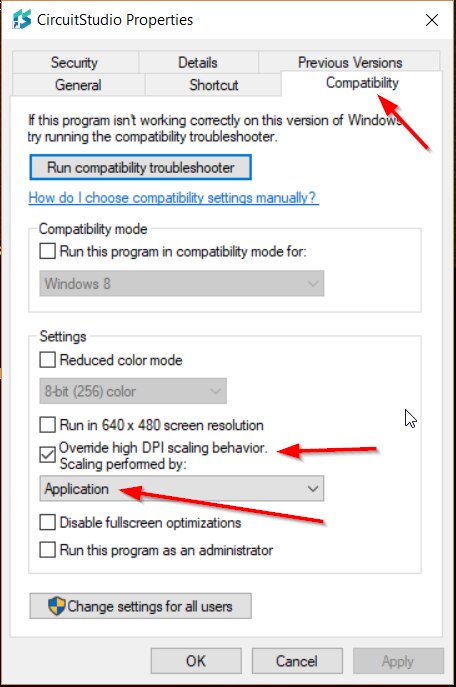
    ...Thanks for the input. Looks like I just solved it...the desktop shortcut had it's setting undefined for "High DPI Scaling Behavior." There are three options Application, System and System (Enhanced). I tried overriding it and changing it to System (Enhanced) and no change in clarity. I then changed it to Application and vuala the screen was nice and sharp. See attached screen shot for details.

    image

    • Cancel
    • Vote Up 0 Vote Down
    • Cancel
element14 Community

element14 is the first online community specifically for engineers. Connect with your peers and get expert answers to your questions.

  • Members
  • Learn
  • Technologies
  • Challenges & Projects
  • Products
  • Store
  • About Us
  • Feedback & Support
  • FAQs
  • Terms of Use
  • Privacy Policy
  • Legal and Copyright Notices
  • Sitemap
  • Cookies

An Avnet Company © 2026 Premier Farnell Limited. All Rights Reserved.

Premier Farnell Ltd, registered in England and Wales (no 00876412), registered office: Farnell House, Forge Lane, Leeds LS12 2NE.

ICP 备案号 10220084.

Follow element14

  • X
  • Facebook
  • linkedin
  • YouTube