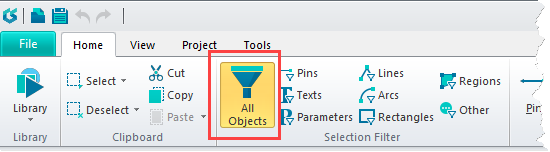
I just purchased for home use CircuitStudio 1.5.1 Build 13. I installed it on a fast Win10 machine in November 2018.
FWIW, I am an experienced Altium Designer 17 user from my day job as a circuit designer. I've assumed that my learning time on CS will be nearly instantaneous due to my AD17 experience.
Tonight I'm editing the graphics of schematic symbols. Everything is mostly fine, meaning that CS behaves generally as AD17 does.
However, when my schematic symbol was nearly complete and ready to save, I laid down a yellow-filled rectangle around the symbol's graphical primitives. The placement location of my rectangle wasn't perfect, so I attempted to highlight it and drag it into proper position.
The beast won't highlight. It just sits there staring back at me with me clicking feverishly on it. It even refuses to be highlighted by lasso'ing it with the cursor.
So, just to prove my point I laid down a second rectangle beside the first one. Same thing: it refuses to be highlighted and thus cannot be resized or moved with the mouse.
What's up with this?
Jim Olson
Indianapolis, IN US