element14 Community
element14 Community
    Register Log In
  • Site
  • Search
  • Log In Register
  • Community Hub
    Community Hub
    • What's New on element14
    • Feedback and Support
    • Benefits of Membership
    • Personal Blogs
    • Members Area
    • Achievement Levels
  • Learn
    Learn
    • Ask an Expert
    • eBooks
    • element14 presents
    • Learning Center
    • Tech Spotlight
    • STEM Academy
    • Webinars, Training and Events
    • Learning Groups
  • Technologies
    Technologies
    • 3D Printing
    • FPGA
    • Industrial Automation
    • Internet of Things
    • Power & Energy
    • Sensors
    • Technology Groups
  • Challenges & Projects
    Challenges & Projects
    • Design Challenges
    • element14 presents Projects
    • Project14
    • Arduino Projects
    • Raspberry Pi Projects
    • Project Groups
  • Products
    Products
    • Arduino
    • Avnet & Tria Boards Community
    • Dev Tools
    • Manufacturers
    • Multicomp Pro
    • Product Groups
    • Raspberry Pi
    • RoadTests & Reviews
  • About Us
  • Store
    Store
    • Visit Your Store
    • Choose another store...
      • Europe
      •  Austria (German)
      •  Belgium (Dutch, French)
      •  Bulgaria (Bulgarian)
      •  Czech Republic (Czech)
      •  Denmark (Danish)
      •  Estonia (Estonian)
      •  Finland (Finnish)
      •  France (French)
      •  Germany (German)
      •  Hungary (Hungarian)
      •  Ireland
      •  Israel
      •  Italy (Italian)
      •  Latvia (Latvian)
      •  
      •  Lithuania (Lithuanian)
      •  Netherlands (Dutch)
      •  Norway (Norwegian)
      •  Poland (Polish)
      •  Portugal (Portuguese)
      •  Romania (Romanian)
      •  Russia (Russian)
      •  Slovakia (Slovak)
      •  Slovenia (Slovenian)
      •  Spain (Spanish)
      •  Sweden (Swedish)
      •  Switzerland(German, French)
      •  Turkey (Turkish)
      •  United Kingdom
      • Asia Pacific
      •  Australia
      •  China
      •  Hong Kong
      •  India
      • Japan
      •  Korea (Korean)
      •  Malaysia
      •  New Zealand
      •  Philippines
      •  Singapore
      •  Taiwan
      •  Thailand (Thai)
      • Vietnam
      • Americas
      •  Brazil (Portuguese)
      •  Canada
      •  Mexico (Spanish)
      •  United States
      Can't find the country/region you're looking for? Visit our export site or find a local distributor.
  • Translate
  • Profile
  • Settings
Altium CircuitStudio
  • Products
  • Manufacturers
  • Altium CircuitStudio
  • More
  • Cancel
Altium CircuitStudio
Altium CircuitStudio Forum Changing Templates does not work
  • Blog
  • Forum
  • Documents
  • Events
  • Polls
  • Members
  • Mentions
  • Sub-Groups
  • Tags
  • More
  • Cancel
  • New
Join Altium CircuitStudio to participate - click to join for free!
Actions
  • Share
  • More
  • Cancel
Forum Thread Details
  • State Suggested Answer
  • Locked Locked
  • Replies 6 replies
  • Answers 1 answer
  • Subscribers 89 subscribers
  • Views 1501 views
  • Users 0 members are here
Related
This discussion has been locked.
You can no longer post new replies to this discussion. If you have a question you can start a new discussion

Changing Templates does not work

sclifford
sclifford over 6 years ago

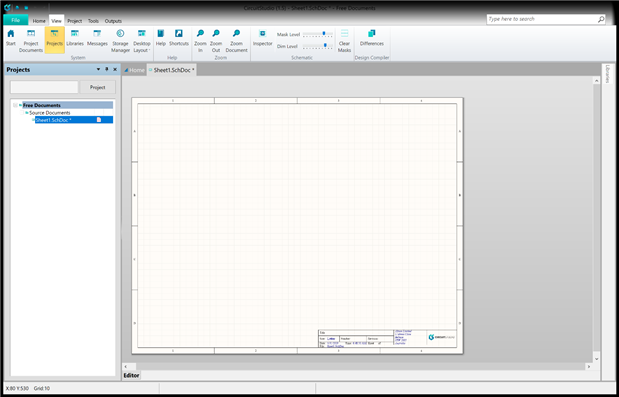
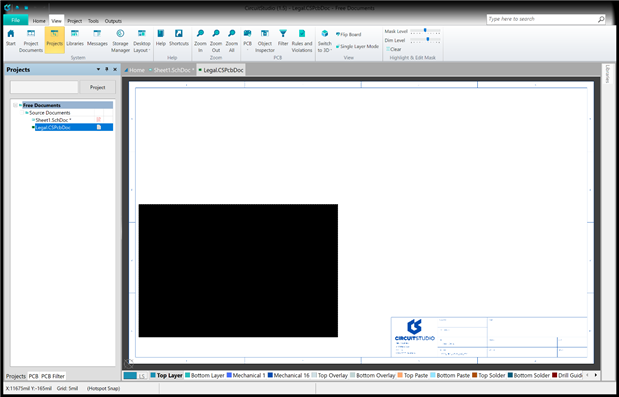
Why can I not change the templates in CS to load my own logo.    I am using the Letter format yet when I load the form form the location noted in C:\Users\Public\Documents\Altium\CS\Templates it is completely different than the one show in CS.  Second when i load the form it has a black square in the center as well as when I load a logo CS lock up completely!

Here is the Version that loads when I create a schematic
image

Here is version when i load the Letter template.
image


What am i doing wrong?  I am running CS on my brand new new Surface Pro 6 running windows 10


Scott

  • Cancel
  • e14softwareuk
    0 e14softwareuk over 6 years ago

    Hi, this previous post may help.

    Custom Title Block and Drawing templates

    • Cancel
    • Vote Up 0 Vote Down
    • Cancel
  • sclifford
    0 sclifford over 6 years ago in reply to e14softwareuk

    Sorry but this old post does not fix my issue!  I did just as the post stated and i still have the same problem!


    Scott

    • Cancel
    • Vote Up 0 Vote Down
    • Cancel
  • e14softwareuk
    0 e14softwareuk over 6 years ago in reply to sclifford

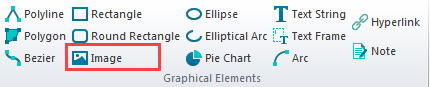
    Does the following work for you. In the CS template folder (C:\Users\Public\Documents\Altium\CS\Templates) copy Letter.SchDot to MyLetter.SchDot. Open CircuitStudio and then drag the new SchDot file onto the application to edit. You should be able to delete the existing logo and add your own image.

    image

    In your opening post you refer to errors but the images are missing, it may help if you could edit the post to include the images.

    • Cancel
    • Vote Up 0 Vote Down
    • Cancel
  • sclifford
    0 sclifford over 6 years ago in reply to e14softwareuk

    OK ... Peter I am going to have to pay better attention to the extensions on these files, and how to properly load them into CS.  First the ????.SCHDot files are not accessible from within the File pull down menu/Open Document in CS.  This is what got me into trouble, the only way to get the ????.SCHDot files into CS is by dragging them into CS from a window open in File Explore from Windows.  Once I dragged in my case the file I named Letter-Driver.SCHDot from File Explore into CS I was able to get the changes made I wanted.


    Note once you make the changes to the template one needs to go to there original schematic and right click on the schematic and go under Options, then Document Options to change the default template to the one you just made.


    I hope this helps others who wont make the same mistake I made in trying to do this in CS only.


    Thanks

    For your Help!!!

    • Cancel
    • Vote Up 0 Vote Down
    • Cancel
  • e14softwareuk
    0 e14softwareuk over 6 years ago in reply to sclifford

    Thanks for letting the community know you have got this working and it should be a valuable how to for other CircuitStudio users.

    • Cancel
    • Vote Up 0 Vote Down
    • Cancel
  • voltsandjolts
    0 voltsandjolts over 6 years ago in reply to sclifford

    You can open ".SchDot" files from within CS:


    File > Open Document > Select extension filter " *.* " (any file) > Pick your SchDot file from the templates directory

    ... / Public Documents / Altium / CS / Templates


    Edit it, add your logo.

    Right Click on logo image > Properties > Select "Embedded"


    Double click outside the page area to view document options.

    Select Parameters tab - here is the source of the special strings you can add to your template.

    Add special strings e.g. "=DocumentFullPathAndName", "=SheetNumber", "=SheetTotal" etc. as required to your template.


    Save or Save As *.SchDot


    Change your default template preference in

    File System Preferences > Schematic > General > Defaults


    Done.

    • Cancel
    • Vote Up 0 Vote Down
    • Cancel
element14 Community

element14 is the first online community specifically for engineers. Connect with your peers and get expert answers to your questions.

  • Members
  • Learn
  • Technologies
  • Challenges & Projects
  • Products
  • Store
  • About Us
  • Feedback & Support
  • FAQs
  • Terms of Use
  • Privacy Policy
  • Legal and Copyright Notices
  • Sitemap
  • Cookies

An Avnet Company © 2026 Premier Farnell Limited. All Rights Reserved.

Premier Farnell Ltd, registered in England and Wales (no 00876412), registered office: Farnell House, Forge Lane, Leeds LS12 2NE.

ICP 备案号 10220084.

Follow element14

  • X
  • Facebook
  • linkedin
  • YouTube