element14 Community
element14 Community
    Register Log In
  • Site
  • Search
  • Log In Register
  • Community Hub
    Community Hub
    • What's New on element14
    • Feedback and Support
    • Benefits of Membership
    • Personal Blogs
    • Members Area
    • Achievement Levels
  • Learn
    Learn
    • Ask an Expert
    • eBooks
    • element14 presents
    • Learning Center
    • Tech Spotlight
    • STEM Academy
    • Webinars, Training and Events
    • Learning Groups
  • Technologies
    Technologies
    • 3D Printing
    • FPGA
    • Industrial Automation
    • Internet of Things
    • Power & Energy
    • Sensors
    • Technology Groups
  • Challenges & Projects
    Challenges & Projects
    • Design Challenges
    • element14 presents Projects
    • Project14
    • Arduino Projects
    • Raspberry Pi Projects
    • Project Groups
  • Products
    Products
    • Arduino
    • Avnet & Tria Boards Community
    • Dev Tools
    • Manufacturers
    • Multicomp Pro
    • Product Groups
    • Raspberry Pi
    • RoadTests & Reviews
  • About Us
  • Store
    Store
    • Visit Your Store
    • Choose another store...
      • Europe
      •  Austria (German)
      •  Belgium (Dutch, French)
      •  Bulgaria (Bulgarian)
      •  Czech Republic (Czech)
      •  Denmark (Danish)
      •  Estonia (Estonian)
      •  Finland (Finnish)
      •  France (French)
      •  Germany (German)
      •  Hungary (Hungarian)
      •  Ireland
      •  Israel
      •  Italy (Italian)
      •  Latvia (Latvian)
      •  
      •  Lithuania (Lithuanian)
      •  Netherlands (Dutch)
      •  Norway (Norwegian)
      •  Poland (Polish)
      •  Portugal (Portuguese)
      •  Romania (Romanian)
      •  Russia (Russian)
      •  Slovakia (Slovak)
      •  Slovenia (Slovenian)
      •  Spain (Spanish)
      •  Sweden (Swedish)
      •  Switzerland(German, French)
      •  Turkey (Turkish)
      •  United Kingdom
      • Asia Pacific
      •  Australia
      •  China
      •  Hong Kong
      •  India
      • Japan
      •  Korea (Korean)
      •  Malaysia
      •  New Zealand
      •  Philippines
      •  Singapore
      •  Taiwan
      •  Thailand (Thai)
      • Vietnam
      • Americas
      •  Brazil (Portuguese)
      •  Canada
      •  Mexico (Spanish)
      •  United States
      Can't find the country/region you're looking for? Visit our export site or find a local distributor.
  • Translate
  • Profile
  • Settings
Altium CircuitStudio
  • Products
  • Manufacturers
  • Altium CircuitStudio
  • More
  • Cancel
Altium CircuitStudio
Altium CircuitStudio Forum Project Parameters and synchronization with PCB
  • Blog
  • Forum
  • Documents
  • Events
  • Polls
  • Members
  • Mentions
  • Sub-Groups
  • Tags
  • More
  • Cancel
  • New
Join Altium CircuitStudio to participate - click to join for free!
Actions
  • Share
  • More
  • Cancel
Forum Thread Details
  • State Verified Answer
  • Locked Locked
  • Replies 4 replies
  • Subscribers 88 subscribers
  • Views 783 views
  • Users 0 members are here
Related
This discussion has been locked.
You can no longer post new replies to this discussion. If you have a question you can start a new discussion

Project Parameters and synchronization with PCB

bolomey
bolomey over 6 years ago

Hello,


We are a small team using CS to design our products. Recently, I set up our own project template in order to harmonize our design style, rules and output generation. The template contains notably a PrjPCB file, SchDoc and CsPcbDoc file.


At the project level, I defined parameters such as project name, document number, author... These parameters are used in the schematics (in the title block) as well as in the PCB (author written in the copper layers). This works fine...on my machine.


A colleague recently tried to use the template and we discovered that there is a problem of synchronization between project parameters and copper inscriptions. Let's say that I place on my copper the string ".DBTAuthor". CS on my computer will directly replace this string by the configured author name. This doesn't work on my colleague installation. The string remains ".DBTAuthor". When he switches to 3D, the text is correct but not in 2D. When he generates the Gerber files, the text is then synchronized but the copper pour is not changed meaning that the opening around the text is too big.


I will upload screenshots when my colleague arrives to the office.

  • Cancel
Parents
  • bolomey
    0 bolomey over 6 years ago

    The question is: what shall I do to synchronize the copper with the project parameters?

    • Cancel
    • Vote Up 0 Vote Down
    • Cancel
  • bolomey
    0 bolomey over 6 years ago in reply to bolomey

    Hello,


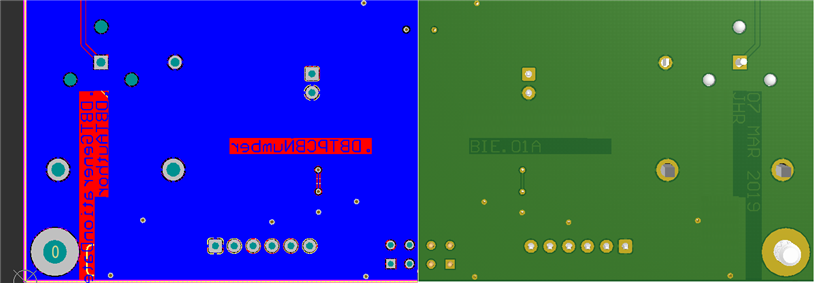
    Here is a screenshot of the 2D and 3D view. This was captured on my colleague machine. Parameters are not actualized in 2D. Only in 3D. Note that the copper pour is not correct. The opening is too big for the actual text.

    image


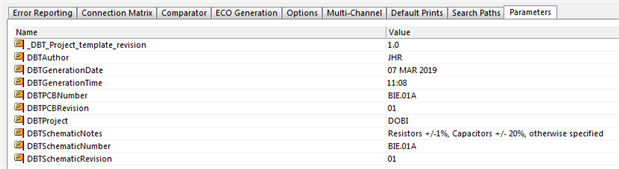
    Here is a screenshot of the project parameters:

    image


    Is there a command to synchronize the parameters?


    Any help appreciated! Thank you!


    Romain

    • Cancel
    • Vote Up 0 Vote Down
    • Cancel
Reply
  • bolomey
    0 bolomey over 6 years ago in reply to bolomey

    Hello,


    Here is a screenshot of the 2D and 3D view. This was captured on my colleague machine. Parameters are not actualized in 2D. Only in 3D. Note that the copper pour is not correct. The opening is too big for the actual text.

    image


    Here is a screenshot of the project parameters:

    image


    Is there a command to synchronize the parameters?


    Any help appreciated! Thank you!


    Romain

    • Cancel
    • Vote Up 0 Vote Down
    • Cancel
Children
  • bolomey
    0 bolomey over 6 years ago in reply to bolomey

    Resolved!


    Something was broken in PCB file. We don't know exactly what but we have identified from which SVN revision the problem appears.


    We were able to copy all the broken PCB in a clean template PCB file. Then a few manual tasks to reassign net to the correct copper, and everything is OK now.


    Thank you

    Bye

    • Cancel
    • Vote Up 0 Vote Down
    • Cancel
element14 Community

element14 is the first online community specifically for engineers. Connect with your peers and get expert answers to your questions.

  • Members
  • Learn
  • Technologies
  • Challenges & Projects
  • Products
  • Store
  • About Us
  • Feedback & Support
  • FAQs
  • Terms of Use
  • Privacy Policy
  • Legal and Copyright Notices
  • Sitemap
  • Cookies

An Avnet Company © 2026 Premier Farnell Limited. All Rights Reserved.

Premier Farnell Ltd, registered in England and Wales (no 00876412), registered office: Farnell House, Forge Lane, Leeds LS12 2NE.

ICP 备案号 10220084.

Follow element14

  • X
  • Facebook
  • linkedin
  • YouTube